A VPN client is the software on a phone, computer or router that connects the device to a VPN server and sends its traffic to that server through an encrypted tunnel. The client stores the connection details, proves who the user is, agrees encryption keys with the server and encrypts traffic before it leaves the device.
The term appears in VPN app descriptions, in the names of business VPN products and in some router menus. In each place, “VPN client” means the part of the VPN that runs on your side of the connection.
TL;DR
- What it does: A VPN client connects to a VPN server, proves who you are and agrees encryption keys with the server. The client also changes the device’s network settings so that the chosen traffic is encrypted before it leaves the device.
- What it needs: The server address and an account or keys have to come from a VPN service, an employer or your own server, and without a server, the client does nothing.
- What types exist: VPN clients come in five types: the client built into the operating system, a VPN service’s app, protocol and open-source clients such as the WireGuard app, enterprise clients such as Cisco Secure Client, and a router in VPN client mode. A browser VPN is not one of them, because it covers only the browser’s traffic.
- Which one to use: The right client depends on the server. At work, use the client your IT department provides. With a VPN subscription, use the service’s app, or the built-in client if the service publishes manual settings. For your own server, use a client for its protocol. VPN apps can add protection that Microsoft’s and Apple’s setup pages for their built-in clients do not list, such as a kill switch.
- Is it safe: A VPN client handles everything the device sends through the tunnel, and whoever runs the server can see that traffic, apart from the content that HTTPS encrypts, so judge a client by where it came from, how it is set up, whether it is kept updated and who runs the server behind it.
What is a VPN client?
A VPN client is the part of a VPN that runs on your device or router. Two names that people meet in apps and settings are kinds of VPN client:
- VPN app: A VPN app is a VPN client that runs as an app on the device, such as a VPN service’s app or the WireGuard app.
- Built-in VPN: A built-in VPN is the operating system’s own VPN client, which you set up in the VPN settings of Windows, Apple devices, Android or ChromeOS.
VPN clients run on computers, phones, tablets and routers. Client types describe the software on the device, while remote access and site-to-site VPNs describe how an organisation sets up a VPN.
What does a VPN client do?
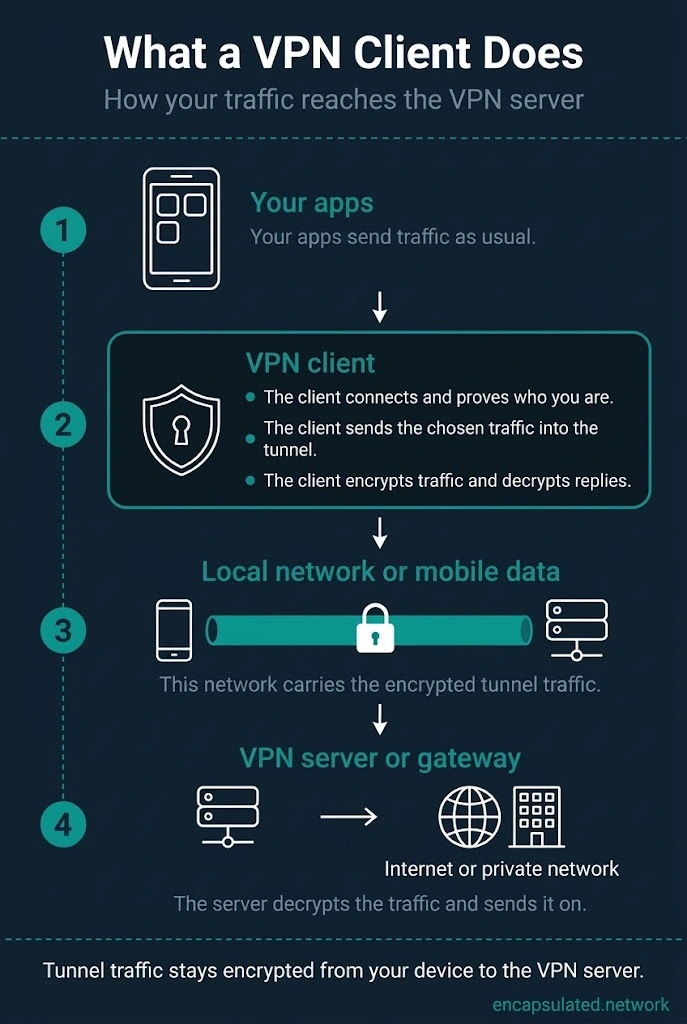
A VPN client prepares the device, connects to the server and moves the traffic through the tunnel. The client does eight jobs:
- Connection details: The client keeps the server’s address and the keys, certificates or sign-in details it needs. These details can come in a configuration file that the VPN provider, employer or server owner supplies.
- Identity and keys: The client contacts the server, both sides prove who they are, and they agree the keys that will encrypt the traffic.
- Virtual interface: The client adds a virtual network interface to the device, which the operating system treats like another network connection.
- Tunnel address: The client gets an address for the tunnel, either from the server while the connection is set up or from its configuration file.
- Routes: The client changes the device’s routes so that the chosen traffic goes into the virtual interface. The client can send all traffic through the VPN, or only some of it with split tunnelling.
- DNS: The client can set which DNS servers the device uses while the VPN is on.
- Encryption: The client encrypts traffic before it leaves the device and decrypts what comes back from the server.
- Upkeep: The client keeps the tunnel working in the background, renewing keys and, for protocols such as OpenVPN, reconnecting when the link fails.
On phones, VPN apps are built on a framework that the operating system provides. Android provides VpnService, and Apple’s operating systems provide Network Extension. A VPN app on Android tells the system which address, routes and DNS servers the tunnel uses, and Android then sends the chosen traffic to the app through a virtual interface.
An Android phone runs one VPN app at a time for each user or work profile. An iPhone runs one VPN app built on Apple’s packet tunnel framework at a time, but Apple lets a Personal VPN, which uses the built-in IKEv2 or IPsec protocols, stay connected alongside that app.
How a VPN works follows one request through the tunnel, from the device to the server and back.
VPN client vs VPN server
In a typical VPN, the client starts the connection, and the server answers it, checks who the user is and carries the traffic. Business VPN documentation calls the server side a VPN gateway.
| VPN client | VPN server | |
|---|---|---|
| Where it runs | Your phone, computer or router | A machine run by a VPN service, an employer or you |
| Role | Starts the connection | Answers connections from clients, checks who they are and carries their traffic |
| Traffic | Encrypts the device’s traffic and sends it to the server | Decrypts it and sends it on to the internet or a private network |
| Set up by | You, or the IT department on a work device | The VPN service, the employer or the person who runs it |
A VPN service supplies the servers and the accounts, and it can also supply an app that connects to them. A built-in client comes with no servers or accounts, so before it can connect, you need a server address and sign-in details from your employer or a VPN service, or from your own server if you run one.
Some routers can run in either role: a router in VPN client mode connects to a VPN server, and a router in VPN server mode accepts VPN connections from outside, so that you can reach your home network while away.
WireGuard, mesh VPNs and site-to-site VPNs do not follow the usual client and server roles.
When the client and server split does not apply
- WireGuard: WireGuard treats both ends as peers, and either peer can start the connection if it knows the other peer’s address. People still call the end that starts the connection the client, and WireGuard’s own examples do the same.
- Mesh VPN: In a mesh VPN, each device runs the client and becomes a peer that can connect directly to the other devices.
- Site-to-site VPN: In a site-to-site VPN, the gateways connect to each other, and NIST notes that the computers behind them need no VPN client software.
Types of VPN client
VPN clients come in five types: built-in operating system clients, VPN provider apps, protocol and open-source clients, enterprise clients and router clients.
| Type | Comes from | Connects to | Set up by |
|---|---|---|---|
| Built-in client | The operating system | A server that uses a protocol the built-in client supports, if you have its address and sign-in details | You or an IT department |
| VPN provider app | A VPN service | That service’s servers | The app, after you sign in to your account |
| Protocol or open-source client | A protocol project or open-source developer | Any compatible server, through a configuration file or profile | You, with a file from the server’s owner |
| Enterprise client | A networking or security vendor, provided by the employer’s IT department | The organisation’s VPN gateway | The IT department, which supplies the settings |
| Router client | The router’s firmware | A VPN server, on behalf of devices on the home network | You, in the router’s settings |
Built-in VPN clients
A built-in VPN client comes with the operating system and needs no extra software for the protocols it supports.
| System | Built-in VPN types | Conditions |
|---|---|---|
| Windows 11 | IKEv2, SSTP, L2TP, PPTP, Automatic | No WireGuard or OpenVPN option |
| macOS, iOS, iPadOS | IKEv2, IPsec (Cisco IPSec), L2TP over IPsec | PPTP removed in iOS 10 and macOS Sierra |
| Android | IKEv2 (from Android 11), PPTP, L2TP/IPsec and older IPsec types | Android 11: IKEv2 only on phones whose maker includes IPsec tunnel support. Android 12 and later: Android’s own Settings app offers only IKEv2 types for new profiles, and older types stay on existing profiles. |
| ChromeOS | IKEv2, L2TP over IPsec, basic OpenVPN | WireGuard on some Chromebooks; Chromebooks with the Play Store can also use Android VPN apps |
| Linux | WireGuard and IPsec in the kernel; NetworkManager | Kernel WireGuard since 5.6 (March 2020); NetworkManager WireGuard without a plugin since 1.16 (March 2019); other protocols through plugins, such as OpenVPN, OpenConnect, strongSwan and libreswan |
On Linux, VPN support comes from the kernel and from tools such as NetworkManager rather than from one built-in app. The guides to setting up a VPN on Android and setting up a VPN on Linux cover the steps.
Does Windows have a built-in VPN client?
Windows 11 includes a built-in VPN client. When you add a VPN connection in Settings, Windows offers “Windows (built-in)” as the VPN provider.
The Windows built-in client supports IKEv2, SSTP, L2TP and PPTP, plus an Automatic option. The Automatic option tries each built-in protocol in turn, starting with the most secure, until one connects.
The built-in client does not offer WireGuard or OpenVPN. Other VPN protocols reach Windows through VPN apps, some of which plug into Windows’ own VPN settings.
The built-in client comes with no VPN servers or accounts, so it cannot connect until you add a server’s details. For a VPN service you subscribe to, Microsoft suggests checking the Microsoft Store for the service’s app or checking the service’s website for its connection settings.
In October 2024, Microsoft announced that future Windows Server versions would stop accepting incoming PPTP and L2TP connections, and new Windows Server 2025 VPN servers no longer accept them by default. Microsoft said Windows will still be able to make outgoing PPTP and L2TP connections.
VPN provider apps
A VPN provider app is the client that a VPN service gives its subscribers. The app comes with the service’s server list and account sign-in, and it can add features such as a kill switch.
Protocol and open-source clients
Protocol and open-source clients load a configuration file or profile and connect to any compatible server, rather than only to one VPN service’s servers.
The WireGuard project publishes its own apps for Windows, macOS, Android and iOS, and Linux uses the kernel’s WireGuard with the project’s command-line tools. OpenVPN Inc. publishes OpenVPN Connect for connecting to OpenVPN servers.
People use these clients with a self-hosted server, with a configuration file from an employer, or with a VPN service that publishes manual settings.
Enterprise VPN clients
An employer’s IT department provides an enterprise VPN client and supplies its settings, and the client connects to the organisation’s VPN gateway.
Some business VPN clients, such as Cisco Secure Client, can check the device before the VPN tunnel is fully set up and can connect on their own when the device leaves the office network. Cisco previously called its client AnyConnect Secure Mobility Client, and Ivanti Secure Access Client was formerly Pulse Secure Client, so older instructions may use those names.
Router and hardware VPN clients
A router in VPN client mode connects to a VPN server and can give the devices on the home network VPN access without VPN software on each device. Those devices can include ones that cannot run a VPN app, such as smart TVs.
“Hardware VPN client” means a router or other network device that runs a VPN client for the devices connected to it. The guide to setting up a VPN on a router covers the steps and the router’s limits.
Browser VPNs and clientless access
A browser VPN and a clientless portal work inside the web browser, so they do not put the whole device on a VPN.
Firefox now has a built-in VPN that, in Mozilla’s words, routes “browser traffic through a secure proxy server”. Firefox’s VPN is free with a 50 GB monthly limit, needs a Mozilla account, and protects only traffic from Firefox. Mozilla is rolling the VPN out in stages from Firefox 149 and only in selected regions, so some Firefox users do not have it yet.
Chrome and Firefox let extensions change the browser’s own proxy settings, so a browser VPN extension that works this way routes only the browser’s traffic. VPN vs proxy explains how a proxy differs from a VPN.
A clientless SSL VPN portal lets a user reach chosen web applications through the gateway with only a web browser. Features such as port forwarding still need software on the device.
What features can a VPN client add?
Beyond the tunnel, VPN clients and the platforms they run on can add five settings:
- Protocol choice: Some VPN apps let the user pick the VPN protocol.
- Kill switch: A kill switch blocks internet traffic if the VPN connection drops. Neither Microsoft’s nor Apple’s setup pages for their built-in clients list such a setting.
- Split tunnelling: VPN apps can offer split tunnelling as a setting.
- Starting automatically: Some platforms can start the VPN without the user, for example Android’s Always-on VPN when the phone starts and Apple’s Connect On Demand when an iPhone joins a Wi-Fi network that the VPN’s On Demand rules name.
- DNS leak protection: DNS leak protection stops the device from sending DNS lookups outside the VPN tunnel.
Built-in client or VPN app: which do you need?
The right client depends on which server you connect to and who gave you its details.
| Situation | Client to use |
|---|---|
| Work VPN | The client and settings your IT department provides |
| VPN service subscription | The service’s app, or the built-in client if the service publishes manual connection settings |
| Your own server | A client that supports the server’s protocol, such as the WireGuard app for a WireGuard server |
| Every device at home, including ones that cannot run an app | A router in VPN client mode |
| Chromebook | The built-in client, or an Android VPN app on Chromebooks with the Play Store |
The built-in Windows client works when you already have server details, but it offers no WireGuard or OpenVPN option, and Microsoft’s setup page lists no setting that blocks traffic if the VPN drops.
Is a VPN client safe?
A VPN client is as safe as its source, its settings, its updates and the operator of the server it connects to.
- The client handles your traffic: A VPN client handles every packet the device sends through it. Android asks you to confirm that you trust a VPN app before the app can start a VPN for the first time, and Apple requires App Store VPN apps to promise in their privacy policy not to sell, use or disclose user data to third parties.
- Some apps are unsafe: Researchers have found VPN apps that send advertising identifiers, send data without encryption or leak traffic outside the tunnel. A 2026 study of 281 popular Android VPN apps found 29 that leaked traffic, including DNS lookups. The guide to free VPN safety covers free apps in detail.
- The server operator sees your traffic: A VPN hides your browsing from your internet provider but not from whoever runs the VPN, who can see the parts of your traffic that HTTPS does not encrypt. Using one moves your trust from the internet provider to the VPN provider or, at work, to your employer. A VPN provider’s logging policy is the provider’s own account of what it records, and the guide to no-log VPNs explains how to check that account.
- Some checks can be switched off: Some clients let you skip checking the server’s certificate, and in at least one, SoftEther VPN Client, the check is off until you turn it on. Without that check, the client cannot be sure it is talking to the real server.
- The network can redirect traffic: In 2024, researchers showed that an attacker on the same local network can use a DHCP option, one of the settings a network hands to devices when they join, to add routes that pull traffic outside the VPN tunnel. The researchers named the attack TunnelVision, and the CVE list records it as CVE-2024-3661. The researchers say it can affect Windows, macOS, iOS and Linux, and that Android remains unaffected because it does not appear to support the DHCP option the attack uses.
Three checks lower the risk:
- Download a VPN client only from an official app store, the maker’s own site or, at work, your IT department, but an app store listing alone does not make an app safe.
- Keep the VPN client updated, because security fixes arrive through updates.
- At work, use the VPN client and settings your IT department provides, and ask IT if you are unsure.
Frequently asked questions
What is the difference between a VPN and a VPN client?
A VPN is the whole setup, made up of a VPN client, a VPN server and the encrypted connection between them. The VPN client is the part on your device or router that starts the connection and encrypts the traffic it sends.
What is the difference between a VPN client and a proxy?
A proxy forwards traffic only for the apps set to use it, and whether the link to the proxy is encrypted depends on the proxy and the app. A VPN client changes the device’s routes, so the chosen traffic from the device goes through an encrypted tunnel.
Is a VPN app the same as a VPN client?
Every VPN app is a VPN client, but not every VPN client is an app. The client built into Windows, macOS or Android needs no app download, and a router in VPN client mode runs the client in its firmware.
Is WireGuard or OpenVPN a VPN client?
WireGuard and OpenVPN are VPN protocols, not VPN clients. Each protocol sets the rules that the two ends of a connection follow to build the tunnel. The WireGuard project publishes WireGuard apps for WireGuard servers, and OpenVPN Inc. publishes OpenVPN Connect for OpenVPN servers.
Does a VPN client hide my IP address?
For internet traffic that goes through the tunnel, websites see the VPN server’s IP address rather than the device’s own address, because the VPN server sends that traffic on to the internet. Traffic outside the tunnel, such as traffic that split tunnelling leaves out, still shows the device’s own address, and the VPN server’s operator can also see that address.
Is a VPN client free?
Built-in VPN clients come with the operating system, and standalone clients such as the WireGuard app and OpenVPN Connect cost nothing to download. The cost, if there is one, comes from the VPN service or server that the client connects to.
Do I need to install a VPN client?
You do not always have to install a VPN client. The operating system’s own client is already there for the protocols it supports, a router in VPN client mode can give devices at home VPN access, and in a site-to-site VPN, NIST notes that the computers behind the gateways need no VPN client software.
Can I run two VPN clients at the same time?
On Android, only one VPN app can be active in each user or work profile, so starting a second one stops the first. On an iPhone, one VPN app built on Apple’s packet tunnel framework can be active at a time, and a Personal VPN configuration can stay connected beside it.
What is VPN client mode on a router?
VPN client mode makes the router connect to a VPN server on behalf of the devices on its network, so devices without a VPN app of their own can use the VPN. Some routers also let you choose which devices use the VPN.