OpenVPN has been in production since 2001 — longer than WireGuard has existed and longer than most of today’s internet infrastructure. Most guides treat it as the slow fallback you switch to when something else fails. This one explains how it actually works.
TL;DR
OpenVPN is an open-source VPN protocol — a set of rules governing how two devices build an authenticated, encrypted tunnel between them — created by James Yonan and first released in May 2001. Unlike newer protocols such as WireGuard, OpenVPN is built on TLS/SSL, the same security layer that protects every HTTPS website, giving it 25 years of independent scrutiny and the unique ability to run on TCP port 443, where its traffic is indistinguishable from ordinary web browsing to most firewalls.
OpenVPN delegates all cryptographic operations to an external library — most commonly OpenSSL, with mbed TLS supported as an upstream alternative. It runs two simultaneous channels: a TLS control channel that handles authentication, key negotiation, and server configuration push; and a data channel that encrypts your actual traffic with AES-256-GCM or ChaCha20-Poly1305. It runs over UDP by default on port 1194 — both UDP/1194 and TCP/1194 are IANA-registered — or over TCP, including TCP port 443, where basic firewalls cannot distinguish it from standard web traffic. It is slower than WireGuard in a default installation and more complex to configure, but it remains the protocol of choice when WireGuard’s UDP traffic is blocked, when enterprise-grade authentication is required, or when maximum configurability is the priority.
OpenVPN in plain English
Think of OpenVPN as an armored truck for your data. Your information is loaded into a safe — that is the encryption — locked inside the truck, and driven down a private highway that bypasses public roads. Before the truck moves, the driver’s identity is verified against a trusted registry: that is the certificate handshake. Only the destination depot can open the safe, because only the server holds the matching key. And the truck runs under strict regulatory oversight: 25 years of independent inspection, every weakness found by researchers and fixed, maintenance records fully public for anyone to read.
What makes OpenVPN different from newer protocols is not just what it does — creating an encrypted tunnel between your device and a VPN server — but how it does it. OpenVPN is built on TLS, the same protocol that secures every HTTPS website you visit. That design choice has shaped everything: its security properties, its configurability, its ability to blend in with ordinary web traffic, and the complexity that comes with 25 years of accumulated capability.
If you are reading this because you saw “OpenVPN” in your VPN app’s protocol selector and wanted to understand what it means, the plain answer is: it is a proven, highly flexible VPN protocol that has been in production since 2001. The rest of this article explains how it actually works — from the TLS handshake to the cipher configuration to the two scenarios where it still beats everything else.
If you are new to VPNs entirely and want to understand how encryption and tunnelling work before diving into protocol specifics, start with our guide to how a VPN actually works and come back here.
Quick facts
| Field | Detail |
|---|---|
| Type | VPN protocol and open-source software |
| Created by | James Yonan |
| First release | Version 0.90, May 2001 (1.0 stable: 23 March 2002) |
| Licence | GPLv2 |
| Cryptographic library | OpenSSL (default); mbed TLS (upstream alternative) |
| Default port | UDP 1194 — IANA-registered (both UDP/1194 and TCP/1194, November 2004) |
| Transport | UDP (default) or TCP — including TCP port 443 |
| Tunnel modes | TUN (Layer 3 / IP routing) or TAP (Layer 2 / Ethernet bridging) |
| Platforms | Linux, Windows, macOS, iOS, Android, routers |
| Codebase size | ~70,000–100,000 lines (core daemon and dependencies) |
| Current versions | 2.7.x (current stable — 2.7.1 released 31 March 2026), 2.6.x (maintained LTS-style branch), 3.x (OpenVPN 3 client) |
| DCO (mainline kernel module) | Linux 6.16 — patches submitted to netdev 18 March 2025; accepted by netdev maintainers 17 April 2025 |
What OpenVPN actually is — three things with one name
The name “OpenVPN” is used for three separate things, and the confusion between them causes real misunderstanding. Before going further, it is worth being precise.
The protocol. The specification governing how two devices build, authenticate, and maintain an encrypted tunnel between them. When your VPN app lists “OpenVPN” in its protocol selector, this is what it means. The protocol is open-source and free to implement. Using it does not require any relationship with the OpenVPN company.
The open-source software. The daemon (openvpn), the client applications (OpenVPN Connect, OpenVPN for Android), and the configuration tooling. Released under the GPLv2 licence, free to download, deploy, and modify. This is what runs on your router when a VPN provider says their server supports OpenVPN.
OpenVPN Inc. The company James Yonan co-founded with Francis Dinha to commercialise the protocol. OpenVPN Inc. maintains the open-source project and sells commercial products — Access Server and CloudConnexa — built on top of it. The company and the protocol are legally and operationally separate. When you connect to Mullvad or ProtonVPN using the OpenVPN protocol, you have no relationship with OpenVPN Inc.
When a commercial VPN provider says “we support OpenVPN,” they mean the protocol and the open-source daemon. They are not reselling OpenVPN Inc.’s products.
The TLS/SSL foundation — why OpenVPN is built differently
In plain terms: OpenVPN wraps your VPN connection in the same security layer that protects online banking. That is why its traffic can look like ordinary web browsing — and why 25 years of global scrutiny have gone into hardening it.
OpenVPN’s defining architectural decision is that it is built on top of TLS — the same protocol that protects every HTTPS connection you make. This is what separates it structurally from WireGuard, which uses the Noise Protocol Framework and its own fixed cryptographic suite. OpenVPN inherits TLS’s configurability, its widespread deployment, and its 25 years of scrutiny. It also inherits TLS’s complexity — which is the source of both its power and its steeper learning curve.
The cryptographic library — OpenSSL and mbed TLS
OpenVPN does not implement its own cryptographic primitives. It delegates all cryptographic operations to an external TLS library. In a standard build, that library is OpenSSL — the most widely deployed cryptographic library in existence, the same one used by Apache, nginx, and most of the internet’s HTTPS infrastructure. As an upstream alternative, mbed TLS (formerly PolarSSL) has been supported since OpenVPN 2.3 — it was added as PolarSSL and renamed to mbed TLS following the upstream rebrand in OpenVPN 2.4 — and configured at compile time via --with-crypto-library=mbedtls. Downstream forks and commercial products may use other libraries such as wolfSSL, but these are not part of the upstream OpenVPN project.
Using OpenSSL as the cryptographic backend means that OpenVPN’s security track record is partly the OpenSSL project’s security track record. Every OpenSSL security audit benefits OpenVPN. Every OpenSSL patch — including the comprehensive remediation that followed the Heartbleed disclosure in 2014 — flows directly into OpenVPN deployments. This is not a dependency risk. It is trust inheritance: OpenVPN’s cryptographic code has been reviewed by more eyes than almost any other VPN protocol’s implementation.
The two-channel architecture
Every OpenVPN connection runs two simultaneous channels. They are distinct in purpose and distinct in how they are protected. Understanding this separation is the key to understanding everything else about how OpenVPN works — including why tls-crypt matters, why AEAD ciphers are the right choice, and why the configuration has two visually distinct sections.
The control channel uses TLS. It handles three jobs: peer authentication (verifying the server is who it claims to be), key negotiation (agreeing on the session keys the data channel will use), and configuration push (the server sending settings to the client — DNS resolvers, routing rules, cipher confirmation). The control channel runs continuously for the life of the session, renegotiating keys at configurable intervals. It is always TLS-encrypted, regardless of any other setting in the config.
The data channel carries your actual traffic — every web request, every file transfer, every video packet. It is encrypted with a symmetric cipher (AES-256-GCM or ChaCha20-Poly1305) using session keys that the control channel negotiated. This is the high-throughput, performance-sensitive path. The separation exists for a good reason: the TLS handshake complexity in the control channel has no effect on data channel throughput. The server renegotiating keys every hour does not interrupt your download.
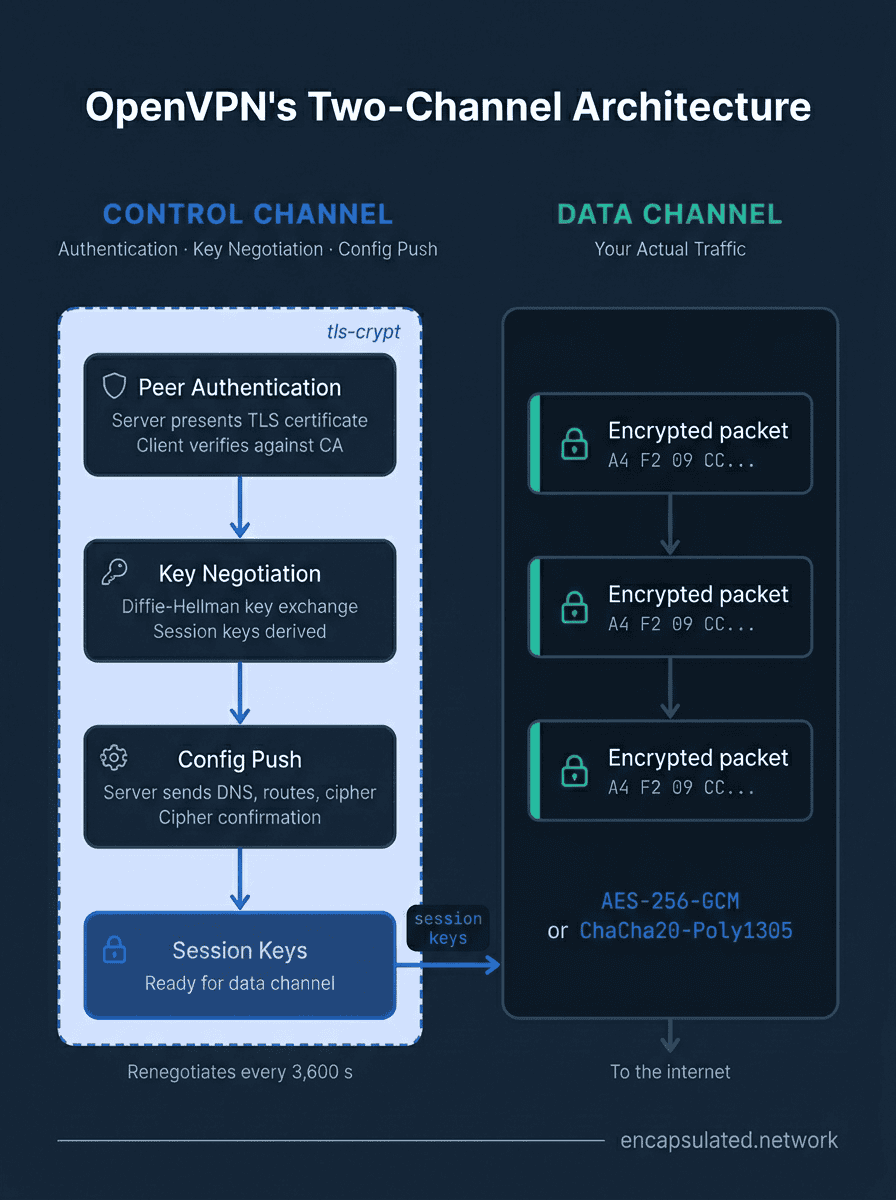
uses them.
If you have ever opened a .ovpn configuration file and noticed that some directives relate to certificates and key exchange while others relate to ciphers and keepalive — you were looking at the two channels in configuration form.
The handshake — authentication before a single packet moves
In plain terms: before any of your data moves, both your device and the server prove who they are using digital certificates, then secretly agree on an encryption key — and only then does the tunnel open.
No data travels through an OpenVPN tunnel before both sides have authenticated each other and agreed on session keys. That process is the handshake, and it runs on the control channel before the data channel opens.
The TLS handshake, step by step
- The client initiates a connection to the server’s configured endpoint.
- The server presents its TLS certificate — its proof of identity.
- The client verifies the certificate against the Certificate Authority it trusts, configured via the
cadirective. If the certificate was not signed by that CA, the connection fails. - If mutual authentication is enabled, the client also presents its own certificate and the server verifies it.
- Both sides perform a Diffie-Hellman key exchange — agreeing on shared session key material without ever transmitting the key itself across the network.
- Session keys are derived for the data channel.
- The server pushes configuration to the client: DNS resolvers, routing rules, the negotiated cipher.
- The data channel opens. Encrypted traffic begins.
Step 3 is why OpenVPN resists man-in-the-middle attacks. An attacker positioned between you and the server cannot impersonate the server without presenting a certificate signed by the trusted CA — which they do not have. The remote-cert-tls server directive in a .ovpn file enforces this check by requiring the server certificate to carry the Server Authentication extended key usage attribute. A config without this directive is vulnerable to MITM even when TLS is active.
tls-auth, tls-crypt, and tls-crypt-v2 — protecting the control channel itself
All three mechanisms address a specific problem: without any pre-authentication layer, anyone who can reach the server’s port can initiate a TLS handshake. That consumes server CPU, exposes the server’s address to port scanners, and leaves the TLS implementation itself as an attack surface. tls-auth, tls-crypt, and tls-crypt-v2 each add a layer in front of the TLS handshake — a pre-authentication filter that drops packets before TLS processing begins.
tls-auth adds an HMAC signature to every TLS control-channel packet using a shared static key. Any packet that does not carry a valid HMAC is dropped before TLS processing begins. An observer can still see the TLS handshake itself — the certificate, the cipher suite negotiation — because tls-auth provides authentication only, not encryption of the control channel. It is a lightweight firewall against DoS attacks and uninformed port scanners, but it does not hide the nature of the connection.
tls-crypt encrypts and authenticates the control-channel packets using AES-256-CTR with HMAC-SHA-256 in an SIV-style construction, wrapping the OpenVPN control-channel packets that carry the TLS handshake records. This means the TLS Client Hello, the server certificate exchange, and the key agreement are all hidden from passive observers. OpenVPN’s own source code — specifically src/openvpn/tls_crypt.h — describes this as providing “poor-man’s post-quantum security”: because the entire TLS handshake is wrapped inside a symmetric pre-shared key, a future quantum adversary who has captured today’s traffic cannot recover the handshake to derive the data-channel keys, even if they break the classical Diffie-Hellman key exchange in the future. One important qualification on the shared-key model: tls-crypt uses a single static key file that is distributed to every client and held by the server — so if any one client is compromised, that shared key is exposed and the control-channel protection for all sessions using it is retroactively weakened. And despite tls-crypt’s protections, the OpenVPN opcode and session-ID bytes are not encrypted, which means deep-packet inspection can still fingerprint the traffic as OpenVPN. tls-crypt is privacy and DoS protection; it is not a censorship-evasion transport.
tls-crypt-v2 provides the same encryption and authentication as tls-crypt, but replaces the shared group key with a unique key per client. The server holds a wrapping key; each client receives a unique client key plus its wrapped form embedded in the client’s configuration. If one client’s key is compromised, every other client remains unaffected — the compromise is contained to that single client. tls-crypt-v2 requires OpenVPN 2.5 or later on both the server and client.
The recommendation for 2026: tls-crypt-v2 if your server supports it. tls-crypt as the minimum. tls-auth is legacy — still widely deployed but providing meaningfully weaker control channel protection than either of the alternatives.
TUN vs TAP — the two tunnel modes
OpenVPN uses the Universal TUN/TAP driver — drivers/net/tun.c in the Linux kernel — to interact with the operating system’s network stack. The driver creates a virtual network interface that OpenVPN reads from and writes to exactly like a physical network card. Which type of virtual interface is created depends on the dev directive in the config: dev tun or dev tap.
TUN (tun interface) operates at Layer 3 — the network layer. It routes IP packets through the tunnel. Your traffic arrives at OpenVPN as IP packets; OpenVPN encrypts them, sends them to the server, and the server routes them to the internet. TUN is what virtually all consumer VPN use cases require: remote access, privacy, streaming, bypassing restrictions. Every major commercial VPN provider uses TUN. It carries lower overhead than TAP because Layer 2 Ethernet headers are stripped — only IP packets travel through the tunnel.
TAP (tap interface) operates at Layer 2 — the data link layer. It emulates a physical Ethernet interface, including ARP, broadcast traffic, and MAC addresses. TAP is required in specific enterprise scenarios: when two offices need to appear as a single flat network where devices on both sides share the same IP subnet and can use broadcast-dependent protocols — Windows file sharing via SMB, network printers, legacy applications that rely on Ethernet broadcasts. A corporate setup bridging the London and Frankfurt offices at Layer 2 would use TAP. A consumer VPN user never needs it.
One practical note: macOS and iOS have no TAP kernel driver. Apple’s platforms simply do not ship one. This means TAP is not available on Apple client devices regardless of provider or configuration — another reason virtually all commercial deployments use TUN.
The decision rule is simple. If your .ovpn file says dev tun, this is correct for all consumer use cases. TAP is for network bridging in enterprise site-to-site deployments where broadcast-dependent protocols must cross the tunnel.
UDP vs TCP — and the TCP meltdown problem
Why UDP is the default
UDP sends packets without acknowledgment or delivery guarantees — it fires and forgets. For a VPN that already handles its own reliability through the TLS control channel, this is the correct design. Your actual applications — your browser, your file transfers, your video streams — manage their own TCP retransmission inside the tunnel. Wrapping all of that in another acknowledgment layer at the transport level is redundant overhead that adds latency without adding value. UDP eliminates it. Both UDP/1194 and TCP/1194 are registered with IANA to James Yonan, but the protocol’s default behaviour — and best-performing mode — is UDP.
The TCP meltdown problem
When OpenVPN runs over TCP, you get TCP carried inside TCP. This creates a documented failure mode that networking engineers have described since at least 2001. Olaf Titz’s write-up Why TCP Over TCP Is A Bad Idea (2001) and the academic paper Understanding TCP over TCP: Effects of TCP Tunneling on End-to-End Throughput and Latency by Honda, Ohsaki, Imase, Ishizuka, and Murayama (SPIE, 2005) both characterise the same phenomenon: under any packet loss, the inner TCP connection (your application traffic) detects the loss and begins retransmitting. The outer TCP connection (OpenVPN’s own transport) detects the same packet loss and simultaneously backs off and queues its own retransmissions. Both stacks are reacting to the same event independently — they compound each other. The inner stack’s retransmissions arrive faster than the outer stack can deliver them. Throughput collapses far below what either layer would lose independently. This is the TCP meltdown problem, and it is why UDP always delivers higher performance when the network allows it.
When TCP port 443 is the right call
WireGuard uses UDP exclusively. A corporate firewall or a government-level censorship system can silence WireGuard by dropping all non-TCP traffic on non-standard ports. OpenVPN on TCP port 443 sends traffic on the same port used by standard HTTPS. To a stateless firewall that filters by port and protocol, the connection is indistinguishable from browsing the web.
The TCP meltdown cost is real, and on a good network it will be felt. Accept it when the alternative is no connection at all. For the full comparison of when TCP 443 gets through and when it does not, including the DPI caveat and the obfuscation layer you need for advanced inspection environments, see our WireGuard vs OpenVPN guide.
The cipher suite — what to configure and what to avoid
In plain terms: the cipher is the lock OpenVPN puts on your data. The choice is simpler than it looks — use AES-256-GCM or ChaCha20-Poly1305 and everything else follows from that.
Modern AEAD ciphers and the data-ciphers directive
OpenVPN 2.4 introduced the --ncp-ciphers directive for negotiated cipher selection between client and server. OpenVPN 2.5 renamed it to --data-ciphers to more accurately describe its function. The directive specifies an ordered preference list; the server selects the highest-preference cipher that both sides support during connection setup.
The default --data-ciphers list in OpenVPN 2.5 is AES-256-GCM:AES-128-GCM. OpenVPN 2.6 expanded the default to AES-256-GCM:AES-128-GCM:CHACHA20-POLY1305 on builds where ChaCha20-Poly1305 is available. If you are configuring a server and want to specify the list explicitly, this is the correct 2026 configuration:
data-ciphers AES-256-GCM:AES-128-GCM:CHACHA20-POLY1305A companion directive, --data-ciphers-fallback, specifies the cipher to use when connecting to a peer too old to negotiate — OpenVPN 2.3 and earlier with --enable-small. For most deployments in 2026 this can be ignored, but it is worth knowing the directive exists if you are maintaining backward compatibility with old infrastructure.
All three ciphers in the recommended list are AEAD — Authenticated Encryption with Associated Data. They provide confidentiality and integrity in a single cryptographic operation: no separate HMAC step, no padding oracle vulnerability class. AES-256-GCM is hardware-accelerated on virtually every processor manufactured since the mid-2010s. ChaCha20-Poly1305 — defined in RFC 8439 — runs efficiently in pure software and is the right choice for hardware without AES acceleration: older mobile devices, IoT hardware, embedded router platforms.
What to avoid — reading outdated configs
AES-256-CBC. Still present in configs predating OpenVPN 2.5. CBC mode does not provide integrity on its own — it requires a separate --auth directive (for example, auth SHA256) to add HMAC-based message authentication. Without it, a stock OpenVPN installation would use the historical default of HMAC-SHA1. There is no known practical attack against AES-256-CBC in VPN deployments, but AEAD is strictly better: integrity is built into the cipher operation, not an add-on. Any server generating new configurations in 2026 should use GCM.
The old --cipher directive. A config containing cipher AES-256-CBC without a data-ciphers line predates OpenVPN 2.5 cipher negotiation. In OpenVPN 2.6 and 2.7, --cipher is ignored in TLS mode — it remains active only in the deprecated --secret pre-shared-key mode. Seeing cipher alone in a config is a reliable signal that it has not been updated since the 2.5 era.
BF-CBC, DES, RC2, or any cipher with a key length below 128 bits. Deprecated and insecure. These should not appear in any live deployment. If a server is offering these ciphers, it is misconfigured regardless of what other settings it has.
Authentication methods — how OpenVPN verifies identity
Certificate-based authentication (PKI)
The strongest authentication model. A Certificate Authority signs the server certificate and, if mutual authentication is configured, individual client certificates. On every connection, the server presents its certificate; the client verifies it against the CA root it trusts. With mutual authentication enabled, the server also verifies the client’s certificate before the session proceeds. The private key for each certificate never travels across the network. Compromise of one client’s certificate does not affect any other client. This is the correct choice for self-hosted deployments where maximum security is the priority. Easy-RSA is the standard tooling for generating and managing the CA and issuing certificates.
Username and password + certificate
The model used by virtually all commercial VPN providers for consumer clients. The server still presents a certificate that the client verifies — that part of the authentication chain is unchanged. But client identity is established by credentials rather than a per-client certificate. The auth-user-pass directive enables this. It is operationally practical at scale: no per-client certificate to generate, distribute, or revoke when a user cancels their subscription. The trade-off is that a stolen username and password compromises that account — there is no cryptographic equivalent of a private key that never leaves the device.
Pre-shared keys (static key mode)
OpenVPN’s original and simplest mode: a single shared key file on both endpoints. No TLS handshake, no PKI, no CA. Point-to-point only — one client, one server. No Perfect Forward Secrecy: if the static key is ever compromised, all past and future sessions encrypted with it are exposed retroactively. Appropriate only for trusted two-point connections where both endpoints are under the same administrative control. Not recommended for any new configuration in 2026.
The .ovpn config file — understanding what your provider gives you
When a VPN provider sends you a .ovpn file, they are giving you a complete connection profile: server address, cryptographic parameters, certificates, and the directives that control every aspect of how OpenVPN behaves. You do not need to write or modify one to use it — but understanding what the key directives mean lets you evaluate whether the profile is well-configured. This is not a setup guide; for step-by-step VPN configuration on Linux see our Linux VPN setup guide, and for router-level configuration see our router VPN setup guide.
| Directive | What it controls |
|---|---|
client |
Declares this is a client configuration (not a server) |
dev tun / dev tap |
Tunnel mode — TUN for virtually all consumer use |
proto udp / proto tcp |
Transport protocol and mode |
remote [host] [port] |
Server endpoint — hostname or IP and port number |
data-ciphers |
Ordered cipher preference list for data-channel negotiation |
tls-crypt / tls-crypt-v2 / tls-auth |
Control channel protection mechanism and the key material |
<ca> |
Inline CA certificate block — the root of trust for server verification |
<cert> / <key> |
Client certificate and private key for mutual authentication (not present in username/password configs) |
remote-cert-tls server |
Requires the server certificate to carry Server Authentication EKU — prevents MITM by enforcing certificate purpose |
auth-user-pass |
Enables username and password authentication (used by most commercial providers) |
reneg-sec |
Data-channel key lifetime in seconds. Default: 3600. Servers pseudo-randomise between 90% and 100% of this value (3240–3600 s) to prevent synchronised renegotiation under load; clients use the exact value. |
keepalive [interval] [timeout] |
Heartbeat interval and dead-peer detection timeout |
persist-key, persist-tun |
Preserve keys and the tunnel interface across restarts without re-reading key files |
verb |
Log verbosity — higher values produce more diagnostic output |
A quick quality check for any .ovpn file: a well-configured profile from a reputable provider will include remote-cert-tls server, a tls-crypt or tls-crypt-v2 block, and a data-ciphers line listing only AEAD ciphers. A profile missing any of these is worth examining more carefully before connecting.
Performance — DCO and what it changes
OpenVPN traditionally ran entirely in user space. Every packet crossed the kernel/user-space boundary twice — once from the network into OpenVPN for decryption, once back down into the kernel for forwarding — creating a context-switching overhead that capped throughput significantly below WireGuard, which runs natively in kernel space. Data Channel Offload (DCO) addresses this by moving OpenVPN’s data plane into the Linux kernel. The performance gains are substantial: general deployments see throughput improvements of 2× to 10× over traditional OpenVPN on the same hardware.
Two details worth knowing that complement the full DCO explanation in our dedicated OpenVPN DCO article:
The original out-of-tree DCO module (ovpn-dco) supported UDP only. The mainline ovpn kernel module — patches submitted to netdev on 18 March 2025, accepted by netdev maintainers on 17 April 2025, and shipped in Linux 6.16 — supports both UDP and TCP. TCP port 443 works just as UDP port 1194 does at the kernel level; the port is a userspace configuration choice with no kernel-side restriction. DCO also requires modern AEAD ciphers — AES-256-GCM, AES-128-GCM, or ChaCha20-Poly1305. Older CBC-mode configurations must be updated before DCO can engage.
Post-quantum readiness
In plain terms: future quantum computers could break today’s key exchange. OpenVPN already has a practical defence available now — tls-crypt-v2 — and a more complete solution arriving through its TLS library as OpenSSL matures.
Quantum computers capable of breaking current public-key cryptography — including the Diffie-Hellman key exchange at the heart of OpenVPN’s TLS handshake — do not yet exist at the scale required. Most researchers estimate cryptographically relevant quantum hardware is at least a decade away. But the “harvest now, decrypt later” threat model is already active: adversaries may be recording encrypted VPN sessions today, intending to decrypt them once sufficiently powerful quantum hardware arrives. For anyone handling long-term sensitive data, this is a real consideration now.
What OpenVPN offers today — tls-crypt-v2 and handshake protection
OpenVPN’s most meaningful post-quantum protection available in production today is tls-crypt-v2. Because tls-crypt wraps the entire TLS control-channel — including the classical Diffie-Hellman key exchange — inside a symmetric AES-256-CTR + HMAC-SHA-256 envelope, a future quantum adversary who captured today’s traffic cannot recover the handshake to derive the data-channel keys. The pre-shared key used by tls-crypt is provisioned out-of-band and never transmitted — it cannot be derived from the captured traffic alone. OpenVPN’s own source documentation describes this as “poor-man’s post-quantum security,” and the framing is apt.
This protection is partial and conditional. There is no forward secrecy at the tls-crypt layer: if the pre-shared key is ever compromised through a server breach, all past sessions wrapped by that key become retroactively decryptable. The data channel itself — AES-256-GCM or ChaCha20-Poly1305 — is quantum-resistant against Grover’s algorithm, retaining approximately 128-bit effective security. The data channel does not need separate post-quantum protection. The vulnerability sits in the classical key exchange that generates the data-channel keys, and tls-crypt addresses that vulnerability at the handshake level.
The roadmap — hybrid key exchange via OpenSSL 3.5+
OpenVPN’s path to full post-quantum key exchange runs through its TLS library backend. OpenSSL 3.5 added native support for the hybrid named group X25519MLKEM768 — X25519 (classical elliptic curve) combined with ML-KEM-768 (a NIST-standardised post-quantum key encapsulation mechanism at Security Level 3), specified in the IETF draft draft-ietf-tls-ecdhe-mlkem. OpenVPN 2.7 — the current stable release as of 2.7.1 on 31 March 2026 — can negotiate this hybrid group when compiled and linked against OpenSSL 3.5+ or 3.6+.
As of May 2026, post-quantum key exchange is not enabled by default in any OpenVPN release and is not available through standard distribution builds — enabling it requires building against a compatible OpenSSL version and explicit configuration. OpenVPN Connect — the official client application — still ships with OpenSSL 3.4.x and does not support PQ negotiation. Post-quantum key exchange in OpenVPN should be understood as available but non-default and build-dependent: meaningful for technical evaluation and early adoption, but not something a standard deployment receives automatically. In production, tls-crypt-v2 remains the practical post-quantum mitigation available in every OpenVPN deployment today without any special build requirements.
25 years of audits — why longevity is a security advantage
OpenVPN’s first numbered release appeared in May 2001. The Linux kernel gained WireGuard in March 2020. The nearly two-decade gap between them matters in a specific way: every vulnerability in OpenVPN that was findable has had 25 years to be found — by independent researchers, by hostile governments, by security firms, by the global open-source community, and by the many organisations that have deployed OpenVPN at scale and had strong incentives to report what they discovered.
OpenVPN has a CVE history. The correct interpretation of that history is not that the protocol is weak — it is that the scrutiny has been intense and the project has responded. A security project with an unbroken CVE record is not more trustworthy; it is less examined. The 2014 Heartbleed disclosure forced a comprehensive re-examination of the entire OpenSSL-dependent ecosystem, including OpenVPN. Multiple Cure53 audits have reviewed the core codebase.
The practical implication: OpenVPN’s security has been stress-tested by 25 years of adversarial real-world deployment at enormous scale. That is not a guarantee of perfection — nothing in software is. It is the closest thing to one that time and scrutiny can produce.
The codebase trade-off — complexity as a design choice
WireGuard’s Linux kernel module is approximately 4,000–5,000 lines of code. OpenVPN’s core daemon runs to roughly 70,000–100,000 lines including its direct dependencies. The gap is real, and it has a real security implication: a single skilled researcher can read and understand the entire WireGuard kernel implementation in a reasonable period of time. Auditing OpenVPN in equivalent depth is a multi-year project.
But there is a nuance worth understanding. OpenVPN’s user-space architecture — often characterised purely as a performance limitation — is also an intentional security isolation decision. A vulnerability in a user-space application cannot directly compromise kernel memory. Running in user space limits the blast radius of any OpenVPN bug. WireGuard’s kernel-space architecture offers speed at the cost of that isolation boundary. Both trade-offs are defensible; they optimise for different threat models.
The complexity overall is not incidental. It is what enables the configurability. A protocol that can be deployed as a corporate remote access gateway with RADIUS authentication, per-client certificate management, TAP-mode network bridging, and custom scripting hooks necessarily has more code than one that does one thing correctly. The auditing requirement scales with the codebase — a genuine cost. But it is the cost of flexibility that makes OpenVPN still the right answer in contexts where WireGuard’s fixed design is a constraint rather than a feature.
Where OpenVPN still wins in 2026
Restrictive firewalls. This remains OpenVPN’s most important advantage. WireGuard uses UDP exclusively. A corporate firewall, hotel network, or government-level censorship system can silence it by dropping non-TCP traffic on non-standard ports. OpenVPN on TCP port 443 is the answer that gets through where nothing else does. No other protocol covered in our VPN protocols guide shares this capability. The TCP meltdown cost is real; accept it when the alternative is no connection.
Self-hosted and enterprise deployments. PKI management, authentication backends, multiple simultaneous clients with per-client certificates, TAP-mode network bridging, fine-grained cipher control, and custom scripting hooks — WireGuard supports none of this natively. In enterprise environments, OpenVPN slots into existing identity infrastructure: the openvpn-auth-radius plugin handles RADIUS authentication, and PAM modules enable LDAP integration, allowing VPN access control to follow the same directory as the rest of the organisation. Certificate-only authentication via a self-managed CA remains the highest-assurance option, with Easy-RSA as the standard tooling for issuing and revoking per-client certificates. With DCO enabled on a modern server, the per-core connection ceiling rises significantly by eliminating user-space overhead — a meaningful difference at scale. For a self-managed VPN server where configurability is the primary requirement, OpenVPN is still the standard that enterprise and self-hosted deployments reach for first.
Legacy hardware. Routers and embedded devices running firmware with mature OpenVPN support and no WireGuard implementation. An older DD-WRT build runs OpenVPN. It does not run WireGuard. For hardware that cannot be upgraded, OpenVPN is not a compromise — it is the only option.
DCO-enabled deployments. With Data Channel Offload active on a server running the mainline ovpn module (Linux 6.16+), OpenVPN’s throughput approaches WireGuard on the same hardware. The speed argument against OpenVPN weakens significantly in environments where DCO is running. See our OpenVPN DCO guide for the full performance picture.
Post-quantum-conscious deployments today. tls-crypt-v2 provides meaningful protection against harvest-now-decrypt-later attacks on the TLS handshake, using symmetric key material that is never transmitted. For organisations handling sensitive long-term data and unwilling to wait for GA post-quantum key exchange support, tls-crypt-v2 is the practical mitigation available in every production OpenVPN deployment right now.
OpenVPN’s limitations
Speed without DCO. In a default user-space configuration without Data Channel Offload, OpenVPN has a measurable throughput gap below WireGuard on identical hardware. On router hardware in particular — where CPU resources are constrained — this gap is the deciding factor for many deployments. DCO significantly closes it, but requires a modern server kernel and AEAD cipher configuration.
Configuration complexity. OpenVPN has more ways to be misconfigured than WireGuard — a missing remote-cert-tls server directive, an outdated cipher line, or a tls-auth key where tls-crypt-v2 belongs. These mistakes degrade security silently, without connection failures or visible warnings. The configurability that is OpenVPN’s strength is also the source of this risk.
No built-in obfuscation. TCP port 443 defeats stateless firewall filtering. It does not defeat deep-packet inspection. On networks running active DPI, OpenVPN traffic is identifiable from the opcode and session-ID bytes in the control-channel packets — bytes that tls-crypt does not encrypt. For environments with DPI-level scrutiny, a dedicated obfuscation layer is needed on top of the protocol.
No roaming mechanism. OpenVPN has no equivalent of WireGuard’s implicit endpoint update or IKEv2’s MOBIKE extension. When a mobile device moves from Wi-Fi to cellular — changing its IP address — the OpenVPN session must be torn down and rebuilt from scratch. For commuters or anyone whose device moves between networks frequently, this is a meaningful practical limitation compared to both alternatives. For a full comparison of roaming behaviour across all three protocols, see our IKEv2/IPsec guide.
Larger attack surface by design. The codebase complexity that enables OpenVPN’s configurability also means a larger audit surface, a slower patch cycle per discovered vulnerability, and more implementation-level risk than WireGuard’s lean kernel module.
Frequently asked questions
Is OpenVPN safe in 2026?
Yes, when correctly configured. A deployment using tls-crypt-v2 for control channel protection, AES-256-GCM or ChaCha20-Poly1305 for the data channel, certificate-based server authentication with remote-cert-tls server enforced, and a current version of OpenSSL has no known practical vulnerability. The caveats are configuration-dependent: OpenVPN’s security is only as strong as the weakest directive in the config. A profile using outdated ciphers, missing HMAC protection, or no certificate verification can be significantly weaker even while technically connecting. Checking the key directives described in the config file section above is the fastest way to evaluate any given deployment.
Is OpenVPN faster than WireGuard?
In a standard user-space configuration, no — WireGuard is faster, with a meaningful throughput advantage that is most pronounced on router hardware and mobile devices. The gap narrows significantly with DCO enabled on the server: benchmarks on 2026 hardware show DCO-enabled OpenVPN approaching and in some cases matching WireGuard throughput on the same hardware. WireGuard still maintains advantages in connection establishment latency and mobile network transitions. For the full speed comparison including hardware context, see our WireGuard vs OpenVPN guide.
What encryption does OpenVPN use?
OpenVPN uses AES-256-GCM as its primary data-channel cipher in 2026, with AES-128-GCM and ChaCha20-Poly1305 also in the recommended data-ciphers list. All three are AEAD constructions — authenticated encryption — providing both confidentiality and integrity in a single operation. The TLS control channel uses the cipher suite negotiated by the TLS handshake, which on modern configurations is ECDHE for key exchange and AES-256-GCM for the record layer. Older configs using AES-256-CBC should be updated; they require a separate HMAC directive for integrity and do not benefit from the AEAD security model.
What is the difference between OpenVPN TCP and UDP?
UDP is the default and higher-performing transport. It sends packets without acknowledgment, which is correct for a VPN that already manages reliability through its TLS control channel. TCP is the alternative — slower due to the TCP meltdown problem (nested TCP stacks compounding each other’s response to packet loss), but useful in specific circumstances. The main reason to use TCP is port 443: on TCP/443, OpenVPN traffic is indistinguishable from HTTPS to a stateless firewall, allowing connections through networks that block VPN UDP traffic. On any network that does not filter OpenVPN’s UDP traffic, UDP is the better choice.
What is the difference between TUN and TAP in OpenVPN?
TUN operates at Layer 3 and routes IP packets — it is what virtually all consumer VPN use cases require. TAP operates at Layer 2, emulates an Ethernet interface including MAC addresses and broadcast traffic, and is used for enterprise site-to-site setups where two networks need to appear as a single flat Layer 2 domain. macOS and iOS have no TAP kernel driver, so TAP is not available on Apple client devices. If your .ovpn file says dev tun, you are in the correct and standard configuration for any consumer or remote access use case.
Is OpenVPN free?
The OpenVPN protocol and the open-source software are free under the GPLv2 licence — free to download, deploy, and modify with no cost. OpenVPN Inc. sells commercial products (Access Server, CloudConnexa) built on top of the open-source codebase, but these are not required to use the protocol. Your VPN provider’s subscription covers access to their infrastructure; the protocol itself costs nothing.
What is tls-crypt in OpenVPN, and do I need it?
tls-crypt is a pre-authentication layer that encrypts and authenticates the OpenVPN control channel using a symmetric pre-shared key, wrapping the TLS handshake — including certificate exchange and key agreement — before any TLS processing begins. It serves three purposes: protecting the server from denial-of-service attacks against the TLS stack, preventing port scanners from confirming a VPN server is running at a given address, and providing what OpenVPN’s own source documentation calls “poor-man’s post-quantum security” by hiding the classical Diffie-Hellman key exchange from passive observers. tls-crypt-v2 is the preferred version — per-client keys rather than a shared group key. If your provider’s .ovpn file does not include a tls-crypt or tls-crypt-v2 block, the control channel is running without this protection layer, which is a meaningful security gap in 2026.
Can OpenVPN be detected and blocked by a firewall?
It depends on the firewall. On UDP, OpenVPN traffic is readily identifiable by port and packet structure — any network administrator can block it with a simple firewall rule. On TCP port 443, OpenVPN traffic is indistinguishable from HTTPS to a stateless firewall that filters by port and protocol. However, even with tls-crypt enabled, the OpenVPN opcode and session-ID bytes are not encrypted, which means a deep-packet inspection engine specifically looking for OpenVPN can identify it regardless of port. TCP 443 bypasses most corporate and hotel network restrictions; it does not bypass sophisticated DPI-based censorship systems. For those environments, a dedicated obfuscation layer is required on top.
What is a .ovpn file?
A .ovpn file is a complete OpenVPN connection profile in plain text. It contains the server address and port, the transport protocol, the cipher configuration, the CA certificate used to verify the server, and optionally the client certificate and key for mutual authentication or a tls-crypt key block for control channel protection. Importing a .ovpn file into an OpenVPN client (OpenVPN Connect, OpenVPN for Android, or the NetworkManager OpenVPN plugin) gives the client everything it needs to connect without any manual configuration. Most commercial VPN providers offer .ovpn downloads from their website or dashboard for providers or use cases that do not have a native app.
Is OpenVPN good for mobile?
It works on both Android and iOS, but it has meaningful limitations compared to WireGuard and IKEv2 on mobile. OpenVPN has no roaming mechanism — no equivalent of WireGuard’s implicit endpoint update or IKEv2’s MOBIKE extension — so when your device moves from Wi-Fi to cellular and its IP address changes, the tunnel drops and must be rebuilt from scratch. Battery consumption is also higher than WireGuard because OpenVPN’s connection model keeps the radio more active. For daily mobile use where performance and battery life are the priority, WireGuard is the better default. OpenVPN on mobile makes the most sense when you need TCP port 443 to connect through a restrictive network that blocks WireGuard’s UDP traffic — which WireGuard and IKEv2 both cannot do.
Can I run my own OpenVPN server?
Yes. OpenVPN is free and open-source and is explicitly designed for self-hosted deployment. A low-powered Linux server — a cloud VPS or a Raspberry Pi — is sufficient for a personal or small-team setup. The main tasks are generating a PKI (a Certificate Authority, a server certificate, and client certificates) using Easy-RSA, configuring the server daemon, and opening the relevant firewall port. The decisions that matter most — which cipher to configure, which authentication model to choose, whether to enable tls-crypt-v2, whether DCO is available on your kernel — are covered in the relevant sections of this article. For the full Linux installation walkthrough, see our Linux VPN setup guide.
Which VPN providers support OpenVPN?
Virtually every major commercial VPN provider supports OpenVPN as one of their available protocols: Mullvad, ProtonVPN, NordVPN, IVPN, ExpressVPN, Surfshark, CyberGhost, and most others all offer it. Most providers now default to WireGuard for new connections — which is the right choice for most users on open networks — and retain OpenVPN as a selectable fallback for restrictive networks or compatibility with older client software. If your provider offers both, the practical rule is straightforward: use WireGuard on networks that permit it and switch to OpenVPN over TCP port 443 when WireGuard fails to connect.
Should I use OpenVPN or WireGuard?
For most users in 2026, WireGuard is the better default: faster, more battery-efficient on mobile, simpler to audit, and supported by every reputable VPN provider. Use OpenVPN when WireGuard’s UDP traffic is being blocked by a firewall — TCP port 443 mode will get through where WireGuard cannot. Also use OpenVPN when you are self-hosting a VPN server that requires enterprise authentication backends, per-client certificate management, or network bridging capabilities that WireGuard does not natively support. If your only concern is everyday privacy, streaming, and performance, WireGuard is the right choice. If you hit a network that blocks it, OpenVPN is what you switch to. For the full side-by-side comparison of both protocols across every relevant dimension, see our WireGuard vs OpenVPN guide.