A standard VPN is like sending a locked iron safe through the postal system. The contents are completely secure — nobody can read what is inside. But the presence of the safe on the conveyor belt is itself a red flag. Anyone monitoring the mail can see that something is being concealed, even if they cannot open it. An obfuscated VPN does not change what is inside the safe. It disguises the safe as an ordinary parcel — so that nobody inspecting the conveyor belt suspects anything is there.
That distinction — between hiding your data and hiding the fact that you are using a VPN — is what this article is about. Standard VPN encryption and obfuscation are two separate layers, solving two separate problems. Understanding what each does, and where each stops, is the foundation for knowing whether obfuscation belongs in your setup.
This article assumes you already understand how VPN tunnels work, how deep packet inspection identifies VPN protocols, and why running OpenVPN on TCP port 443 is not the same thing as true obfuscation. Those foundations are covered in depth in how a VPN actually works, the OpenVPN explainer, and the WireGuard vs OpenVPN comparison. What this article covers is what comes next: the specific techniques that sit above those protocols, how each one works mechanically, and the honest answer to whether you actually need them.
TL;DR
VPN obfuscation is a processing layer that sits above your VPN protocol and transforms your traffic’s observable characteristics — packet structure, handshake signatures, timing patterns — so that deep packet inspection systems cannot identify it as VPN traffic. Standard VPN encryption hides what you are doing; obfuscation hides that you are using a VPN at all. The techniques range from simple XOR scrambling, which erases protocol header signatures, to full protocol impersonation, which makes your traffic indistinguishable from a real browser connecting to a legitimate website. Most users on most networks never need obfuscation; enabling it without cause costs throughput and battery for no benefit. The situation where it becomes necessary is specific: networks that actively detect and block VPN traffic using deep packet inspection, which describes censorship infrastructure in countries like China, Iran, and Russia, as well as some aggressive institutional networks.
What is VPN obfuscation?
VPN obfuscation is a technique that disguises the fact that you are using a VPN by transforming your traffic’s observable characteristics — its packet structure, handshake signatures, and timing patterns — so that deep packet inspection systems cannot identify it as VPN traffic. Unlike standard VPN encryption, which protects the content of your data, obfuscation protects the appearance of your connection. Both layers operate simultaneously in a properly obfuscated VPN: the tunnel encrypts what you are doing; the obfuscation layer hides that you are using a VPN at all.
The distinction between these two layers is the article’s foundational concept. When you connect to a standard VPN, your data is encrypted before it leaves your device. An observer intercepting the connection cannot read your traffic. But that encrypted traffic still has a recognisable shape: characteristic packet sizes, a distinct handshake sequence, specific header fields, and predictable timing. Deep packet inspection systems do not need to decrypt your traffic to identify it. They read its structure the way a trained eye reads a silhouette, and the silhouette of a VPN connection is distinctive enough to classify and block without ever seeing the content inside.
Obfuscation targets that silhouette. It does not modify the encryption inside the tunnel; your data remains just as protected. What it modifies is the outer appearance of the connection: the observable characteristics that a network inspection system uses to classify traffic. Done well, the result is a traffic stream that looks to any monitoring system like ordinary encrypted web browsing, with no detectable sign that a VPN is involved.
This addresses a specific security property that encryption alone does not provide. In security terms, a standard VPN provides confidentiality (nobody can read your data) and integrity (nobody can alter it undetected). Obfuscation provides availability: ensuring your connection can be established at all on networks that would otherwise block it. The three properties are distinct, and a VPN that provides the first two without the third is useless in an environment where the connection itself is blocked before any data can flow.
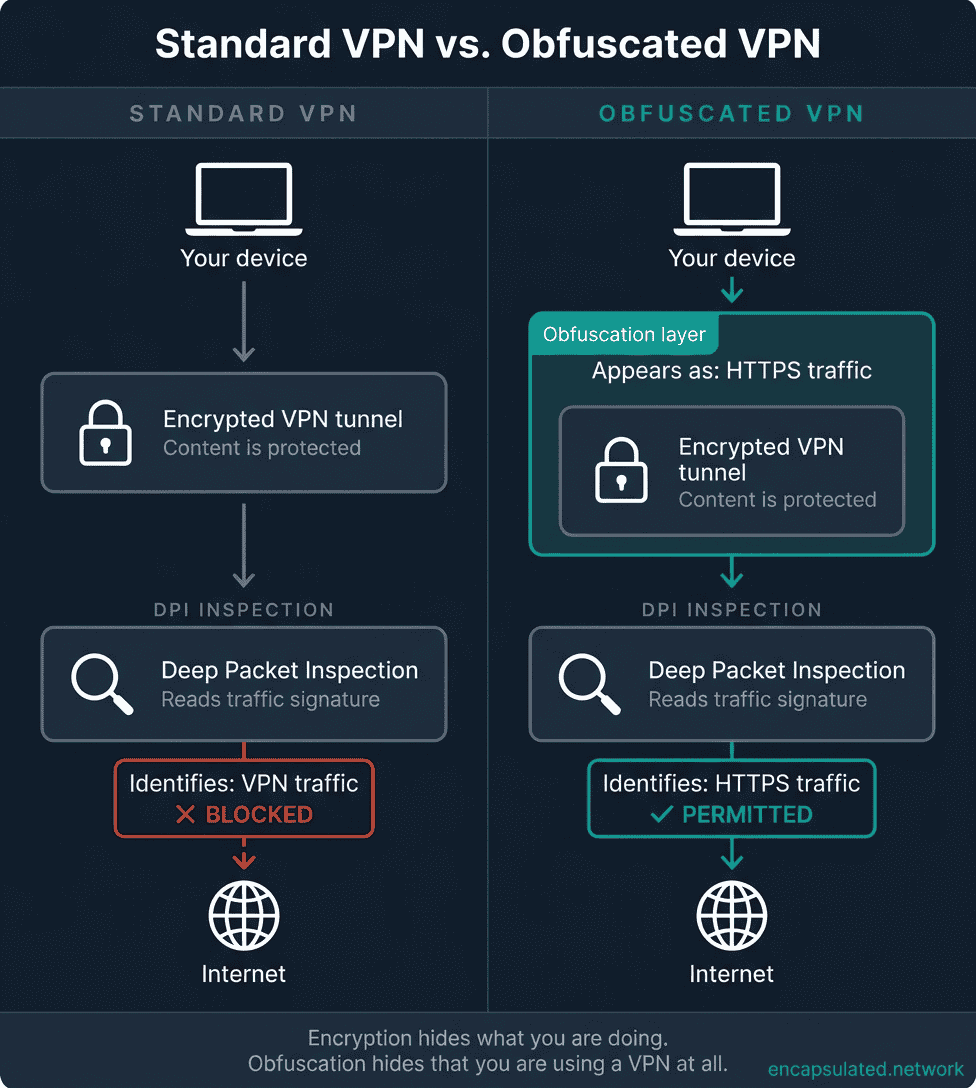
One clarification on terminology before going further: VPN providers market this feature under many names. Proton VPN calls it Stealth. Surfshark calls it Camouflage Mode. Windscribe calls it Stealth Protocol. NordVPN calls its feature Obfuscated Servers. VyprVPN has its Chameleon Protocol. All of these are implementations of the same underlying concept. This article uses “obfuscation” throughout as the technically precise term, and maps each provider’s label to the actual technique it uses in a later section.
Why standard VPN traffic can be detected
Traditional network firewalls operate by filtering traffic based on IP addresses and port numbers. A firewall rule that blocks connections to known VPN server IP addresses, or that closes UDP port 1194, stops basic VPN traffic without needing to inspect anything beyond the packet header. This is the level of filtering most corporate and institutional networks apply.
Deep packet inspection — DPI — goes considerably further. Rather than looking only at where data is going, a DPI system analyses the structure of the data itself: the byte sequences in packet headers, the pattern of a protocol’s handshake, the distribution of packet sizes across a session, and the timing between packets. It can identify the protocol in use without decrypting the content, the same way a trained mail scanner can identify the contents of an envelope by its weight and dimensions without opening it.
VPN protocols produce recognisable fingerprints at this level. OpenVPN’s control channel has specific opcode values in its packet headers that identify it as OpenVPN traffic regardless of which port it runs on. The technical detail of why tls-crypt does not protect against this is covered in the OpenVPN explainer. WireGuard’s handshake has a characteristic structure that DPI systems can identify from the first packet; why that is and what it means for obfuscation is covered in the WireGuard explainer. The fingerprint is present regardless of the port the protocol runs on.
Once a DPI system identifies traffic as VPN traffic, three responses are available to the network operator: drop the packets silently, throttle the connection to the point of unusability, or blacklist the VPN server’s IP address. In practice, sophisticated censorship systems use all three in combination, maintaining updated lists of known VPN infrastructure and applying DPI as a second-line check when IP blocking alone is insufficient.
Running OpenVPN on TCP port 443 — the same port used by standard HTTPS web traffic — is a partial countermeasure that defeats stateless port-based filtering. It is not obfuscation. An inspection system with DPI capability can still identify OpenVPN traffic on port 443 from its protocol structure. The complete explanation of what TCP 443 does and does not achieve is in the WireGuard vs OpenVPN comparison. The relevant point for this article is that TCP 443 is a middle step: it passes most corporate and hotel network filters, but falls short against the level of DPI deployed by censorship regimes and sophisticated institutional networks.
The entities that operate DPI at the level where obfuscation becomes necessary are a specific group: government-run firewall infrastructure including China’s Great Firewall and Russia’s TSPU filtering system, ISPs in countries with state-mandated traffic inspection requirements, and some corporate networks with compliance-driven deep inspection requirements. For most users on most networks, this level of scrutiny is not present, and standard VPN protocols work without interference.
How VPN obfuscation works — the architecture
Obfuscation is not a replacement for your VPN protocol. It is a processing layer that sits above the protocol and operates on its output. Whatever protocol is running underneath — OpenVPN, WireGuard, or anything else — continues to function exactly as designed. The encrypted tunnel remains intact. What the obfuscation layer changes is what that tunnel looks like to an outside observer examining the network traffic.
The transformation target is the observable traffic signature: the set of characteristics that a DPI system uses to classify what it is looking at. This includes packet header fields, byte patterns in the first few packets, the structure of the connection handshake, the distribution of packet sizes across a session, and the timing intervals between packets. Obfuscation either removes these characteristics, randomises them, or replaces them with the characteristics of a different, permitted type of traffic — most commonly, ordinary HTTPS web browsing.
Four mechanisms are used to achieve this, individually or in combination, and the techniques in the next section are all implementations of one or more of these approaches:
SSL/TLS wrapping: encapsulating the VPN tunnel inside an additional TLS layer, so that the outer connection looks like a standard HTTPS session to any inspection system examining it from the outside.
Scrambling: modifying the content of the packets using a cipher or XOR operation to erase recognisable protocol header patterns, replacing structured data with what appears to be random bytes.
Protocol mimicry: engineering the traffic to be indistinguishable from a specific, trusted protocol or application at every observable level, from port and TLS fingerprint to packet timing and server response behaviour.
Packet randomisation: deliberately varying packet sizes and introducing timing jitter to break the statistical flow patterns that machine-learning-based DPI systems use to classify traffic even after signature-based detection is defeated.
Because the obfuscation layer adds processing on both ends of the connection and increases the effective payload size, it has a real throughput and latency cost. The magnitude of that cost varies significantly by technique, from nearly negligible for simple scrambling to meaningful for full TLS wrapping. That trade-off is covered in the limitations section. The important point at the architecture level is that the cost exists, and enabling obfuscation on a network that does not require it is a loss rather than a gain.
VPN obfuscation techniques — what each one actually does
Most guides treat all obfuscation techniques as roughly equivalent. They are not. The techniques differ in how convincingly they defeat detection, what kinds of DPI they can and cannot pass, and whether they resist active probing — a surveillance tactic used by the most sophisticated censorship systems, in which the firewall actively tests suspected VPN endpoints to confirm whether they are VPN servers.
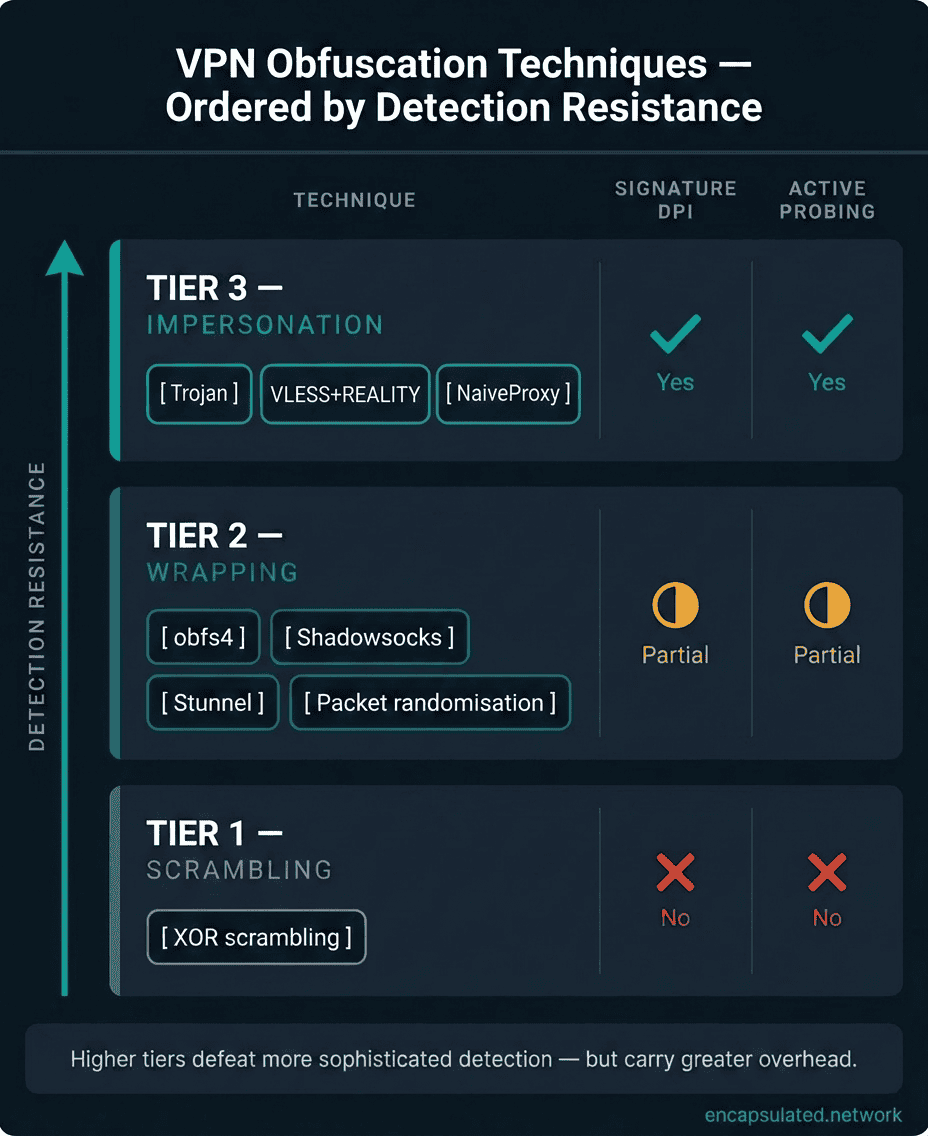
The techniques fall into three tiers, ordered by detection resistance. Tier 1 — Scrambling removes protocol signatures but leaves the traffic statistically identifiable and does not resist active probing. Tier 2 — Wrapping encapsulates VPN traffic inside a different protocol, passing DPI signature checks but potentially susceptible to TLS fingerprinting and some statistical analysis. Tier 3 — Impersonation makes traffic indistinguishable from a specific, trusted application at every observable level. This is the current frontier, and the direction in which the field is moving.
XOR scrambling — Tier 1
XOR scrambling is the simplest obfuscation method available. It applies a bitwise XOR operation to packet data using a shared key, which randomises the byte values and erases the recognisable header patterns that identify OpenVPN traffic. The result looks like a stream of random data rather than a structured protocol, which defeats basic signature matching.
The weakness is fundamental: XOR scrambling is deterministic. Given the same key and the same input, it produces the same output every time. A DPI system that collects enough XOR-scrambled traffic and trains on it can learn to recognise the statistical characteristics of the scrambling process itself: the randomness is not truly random, and the pattern of the randomisation is detectable. XOR scrambling provides no active probing resistance at all. A censorship system that sends a crafted probe packet to a suspected VPN endpoint and observes the response can confirm VPN usage even when XOR scrambling is active.
This technique is sometimes marketed as “OpenVPN scramble” and appears in some providers’ feature lists. It is better than nothing against the most basic network filters, but should not be considered meaningful protection against any DPI infrastructure specifically targeting VPN traffic. If your provider’s only obfuscation feature is XOR scrambling, treat it as absent for any situation where detection is a real risk.
obfs4 — Tier 1 / Tier 2 boundary
obfs4 was developed by the Tor Project as a pluggable transport: a modular obfuscation layer designed to keep Tor working in environments where Tor’s native traffic is detected and blocked. It is the current generation in the obfsproxy family, succeeding obfs2, obfs3, and ScrambleSuit. The earlier protocols were retired for distinct reasons: obfs2 was fingerprintable by DPI systems; obfs3 lacked active probing resistance; ScrambleSuit was superseded by obfs4 for performance and security reasons. obfs4 is the current standard for Tor bridge obfuscation and is widely used as a VPN obfuscation layer by providers who want genuine censorship resistance.
Where XOR scrambling replaces structured packet content with pseudo-random data, obfs4 does something more sophisticated: it makes traffic look like genuinely random, high-entropy noise with no identifiable structure whatsoever. The key exchange that sets up an obfs4 session uses the Elligator2 encoding to map the handshake’s cryptographic keys onto curve points that, when observed on the wire, are indistinguishable from random bytes. There is no handshake pattern to recognise, no header structure to identify, and no consistent packet size distribution to analyse. To a DPI system, obfs4 traffic looks like structureless noise.
The active probing resistance is what separates obfs4 from every Tier 1 technique. An obfs4 server requires the connecting client to know a shared secret — the bridge’s obfs4 public key and node identifier, distributed together as a bridge line — before it will respond to any connection attempt. A probe sent by a censorship system without that secret receives complete silence. No connection attempt is acknowledged, no error is returned, no response of any kind arrives. This is the same “silence is a virtue” principle described in the WireGuard explainer, applied to the obfuscation layer rather than the VPN protocol itself.
obfs4’s limitation appears in environments that use protocol whitelisting rather than protocol blacklisting. A DPI system that blocks all traffic that does not match a known, permitted protocol can flag obfs4 traffic as “unknown and therefore blocked” — that is, traffic consisting of pure random bytes does not match any recognised protocol. This approach is documented in production: the Great Firewall of China has operated a “deny-all for unknown protocols” heuristic since November 2021, and the Tor Project’s own current guidance for China states that public obfs4 bridges “most likely won’t work” in mainland China. Private unlisted obfs4 bridges may still work, but public bridge pools are largely blocked. In those situations, Tier 3 impersonation techniques are more effective than obfs4.
Shadowsocks — Tier 2
Shadowsocks was created in China in 2012 by a developer who needed a reliable way to bypass the Great Firewall. It was designed specifically for this adversarial environment from the beginning, which gives it an operational track record that no other obfuscation tool can match: over a decade of real-world testing against the highest-capability censorship infrastructure currently in operation.
Architecturally, Shadowsocks is a SOCKS5 proxy with AEAD encryption — ChaCha20-Poly1305 or AES-256-GCM, depending on the configuration. When used as a VPN obfuscation layer, VPN traffic is routed through the Shadowsocks proxy, which wraps it in an encrypted SOCKS5 session. To a DPI system examining the connection, the traffic looks like encrypted application data going to a Shadowsocks server — not a VPN connection to a VPN server. The Shadowsocks handshake uses a randomised structure and does not produce the kind of predictable byte sequence that identifies OpenVPN or WireGuard.
What distinguishes Shadowsocks from a simple protocol wrapper is that its design was shaped entirely by the need to evade detection in an environment where evasion is actively contested. Its randomised headers, the use of AEAD encryption that produces ciphertext indistinguishable from random data, and its deliberate avoidance of fixed packet structures all reflect choices made by someone who understood exactly what the opposing detection system was looking for.
Mullvad’s obfuscation stack — running over its WireGuard-only infrastructure following the retirement of OpenVPN in January 2026 — offers four modes the app can cycle through automatically: UDP-over-TCP (udp2tcp), Shadowsocks bridges, QUIC obfuscation, and Lightweight WireGuard Obfuscation (LWO). UDP-over-TCP is Mullvad’s recommended replacement for users who previously relied on OpenVPN over TCP. Outline, a self-hosted VPN tool built on Shadowsocks, was launched in 2018 by Jigsaw (an Alphabet technology incubator) for news organizations and high-risk users such as journalists and activists who need to avoid the “guilty by association” effect of commercial VPN IP ranges being bulk-blocked. In January 2026, stewardship transferred to the independent nonprofit Outline Foundation; the project remains actively developed and open source. For high-risk users, a self-hosted Shadowsocks server on a non-commercial IP address is meaningfully more resistant to IP-level blocking than a commercial VPN server.
Shadowsocks is not invulnerable. The Great Firewall deployed passive ML-based detection against fully-encrypted protocols — including Shadowsocks — in November 2021 (documented by Wu et al., USENIX Security 2023). As of 2026, standard Shadowsocks requires additional measures to work reliably in China: Outline’s connection-prefix disguise feature or Shadowsocks-2022 with custom plugins. Active probing against Shadowsocks endpoints has been documented since at least May 2019. Shadowsocks remains substantially more resistant than XOR scrambling and reliably effective against most censorship systems outside China, but should not be assumed to work in China without configuration beyond the defaults.
Stunnel — SSL/TLS wrapping — Tier 2
Stunnel wraps the VPN tunnel inside an additional TLS layer. The VPN connection — whatever protocol is running underneath — becomes the inner payload of a TLS session that presents itself to the network as a standard HTTPS connection. To any inspection system that classifies traffic by the outer protocol, the connection is indistinguishable from ordinary web browsing.
The meaningful difference between stunnel and simply running OpenVPN on TCP port 443 is architectural. When OpenVPN runs natively on TCP 443, its control-channel structure — the handshake, the opcode fields, the certificate exchange — sits inside the TCP session. A DPI system with the capability to inspect the content of a TCP 443 session can still identify OpenVPN from those structures. Stunnel adds a genuine TLS layer on top of the entire VPN connection, so the DPI system sees the TLS handshake of the stunnel wrapper first, and the OpenVPN structures inside that TLS session are not visible to passive inspection.
Windscribe’s Stealth protocol is stunnel-based. The VPN traffic travels inside a TLS session that appears to originate from a real HTTPS client. The approach is reliable and well-understood, and it passes the level of DPI used by most corporate and hotel networks.
The limitation of stunnel, and of TLS wrapping approaches generally, is TLS fingerprinting. Every TLS client — every browser, every application that makes HTTPS connections — presents a specific set of cipher suites and TLS extensions in its ClientHello message. This combination produces a hash called a JA3 fingerprint (and its successor, JA4), which is characteristic of the specific client software making the connection. A stunnel TLS session has a different JA3 fingerprint from Google Chrome or Firefox, and a DPI system that maintains a library of known TLS fingerprints can identify stunnel sessions by this signature even though the traffic looks like HTTPS at the port and protocol level. This is not a theoretical vulnerability. It is actively exploited by some sophisticated censorship systems.
SoftEther VPN’s native SSL-VPN protocol uses the same TLS-on-TCP-443 approach and shares the same fingerprinting limitation — it provides stateless firewall bypass but not active-probing resistance. For the full picture of SoftEther’s firewall bypass behaviour and detectability, see SoftEther Explained.
Packet randomisation — size and timing jitter — Tier 2
Even when packet content is successfully scrambled or wrapped, the statistical properties of the traffic flow can remain detectable. Machine learning-based DPI systems do not look for specific byte patterns or handshake structures — they classify traffic by analysing the shape of the flow: the distribution of packet sizes over a session, the timing intervals between consecutive packets, the ratio of upload to download traffic, and the burstiness or regularity of data transfer. A VPN connection has characteristic statistical properties that differ from web browsing, video streaming, or any other common traffic type, and a classifier trained on enough labelled examples can learn to recognise them.
Packet randomisation addresses this by deliberately disrupting those statistical properties. Packet padding adds bytes to change the size distribution, so that the flow no longer produces the characteristic pattern of VPN keepalive cycles and data bursts. Timing jitter introduces controlled random delays between packets, breaking the metronomic regularity that distinguishes a VPN session from a human browsing the web. The goal is to make the statistical fingerprint of the VPN traffic match — well enough to pass a classifier — the fingerprint of an ordinary web session.
This technique is rarely used in isolation. Its practical application is as an additional layer on top of Shadowsocks, stunnel, or TLS wrapping, for environments where signature-based DPI has been defeated but statistical classification remains a threat. The performance cost is real: padding every packet increases bandwidth consumption, and timing jitter adds latency. The trade-off between stealth and throughput is genuine, and the correct balance depends on the specific detection environment being addressed.
Protocol mimicry — Trojan and REALITY — Tier 3
Tier 3 techniques represent the current frontier of obfuscation technology. Where Tier 1 and Tier 2 techniques attempt to hide VPN traffic by making it look like nothing recognisable, Tier 3 techniques make VPN traffic look like something specific and trusted — a Chrome browser connecting to a well-known website, or a legitimate HTTPS session with a major technology company’s servers. The distinction matters for active probing resistance: a censorship system that sends a test probe to a suspected VPN endpoint receives a plausible, legitimate-looking response rather than silence or an error.
Trojan routes VPN traffic through port 443 using a TLS connection that closely mimics a real HTTPS web server. The key feature is its response to probing: when an active probe connects and sends an HTTP request, Trojan returns a valid HTTP response. The VPN server behaves like a real website. Blocking Trojan means blocking what appears to be a functional HTTPS server, which creates enough collateral damage to deter most network operators. Unlike stunnel, Trojan is designed with TLS fingerprinting in mind and can be configured to present a plausible browser-like TLS profile.
VLESS with REALITY takes a more ambitious approach. Rather than synthesising a lookalike handshake, the REALITY extension proxies the initial TLS handshake through an actual legitimate, high-profile domain — typically a major technology company’s public infrastructure. The certificate the client sees is genuinely from that domain, served by its real TLS stack, and the JA3/JA4 fingerprint is indistinguishable from a real connection to it because it originates from one. If a probe arrives without valid REALITY authentication, the connection continues passing through to the legitimate domain and behaves like an ordinary visit. Valid connections are switched to VLESS only after the handshake completes. An inspection system examining the traffic sees what every observable metric says is a user accessing a trusted service.
NaiveProxy achieves a similar result through a different mechanism: it uses the actual Chromium network stack, the same code that runs inside Google Chrome. The TLS traffic it produces is not merely similar to a real browser’s traffic; it is produced by the same code, with the same fingerprint, the same cipher suite selection, and the same behaviour under active probing. One maintenance requirement follows from this: NaiveProxy must be regularly rebased on each Chromium release. A server presenting an outdated Chromium fingerprint — one that real Chrome users have moved on from — is statistically detectable. Deployments must stay current to preserve the fingerprint match.
Within Tier 3, the three techniques are not equally resistant to fingerprinting. Trojan without explicit uTLS fingerprint configuration presents an OpenSSL-default TLS profile that differs from real browser traffic and can be identified by fingerprint-aware DPI systems. VLESS + REALITY and NaiveProxy are resistant to TLS fingerprinting by design — the former because the fingerprint comes from a real borrowed domain, the latter because it uses Chrome’s actual network stack. For the most adversarial environments, REALITY and NaiveProxy are the stronger choices.
These techniques are primarily available in self-hosted configurations using tools like Xray-core or sing-box — both part of the V2Ray proxy routing framework. A small number of commercial providers focused on censorship circumvention — notably AmneziaVPN and NymVPN — have integrated VLESS + REALITY or AmneziaWG in their apps. NymVPN added AmneziaWG as its default Fast Mode protocol in late January 2025. They are not yet standard features in the apps of the largest commercial VPN providers (NordVPN, ExpressVPN, Proton VPN, Mullvad, Surfshark). They are relevant to this article for two reasons: they represent the direction in which the field is moving as censorship systems adopt ML-based detection, and understanding them equips a reader to evaluate provider claims accurately when these techniques do appear in mainstream products.
Meek and domain fronting — Tier 3
Domain fronting is a technique in which VPN traffic is routed through the infrastructure of a major cloud provider — Amazon CloudFront, Google Cloud, or Microsoft Azure — so that the observed network destination is the cloud provider’s infrastructure rather than the VPN server. Blocking the connection requires blocking all traffic to that cloud provider, which causes enough collateral damage to major legitimate services that most censorship systems cannot afford to apply it.
Meek is the Tor Project’s implementation of domain fronting, used to keep Tor bridges accessible in environments where Tor’s native traffic is blocked. It remains relevant as context for understanding the technique class and how it has been used in production censorship circumvention.
As of 2026, domain fronting is no longer possible through any major public CDN. The major platforms disabled it in sequence: Google App Engine (April 14, 2018), Amazon CloudFront (April 27, 2018), Microsoft Azure Front Door (final enforcement January 22, 2024), and Fastly (February 27, 2024). Cloudflare had enforced SNI/Host matching even earlier. Private fronts — using cloud infrastructure in a configuration the provider controls — still work, but require dedicated operator support and are not available in any mainstream consumer VPN application.
Technique comparison — at a glance
| Technique | Tier | Defeats signature DPI | Defeats statistical DPI | Active probing resistance | Typical overhead |
|---|---|---|---|---|---|
| XOR scrambling | 1 | Partial | No | No | Minimal |
| obfs4 | 1–2 | Yes | Partial | Yes | Low |
| Shadowsocks | 2 | Yes | Partial | Partial | Low–moderate |
| Stunnel / TLS wrapping | 2 | Yes | Partial | No | Moderate |
| Packet randomisation | 2 (additive) | No | Yes | No | Moderate |
| Trojan | 3 | Yes | Yes | Yes | Moderate |
| VLESS + REALITY | 3 | Yes | Yes | Yes | Moderate |
| NaiveProxy | 3 | Yes | Yes | Yes | Higher |
Protocol compatibility — which VPN protocols can be obfuscated?
Obfuscation is a layer applied to a protocol’s output. The base protocol continues to operate underneath, unchanged. Compatibility with obfuscation depends on whether the obfuscation layer can intercept and transform the protocol’s traffic without breaking the connection, and whether the result passes the level of inspection the user is trying to defeat.
OpenVPN — the dominant obfuscation base
OpenVPN is the most obfuscatable mainstream VPN protocol, and virtually all commercial obfuscation implementations are built on top of it. Three properties explain why. First, OpenVPN supports both UDP (its default) and TCP, and obfuscation wrappers target the TCP variant, which gives them a reliable transport to work with; most TLS-wrapping approaches require TCP to function correctly. Second, OpenVPN’s traffic is configurable at the transport level, making it straightforward to intercept its output before it reaches the network. Third, and most importantly, OpenVPN’s identifying fingerprint — the opcode values in its control-channel packet headers — sits near the top of the packet, exactly where an obfuscation layer can intercept and modify it.
The consequence is that obfs4, Shadowsocks, stunnel, XOR scrambling, and packet randomisation all integrate cleanly with OpenVPN. This is why the majority of VPN providers’ obfuscation features (Camouflage Mode, obfuscated servers, stealth protocols based on SSL tunneling) use OpenVPN as the underlying protocol, even when the provider’s default protocol for non-obfuscated connections is WireGuard.
WireGuard — structurally incompatible in native form
WireGuard’s native design makes it significantly harder to obfuscate at the protocol level. Its UDP-only transport eliminates the TCP-based obfuscation approaches that work with OpenVPN, and its handshake — built on the Noise Protocol Framework’s IKpsk2 pattern — has a fixed structure that produces a characteristic packet signature. Modifying that structure requires forking the protocol implementation entirely, as AmneziaWG has done; the result is no longer interoperable with standard WireGuard endpoints. The complete technical explanation of why WireGuard’s traffic is identifiable, and what that means for networks that filter VPN traffic, is in the WireGuard explainer.
The practical consequence for providers who do not want to fork the protocol is that they cannot simply add an obfuscation layer to WireGuard’s native output; they must wrap the entire WireGuard session inside a different transport, effectively hiding WireGuard inside something that looks like a different protocol entirely.
AmneziaWG — WireGuard with obfuscation built in
AmneziaWG takes a fundamentally different approach: rather than wrapping WireGuard in an obfuscation layer, it forks the WireGuard implementation and modifies the protocol itself. The base protocol replaces WireGuard’s fixed message-type headers with configurable per-deployment values (H1–H4), adds pre-handshake junk-byte padding (S1, S2) and junk packets (Jc, Jmin/Jmax), while leaving the cryptographic core (Curve25519, ChaCha20-Poly1305, Noise IK) unchanged. AmneziaWG 2.0, whose protocol specification landed in late 2025 and rolled out to clients in March 2026, extended this further: H1–H4 became ranged values rather than fixed per-deployment bytes, making statistical detection harder, and additional parameters S3/S4 and I1–I5 were added. The implementation is available both as a Linux kernel module and a userspace Go build; most deployments outside Linux servers run the userspace version.
This is architecturally distinct from every other technique in this article. Where all other approaches add an obfuscation layer above an unchanged protocol, AmneziaWG changes the protocol so that obfuscation is a property of the implementation itself, not a wrapper around it. The result is WireGuard-level performance with WireGuard’s identifying fingerprint removed. The trade-off: AmneziaWG is no longer interoperable with standard WireGuard endpoints unless all obfuscation parameters are set to their default (zero) values.
AmneziaWG is primarily available through AmneziaVPN and NymVPN, which added it as its default Fast Mode protocol in late January 2025. The largest commercial VPN providers — NordVPN, Proton VPN, Mullvad, ExpressVPN, and Surfshark — have not integrated AmneziaWG as of 2026, but it represents a meaningful technical direction: rather than wrapping WireGuard in a separate transport, the protocol itself is modified to be undetectable.
Proton Stealth — WireGuard inside TLS/TCP
Proton VPN’s Stealth protocol is the most widely available commercial implementation of WireGuard-based obfuscation. It works by wrapping the WireGuard session inside an obfuscated TLS connection running over TCP. The outer layer — what any network inspection system observes — is a TLS session. The WireGuard session is entirely invisible inside it.
The practical significance is that Proton Stealth makes WireGuard’s performance available in environments that would block native WireGuard, which is most environments where obfuscation is needed at all. Stealth is available on all Proton VPN plans including the free tier, and is currently supported on Android, Windows, macOS, and iOS. Linux Stealth support is on Proton’s 2026 roadmap but had not shipped at the time of writing.
The throughput trade-off for this approach is meaningful. Adding TLS wrapping to WireGuard compounds two layers of processing — WireGuard’s own encryption and the TLS wrapper — which creates more overhead than adding obfuscation to OpenVPN, where the obfuscation layer typically replaces rather than adds to the existing processing. In environments where obfuscation is not needed, using standard WireGuard without Stealth will consistently deliver higher throughput.
IKEv2 and obfuscation
IKEv2/IPsec is not a practical base protocol for obfuscation. Its UDP transport creates the same wrapping challenge as WireGuard, and its certificate-based handshake is sufficiently distinctive that disguising it convincingly requires more engineering than most providers have invested. When a provider’s obfuscation feature is enabled, the underlying protocol almost always switches to OpenVPN rather than applying obfuscation to an IKEv2 session.
How major VPN providers implement obfuscation
VPN providers use proprietary names for their obfuscation features, and most do not publicly document the full technical implementation. The table below identifies what each major provider’s obfuscation offering actually is under the hood, connecting the marketing label to the technique explained above. Where the implementation is not fully disclosed, this is noted.
| Provider | Feature name | Protocol base | Obfuscation method |
|---|---|---|---|
| Proton VPN | Stealth | WireGuard | Obfuscated TLS/TCP wrapping. Open-source client implementation in Proton VPN app repositories; no separate protocol specification published. |
| Mullvad | UDP-over-TCP / Shadowsocks / QUIC / LWO | WireGuard | Four obfuscation modes on a WireGuard-only stack (OpenVPN retired January 2026): UDP-over-TCP (udp2tcp), Shadowsocks bridges, QUIC obfuscation, and Lightweight WireGuard Obfuscation. App selects automatically after repeated connection failures. UDP-over-TCP is the recommended replacement for users who previously relied on OpenVPN over TCP. |
| NordVPN | Obfuscated servers | OpenVPN (UDP or TCP) | OpenVPN with XOR scrambling (OpenVPN Scramble). Technique consistent with XOR scrambling based on available evidence; not officially confirmed by NordVPN. Only available with OpenVPN — not NordLynx. |
| ExpressVPN | Automatic obfuscation | Lightway (open source; GPL-2.0 for the C core, AGPL-3.0 for the Rust rewrite) | Lightway itself is open source and independently audited. The obfuscation layer applied on top of Lightway is proprietary and not publicly documented. |
| Surfshark | Camouflage Mode | OpenVPN | Proprietary OpenVPN-based implementation. Activates automatically when OpenVPN is selected. |
| Windscribe | Stealth | OpenVPN | Stunnel — SSL/TLS wrapping. Supports multiple ports including port 443. |
Two observations are worth drawing from this table. First, OpenVPN is the base protocol for every implementation except Proton Stealth — confirming that OpenVPN’s configurability makes it the natural foundation for commercial obfuscation. Second, the techniques range from well-documented and auditable (Proton Stealth is open source; Shadowsocks is a published protocol) to fully proprietary and unverifiable (ExpressVPN’s implementation). For users in high-risk environments, the auditability of the obfuscation implementation is as important as its existence.
How to enable obfuscation in the major VPN apps
Every provider places the obfuscation toggle in a different location, and on some clients it only appears after selecting a specific protocol. Here is exactly where to find it in each of the major apps covered in this article.
Proton VPN — Stealth
Go to Settings → Connection → Protocol and select Stealth. The option is available on all plans including the free tier. On Android and iOS the path is Settings → Protocol → Stealth. Once selected, Stealth stays active until you manually change the protocol or re-enable Smart protocol mode. Linux Stealth support is on Proton’s 2026 roadmap and had not shipped at the time of writing.
NordVPN — Obfuscated servers
Obfuscated servers are only available when OpenVPN is selected; the option is hidden when NordLynx is active. Go to Settings → VPN Protocol and choose OpenVPN (TCP) or OpenVPN (UDP). Once OpenVPN is selected, an Obfuscated servers toggle appears in the connection settings. Enable it and connect normally — NordVPN routes you to an obfuscated endpoint automatically.
Mullvad — Shadowsocks, QUIC, or LWO
Go to Settings → VPN settings → WireGuard settings → Obfuscation. The selector offers Automatic, UDP-over-TCP, Shadowsocks, QUIC obfuscation, and Lightweight WireGuard Obfuscation. The Automatic setting cycles through available methods after repeated connection failures. UDP-over-TCP is Mullvad’s recommended option for users who previously needed OpenVPN over TCP. For environments with aggressive DPI — China, Iran — selecting Shadowsocks manually with a specific port is more reliable than leaving it on Automatic.
Surfshark — Camouflage Mode
Camouflage Mode activates automatically when OpenVPN is selected. Go to Settings → VPN protocol and choose OpenVPN (UDP) or OpenVPN (TCP). No separate toggle is needed — the app confirms Camouflage Mode is active in the connection status screen when OpenVPN is running.
Windscribe — Stealth
Go to Preferences → Connection → Protocol and select Stealth. The default port is 443, which handles most corporate and hotel filtering. Additional port options are available in the same menu if port 443 is specifically blocked on your network.
How to verify obfuscation is actually active
A provider’s UI may show an obfuscation toggle as enabled while the connection has silently fallen back to a standard protocol — particularly after a network change or app restart. Two checks confirm the obfuscation layer is genuinely working.
The behavioral check is the fastest: attempt to connect from a network that previously blocked your standard VPN. If the connection now establishes where it did not before, the obfuscation layer is working. If the connection still fails, either the configuration is incorrect or the specific technique is being blocked on that network.
The protocol check is more precise: capture the TLS ClientHello of your VPN connection with Wireshark and examine the JA3 or JA4 fingerprint. A correctly obfuscated TLS-wrapped connection — Proton Stealth, Windscribe Stealth — produces a generic TLS fingerprint rather than one that matches known VPN client software. A Shadowsocks connection produces no TLS ClientHello at all; it appears as encrypted application data on the wire. For IP and DNS leak verification alongside any VPN configuration change, the full verification procedure is in our DNS leak guide.
What obfuscation does not do
It does not make you anonymous
Obfuscation hides the fact that you are using a VPN from network-level observers — your ISP, network administrators, and censorship infrastructure. It does not hide your identity. Your VPN provider still knows you are connected to their service. The destination website still receives requests from the VPN server’s IP address. Any tracking that operates at the account or browser layer — your Google account, cookies, browser fingerprinting — is unaffected by obfuscation entirely. For the full picture of what a VPN does and does not protect against at the identity level, the plain-English VPN guide covers this in the context of anonymity versus privacy.
Obfuscation is specifically and exclusively a tool for making a VPN connection work in environments where it would otherwise be blocked. It is not a privacy upgrade. It does not strengthen encryption, hide your activity from your VPN provider, or provide any additional protection on networks where your standard VPN already connects without interference.
It does not defeat all DPI
The techniques section above drew a distinction between signature-based DPI and statistical DPI, and between passive inspection and active probing. Obfuscation tools are not equally effective against all three. A technique that defeats signature-based detection may fail against a machine-learning classifier trained on flow statistics. A technique with no active probing resistance will be identified and blocked by the most sophisticated censorship systems, regardless of how effectively it defeats passive inspection.
ML-based flow classification is the current leading edge of censorship technology. Rather than looking for the byte pattern of an OpenVPN handshake, an ML classifier learns to distinguish VPN traffic from web browsing by the overall shape of the session: packet size distributions, inter-arrival times, the ratio of upstream to downstream traffic, session duration patterns. Obfuscation tools that do not include packet randomisation leave these statistical fingerprints visible even when the protocol signature is successfully removed. This is why the classification in the technique hierarchy table includes a separate column for statistical DPI — and why the techniques that address it are the Tier 2 and Tier 3 options, not the simpler Tier 1 approaches.
Active probing is used by the most capable censorship systems, notably components of the Great Firewall of China, to confirm whether a suspected endpoint is a VPN server. The system sends crafted packets to the suspected server and analyses the response. Only obfuscation implementations with explicit active probing resistance — obfs4, Shadowsocks in well-configured deployments, and all Tier 3 techniques — pass this test. XOR scrambling and basic TLS wrapping without active probing resistance will be identified and blocked in environments that use active probing.
It has a real performance cost
The obfuscation layer adds processing overhead on both the client and server sides of the connection. The client must transform its traffic before sending it; the server must reverse that transformation before processing it. Both operations take CPU cycles and add to the effective packet size. The throughput impact varies significantly by technique: lightweight XOR-style modifications typically cost 0–5% of baseline throughput; Shadowsocks-based obfuscation around 5–15%; TLS-wrapping approaches such as stunnel, Proton Stealth, and Windscribe Stealth often 15–30%. The actual figure also depends on server hardware capability and network conditions.
On mobile devices, the additional CPU load translates into faster battery drain. Devices running obfuscated protocols continuously tend to consume more battery than the same device running standard WireGuard — the processing overhead that adds latency also keeps the CPU more active. WireGuard-based obfuscation implementations (Proton Stealth, AmneziaWG) are expected to be more battery-efficient than OpenVPN-based ones, consistent with the general efficiency difference between the underlying protocols, though published controlled benchmarks specifically comparing obfuscated-protocol battery consumption are limited.
The practical implication is straightforward: obfuscation should not be treated as a default setting or a general privacy upgrade. If your standard VPN connection works without interference on your current network, enabling obfuscation costs you throughput and battery in exchange for no benefit. Enable it when the network requires it, not as a precaution on networks where it does not.
Obfuscation, Double VPN, MultiHop, and Tor-over-VPN — four different problems
These four features share real estate in most VPN providers’ apps and settings menus and are frequently confused with each other. They are not interchangeable — each solves a different problem, and enabling one does not replace another.
Double VPN and MultiHop route your traffic through two VPN servers in sequence. The benefit is trust distribution: neither server can see both your real IP address and your destination simultaneously. This addresses the question “how much do I trust my VPN provider?” It does not make the connection harder to detect — both hops still use standard VPN protocols, and a DPI system can identify VPN traffic at either end.
Tor-over-VPN routes traffic through the Tor network after it leaves your VPN. The benefit is anonymity: your VPN provider knows your real IP but not your destination; the Tor exit node knows the destination but not your IP. This addresses “how do I reduce what any single party knows about me?” It does not help with DPI detection — Tor exit traffic is itself identifiable and blocked in many environments.
Obfuscation makes your VPN connection harder to detect and block by DPI systems. It addresses the question “can I get a working connection on a network that blocks VPN traffic?” It does not distribute trust across multiple servers and does not provide Tor-level anonymity.
| Feature | Problem it solves | Defeats DPI detection? | Distributes trust? | Anonymity benefit? |
|---|---|---|---|---|
| Standard VPN | Encrypts traffic, hides destination from ISP | No | No | No |
| Obfuscation | Bypasses DPI-based VPN blocking | Yes | No | No |
| Double VPN / MultiHop | Reduces what any single server knows | No | Yes | Partial |
| Tor-over-VPN | Strong anonymity via three independent relays | No (Tor is identifiable) | Yes | Yes |
Do you need an obfuscated VPN?
This is the question most guides in this space are commercially motivated to answer with an enthusiastic yes. The honest answer is more useful: most users on most networks never need obfuscation, and enabling it without cause is a net loss. The question worth answering precisely is not “do I need obfuscation?” but “what kind of network am I on, and what does that network actually block?”
Most users never need it
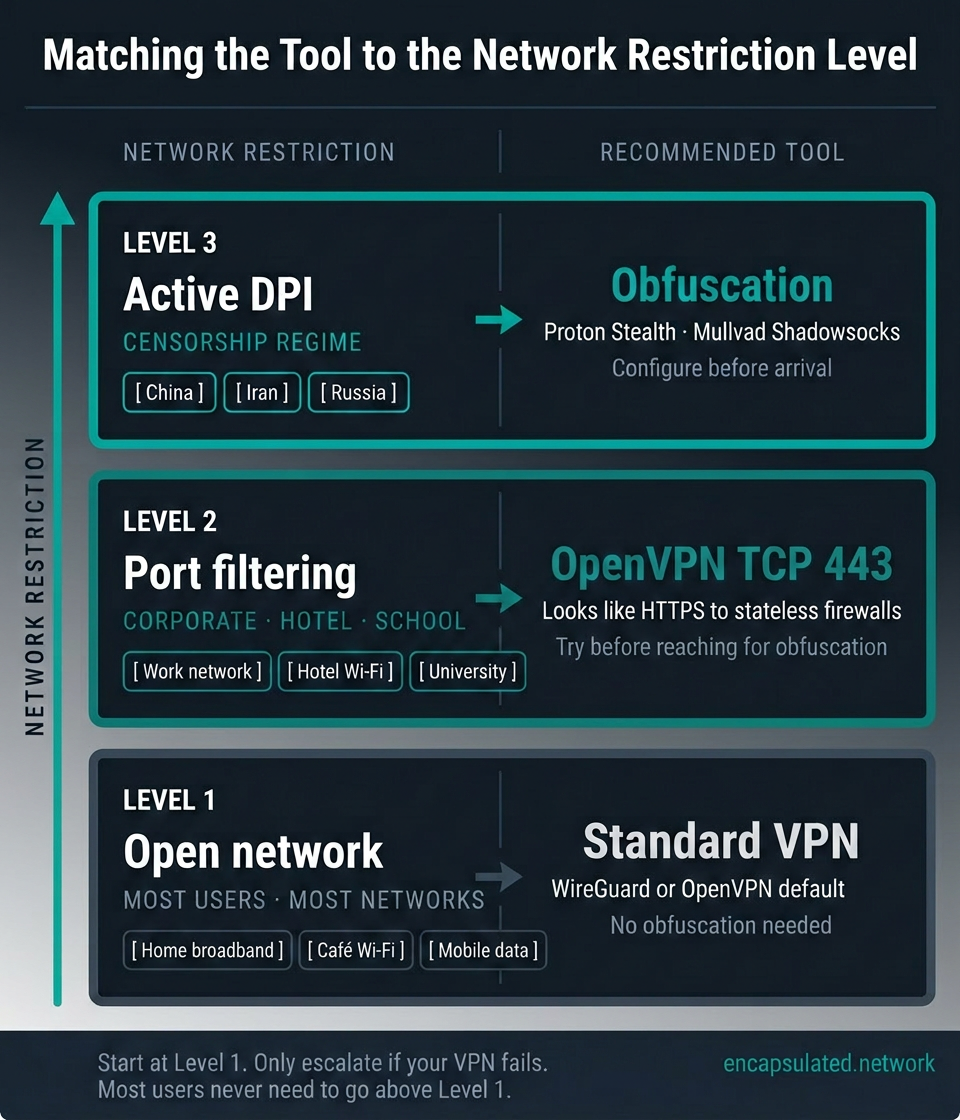
If you connect to your VPN and it works — streaming loads, browsing is fast, applications function normally. Your network is not actively filtering VPN traffic at the DPI level. You are on a network where obfuscation would cost you throughput and battery without providing any benefit in return. The correct setting is your VPN’s default, which for any reputable provider in 2026 should be WireGuard or an equivalent modern protocol.
Obfuscation is a specialist tool for a specific adversarial environment. It is not a general privacy improvement, not a stronger form of encryption, and not a feature you should enable because you want “maximum protection.” The protection it provides is narrow and specific: the ability to establish a VPN connection on a network that would otherwise block one. If that problem does not describe your situation, obfuscation is not relevant to you.
When OpenVPN TCP port 443 is enough
Many of the situations where a VPN fails to connect are not DPI failures; they are simple port-based filtering failures. A corporate network that blocks known VPN ports, a hotel that filters UDP traffic, or a university that blocks connections to known VPN server IP addresses: all of these can be resolved by switching to OpenVPN running on TCP port 443, which sends VPN traffic on the same port used by HTTPS web browsing. A stateless firewall that filters by port and protocol cannot distinguish this from a normal HTTPS connection.
This covers the majority of “my VPN is blocked” situations that users encounter in everyday life. Before reaching for an obfuscation configuration, try OpenVPN on TCP 443. If that connects successfully and works reliably, you do not need obfuscation. TCP 443 mode resolves the problem with less overhead. The full explanation of what TCP 443 achieves and where it stops working is in the WireGuard vs OpenVPN comparison.
The three situations where obfuscation is necessary
When port-based filtering has been eliminated as the cause — when OpenVPN on TCP 443 still fails, or when you know from the context that the network runs DPI — obfuscation becomes the appropriate tool. The users who need it fall into three distinct situations, each with different requirements.
Short-term travellers to censorship-active countries. China, Iran, Russia, Turkmenistan, and a small number of other countries maintain DPI infrastructure specifically designed to detect and block VPN traffic. A standard VPN will not work reliably in these environments, and OpenVPN on TCP 443 is insufficient against the most capable filtering systems. The requirement here is a working, reliable obfuscation solution that can be activated with a single toggle. Proton Stealth, NordVPN’s obfuscated servers, and Mullvad’s Shadowsocks bridges all meet this requirement for most users in most censorship environments. The critical operational note: download and configure your VPN before arrival. VPN provider websites are consistently blocked in China — protonvpn.com, nordvpn.com, mullvad.net, and expressvpn.com all return blocked responses — and frequently blocked in Iran, Russia, and other DPI states. Configuring a VPN from inside these countries is often impossible. Test your chosen configuration before you leave.
Long-term residents and remote workers in restricted environments. Stability under sustained DPI pressure requires a different approach than a reliable first connection for a short visit. Censorship systems adapt continuously: a configuration that works today may be blocked by next month as the firewall’s detection capabilities are updated. Long-term users need an obfuscation solution with genuine active probing resistance, which means obfs4-based implementations, Shadowsocks on a well-maintained server, or Tier 3 techniques such as VLESS + REALITY for technically capable users operating their own infrastructure. Commercial VPN services may not maintain their obfuscated server configurations aggressively enough to remain reliably effective over a period of months or years in the most restrictive environments.
Journalists, activists, and high-risk users. For users whose threat model includes being identified as a VPN user — rather than simply being blocked — the requirements go beyond commercial VPN obfuscation. Commercial VPN IP ranges are known and are subject to bulk blocking; connecting to a well-known commercial VPN provider’s obfuscated server may not provide meaningful protection against an adversary who maintains a comprehensive list of VPN infrastructure. Self-hosted obfuscation infrastructure on a non-commercial IP address, tools such as Jigsaw’s Outline built on Shadowsocks, and for communications specifically, Tor provides stronger anonymity properties than any VPN configuration. For users at this level of risk, the plain-English VPN guide covers the distinction between privacy and anonymity and what replaces a VPN when a VPN alone is not sufficient.
Which technique works where — 2026 state of play
The three major censorship environments differ enough in their filtering infrastructure that the right obfuscation technique varies by country, not just by situation. Choosing the wrong tool for a specific environment often means a connection that works initially but fails under sustained pressure.
China (Great Firewall): The GFW’s ML-based passive detection, deployed in November 2021, blocks fully-encrypted traffic including standard Shadowsocks and public obfs4 bridges. What works in 2026 requires additional steps: Shadowsocks with a connection-prefix disguise (Outline’s approach), Shadowsocks-2022 with custom plugins, or VLESS + REALITY on a self-hosted or specialist provider server. AmneziaWG is also reported effective. No configuration can be assumed reliable without testing before arrival.
Iran: Filtering relies on SNI inspection and IP blacklisting more than ML-based flow classification, making it less sophisticated than the GFW in this specific dimension. Proton Stealth, Mullvad Shadowsocks, and obfs4 from private bridges generally work. Iran implements periodic internet shutdowns during political events during which no obfuscation technique is effective.
Russia (TSPU): Russia’s filtering system has shifted toward throttling rather than hard blocking, though OpenVPN and WireGuard signature detection has been documented since 2022. obfs4, Shadowsocks, and Proton Stealth work for most users. AmneziaWG — Russian-developed, with an active local support community — is well-suited to this environment and increasingly adopted.
Other situations where obfuscation may help
Workplace and university networks with protocol-level filtering. Some institutional networks run DPI that specifically targets VPN protocol signatures, going beyond port-based filtering. If OpenVPN on TCP 443 fails on a network you do not control, obfuscation is the appropriate next step. One important caveat: using obfuscation to circumvent a network that has an explicit policy prohibiting VPN use may violate the institution’s acceptable use terms. Understanding the policy of the network you are on is your responsibility.
ISP throttling of VPN traffic. Some internet service providers selectively throttle traffic they identify as VPN traffic — not blocking it, but degrading it severely enough to make it unusable for video streaming or other high-bandwidth applications. Obfuscation that prevents protocol identification can prevent the throttling from being applied, since the ISP cannot throttle a traffic type it cannot identify. This is a legitimate use case, though less common than censorship circumvention.
Streaming services with VPN detection. Streaming platforms block VPN usage through a combination of IP blacklisting and, increasingly, protocol detection. Obfuscation addresses only the protocol detection component. If the VPN server’s IP address is already on the streaming service’s blacklist — which is the more common detection mechanism — obfuscation alone will not restore access. Providers who specifically maintain streaming-optimised server pools with IP addresses not on streaming blacklists are the relevant tool for this use case, and those are distinct from their obfuscated server pools.
Decision reference
| Your situation | What you need |
|---|---|
| VPN connects and works normally | Standard VPN — no change needed. Obfuscation adds cost with no benefit. |
| VPN blocked at work, in a hotel, or at university | OpenVPN on TCP port 443 — try this before obfuscation. |
| Short-term travel to a censorship-active country (China, Iran, Russia) | Obfuscation — configure and test before arrival. |
| Long-term use in a restricted environment | Obfuscation with active probing resistance — obfs4, Shadowsocks, or REALITY-based tools. |
| High-risk user — journalist or activist | Self-hosted infrastructure; Tor for anonymity-sensitive communications. |
| ISP throttling VPN traffic | OpenVPN TCP 443 first; obfuscation if throttling persists. |
| Streaming service blocking VPN access | Streaming-optimised server pool — obfuscation alone is unlikely to resolve IP-based blocking. |
Is it legal to use an obfuscated VPN?
In every jurisdiction where VPN use is legal, using an obfuscated VPN is equally legal. No country has legislation that specifically prohibits obfuscation as a distinct technology. The legal question is always about VPN use itself: obfuscation is a feature of how traffic is transmitted, not a separate activity subject to separate rules.
In jurisdictions where VPN use is restricted or prohibited, obfuscation does not change the legal status of the underlying connection. Using an obfuscated VPN in a country that bans unauthorised VPNs (China, Iran, Russia, Turkmenistan) is subject to the same legal restrictions as using a standard VPN. Obfuscation makes detection less likely, but it does not create legal permission where none exists. The plain-English VPN guide covers the country-by-country legal landscape in detail, including which countries ban VPN use entirely, which restrict it to state-approved providers, and where enforcement targets providers rather than individual users.
Workplace and institutional networks are a separate question. Using obfuscation to bypass an employer’s or university’s network policy that prohibits VPN use may violate that policy and carry institutional consequences, regardless of whether it raises any legal issue. The law of the country you are in and the acceptable use policy of the network you are on are two different frameworks, and obfuscation affects neither.
The bottom line
A standard VPN and an obfuscated VPN solve different problems. Encryption — the protection that every VPN provides — hides what you are doing online. Obfuscation hides that you are using a VPN at all. Both properties are valuable, but they are not interchangeable, and obfuscation is needed only in environments where the presence of a VPN connection is itself what the network is trying to detect and block.
The techniques that deliver obfuscation form a hierarchy from simple to sophisticated. XOR scrambling removes protocol signatures but is statistically detectable and offers no active probing resistance. obfs4 and Shadowsocks provide genuine censorship resistance with active probing defence in well-configured deployments. TLS wrapping approaches like stunnel pass most DPI inspection but are susceptible to TLS fingerprinting. Packet randomisation addresses the statistical analysis that defeats signature-level obfuscation. Tier 3 techniques — Trojan, VLESS + REALITY, NaiveProxy — represent the current frontier, making VPN traffic indistinguishable from traffic produced by a real browser connecting to a trusted destination. The arms race between censorship systems and circumvention tools is real and ongoing: as ML-based DPI becomes more capable of classifying traffic by statistical properties rather than protocol signatures, the techniques that remain effective are those that produce traffic which, at every observable level, genuinely resembles legitimate application behaviour.
For most readers, the practical conclusion is simple: if your VPN works, you do not need obfuscation. If your VPN fails to connect, try OpenVPN on TCP port 443 before reaching for an obfuscation configuration. If that also fails, you are on a network running DPI, and obfuscation is the appropriate tool — specifically, a provider whose implementation includes active probing resistance, tested against your specific environment before you rely on it.
Choosing which protocol to run underneath the obfuscation layer, and evaluating which providers have genuine obfuscation rather than a marketing feature, are decisions that the VPN protocols guide and WireGuard vs OpenVPN comparison cover in full.
Frequently asked questions
What is an obfuscated VPN?
An obfuscated VPN is a VPN that includes a technique for disguising its traffic so that deep packet inspection systems cannot identify it as VPN traffic. A standard VPN encrypts your data but leaves a recognisable traffic signature. An obfuscated VPN transforms that signature so that the connection appears to be ordinary internet traffic — typically HTTPS web browsing — to any network monitoring system examining it from the outside.
How does VPN obfuscation work?
VPN obfuscation works by applying a processing layer to your VPN traffic’s output — not to the data inside the tunnel, but to how the tunnel looks from the outside. This layer either removes recognisable protocol patterns (scrambling), wraps the VPN session inside a different protocol such as TLS (wrapping), or engineers the traffic to resemble a specific trusted application (impersonation). The VPN tunnel and its encryption remain intact underneath; only the visible signature changes.
What is the difference between a VPN and an obfuscated VPN?
A standard VPN encrypts your internet traffic to protect its content. An obfuscated VPN adds a layer that disguises the traffic’s appearance so that networks cannot detect that a VPN is in use at all. Standard VPN encryption protects confidentiality; obfuscation protects availability: ensuring the connection can be established on networks that would otherwise block it. Most users never need obfuscation, because most networks do not actively filter VPN traffic.
What is a stealth VPN?
Stealth VPN is a marketing term for an obfuscated VPN — a VPN that includes obfuscation technology to disguise its traffic. Different providers use different names for the same concept: Proton VPN calls it Stealth, Surfshark calls it Camouflage Mode, Windscribe calls it the Stealth Protocol. The underlying goal is identical across all of them: making VPN traffic appear as ordinary internet traffic to network inspection systems.
Do I need an obfuscated VPN?
Probably not for everyday use. If your VPN connects and works normally, you do not need obfuscation — your network is not filtering VPN traffic, and enabling obfuscation would reduce your throughput for no benefit. You need obfuscation specifically when you are on a network that uses deep packet inspection to detect and block VPN connections: primarily censorship systems in countries like China, Iran, and Russia, and some corporate or institutional networks with protocol-level DPI. If your VPN fails to connect, try OpenVPN on TCP port 443 before reaching for an obfuscation configuration — that resolves most everyday blocking scenarios.
Is an obfuscated VPN slower?
Yes, typically by 10 to 30 percent compared to the same VPN without obfuscation, depending on the technique used. The obfuscation layer adds processing overhead on both ends of the connection and increases the effective payload size. Simpler techniques like XOR scrambling add minimal overhead; TLS wrapping and packet randomisation add more. On mobile devices, the additional CPU load also increases battery drain. Obfuscation should be enabled only when the network requires it — on networks where your standard VPN works without interference, the performance cost delivers no benefit.
Does obfuscation make a VPN more secure?
No. Obfuscation does not strengthen the encryption protecting your data, does not change your VPN provider’s logging policies, and does not provide additional privacy beyond what your standard VPN connection already delivers. Its only function is making the VPN connection harder to detect and block. Security — in the sense of protecting your data from interception — is a property of the VPN protocol and cipher. Obfuscation is a property of access: it determines whether the connection can be established at all on a restricted network, not how well-protected the data inside that connection is.
What is obfs4?
obfs4 is a pluggable transport developed by the Tor Project to keep Tor bridges accessible in environments where Tor’s native traffic is detected and blocked. It transforms traffic into a high-entropy stream with no identifiable structure, making it appear as structureless random bytes rather than a recognisable protocol. Its key feature is active probing resistance: it requires a connecting client to know a shared secret before the server responds, so probes from censorship systems receive silence rather than a detectable response. It is widely used as a VPN obfuscation layer and provides genuine censorship resistance against most detection systems.
What is Shadowsocks?
Shadowsocks is an encrypted proxy protocol originally created in China in 2012 to bypass the Great Firewall. It is based on SOCKS5 with AEAD encryption, and when used as a VPN obfuscation layer it wraps VPN traffic in an encrypted SOCKS5 session that looks like ordinary application data rather than a VPN connection. It has over a decade of adversarial testing against the Great Firewall, making it one of the most proven censorship circumvention techniques available. Mullvad uses Shadowsocks bridges as its primary obfuscation offering.
What is the difference between obfs4 and Shadowsocks?
Both tools are battle-tested censorship circumvention techniques, but they take different approaches. obfs4 makes traffic look like structureless random bytes with no identifiable protocol — it hides traffic by making it look like nothing. Shadowsocks wraps VPN traffic inside an encrypted SOCKS5 proxy session — it hides traffic by making it look like application data. obfs4 has strong active probing resistance built into its design. Shadowsocks’ probing resistance depends on configuration. For most environments, both are effective; for environments with aggressive active probing, obfs4’s resistance is more explicitly engineered.
Can an obfuscated VPN be detected?
It depends on the technique and the sophistication of the detection system. Simple techniques like XOR scrambling are detectable by statistical analysis and offer no active probing resistance. More sophisticated techniques like obfs4, Shadowsocks, and Tier 3 impersonation approaches are significantly harder to detect, but no technique is unconditionally undetectable. Machine learning-based DPI can classify traffic by flow statistics even when protocol signatures have been successfully removed. The most capable censorship systems — particularly the Great Firewall of China — use a combination of statistical analysis, active probing, and IP blacklisting that can defeat most commercial obfuscation implementations under sustained pressure.
What is deep packet inspection and why does it matter for VPNs?
Deep packet inspection is a network analysis technique that examines the content of data packets beyond their IP and port headers, allowing inspection systems to identify the protocol in use without decrypting the data. Traditional firewalls filter by destination and port; DPI can identify VPN protocols from their characteristic packet structure, handshake sequences, and timing patterns. This matters for VPNs because it allows networks to detect and block VPN traffic even when that traffic uses commonly permitted ports like HTTPS’s port 443. Obfuscation is the countermeasure: it transforms VPN traffic to defeat DPI identification.
Which VPN protocols support obfuscation?
OpenVPN is the most obfuscatable protocol and is the base for the majority of commercial obfuscation implementations. WireGuard in its native form is not directly obfuscatable at the protocol level, but can be wrapped inside a TLS session — which is what Proton Stealth does. AmneziaWG is a WireGuard fork that modifies the protocol itself to remove its identifying fingerprint. IKEv2 is not practically obfuscatable. For most users, the relevant choice is between Proton Stealth for WireGuard-based obfuscation and OpenVPN-based obfuscation from providers like Mullvad, NordVPN, and Surfshark.
How do I know if my VPN has real obfuscation?
Check what the provider actually discloses about the technique. Providers with genuine obfuscation — Proton VPN, Mullvad, Windscribe — name the specific technique (Stealth/TLS wrapping, Shadowsocks, stunnel) and in some cases publish open-source implementations. Providers who describe their obfuscation feature only in marketing language, without identifying the underlying technique or providing any technical documentation, may be offering XOR scrambling or a similarly limited approach that will not perform under real DPI scrutiny. For high-risk use in censorship-active countries, test the feature before you need to rely on it.
Is it legal to use an obfuscated VPN in China, Iran, or Russia?
Obfuscation does not change the legal status of VPN use in any jurisdiction. In countries where VPN use is legal, an obfuscated VPN is equally legal. In countries where VPN use is restricted or prohibited — China, Iran, Russia, Turkmenistan — an obfuscated VPN is subject to the same restrictions as any other VPN. No country specifically targets obfuscation as a distinct technology. The plain-English VPN guide covers the country-by-country legal landscape in full.
How do I check if my VPN’s obfuscation is actually working?
The fastest check is behavioral: attempt to connect from a network that previously blocked your standard VPN. If the connection now establishes, the obfuscation layer is working. For a more precise check, capture the TLS ClientHello of your connection with Wireshark and examine the JA3 or JA4 fingerprint — a correctly obfuscated TLS-wrapped connection produces a generic TLS fingerprint rather than one matching known VPN client software. A Shadowsocks-based connection produces no TLS ClientHello at all; it appears as encrypted application data.
What is the difference between obfuscation and Double VPN or MultiHop?
They solve different problems. Obfuscation makes your VPN connection harder to detect and block by DPI systems, addressing availability on restrictive networks. Double VPN and MultiHop route traffic through two servers in sequence, distributing trust so that neither server sees both your real IP and your destination simultaneously. Double VPN does not make the connection harder for DPI to detect; both hops still use standard VPN protocols. Obfuscation has no trust-distribution benefit. Enabling one does not replace the other.
Can I use an obfuscated VPN on an iPhone or Android device?
Yes. Proton VPN’s Stealth protocol is available on both iOS and Android. NordVPN’s obfuscated servers are available on Android when OpenVPN is selected in the protocol settings. Mullvad’s Shadowsocks and QUIC obfuscation options are available on Android; iOS support varies by release — check the current Mullvad app changelog. Surfshark’s Camouflage Mode activates automatically on mobile when OpenVPN is selected. For the full Android VPN configuration process including protocol selection and battery settings, see our Android VPN setup guide.