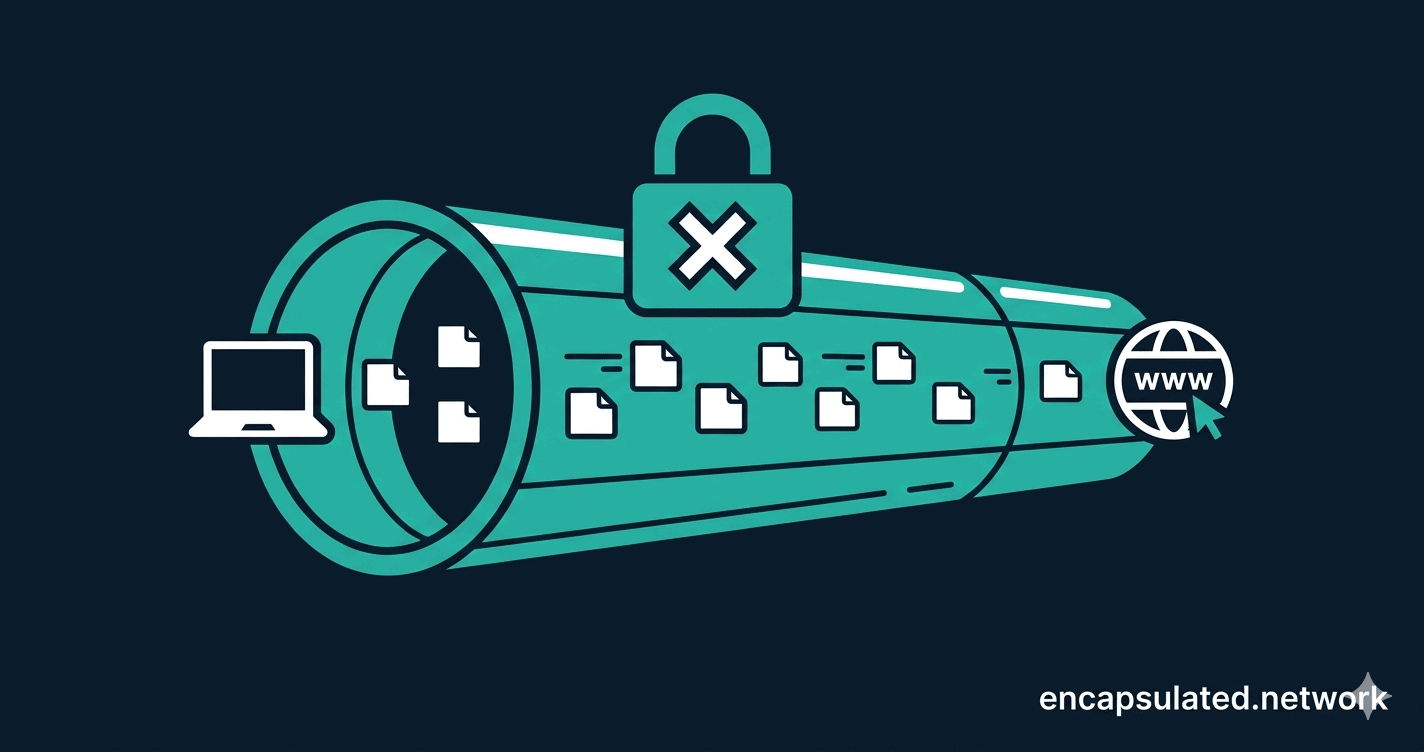
How a VPN works comes down to one mechanism: your device encrypts every packet of data it sends and routes it through a server you’ve chosen, so your ISP sees only encrypted traffic and websites see only that server’s IP address, not yours. You tap connect on public Wi-Fi, a padlock appears, and this guide explains exactly what changed about your data in that moment, step by step, in plain English.
TL;DR
A VPN encrypts every packet your device sends, wraps it in an outer packet addressed to a server you’ve chosen, and lets that server make requests on your behalf — so your ISP sees only encrypted traffic to the VPN server, and websites see only the server’s IP, not yours. The protection is real but bounded: a VPN shifts trust from your ISP to your VPN provider, and it cannot protect you from malware, defeat account-based tracking, or substitute for a full anonymity tool like Tor.
The same five events happen every time you activate a VPN.
Step 1 — The handshake
Your device and the VPN server introduce themselves using asymmetric encryption. Think of it like a padlock you mail to someone: anyone can close it (encrypt data to send to you), but only you have the key to open it. During this handshake, your device proves its identity using credentials or a digital certificate, and both sides agree on a shared secret key for the session.
Step 2 — Your data packet gets a disguise
Before any data leaves your device, the VPN software intercepts it and wraps it in a new outer packet — a process called encapsulation. Your original data packet (containing your actual request, say, loading a webpage) becomes the inner payload, sealed inside a new carrier packet addressed to the VPN server. This is the “tunnel” you hear about: a packet inside a packet, invisible to anyone looking from the outside.
The outer packet has two parts: a header containing routing information — your device’s IP address, the VPN server’s IP address, and the transport protocol — and a payload containing your encrypted original packet. Anyone who intercepts traffic between your device and the VPN server, including your ISP, can read the outer header. That header tells them only that encrypted data is moving to the VPN server’s address. The inner payload is ciphertext: structurally opaque, mathematically indistinguishable from random noise to anyone who does not hold the session key agreed during the handshake. The original destination, the content of your request, and the protocol you are using are all sealed inside that payload — invisible to every node on the path between you and the VPN server.
Step 3 — Encrypted packets travel to the VPN server
Your internet provider can see that data is moving between your device and the VPN server’s IP address. They can see the volume and timing of that traffic. What they cannot see is the content — it’s protected by strong symmetric encryption. Depending on which protocol you’re using, that’s either AES-256-GCM (used by OpenVPN and IKEv2) or ChaCha20-Poly1305 (used by WireGuard). Both are considered equally secure — ChaCha20 is often faster on phones and older devices that lack hardware acceleration for AES.
Step 4 — The VPN server decrypts and forwards
When your encrypted packet arrives at the VPN server, the server decrypts it, removes the outer carrier, and reads your original request. It then forwards that request to the destination on your behalf — Google, your bank, a streaming service — as if it were the VPN server making the request, not you.
Step 5 — The response comes back to you
The destination website sends its response back to the VPN server. The server re-encrypts it, packs it back into a carrier packet, and sends it to your device. Your VPN app decrypts it, and you see the webpage.
How a VPN works — a step-by-step diagram of the complete traffic flow. Your ISP sees only encrypted traffic to the VPN server; the destination website sees only the VPN server’s IP address.
IP replacement in practice
Before: Real IP exposed — Tunisia, Ooredoo ISP
After: IP replaced — Japan, WireGuard active, zero DNS leaks
What is a VPN? The 10-second version
A VPN — Virtual Private Network — does two things simultaneously: it encrypts your internet traffic, and it routes that traffic through a server in another location before it reaches its destination.
Think of your normal internet connection as a postcard. Anyone who handles it — your internet provider, your router, anyone on the same Wi-Fi network — can read exactly what’s written on it. A VPN puts that postcard inside a sealed, opaque envelope. The postman still carries it, but they can’t read the contents.
Wait — doesn’t HTTPS already encrypt my traffic?
Yes, and that’s an important nuance most VPN guides skip. In 2026, the majority of websites use HTTPS, which already encrypts the content of your connection — a VPN doesn’t add much there. What a VPN adds on top of HTTPS is different: it hides which websites you’re connecting to from your ISP (HTTPS still exposes the domain name in its SNI metadata), it replaces your real IP address with the VPN server’s, and it protects you against compromised local networks like rogue Wi-Fi hotspots. The envelope analogy still holds — but think of HTTPS as already sealing the letter inside, and the VPN as hiding the address on the envelope too.
The “virtual” in VPN means the private network is software-defined — it exists as an encrypted tunnel layered on top of the ordinary public internet, rather than a physically separate cable.
What a VPN actually solves
Hostile networks — public Wi-Fi, hotels, conferences
The encryption step seals your data before it leaves your device. On an unencrypted public network — where anyone connected to the same hotspot can potentially intercept traffic — that seal is what stands between your data and anyone listening. This is the most concrete everyday use case for a VPN, and the one where the protection is most immediate and least contested.
ISP tracking and ad profiling at home
The routing step hides which websites you’re connecting to from your internet provider. Your ISP can see you’re connected to a VPN server, but not the destinations beyond it. In markets without strong data-protection laws, ISPs can monetise browsing data derived from that visibility — a VPN removes it. Note that this shifts trust to your VPN provider; see Can you trust your provider?
Geo-unblocking and travel
The IP-replacement step makes you appear to originate from wherever the VPN server is located. Streaming services, banking apps that block foreign IP addresses, and regional content platforms all use your IP to determine access. By choosing a server in a different country, you change what those services see — and what they allow. The arms race between VPN providers and streaming services means this isn’t guaranteed for every platform on every server, but it works reliably with major providers on well-maintained server pools.
ProtonVPN connected to Switzerland — 145 countries available, WireGuard active, Kill Switch and Split Tunneling visible in the sidebar.
Censorship circumvention
On restrictive networks, VPN traffic itself can be detected and blocked. The practical solution is OpenVPN running over TCP on port 443 — the same port used by standard HTTPS traffic — which makes the VPN tunnel look like ordinary web browsing to most firewalls. If you’re in a country that actively restricts VPN use, configure this before you arrive; provider websites are frequently blocked in-country.
For which countries restrict VPN use and what the law says in each, see Are VPNs Legal? For networks running active deep packet inspection, AmneziaWG is a WireGuard fork that modifies the protocol itself to make traffic unrecognisable to DPI.
Anonymity-adjacent use cases — with an important caveat
A VPN changes which IP address websites see and hides destinations from your ISP. It does not make you anonymous. If you’re logged into any account — Google, your bank, social media — those platforms still know exactly who you are. For journalists and activists handling genuinely sensitive information, a VPN is one layer of a broader toolkit; Tor provides a significantly stronger anonymity guarantee by routing traffic through three independent relays with no single point of trust. For a full breakdown of who needs a VPN, in which circumstances, and what replaces it when it isn’t enough, see the plain-English VPN guide.
A threat model in 30 seconds
A VPN is a tool, not a talisman. The honest question isn’t “do I need a VPN?” but “who am I trying to keep out?” The table below answers that directly.
Adversary
Does a VPN help?
Why
Public Wi-Fi attacker
✅ Yes
Encryption seals your traffic before it reaches the shared network. Even a compromised hotspot sees only ciphertext addressed to the VPN server.
Your ISP
✅ Yes
Routing hides your destinations; encryption hides your content. Your ISP sees the VPN server’s address and nothing beyond it.
Your VPN provider
⚠️ Partially
They are the new middleman and can see everything your ISP used to. A verified, independently audited no-logs policy is the only meaningful mitigation — see the no-log VPN guide.
Your employer (on a company device)
❌ No
Corporate devices typically run endpoint monitoring software that operates at the OS level, below and independently of the VPN. A VPN encrypts the network path but doesn’t affect device-level logging.
An advertiser tracking via account login
❌ No
Your Google, Facebook, or platform account follows you regardless of which IP you’re connecting from. IP replacement doesn’t touch cookie- or account-based tracking.
Malware already on your device
❌ No
A VPN encrypts traffic in transit. It does not scan files, block malicious downloads, or remove software already installed. For malware, you need an antivirus.
If the first two rows describe your situation, a VPN directly addresses your problem. If your concern is primarily the bottom four, other tools are more precisely targeted — and layering a VPN on top won’t close those gaps.
The encryption: what does “scrambled” actually mean?
VPNs use a hybrid encryption system because different tasks require different tools.
The initial handshake uses asymmetric encryption — the padlock model. It’s computationally slow, so it’s only used at the start of a session to securely agree on a shared key.
All ongoing data transfer uses symmetric encryption, where both sides use the same key agreed during the handshake. Modern VPNs use one of two ciphers for this:
AES-256-GCM — used by OpenVPN and IKEv2. Industry standard, hardware-accelerated on most modern processors. The key is 256 bits long — that’s 2256 possible combinations, vastly more than the roughly 1080 atoms in the observable universe. It cannot be brute-forced. AES has been publicly standardised since 2001 and has never been broken in over 20 years of real-world use.
ChaCha20-Poly1305 — used by WireGuard. Equally secure to AES-256 by current cryptographic analysis, and often significantly faster on mobile devices and hardware without dedicated AES chips. This is one of the reasons WireGuard performs so well on phones.
Your choice of VPN protocol determines which cipher protects your traffic. The difference is performance on specific hardware, not security. What those ciphers actually do — what GCM mode means, why the cipher mode matters more than the key length, and how AEAD authentication works — is covered in full in VPN Encryption Explained.
That extra cryptographic work also has a measurable cost on mobile devices. If you’re using a VPN on your phone and wondering why your battery doesn’t last the day, see Does a VPN Drain Your Battery?
What a VPN hides — and what it doesn’t
A VPN is a powerful privacy tool, but it’s not magic. Here’s exactly what changes when you turn one on.
What a VPN hides
Hidden from whom
The websites and services you connect to (domains, IPs, SNI metadata)
Your internet service provider (ISP)
Your real IP address
Websites and services you visit
All traffic (including unencrypted apps that don’t use HTTPS)
Other users on the same Wi-Fi network
Your approximate location
Websites tracking by IP geolocation
What a VPN does NOT hide
Why
Your activity from the VPN provider
They are the new middleman — choose one with a verified no-log policy
Your identity if you’re logged into Google
Account logins track you regardless of IP address
Malware or phishing links
A VPN is not an antivirus — it encrypts traffic, it doesn’t scan it
Your browsing from your employer’s device
Corporate devices often have their own monitoring software
If you trust your provider more than your ISP — which is often a reasonable position — that’s a meaningful privacy improvement. If you don’t trust your VPN provider, you’ve gained little.
If you’re weighing a VPN against a proxy, the VPN vs. proxy guide covers the distinction in full.
VPN protocols: why the one your VPN uses matters
A VPN protocol is the rulebook that governs how the encrypted tunnel is built. Different protocols make different trade-offs between speed, security, and compatibility. Here’s a quick orientation.
WireGuard — the modern default
WireGuard is the newest major protocol and the one most experts recommend for everyday use. Its codebase contains roughly 4,000 lines of code — compared to OpenVPN’s 70,000–100,000+ — which means less surface area for security vulnerabilities and faster performance. It uses ChaCha20-Poly1305 encryption, which is especially efficient on mobile processors. If your VPN app offers WireGuard, use it.
WireGuard UDP selected for maximum speed, with OpenVPN and Stealth mode available for restricted networks.
If you’re on Linux and ready to configure it, the step-by-step guide to setting up a VPN on Linux covers four different methods — from a one-command provider app install to a fully manual WireGuard configuration.
OpenVPN — the proven veteran
OpenVPN has been battle-tested for over 20 years and remains the most widely audited protocol. Its key advantage over WireGuard is that it can disguise VPN traffic as regular HTTPS on port 443, making it harder to detect and block — useful if you’re in a country that restricts VPN use. A newer feature called Data Channel Offload (DCO) dramatically improves OpenVPN’s throughput by moving packet processing to the operating system kernel; it’s supported on Linux, Windows, and FreeBSD. Full detail is in the OpenVPN DCO guide.
IKEv2/IPsec — the mobile specialist
IKEv2 uses a protocol called MOBIKE that allows it to seamlessly switch between network connections — from your home Wi-Fi to your phone’s mobile data, for example — without dropping the VPN tunnel. It’s often the fastest protocol on mobile devices.
Protocols to avoid: PPTP and L2TP
PPTP is considered broken — multiple vulnerabilities have been publicly documented and it should not be used. L2TP/IPsec is not broken but relies on pre-shared keys that can be weak if misconfigured; Microsoft formally deprecated it from Windows Server RRAS in October 2024, naming IKEv2 and SSTP as the supported replacements for Windows deployments. Neither PPTP nor L2TP offers meaningful security advantages over WireGuard or OpenVPN. If your VPN offers only these protocols, consider switching providers.
At a glance: which protocol for which situation?
Protocol
Speed
Battery
Best for
When to choose it
WireGuard
Fastest
Excellent
Daily use, streaming, gaming
Default — use this unless a specific reason applies below
OpenVPN (UDP)
Moderate
Poor
Stable connections
When WireGuard isn’t available on your provider
OpenVPN (TCP, port 443)
Slower
Poor
Restricted networks
VPN blocked at work, in a hotel, or in a censored country
Windows-native port 443 alternative; no install required. Migration path from L2TP/IPsec on Windows Server. See SoftEther Explained for multi-protocol server deployments.
Where a VPN fits — and where other tools take over
A VPN protects the route your traffic takes across the network. It doesn’t touch the layers above or below it — and understanding where those boundaries fall is the difference between a well-calibrated privacy setup and a false sense of security.
VPN vs Tor: privacy vs anonymity
A VPN replaces your IP address with a single server’s address. There is one hop, one point of trust, and your VPN provider can see your traffic if they choose to look. Tor routes your traffic through three independent volunteer-operated relays, encrypting it at each hop, so no single relay ever knows both who you are and where you’re going. Tor provides significantly stronger anonymity — at the cost of speed and practical compatibility (it works primarily through the Tor Browser, not all apps). For everyday privacy — hiding browsing from your ISP, protecting traffic on public Wi-Fi — a VPN is faster and more practical. For journalists, activists, and anyone for whom being identified carries real consequences, Tor is the appropriate tool. The two can be layered.
VPN vs DNS-over-HTTPS and Encrypted Client Hello
HTTPS still exposes domain names through SNI metadata — a VPN closes that gap by routing all DNS requests through the encrypted tunnel. DNS-over-HTTPS (DoH) is a narrower technology that encrypts DNS lookups specifically, without routing all your traffic through a server. Encrypted Client Hello (ECH) addresses the SNI leakage problem directly at the TLS layer. These tools solve overlapping problems from different angles. A VPN covers all of them simultaneously, at the cost of a routing hop; DoH and ECH are lighter interventions that leave your ISP able to see destination IP addresses. Neither replaces the other — they operate at different layers of the stack. A related category is Smart DNS, which redirects specific DNS queries to bypass geo-restrictions without encrypting traffic or routing it through a server — a narrower tool for a narrower use case.
What a VPN cannot defeat: fingerprinting and account tracking
Browser fingerprinting identifies you through your device’s configuration — screen resolution, installed fonts, browser version, time zone, and dozens of other attributes — independently of your IP address. Cookies and account logins follow you across sessions regardless of which IP you’re connecting from. A VPN has no effect on either. For tracking that operates at the identity and application layers rather than the network layer, browser-level defences — hardened browser configuration, tracker blockers, compartmentalised accounts — are the relevant tools. A VPN is one layer in a privacy stack, but it was never designed to be the whole stack. For a full side-by-side of VPN, proxy, Tor, and HTTPS, see the complete VPN explainer.
Can you trust your provider? The infrastructure of anonymity
Once you understand that a VPN shifts trust to the provider, the question becomes: how do you evaluate whether that trust is warranted?
No-log policies — and how to verify them
Every VPN provider claims a “no-log policy.” What separates trustworthy providers from marketing claims is third-party verification. Mullvad, ProtonVPN, and ExpressVPN have all published independent audits conducted by firms like Cure53 or Deloitte, confirming their no-log claims hold up against real infrastructure inspection. A policy that has never been audited is just a sentence on a website.
RAM-only servers
Some providers — Mullvad and ExpressVPN among them — run their servers entirely from RAM rather than hard drives. Every time a server reboots, all data is permanently wiped. Even if a server were physically seized by authorities, there would be nothing to recover. This is currently the gold standard for infrastructure privacy.
Jurisdiction matters
The country your VPN provider is headquartered in determines which government can legally compel it to hand over data. Providers based in Switzerland (ProtonVPN) or Panama (NordVPN) operate outside the 14 Eyes intelligence alliance — the group of countries that share surveillance data with each other. This doesn’t guarantee privacy, but it does raise the legal bar for compelled disclosure significantly.
For a complete breakdown of what no-log policies actually mean — including which providers have had their claims independently verified and which have been tested under legal pressure — the guide to no-log VPN policies and independent audits covers both in detail.
If you’d rather control the server directly rather than evaluating any provider, a self-hosted VPN removes that dependency entirely — you define the logging policy, hold the cryptographic keys, and choose the jurisdiction yourself. It introduces different trade-offs in anonymity, maintenance, and operational ownership.
Four settings to enable the moment you install a VPN
Understanding how a VPN works is only useful if the settings are configured correctly. These features should be enabled before you consider yourself protected. The screenshots below use ProtonVPN as the example — every major provider offers the same settings under similar names.
Kill switch — If your VPN connection drops unexpectedly, a kill switch immediately cuts your device’s internet access entirely. Without it, your real IP address is briefly exposed to every site you’re visiting at the moment of disconnection. This happens without warning unless a kill switch catches it.
ProtonVPN kill switch enabled — Standard mode automatically cuts internet if the VPN connection drops
DNS leak protection — Your DNS requests are what translate domain names into IP addresses. Without leak protection, these requests can still be sent through your ISP‘s servers even when your VPN is active, exposing your browsing activity despite the tunnel. Every reputable VPN offers this — make sure it’s enabled.
Custom DNS servers disabled by default — ProtonVPN automatically routes all DNS requests through its own encrypted servers.
IPv6 leak protection — Many VPNs encrypt IPv4 traffic perfectly but leave IPv6 traffic unprotected. If your device and the sites you visit both support IPv6, your real address can leak. Enable IPv6 leak protection, or disable IPv6 entirely on your device if your VPN doesn’t offer this setting.
If you want these protections to apply to every device on your network — smart TVs, gaming consoles, and IoT devices that cannot run a VPN app — consider setting up a VPN on a router, or see the Firestick VPN setup guide if you have an Amazon Fire TV Stick. For devices where neither option applies, Smart DNS is a narrower alternative for streaming-only geo-access, without encryption or full IP replacement.
ProtonVPN Advanced Settings — IPv6 support and IPv6 leak protection both enabled, blocking any IPv6 traffic outside the tunnel
Split tunneling — This lets you choose which apps or websites route through the VPN and which use your regular connection directly. Useful for keeping your banking app through the VPN while letting a local streaming service — which would otherwise block the VPN’s IP — connect normally. It also reduces the performance overhead if you only need protection for specific traffic. For step-by-step setup on Android — including the battery optimization step that most guides skip — see the Android VPN setup guide.
For Amazon Fire TV Stick — including the architectural differences between Fire OS and Vega OS that determine which method applies to your device — see the Firestick VPN setup guide.
For P2P and torrenting specifically: a related connection-layer feature is VPN port forwarding, which opens a specific inbound port at the VPN server so peers can initiate connections to your torrent client rather than waiting for your client to reach them first. Most major providers do not offer it, and most users do not need it — but if seeding performance matters to you, or you host a service that requires inbound connections, see VPN port forwarding.
Split tunneling enabled in Exclude mode — selected apps bypass the VPN tunnel while all other traffic stays protected
Verify your VPN is working in 60 seconds
Once the first three settings are active, confirm they’re working before you rely on the protection. This takes under a minute.
With the VPN off: visit an IP checker (search “what is my IP”) and note your real IP address and the ISP name shown.
Turn the VPN on and connect to a server.
Revisit the IP checker. The IP address should now show the VPN server’s address, not yours. The ISP listed should reflect the VPN provider’s infrastructure — not your home ISP.
Run a DNS leak test — search “DNS leak test” and use any of the free tools. The DNS servers listed should belong to your VPN provider, not your home ISP.
Before: 4 Ooredoo DNS servers exposed — real ISP identity visible
After: 23 Proton AG DNS servers only — zero ISP DNS visible
If anything doesn’t change: your VPN is misconfigured. Check that DNS leak protection and the kill switch are enabled, and that the VPN app has permission to run in the background on your device.
The following covers how each mechanism works at the specification level, with links to the underlying references. For full protocol comparisons, speed benchmarks, and post-quantum provider coverage, see the complete VPN protocols guide.
WireGuard’s Noise_IK handshake
WireGuard implements the Noise Protocol Framework‘s Noise_IK handshake pattern — “I” for identity (the initiator knows the responder’s static public key in advance) and “K” for known (the responder can immediately authenticate the initiator). The exchange requires only one round trip, which is why WireGuard establishes connections in under 100 milliseconds. Key exchange uses Curve25519; session data is encrypted with ChaCha20-Poly1305; messages are authenticated with BLAKE2s; and key derivation uses HKDF. The full cryptographic specification is in the WireGuard whitepaper.
That minimalism leaves one gap for commercial VPNs to close. WireGuard’s default design maps each connected user’s public key to a static internal IP address. That is a persistent record a no-logs provider would rather not keep, which is why providers close it in their server infrastructure rather than by altering the protocol. NordVPN’s NordLynx is the clearest example: it runs unmodified WireGuard underneath and wraps it in a double-NAT layer that strips that mapping of any identifying value.
IKEv2 and MOBIKE
IKEv2 is specified in RFC 7296. The MOBIKE extension (RFC 4555) allows a Security Association to survive when the device’s IP address changes — for example, moving from a Wi-Fi address to a cellular address as you leave a building. Instead of tearing down and re-establishing the VPN tunnel from scratch, MOBIKE sends an UPDATE_SA_ADDRESSES notification to rebind the existing SA to the new address. This is why IKEv2 handles commuter-style network transitions more cleanly than WireGuard or OpenVPN, which both re-establish the tunnel on network changes.
IKEv2/IPsec is also the standard protocol for site-to-site VPN deployments — the gateway-to-gateway architecture businesses use to permanently connect entire office networks to each other, with no client software required on individual devices.
OpenVPN Data Channel Offload
Standard OpenVPN processes encrypted packets in userspace, which requires a context switch to and from the operating system kernel on every packet — a significant throughput bottleneck at high speeds. OpenVPN DCO moves the data channel into the kernel as a native module, eliminating those context switches and bringing throughput close to WireGuard’s level on supported platforms (Linux, Windows, FreeBSD). The control channel — which handles authentication and key renegotiation — remains in userspace. Full details are in the OpenVPN DCO guide.
Post-quantum readiness in 2026
Quantum computers capable of breaking current asymmetric key exchange — Curve25519, ECDH, RSA — do not yet exist at the scale required. However, adversaries can record encrypted VPN traffic today and attempt decryption once capable quantum hardware becomes available — a threat model called “harvest now, decrypt later.” Both WireGuard and IKEv2 support Post-Quantum Pre-Shared Keys (PQ-PSK) as a mitigation layer, and several providers have begun implementing NIST-standardised post-quantum algorithms (ML-KEM, formerly Kyber) in their key exchange.
Frequently asked questions
Are VPNs legal?
In most countries, yes — VPNs are entirely legal and widely used by businesses, remote workers, and privacy-conscious individuals. Some countries restrict or ban VPN use, including China, Russia, Belarus, and the UAE. If you’re travelling to a country with VPN restrictions, download and configure your VPN before you arrive, as VPN provider websites are often blocked in-country.
What does a VPN stop?
A VPN stops four specific things. First, it stops your ISP from seeing which websites and services you connect to — the encrypted tunnel hides your destinations, even though your ISP can see that you are connected to a VPN server. Second, it stops anyone on the same local network — a public Wi-Fi attacker, a compromised hotspot — from intercepting your traffic, because all data is encrypted before it leaves your device. Third, it stops websites from seeing your real IP address and approximate physical location, replacing both with the VPN server’s address. Fourth, it stops passive traffic analysis of apps that do not use HTTPS, because all traffic enters the encrypted tunnel before it reaches the network.
What a VPN does not stop: malware already on your device, account-based tracking when you are logged into a service, browser fingerprinting, or monitoring software running on a corporate device.
Can a VPN protect against all cyber threats?
No. A VPN operates at the network layer — it secures the path your data travels, not the device it travels from or the applications running on it. Threats that operate above the network layer are outside its scope entirely: a phishing page looks identical whether you’re on a VPN or not, malware that’s already installed continues to run, and a tracker that follows you through your Google account doesn’t care which IP you’re connecting from. A VPN is a precise tool for a specific job. Pair it with a password manager, two-factor authentication, and a reputable browser for the threats it can’t reach. For a full classification of every major cyber threat by the layer it operates at see Does a VPN Protect Against All Cyber Threats?
Should I use a free VPN?
Be very cautious. Running VPN infrastructure — servers, bandwidth, support — costs real money. Free VPN providers have to recoup that cost somehow. Many do so by logging and selling user data to advertising networks — the exact behaviour a VPN is supposed to prevent. A handful of legitimate free tiers exist (ProtonVPN’s free tier is genuinely no-log and unlimited, just slower) but they are the exception. If you’re not paying for the product, examine very carefully how the provider makes money. If a free proxy seems like another option, it comes with the same trust problem — and fewer protections. The VPN vs. proxy guide covers that trade-off in full.
Does a VPN slow down my internet?
Yes, to some degree — encryption and the extra routing hop both add latency. In practice, on a modern device using WireGuard, the slowdown is usually under 10% and often imperceptible. The main culprit for significant slowdowns is server distance: connecting to a server on the other side of the world routes all your traffic that extra distance. Choose a server geographically close to you for everyday use.
Do I need a VPN on my phone?
The radio link between your phone and a cell tower is encrypted by LTE and 5G protocols, making casual over-the-air interception harder than on open Wi-Fi. However, your carrier sees everything on the other side of that link — your browsing activity, app traffic, and connection metadata — and can sell data derived from it to advertisers. A VPN on mobile protects you from carrier-level tracking and is especially important whenever you connect to public Wi-Fi, which bypasses carrier encryption entirely. On battery life specifically, the guide to VPN battery drain on mobile covers this in detail. For step-by-step setup instructions covering provider apps, WireGuard manual configuration, and Android-specific security settings, see the Android VPN setup guide.
Can my ISP see I’m using a VPN?
Yes — your ISP can see that you’re connected to a VPN server’s IP address, and that encrypted traffic is flowing to and from it. They cannot see which websites you’re visiting or what data you’re sending. If you need to hide the fact that you’re using a VPN at all (for example in a country that restricts them), look for a provider that offers obfuscation or “stealth” mode, which disguises VPN traffic as regular HTTPS.
Should I use a VPN or Tor?
It depends on your threat model. A VPN is faster, works across all your apps, and is sufficient for most everyday privacy goals — hiding browsing from your ISP, protecting traffic on public Wi-Fi, and unblocking geo-restricted content. Tor routes your traffic through three independent relays with no single point of trust, providing substantially stronger anonymity — but at the cost of significant speed reduction and limited compatibility (it works primarily through the Tor Browser). If your concern is ISP tracking or hostile networks, a VPN is the practical choice. If you’re a journalist, activist, or someone for whom being identified carries serious risk, Tor is the appropriate tool. They can be combined — some users run Tor through a VPN — but for most people, a verified no-logs VPN is the right starting point.
Does a VPN protect my activity on a company device?
Generally no. Corporate devices typically run endpoint monitoring software — mobile device management (MDM) systems, network monitoring agents, or keyloggers — that operate at the OS level independently of your network connection. A VPN encrypts the path between your device and the VPN server, but has no effect on what’s logged on the device itself. If you’re using a company-issued device, assume your employer can see your activity regardless of whether a VPN is running. Use a personal device for personal browsing on any network you don’t control.
The bottom line
A VPN works by encrypting your data before it leaves your device, routing it through a server that acts as an intermediary, and returning the response via the same encrypted path. Your ISP sees encrypted traffic going to a VPN server — and crucially, can no longer see which websites and services you’re connecting to, even though HTTPS already protects the content of those connections. The destination website sees a request from the VPN server’s IP address, not yours.
What a VPN cannot do is make you anonymous. It shifts trust from your ISP to your VPN provider. The quality of that privacy depends entirely on how seriously the provider takes its no-log commitments — which is why independent audits and RAM-only infrastructure matter.
Routing through two servers operated by separate providers shifts that trust further, distributing what each one can observe rather than concentrating it in a single party. That is the logic behind a two-server VPN connection.
The next question is which VPN to trust. The guide to no-log VPN policies and independent audits covers exactly that — including which providers have had their claims tested in the real world, and which are operating on nothing but marketing copy.