WireGuard is a VPN protocol — a set of cryptographic rules that governs how two computers build an authenticated, encrypted tunnel between them — implemented as a kernel module in Linux and as native apps on Windows, macOS, iOS, and Android.
Every VPN review says the same thing about WireGuard: it is fast, modern, and recommended. Almost none of them explain why it was designed the way it was — or what that design deliberately left out.
This article is a different kind of explanation. It does not compare WireGuard to OpenVPN (that comparison lives in our WireGuard vs OpenVPN guide). It does not rank protocols (that is our VPN protocols guide). What it does is open the protocol and show you the inside: the handshake, the cryptographic choices, the session model, the things that were not built in, and why each decision was made the way it was.
If you want to understand what WireGuard is and how it actually works — mechanism by mechanism — you are in the right place.
TL;DR
WireGuard is an encrypted VPN tunnel implemented as a Linux kernel module, created by Jason A. Donenfeld and first presented at NDSS 2017. Its handshake is built on the Noise Protocol Framework‘s Noise_IK pattern and completes in a single round trip. Authentication uses Curve25519 public key pairs: your public key is your identity; there are no usernames, no passwords, and no certificate infrastructure. Data is encrypted with ChaCha20-Poly1305.
The design is intentionally minimal: fewer than 4,000 lines of kernel code (as of the 2017 paper), a fixed cryptographic suite with no negotiation, and, on Linux, packet processing handled entirely in the kernel. Those choices produce speed and auditability. They also create specific limitations: WireGuard makes no attempt to hide itself from network inspection, its default server architecture requires a persistent peer table that commercial providers must work around, and it was never designed for anonymity.
WireGuard in plain English
WireGuard is a piece of software that creates a private, encrypted link between two computers over any network — even an untrusted one. Think of it like SSH, the tool system administrators use to log into remote servers securely: SSH identifies a server by its public key rather than a password, and anyone who knows the right private key can connect. WireGuard works the same way. Each device has a key pair — a public key it shares freely and a private key it never shares — and two devices that know each other’s public keys can build an encrypted tunnel between themselves without any other infrastructure.
From the user’s perspective, turning on WireGuard is indistinguishable from turning on any other VPN: your traffic is encrypted and your IP address is replaced with the server’s. What is different is what is happening underneath — a significantly smaller and simpler protocol than the alternatives. If you want to understand that mechanism, the rest of this article takes you through it step by step.
If you are new to VPNs entirely and want to understand how encryption and tunnelling work before diving into WireGuard specifically, start with how a VPN actually works and come back here.
Quick facts: what WireGuard is — and is not
Before going deeper, here are the categorical facts most searches are looking for.
| Field | Detail |
|---|---|
| Type | VPN protocol — a tunneling and encryption specification |
| Created by | Jason A. Donenfeld (independent researcher, handle: zx2c4) |
| Development began | 2015; first public release June 2016 |
| Academic paper | WireGuard: Next Generation Kernel Network Tunnel, NDSS 2017 |
| License | GPLv2 (kernel module); MIT/ISC for user-space tools |
| Cost | Free and open source |
| Linux mainline since | Kernel 5.6 (March 29, 2020) |
| Port | Any UDP port you configure; 51820 is the usual choice in examples |
| Transport | UDP only — no TCP mode |
| Official apps | Linux, Windows, macOS, iOS, Android, OpenWRT |
Protocol vs. implementation vs. branded product
WireGuard the protocol is an open specification. wireguard-tools (wg, wg-quick) is the official reference implementation of the user-space utilities. The official client apps for each platform are separate projects, all open source. NordLynx, Mullvad WireGuard, and ProtonVPN’s WireGuard implementation are all commercial VPN services built on top of the same open WireGuard protocol — they are not different protocols, but they add proprietary layers above it (NordLynx’s double-NAT, for example, is described in our WireGuard vs OpenVPN guide). When your VPN provider says it supports WireGuard, it is using the same cryptographic protocol described in this article.
What is WireGuard, and why does it exist?
WireGuard is a VPN protocol — one of a small family of mainstream protocols (alongside OpenVPN, IPsec/IKEv2, and SSTP) that solve the same general problem: moving IP packets across an untrusted network with confidentiality, integrity, and authenticated identity. Specifically, WireGuard is a Layer 3, point-to-point, UDP-based protocol authenticated exclusively by public key cryptography. For a full comparison of where it sits relative to every other protocol, see our VPN protocols guide. This article focuses on the mechanism — how WireGuard itself works.
WireGuard is a secure network tunnel implemented as a virtual network interface — you configure it like any other network interface on Linux (or any other platform), and it handles the encryption and routing transparently. It operates at Layer 3: it encrypts IP packets, wraps them in UDP, and forwards them to a configured endpoint.
It was created by Jason A. Donenfeld, an independent security researcher who publishes under the handle zx2c4. Development began in 2015 and the first public software release appeared in June 2016. The academic paper introducing the protocol — WireGuard: Next Generation Kernel Network Tunnel — was presented at the Network and Distributed System Security Symposium (NDSS) in February 2017, establishing its peer-reviewed credentials from the start.
In March 2020, WireGuard was merged into the Linux kernel mainline as part of version 5.6 — a significant milestone for a protocol that had spent four years in production use via an out-of-tree module and compatibility backport.
What made the merge notable was not that WireGuard was the first VPN-related code in the kernel (IPsec’s XFRM stack has been in the mainline since 2002), but what WireGuard represented: a complete, self-contained, opinionated tunnel with a minimal codebase and a fixed cryptographic suite, designed to be maintained as a first-class kernel component.
The 5.6 merge is when WireGuard became part of the kernel itself — available by default on every Linux system going forward, without an additional module.
The problem WireGuard was designed to solve: cryptographic agility
Legacy VPN protocols like IPsec and OpenVPN were built around what cryptographers call cryptographic agility — the ability to negotiate which encryption algorithms to use from a large menu of options. The idea sounds sensible: as cryptography evolves, you can upgrade to stronger algorithms without redesigning the protocol.
In practice, cryptographic agility creates serious problems. Every negotiation surface is a potential downgrade attack: an adversary in the middle of a handshake can manipulate which algorithms get selected, pushing both sides toward weaker options they both technically support. Configuration errors are common and hard to detect — a server accepting a deprecated cipher because an administrator did not know to disable it. Auditing a protocol with hundreds of possible cipher combinations requires examining all of them. The attack surface grows with every option added.
WireGuard’s answer is to remove the negotiation entirely. It mandates a single, fixed suite of cryptographic primitives. There is nothing to negotiate. If a primitive is found to be broken, the protocol version is updated and all users move to the new version together — there are no stragglers lingering on deprecated ciphers. This is called an opinionated design, and it makes WireGuard significantly easier to reason about and audit.
Simplicity as a security principle
The 2017 NDSS paper documented WireGuard’s Linux kernel module at fewer than 4,000 lines of code. The current in-tree implementation in recent kernels has grown modestly to approximately 5,000 lines as features have been added and refined. Compare that to OpenVPN’s core daemon at on the order of 70,000 to 100,000 lines, or to IPsec software such as strongSwan, which is larger and more complex because it negotiates algorithms and supports many options.
Codebase size has a direct security implication: a smaller codebase is easier to audit. A single skilled researcher can read and understand WireGuard’s entire implementation in a reasonable amount of time. Auditing OpenVPN or a full IPsec stack in equivalent depth is a multi-year project. Fewer lines also means fewer places for bugs to hide and a faster patch cycle when vulnerabilities are found.
The Noise Protocol Framework
WireGuard’s handshake is not a custom one-off design. It is built on the Noise Protocol Framework, a specification for constructing cryptographic handshake protocols designed by Trevor Perrin. Noise is not WireGuard-specific — it is also used by WhatsApp (for its client-to-server transport encryption — WhatsApp’s end-to-end encryption uses the Signal Protocol separately), the Lightning Network (specified in BOLT #8), and I2P, among others. The framework is formally specified at noiseprotocol.org (revision 34, July 2018), not as an IETF RFC — it is maintained by Perrin as a stable, versioned specification.
The appeal of Noise for WireGuard is that it is formally analysed, minimal, and composable. Rather than inventing a new handshake and submitting it to years of cryptographic scrutiny, Donenfeld selected a well-studied Noise pattern that matched WireGuard’s requirements exactly.
Understanding Noise pattern names
Noise patterns are named using a two-letter code that describes the state of each party’s static key at the start of the handshake. Understanding the naming convention is essential to understanding why WireGuard’s handshake works the way it does.
The two letters in a Noise pattern name refer to the initiator first, then the responder. Each letter describes what happens with that party’s static public key:
- I (Immediate) — the party’s own static public key is transmitted inside the handshake itself, encrypted within Message 1.
- K (Known) — the other party already knows this party’s static public key in advance, configured out-of-band before the handshake begins.
WireGuard uses Noise_IK:
- The I describes the initiator: the initiator’s own static public key is transmitted (encrypted) inside Message 1, so the responder learns the initiator’s identity during the handshake itself.
- The K describes the responder: the initiator already knows the responder’s static public key before the handshake begins, because both sides configured each other’s public keys out-of-band as part of setup.
In plain terms: before any packet is sent, both sides have each other’s public keys loaded into their configuration. The initiator uses the responder’s pre-known public key to encrypt its own identity inside Message 1 — meaning the initiator is authenticated inside the first message without ever exposing its identity to a passive observer. The handshake then takes just one round trip to complete.
The full protocol identifier WireGuard uses, including its optional pre-shared key, is Noise_IKpsk2_25519_ChaChaPoly_BLAKE2s. The psk2 suffix indicates that an optional pre-shared key is mixed into the handshake after Message 2; this is WireGuard’s post-quantum mitigation layer, discussed further below.
The WireGuard handshake, step by step
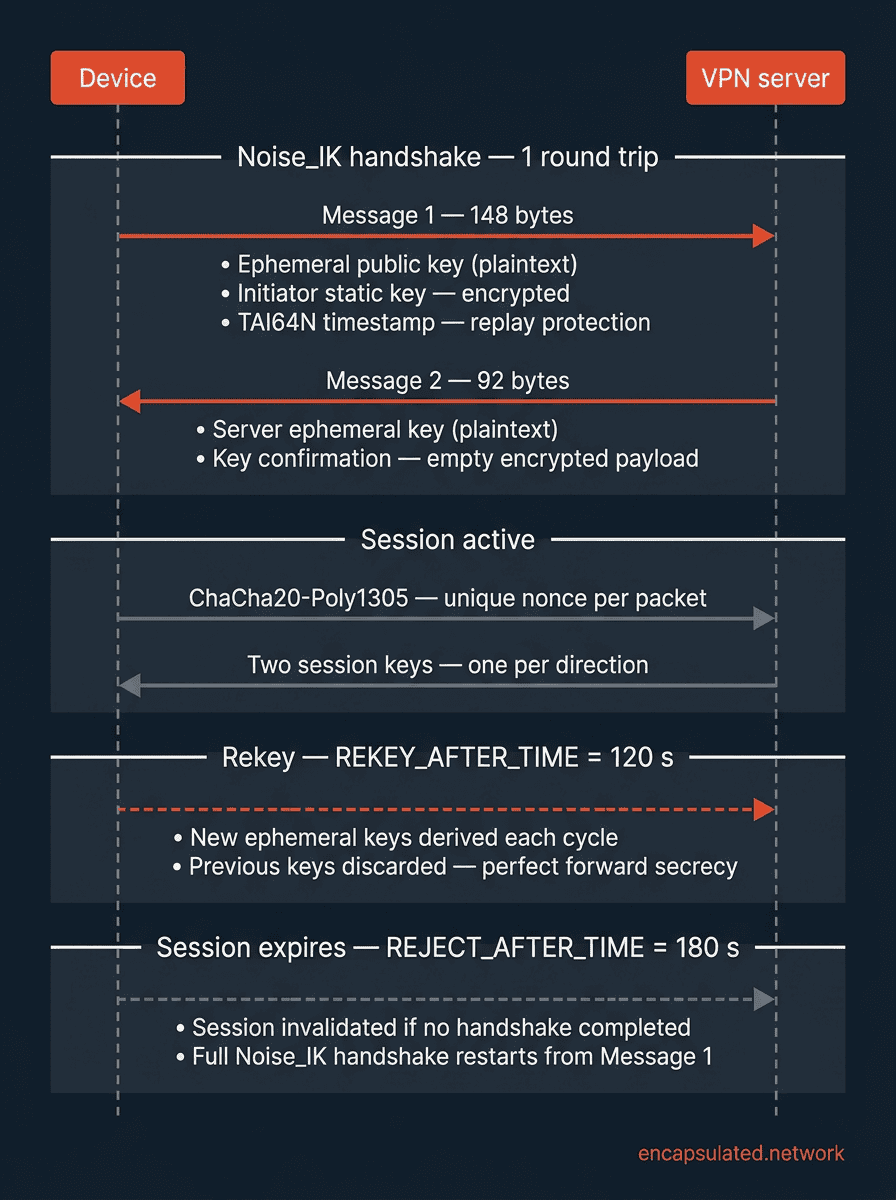
WireGuard’s handshake consists of two messages — one from the initiator to the responder, and one reply. After those two messages, both sides have independently derived identical session keys and data can flow. This is the “single round trip” that makes WireGuard connections feel instant.
Message 1: the initiator hello
The initiator sends a packet containing three elements:
- Ephemeral public key — generated fresh for this handshake, sent in plaintext. This is the initiator’s one-time key for this session, distinct from its long-term static key.
- Encrypted static public key — the initiator’s long-term static public key, encrypted under a combination of the initiator’s ephemeral key and the responder’s pre-known static public key. A passive observer who does not know the responder’s static key cannot determine who is initiating the handshake.
- Encrypted TAI64N timestamp — a 12-byte timestamp format: 8 bytes of big-endian seconds (in International Atomic Time, TAI) plus 4 bytes of nanoseconds. It serves one purpose: replay protection. The responder records the greatest timestamp it has received from each peer and rejects any Message 1 with a timestamp equal to or less than the last seen. Crucially, the timestamp does not need to be accurate — it only needs to be monotonically increasing per peer, so it cannot be replayed.
The total size of a WireGuard handshake initiation message is 148 bytes.
Message 2: the responder hello
If Message 1 authenticates successfully, the responder replies with:
- Responder’s ephemeral public key — also generated fresh for this handshake.
- Empty encrypted payload — not empty by accident. Encrypting an empty payload forces the responder to demonstrate it has correctly derived the same session key material as the initiator, without transmitting any additional identifying information. It is proof of key possession, not a placeholder.
The total size of a WireGuard handshake response message is 92 bytes. After this message, both sides have performed four Diffie-Hellman operations (mixing ephemeral and static keys in both directions) and can independently derive identical session keys using HKDF.
Key confirmation, 1.5-RTT, and KCI resistance
While the handshake completes in one round trip (two messages), there is a subtle additional step: the responder waits until it receives the initiator’s first actual data packet before it begins sending data of its own, making effective connection establishment 1.5 round trips rather than exactly 1.
Donenfeld’s own description from the WireGuard mailing list calls this “key confirmation” — the responder must receive one encrypted session packet from the initiator before it begins using the new session, confirming that both sides have derived the same session keys. This also provides resistance against Key Compromise Impersonation (KCI) as a named security property: in a KCI attack, an adversary who has compromised the responder’s static private key attempts to impersonate the responder to a legitimate initiator. KCI resistance is a property of the Noise_IK pattern itself; the 1.5-RTT delay specifically delivers key confirmation, with KCI protection as a direct consequence. The cost is half a round trip of additional latency at connection establishment.
Session key derivation
After the two handshake messages, both sides run HKDF (keyed with BLAKE2s) over the accumulated Diffie-Hellman outputs and the transcript of the handshake. This produces two session keys — one for each direction of the connection — that are independent and uniformly random. All subsequent data traffic uses ChaCha20-Poly1305 symmetric encryption with these session keys and incrementing nonce counters. No further asymmetric operations occur during the session’s lifetime.
The cryptographic suite — why each primitive was chosen
WireGuard’s fixed suite consists of five primitives. Four appear in the wire protocol; the fifth protects internal data structures. Here is why each one was selected.
Curve25519 — not RSA, not P-256
Curve25519 is an elliptic curve designed by Daniel J. Bernstein and published at the Public Key Cryptography conference (PKC) in 2006. WireGuard uses it for all Diffie-Hellman operations in the handshake. Three properties made it the right choice over RSA or NIST P-256.
First, timing side-channel resistance. Many elliptic curve implementations have branching code paths whose execution time depends on secret key bits — an attacker measuring execution time can recover key material. Curve25519’s parameter choices (its Montgomery curve form, x-coordinate-only Montgomery ladder arithmetic, and the prime 2²⁵⁵ − 19) are specifically designed to make simple, natural implementations also be constant-time. Simple code plus safe parameters equals no need for platform-specific constant-time tricks.
Second, parameter transparency. NIST P-256’s curve coefficients were generated by hashing an unexplained seed (c49d3608 86e70493 6a6678e1 139d26b7 819f7e90). Nobody has publicly explained what that seed represents or how it was chosen — which means nobody can rule out that the parameters were selected for reasons other than security. The SafeCurves project (Bernstein and Lange, 2013) formalised this concern, classifying NIST P-256 as having “manipulatable” parameters. This is a documented cryptographic controversy, not an informal community grievance — though it does not mean NIST P-256 is broken. Curve25519’s parameters are generated deterministically from transparent, self-explanatory constants, removing any concern about parameter provenance.
Third, performance. Curve25519 operations are faster than equivalent-security RSA and competitive with P-256, with 32-byte public keys that keep packet sizes small.
ChaCha20-Poly1305 — the original design rationale
WireGuard uses ChaCha20-Poly1305 as its authenticated encryption with associated data (AEAD) construction, specified in RFC 7539 (May 2015) — the version the WireGuard whitepaper cites — and subsequently in RFC 8439 (June 2018), which obsoletes it with identical algorithm content. ChaCha20 was designed by Daniel J. Bernstein; Poly1305 is also a Bernstein design; their AEAD combination provides confidentiality and integrity in a single pass.
The choice was driven by what was true when WireGuard was designed, not by 2026 hardware. ChaCha20 is implemented as a sequence of simple arithmetic operations (additions, XORs, and bit rotations) that require no lookup tables and no hardware instructions to run efficiently. This matters on ARM processors without cryptographic extensions, on IoT devices, on older smartphones, and on embedded hardware where WireGuard was intended to be deployable.
Software implementations of AES that use precomputed lookup tables (T-table implementations) are vulnerable to cache-timing attacks — an adversary can measure cache hit and miss timing to recover key bits. This vulnerability is specific to software T-table AES. Modern processors with AES-NI (Intel since 2010, AMD since 2011, ARMv8 with Crypto Extensions since 2014) perform AES in fixed-latency hardware paths and do not have the cache-timing problem. On those processors, AES-GCM is fast and safe. But WireGuard was designed to be secure on all hardware — including hardware without AES acceleration — and ChaCha20 achieves that without branching on a platform check.
For a full explanation of what ChaCha20-Poly1305 actually does — how Poly1305 derives its one-time authentication key, what AEAD mode means in practice, and how it compares to the AES-256-GCM used by OpenVPN and IKEv2 — see VPN Encryption Explained.
BLAKE2s — why not SHA-256
BLAKE2s is a cryptographic hash function designed by Jean-Philippe Aumasson, Samuel Neves, Zooko Wilcox-O’Hearn, and Christian Winnerlein, published at ACNS 2013. The “s” suffix denotes the variant optimised for 8- to 32-bit platforms and short messages, as distinct from BLAKE2b which targets 64-bit CPUs. On such platforms, BLAKE2s is faster than SHA-256 in software while meeting the same cryptographic strength requirements — the BLAKE2 paper demonstrates it outperforms SHA-256, SHA-1, and MD5 on constrained hardware.
BLAKE2s serves three distinct roles in WireGuard (per the whitepaper §5.4):
- Plain hash — used as the chaining hash Hᵢ that binds the handshake to its public parameters, ensuring the transcript of the handshake cannot be tampered with.
- Keyed MAC — used for the mac1 and mac2 fields in WireGuard’s cookie/DoS resistance mechanism.
- HMAC base — used as the underlying hash function inside WireGuard’s HKDF key derivation construction.
HKDF — turning raw key exchange output into usable keys
The raw output of a Diffie-Hellman exchange is not uniformly random — it has algebraic structure, and using it directly as a symmetric encryption key would be cryptographically unsafe. HKDF (HMAC-based Key Derivation Function), specified in RFC 5869 by Hugo Krawczyk and Pasi Eronen, solves this: it takes the structured DH output and produces uniformly random key material suitable for use as symmetric keys. WireGuard’s kernel source even comments this explicitly: “This is Hugo Krawczyk’s HKDF.”
WireGuard instantiates HKDF with BLAKE2s as its underlying hash function rather than the SHA-256 used in RFC 5869’s examples — this is valid, as the RFC explicitly supports any hash function. The result is the same extract-then-expand construction, producing the two per-direction session keys after each handshake.
SipHash-2-4 — an internal detail worth knowing
SipHash-2-4 (designed by Jean-Philippe Aumasson and Daniel J. Bernstein, INDOCRYPT 2012) does not appear on the wire — it is an internal implementation detail. WireGuard uses it to index its in-memory peer lookup hashtable, keyed with a random secret generated at table allocation time. The purpose is to defend against hash-flooding denial-of-service attacks: an attacker who can cause hash collisions in an unprotected table can force O(n) lookup time and degrade performance to nothing. With a random SipHash key, an attacker cannot precompute collisions without knowing the secret — which they do not.
Cryptokey routing — WireGuard’s identity model
WireGuard has no concept of usernames, passwords, or Certificate Authorities. There is no PKI, no certificate chain, no login credential of any kind. Authentication is entirely based on Curve25519 public key pairs: your public key is your identity on a WireGuard network.
Before a WireGuard tunnel can be established, both sides must pre-configure each other’s static public keys out-of-band — typically by distributing them via a provider’s configuration file or a manual exchange. Once configured, the handshake can authenticate both parties without any additional ceremony. Mesh VPN tools built on WireGuard, such as Tailscale and NetBird, automate this exchange: a coordination service distributes each device’s public key to its peers.
The AllowedIPs field: one field, two jobs
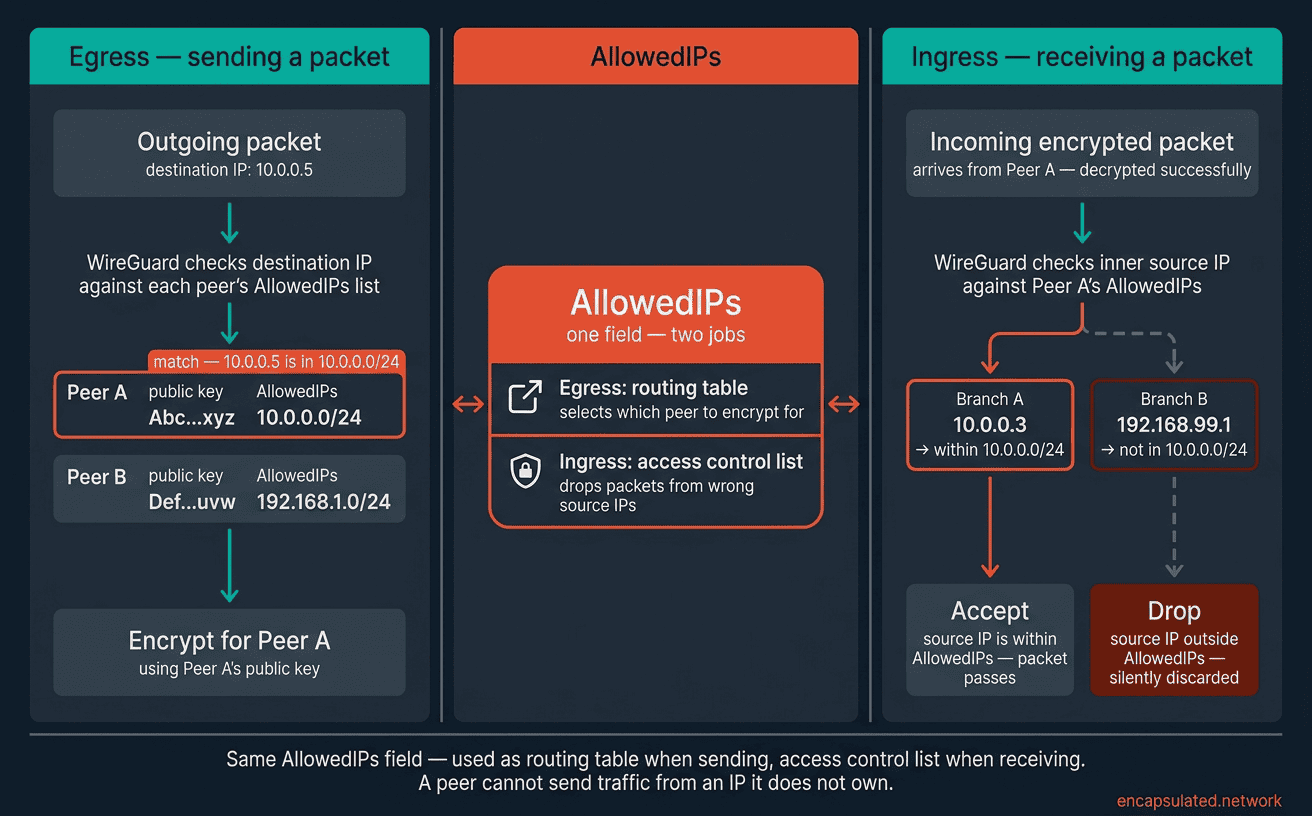
Each peer in a WireGuard configuration has an AllowedIPs field — a list of IP ranges. This single field does two separate jobs simultaneously, which is why it is central to understanding how WireGuard works:
Egress path (routing table). When WireGuard needs to send a packet, it looks up the destination IP against every peer’s AllowedIPs list. Whichever peer’s list matches the destination is the peer that packet is encrypted for and sent to. The AllowedIPs list literally functions as the routing table. Setting AllowedIPs = 0.0.0.0/0, ::/0 routes all traffic — full-tunnel mode. Listing specific subnets routes only matching traffic — split-tunnel mode.
Ingress path (access control list). When WireGuard receives a packet and decrypts it, it checks the inner source IP against the sending peer’s AllowedIPs list. If the source IP does not appear in that list, the packet is dropped — even if it was correctly encrypted by that peer. The AllowedIPs list is therefore also an access control list. A peer cannot send traffic from an IP it is not configured to own.
This bidirectional contract — routing table and access control list in one field — is what Donenfeld calls cryptokey routing. It keeps the configuration minimal and the logic simple: one field, consistently applied in both directions.
What this means in practice
Setting up a WireGuard interface involves generating a key pair (wg genkey produces a private key; wg pubkey derives the public key), exchanging public keys with the peer out-of-band, and writing a configuration file that maps each peer’s public key to their AllowedIPs. That is the complete identity system. There is no certificate to sign, no CA to trust, no intermediate infrastructure. Compare this to IKEv2’s certificate-based authentication (described in our IKEv2/IPsec guide) — WireGuard trades that flexibility for radical simplicity.
Kernel-space architecture — the mechanism behind the speed
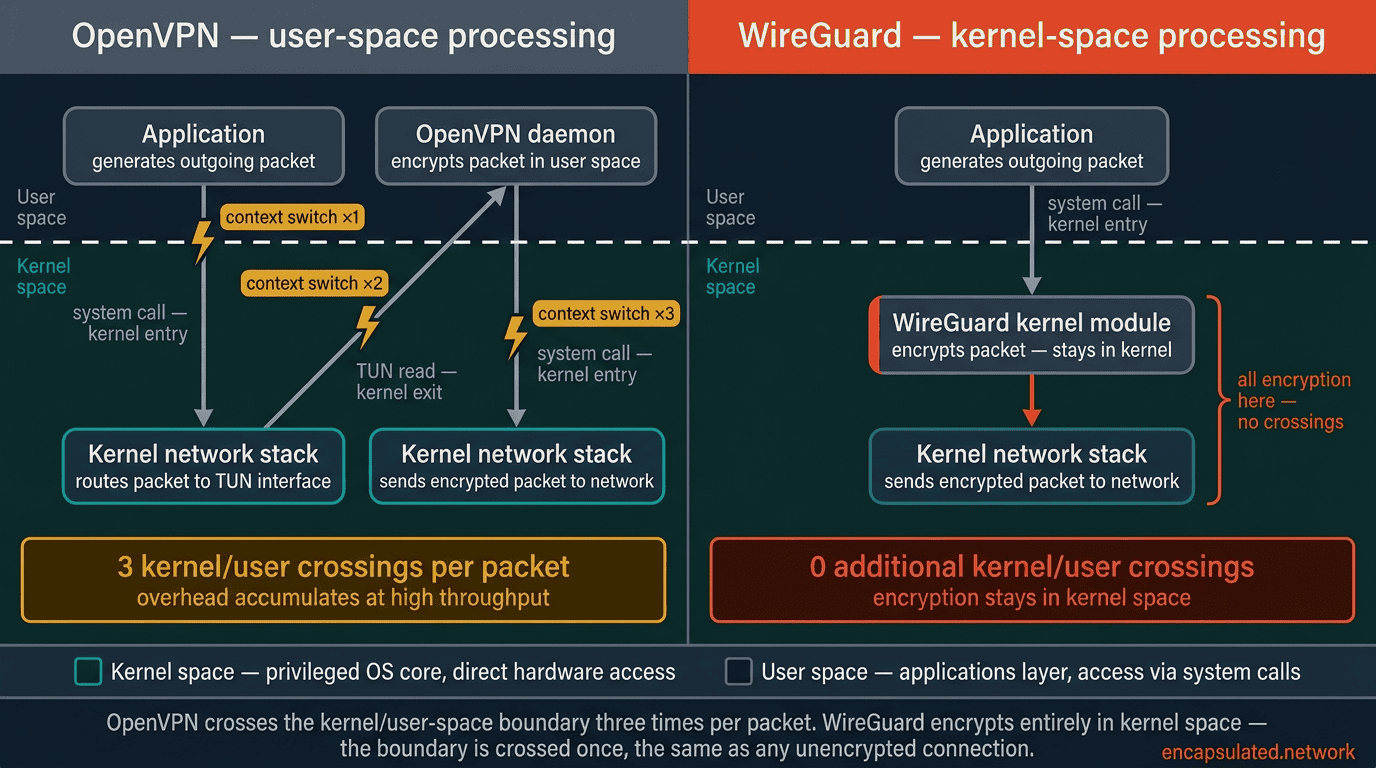
Every operating system is divided into two privilege layers. Kernel space is the privileged core where the OS manages hardware, memory, and system resources directly. User space is where applications run, with controlled access to system resources via system calls.
Crossing between these layers — a context switch — has a cost: the CPU must save state, change privilege levels, validate the transition, and restore state on the other side. This is measured in microseconds per switch, which sounds small, but a high-throughput VPN connection makes this crossing twice per packet (once to send, once to receive), at millions of packets per second. The overhead accumulates into a measurable throughput ceiling.
Where OpenVPN loses performance
OpenVPN runs as a user-space application. Every packet your device sends must travel from user space into the kernel (to be picked up by the network interface), then back out to user space (for OpenVPN to encrypt it), then back into the kernel (to be sent over the network). The same path runs in reverse on receipt. On a 1 Gbps connection, this user-space/kernel-space round trip for every packet is where OpenVPN’s throughput is capped.
OpenVPN’s Data Channel Offload (DCO), covered in our OpenVPN DCO guide, addresses this by moving the data channel into the kernel. It narrows the gap, but WireGuard was kernel-native from the start.
WireGuard as a kernel module
On Linux, and on Windows through the WireGuardNT driver, WireGuard’s packet processing (encryption, decryption, routing lookups and peer matching) happens entirely in kernel space. There are no per-packet context switches. The kernel handles incoming traffic, encrypts it, and puts it on the wire without ever surfacing the data to user space. For outgoing traffic, the reverse path is equally direct.
This is the mechanical source of WireGuard’s throughput advantage. It is not magic, and it is not primarily about ChaCha20 being fast (though it is). It is about eliminating an overhead that user-space protocols such as OpenVPN carry. IPsec, which IKEv2 uses, also processes packets in the Linux kernel, and the official WireGuard apps for iPhone and Mac run in user space, as does the Android app unless the phone is rooted and set up for its kernel option, so this advantage applies against OpenVPN on Linux and Windows.
Stealth and silence — invisible to port scanners
Most network services respond to incoming connection attempts, even failed ones — an HTTP server returns a 400 error, an SSH server sends a banner, an IKEv2 server responds to handshake initiations. These responses confirm that a service is running on that port and allow a network scanner to identify it.
WireGuard does not respond to unauthenticated packets. This is an explicit, documented design principle stated in the whitepaper’s §5.1 (“Silence is a Virtue”): “WireGuard is invisible to illegitimate peers and network scanners.” A packet that fails cryptographic authentication is silently discarded — no ICMP error, no RST, no response of any kind. A packet arriving from a source with no configured peer is silently discarded. A handshake initiation from an unknown initiator is silently discarded.
The defence is layered. Every WireGuard handshake message includes a mac1 field — a MAC computed using the responder’s public key. Generating a valid mac1 requires knowing the responder’s public key in advance. A scanner probing the port without that knowledge receives no response and cannot even confirm WireGuard is running. The whitepaper puts this precisely: “a peer sending a message must know to whom it is talking (by virtue of knowing its public key), in order to elicit any kind of response.”
One nuance worth being precise about: an attacker who does know the server’s public key out-of-band can construct a packet with a valid mac1 and may elicit a cookie reply under high-load conditions. The stealth property is not absolute against a fully-informed adversary — it is protection against scanners and reconnaissance that does not have prior knowledge of the server’s public key. For further discussion of what DPI can and cannot identify, see our WireGuard vs OpenVPN guide.
Under load: the mac2 cookie reply mechanism
WireGuard’s silence breaks intentionally in one circumstance — when the responder is under enough load that processing full handshake initiations would itself become a denial-of-service risk.
Every WireGuard handshake message carries two MAC fields. mac1 is always required: it is a MAC computed over the message using the responder’s static public key as the key. Generating a valid mac1 requires knowing the responder’s public key, which is what makes WireGuard invisible to uninformed scanners. mac2 is required only when the responder signals it is under load — it proves that the initiator’s IP address is reachable before the server commits any significant cryptographic work.
When a server is receiving handshake initiations faster than it can safely process them, it issues a cookie reply to any initiator whose mac1 is valid. The cookie reply is a small encrypted message (64 bytes) containing a cookie — a value derived from the initiator’s source IP address and a server-side secret that rotates every two minutes.
The initiator must include this cookie as its mac2 value on the next handshake attempt. Because generating the cookie requires knowing the initiator’s IP, this mechanism rate-limits handshakes on a per-source-IP basis without the server keeping any per-IP state between requests. An attacker spoofing a source IP address cannot use a cookie issued for a different IP. The full mechanism is specified in whitepaper §5.4.4 and §5.4.7.
Session lifecycle and timers
From the outside, a WireGuard interface looks stateless — there is no “connect” or “disconnect” command. You bring up the interface, configure peers, and traffic flows. Internally, WireGuard manages a state machine of session timers that govern when keys are rotated, when sessions expire, and when peers are considered unreachable.
The relevant timer constants, from the WireGuard kernel source (drivers/net/wireguard/messages.h):
| Constant | Value | What it governs |
|---|---|---|
REKEY_AFTER_TIME | 120 seconds | Initiates a new handshake to rotate session keys, providing Perfect Forward Secrecy |
REJECT_AFTER_TIME | 180 seconds | Invalidates the session entirely if no fresh handshake has completed |
KEEPALIVE_TIMEOUT | 10 seconds | Sends an empty encrypted packet if data has been received but none sent back within this window (passive keepalive) |
REKEY_TIMEOUT | 5 seconds | Retransmission interval for an unanswered handshake initiation |
| Persistent keepalive | Off by default; 25 seconds suggested | Optional, off by default. Forces periodic traffic to keep NAT mappings alive. |
Rekeying and Perfect Forward Secrecy
Every 120 seconds, WireGuard initiates a new handshake to generate fresh session keys — provided the session is in active use. The old keys are discarded. This is Perfect Forward Secrecy implemented at the session level: if an attacker records encrypted traffic and later compromises one set of session keys, they can decrypt only the traffic protected by those keys, not anything from before or after the rekeying boundary.
There is a 60-second window between when rekeying begins (120s) and when the old session is rejected entirely (180s). During that window, WireGuard is actively trying to establish new keys while the old session remains valid. If the rekeying handshake fails — because the peer is temporarily unreachable — WireGuard retries every 5 seconds. After approximately 90 seconds of failed attempts (around 18 retries), it gives up trying to reach that peer entirely.
The two keepalive mechanisms
WireGuard has two distinct keepalive behaviours that are frequently conflated.
The passive keepalive (KEEPALIVE_TIMEOUT = 10 seconds) is reactive: if WireGuard has received data from a peer but has not sent anything back within 10 seconds, it sends an empty encrypted packet. This ensures bidirectional activity and helps the session state machine on both sides stay synchronised.
The persistent keepalive is proactive and optional — off by default, configurable per peer. It forces a periodic empty packet at the configured interval (25 seconds is the conventional recommendation, chosen because many NAT devices drop UDP state mappings after ~30 seconds of inactivity). Without it, an idle WireGuard tunnel is completely silent — which has implications for both NAT traversal and battery life on mobile.
Silent tunnels and mobile battery life
When no data is flowing and persistent keepalive is not configured, WireGuard sends nothing. The radio on a mobile device does not need to stay awake for protocol overhead. This is one of the primary mechanisms behind WireGuard’s mobile battery advantage over OpenVPN — which must send keepalive packets continuously to maintain its connection state, keeping the radio active. For a detailed breakdown of how protocol choice affects battery drain, see our VPN battery drain guide.
Roaming — how WireGuard follows you across networks
When a mobile device moves from a Wi-Fi connection to mobile data, its IP address changes. For a conventional VPN, this is a problem: the server has a tunnel established to the old IP, packets sent to that IP go nowhere, and the client must tear down the connection and rebuild it from scratch — re-running the handshake, re-authenticating, and suffering a visible interruption.
The implicit endpoint update
WireGuard handles this differently, with a mechanism called the latest endpoint update. When the server receives a correctly authenticated data packet from a known peer arriving from a new IP address or port — one that differs from the peer’s previously stored endpoint — WireGuard silently updates its stored endpoint for that peer to the new address. No explicit notification is required. No re-authentication. No renegotiation. The next authenticated packet from the new IP is sufficient.
This works because WireGuard’s peer identity is tied to the Curve25519 static public key, not to the IP address. The IP address is just the current delivery address for a peer whose identity is established by cryptographic means. When that delivery address changes, as long as the packet is correctly authenticated, the update is trusted.
Comparison with IKEv2 MOBIKE
IKEv2 handles network transitions through an explicit protocol mechanism called MOBIKE (RFC 4555). The client sends a protected UPDATE_SA_ADDRESSES notification from its new address; the server records the new address and normally checks that the client can be reached there before sending traffic to it. This explicit approach needs at least one extra exchange. WireGuard’s implicit approach needs no extra exchange and involves no new protocol state, but if the session keys have expired during the network transition (past REJECT_AFTER_TIME = 180 seconds), a full new handshake is needed. Our WireGuard vs IKEv2 comparison covers how the two approaches differ in practice. For the full treatment of IKEv2’s MOBIKE mechanism, see our IKEv2/IPsec guide.
MTU and tunnel overhead
Every WireGuard packet wraps the original payload in additional layers of headers and authentication data. This overhead reduces the usable packet size (the MTU — Maximum Transmission Unit) of the WireGuard tunnel relative to the underlying network connection.
Here is the per-packet overhead breakdown:
| Component | IPv4 outer | IPv6 outer |
|---|---|---|
| Outer IP header | 20 bytes | 40 bytes |
| UDP header | 8 bytes | 8 bytes |
| WireGuard transport header (type 1B + reserved 3B + receiver index 4B + nonce/counter 8B) | 16 bytes | 16 bytes |
| Poly1305 authentication tag | 16 bytes | 16 bytes |
| Total overhead | 60 bytes | 80 bytes |
| Tunnel MTU (from 1500-byte Ethernet) | 1440 bytes | 1420 bytes |
The Linux kernel defaults the WireGuard interface MTU to 1420 bytes — the conservative choice, assuming IPv6 as the outer transport. If your network uses IPv4-only outer packets, 1440 is technically correct, but 1420 will always work safely in either case. On PPPoE connections (common on DSL lines, which have a base MTU of 1492 bytes rather than 1500), the IPv6 calculation gives 1412 bytes.
Why MTU mismatches break websites
If the WireGuard MTU is set too high, large TCP segments exceed the tunnel’s capacity and get fragmented or silently dropped. The symptom is pages that partially load — the small HTML arrives but large resources (images, scripts) stall. The fix is MSS clamping: a firewall rule that rewrites the TCP Maximum Segment Size in SYN packets so the sending host never generates segments too large for the tunnel. For router-level implementation across Asus Merlin, GL.iNet, OpenWRT, and DD-WRT, see our router VPN setup guide.
WireGuard’s privacy limitations
WireGuard is marketed as a privacy tool — and it encrypts traffic effectively. But its default architecture creates a privacy limitation that the protocol’s own creator has openly acknowledged: the static peer table.
The root cause
Cryptokey routing requires the server to maintain a peer table: a persistent mapping of each peer’s Curve25519 public key to its assigned internal IP address. This table must exist for WireGuard’s routing and access control to function. It is not a log in the traditional sense — it does not record what you browsed — but it is a durable record that your public key was configured on this server and was assigned this internal IP.
If a VPN provider stores this table and that table is ever seized or exposed, it could be used to correlate a public key (linked to an account) with connection history. Donenfeld acknowledged this trade-off directly: WireGuard was designed for site-to-site tunnels and trusted networks where identities are known and persistent. Anonymity was not a design goal of the protocol.
The privacy paradox
This creates a genuine paradox for commercial VPN providers who want to use WireGuard’s speed and efficiency: a protocol that excels at network performance has a default architecture that conflicts with a no-logs privacy model. The resolution is not in the WireGuard protocol itself — it is at the software layer above it, and different providers have taken different approaches.
Provider solutions: how they work architecturally
NordVPN (NordLynx) — double NAT. NordVPN inserts a NAT gateway between the WireGuard interface and the internet. All clients connecting to a server are initially assigned the same internal IP by the first network interface. A second dynamic NAT layer then assigns each active session a unique IP for routing. The WireGuard peer table contains addresses that cannot be directly correlated to outbound traffic destinations, because the meaningful routing happens in the NAT layer that sits between WireGuard and the internet. NordVPN describes this mechanism in its published technical documentation, though the implementation is proprietary and not independently auditable.
Mullvad — no per-session activity logging. Mullvad’s approach is different in kind from NordLynx. Mullvad does store a persistent mapping: account number, WireGuard public key, and tunnel IP for each configured peer. This is not deleted when you disconnect. What Mullvad commits to not logging is per-session activity — no traffic logs, no DNS query logs, no connection timestamps, no source IP addresses, and no bandwidth records.
The privacy guarantee is “we do not record what you did” rather than “we do not know your public key is registered here.” Mullvad does have a separate ephemeral peer feature (wgephemeralpeer) that creates genuinely short-lived WireGuard peers — but that feature is used for negotiating post-quantum pre-shared keys (currently ML-KEM-1024 + HQC-256) and for Mullvad’s DAITA (Defense Against AI-guided Traffic Analysis) feature, not as the default session model.
ProtonVPN — ephemeral IP assignment. ProtonVPN uses a NAT gateway approach with ephemeral IP assignment per session. Each connection receives a different internal IP, making cross-session correlation harder even if the peer table itself persists.
IVPN operates a session management model broadly similar to Mullvad’s approach, with a strong no-activity-logs commitment and a privacy-first operational posture.
For a full comparison of which providers handle the static peer table problem most effectively, see our WireGuard vs OpenVPN guide.
The obfuscation gap
WireGuard makes no attempt to disguise what it is on the wire. Its packets have a recognisable structure: a characteristic header layout, consistent UDP behaviour, and a handshake pattern that deep packet inspection engines can identify without decrypting the payload. Unlike OpenVPN running on TCP port 443 — which makes VPN traffic resemble standard HTTPS to a basic firewall — WireGuard has no built-in fallback mode for restrictive networks. Any network administrator or government-level firewall can block WireGuard by dropping traffic on its UDP port, and DPI can identify it by packet structure even if the port is non-standard.
This is a deliberate design choice, not an oversight: WireGuard prioritises protocol efficiency over stealth. For networks where WireGuard is blocked, the correct fallback is OpenVPN over TCP port 443 — covered in our WireGuard vs OpenVPN guide — or, on networks running active DPI, a dedicated obfuscation layer.”
Post-quantum pre-shared keys
Quantum computers capable of breaking Curve25519’s key exchange — by running Shor’s algorithm against the elliptic curve discrete logarithm problem — do not yet exist at scale. But the threat model of “harvest now, decrypt later” is active: adversaries may be recording encrypted VPN traffic today, intending to decrypt it once quantum hardware catches up.
WireGuard includes an optional pre-shared key (PSK) slot in the handshake — reflected in its full protocol identifier Noise_IKpsk2_25519_ChaChaPoly_BLAKE2s. The PSK is a symmetric secret, distributed out-of-band, that is mixed into the key derivation function after Message 2. If Curve25519’s key exchange is broken by a future quantum computer, an adversary decrypting recorded traffic would still need to know the PSK — which was never transmitted and cannot be derived from the traffic. This is WireGuard’s post-quantum mitigation: hybrid security, where breaking one layer does not break the whole. Several providers including Mullvad have implemented this via their ephemeral peer mechanism.
Frequently asked questions
Is WireGuard safe to use in 2026?
Yes. WireGuard uses a cryptographic suite — Curve25519, ChaCha20-Poly1305, BLAKE2s — that is considered strong against all known attacks, including classical attacks. The fixed suite and the absence of negotiation eliminate the downgrade attack surface that has historically affected other VPN protocols. The codebase’s relative simplicity makes it the most auditable mainstream VPN protocol available. There are no known practical vulnerabilities in the WireGuard protocol itself.
Why does WireGuard only use UDP?
WireGuard was designed for efficiency. UDP has less overhead than TCP: there is no connection establishment, no acknowledgement of every packet, and no built-in retransmission. For a protocol doing its own encryption and integrity checking (via Poly1305), the TCP overhead is redundant — WireGuard already knows whether a packet was tampered with. TCP would add latency without adding security. The cost of this choice is that WireGuard cannot use port 443 to masquerade as HTTPS traffic, making it easier for firewalls to block.
Can WireGuard be detected and blocked by a firewall?
Yes, easily. WireGuard uses UDP on its configured port (commonly 51820, but configurable). Any firewall can block it by dropping UDP on non-standard ports. Deep packet inspection can identify WireGuard traffic by the characteristic structure of its handshake packets and transport headers, even on non-standard ports. WireGuard provides no built-in obfuscation. On restrictive networks, the correct alternative is OpenVPN running on TCP port 443. On networks with active deep packet inspection a dedicated obfuscation layer is required. AmneziaWG addresses this at the protocol level by replacing WireGuard’s fixed packet signatures with configurable, randomised alternatives.
Does WireGuard support IPv6?
Yes, fully. WireGuard can route IPv6 traffic through the tunnel (by including IPv6 ranges in AllowedIPs), use IPv6 as the outer transport layer, or both. The MTU calculation changes when using IPv6 as the outer transport: the 40-byte IPv6 header increases total overhead to 80 bytes, giving a tunnel MTU of 1420 on a standard 1500-byte Ethernet link rather than the 1440 achievable with an IPv4 outer header.
Why doesn’t WireGuard support certificate-based authentication?
By design. WireGuard uses Curve25519 public key pairs as its complete identity and authentication system. Certificate infrastructure adds flexibility — you can revoke certificates, issue them to users from a central CA, and integrate with RADIUS or Active Directory. But it also adds complexity: certificate chains, trust stores, expiry management, and revocation checking all expand the attack surface and the configuration complexity. WireGuard’s designers made the deliberate trade-off: maximum simplicity in exchange for the PKI capabilities. Environments that need certificate-based authentication and RADIUS integration should use IKEv2/IPsec, covered in our IKEv2/IPsec guide.
How often does WireGuard rekey the session?
Every 120 seconds (REKEY_AFTER_TIME) when the session is in active use, WireGuard initiates a new handshake to generate fresh session keys. If that rekeying handshake is not completed within 60 seconds — and the session has therefore exceeded the 180-second REJECT_AFTER_TIME — the session is invalidated entirely and a full new handshake is required before any data can flow. Rekeying also triggers after 2⁶⁰ messages on the same session key, whichever limit is reached first.
Is WireGuard resistant to quantum computers?
Curve25519’s key exchange is theoretically vulnerable to Shor’s algorithm running on a sufficiently powerful quantum computer — as is essentially all public-key cryptography in current use. WireGuard includes an optional pre-shared key (PSK) slot that can be used to add a layer of symmetric protection: even if a future quantum computer broke the Curve25519 exchange, it could not decrypt traffic without also knowing the PSK, which was never transmitted. This hybrid approach is being deployed by several providers. ChaCha20-Poly1305’s symmetric encryption is not vulnerable to Shor’s algorithm. It is, however, subject to Grover’s algorithm, which provides a quadratic speedup for brute-force key search — giving a 256-bit key roughly 128-bit effective post-quantum security. That is still considered comfortably safe by current cryptographic standards.
Is WireGuard silent to port scanners?
Largely, yes. WireGuard does not respond to unauthenticated packets — a scanner probing the port without knowing the server’s static public key receives no reply and cannot confirm a VPN service is running. A more sophisticated adversary who knows the server’s public key can construct a packet with a valid mac1 field and may elicit a cookie response under high-load conditions — so the stealth is not absolute against a fully-informed attacker. Against ordinary port scanning and network reconnaissance, WireGuard is invisible.
Why does WireGuard use ChaCha20 instead of AES?
The choice was made for portability and safety across all hardware. ChaCha20 runs efficiently in pure software on any processor — no hardware crypto instructions required — which means it is fast and safe on low-end mobile devices, IoT hardware, and older processors. Software implementations of AES that use lookup tables are vulnerable to cache-timing attacks on hardware without AES acceleration. WireGuard needed to be secure on all hardware, not just hardware with AES-NI. On modern processors that do have hardware AES, the speed difference is less significant, and on Linux and Windows WireGuard’s kernel-space implementation keeps overall performance high regardless of cipher.
What is the WireGuard whitepaper?
The canonical academic paper is WireGuard: Next Generation Kernel Network Tunnel by Jason A. Donenfeld, presented at NDSS (Network and Distributed System Security Symposium) in February 2017. It specifies the complete protocol — handshake messages, timer state machine, cryptographic construction, and security analysis. It is freely available at wireguard.com/papers/wireguard.pdf and is the authoritative reference for all protocol-level details.
Is WireGuard free and open source?
Yes. The WireGuard kernel module is licensed under GPLv2. The user-space tools (wg, wg-quick) and the official client apps for Windows, macOS, iOS, and Android are released under MIT or ISC licences. There is no paid version of WireGuard the protocol — the cost of using WireGuard is zero. What costs money is the infrastructure to run it: either a VPN provider subscription, or a server you run yourself.
Does WireGuard work on Windows, macOS, iOS, and Android?
Yes, on all four. The WireGuard kernel module is native to Linux 5.6 and later. Official WireGuard apps exist for Windows (using the WireGuardNT kernel driver), macOS (a user-space implementation), iOS, and Android — all available from the official wireguard.com download page and their respective platform app stores. Router firmware including OpenWRT (21.02+) and Asus Merlin (388.1+) also support WireGuard natively. The protocol is identical across all platforms; only the implementation differs.
Do I need a VPN provider, or can I run my own WireGuard server?
Either is possible. WireGuard is designed to be self-hosted — you can run it on any Linux server (a cloud VPS, a home server, a Raspberry Pi) and connect to it from any device running the WireGuard client. Self-hosting gives you full control over the infrastructure and the peer table. Using a commercial VPN provider means you are connecting to their WireGuard servers rather than your own — the protocol is the same, but the provider handles key management, IP rotation, and the privacy mitigations described in the privacy limitations section above. For privacy-sensitive use cases, which approach you trust more is the deciding factor.
Is WireGuard the same as NordLynx or Mullvad WireGuard?
No — NordLynx, Mullvad’s WireGuard implementation, and ProtonVPN’s WireGuard are all commercial VPN services built on top of the same open WireGuard protocol, with proprietary software layers added above it. NordLynx, for example, wraps WireGuard in a double-NAT system (described in the privacy limitations section and covered in full in our WireGuard vs OpenVPN guide). The underlying protocol — the handshake, the cryptographic suite, the session timers — is identical to what this article describes. The differences are in how each provider addresses WireGuard’s static peer table problem and what additional infrastructure they operate around it.