WireGuard landed in the Linux kernel in 2020 and became the new default almost immediately. OpenVPN has been in production since 2001 and refuses to retire. Both are capable VPN protocols, and that is exactly why the choice confuses people.
TL;DR
WireGuard is the right default for most users in 2026: faster to connect, built on a fixed modern cipher suite, and easier on battery.
OpenVPN is the right choice when a network blocks WireGuard’s UDP traffic (WireGuard works over UDP only, which many restrictive networks block), including restrictive workplaces, hotels, and high-censorship environments, or when you need granular control for a self-hosted or enterprise deployment.
WireGuard: the modern default
WireGuard is a modern, open-source VPN protocol built on a fixed suite of contemporary cryptography and roughly 4,000 lines of code, designed to be fast and easy to audit. It was merged into the Linux kernel (version 5.6, March 2020) and has since become the dominant protocol across the industry.
Why 4,000 lines of code changes everything
WireGuard’s most important feature is not speed. It is simplicity.
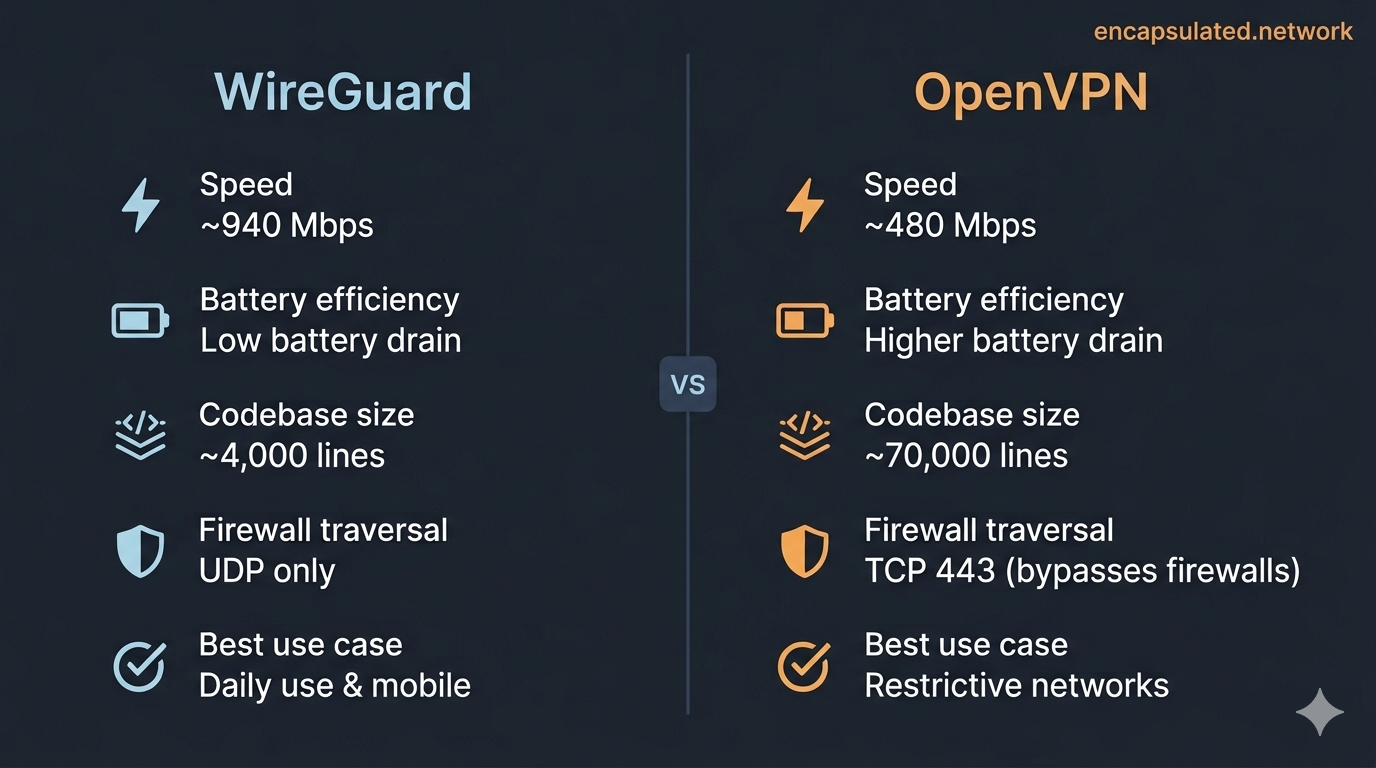
WireGuard’s codebase is approximately 4,000 lines of code, excluding cryptographic primitives. OpenVPN’s core daemon runs to roughly 70,000 lines, and when you include its full dependency chain, that figure climbs to several hundred thousand. Fewer lines means fewer places for bugs to hide and a faster patch cycle: security researchers can audit WireGuard’s entire implementation in a reasonable timeframe; auditing OpenVPN fully is a multi-year project.
WireGuard also completes its handshake in a single round trip, making connection establishment far faster than OpenVPN’s multi-step TLS negotiation, a meaningful difference if you toggle your VPN frequently.
WireGuard uses a fixed, modern cryptographic suite: ChaCha20–Poly1305 for data encryption, Curve25519 for key exchange, and BLAKE2s for hashing. There is no negotiation, no legacy cipher fallback, no configuration surface for a misconfigured server to accidentally offer weak encryption. You get one strong option.
Speed and battery life
On Linux and on Windows via the WireGuardNT kernel driver, WireGuard processes packets in kernel space, the privileged core of the operating system where packets are handled without the overhead of shuttling data up to application-level software. The official macOS, iOS, and Android apps use a userspace implementation. This contrasts with OpenVPN, which runs as a user-space application on all platforms: every packet must cross the kernel/user-space boundary for encryption processing, and that overhead accumulates at high throughput.
In independent benchmarks, WireGuard consistently delivers significantly higher throughput than OpenVPN without DCO on the same hardware. Real-world tests on a 1 Gbps connection typically show WireGuard reaching 940-960 Mbps versus non-DCO OpenVPN’s roughly 480 Mbps over UDP. With OpenVPN’s Data Channel Offload (DCO, a kernel-level performance upgrade for OpenVPN) enabled, that gap closes substantially.
WireGuard’s lightweight design means it does not need to maintain constant keepalive packets: the tunnel goes quiet when idle and resumes instantly when traffic flows. Independent tests commonly show 20-40% less battery drain compared to OpenVPN over the same usage period, with some tests showing as much as two-thirds less, though results vary considerably by device, workload, and whether the hardware has AES acceleration. For a full breakdown of how protocol choice affects battery drain, see Does a VPN drain your battery?
OpenVPN: the two scenarios where it still wins
OpenVPN is a mature, highly configurable open-source VPN protocol, in production since 2001, that can run over TCP or UDP and supports fine-grained cipher and authentication control. In 2026, its advantages are specific rather than general, but in the scenarios where it wins, nothing else comes close.
Bypassing restrictive firewalls (the TCP 443 trick)
This is OpenVPN’s most important remaining advantage. WireGuard uses UDP exclusively. UDP is a fast, connectionless transport protocol that many restrictive networks can silently block: it lacks the universal status of TCP, which carries standard HTTPS and is much harder to filter without breaking normal web browsing. A network administrator or government-level firewall can silence WireGuard simply by dropping non-TCP traffic. OpenVPN can run over TCP on port 443, the same port used by standard HTTPS web traffic.
To a basic firewall, OpenVPN traffic on TCP 443 is indistinguishable from a normal HTTPS connection. For environments running active deep packet inspection that can identify VPN protocols regardless of port, AmneziaWG eliminates WireGuard’s identifiable packet signatures while retaining its UDP performance.
One important caveat: TCP 443 is not true obfuscation. Deep packet inspection (DPI) can still identify OpenVPN traffic if someone is specifically looking for it. For environments with advanced DPI, you need a provider that offers a dedicated stealth or obfuscation layer on top, such as Mullvad’s Shadowsocks bridges. For most restrictive networks, TCP 443 is enough to get through.
Complex and legacy environments
OpenVPN is the right choice when you need protocol-level control that WireGuard does not offer:
- Self-hosted VPN servers where you need fine-grained cipher suite selection, authentication backends (RADIUS, LDAP), or client certificate management
- Corporate deployments that require specific compliance configurations
- Legacy hardware. Older routers, embedded devices, and some NAS boxes have mature OpenVPN support with no WireGuard option
What is a VPN protocol, anyway?
A VPN protocol is the set of rules that governs how your device builds, maintains, and secures the encrypted tunnel to the VPN server. Think of it as the language your device and the server use to negotiate the connection. Different protocols make different trade-offs between speed, security, compatibility, and stealth. The 2026 landscape is largely a three-way comparison: WireGuard, OpenVPN, and IKEv2/IPsec (the latter particularly common on iOS and macOS for its fast reconnection after network switches).
For the foundational picture of how VPN encryption and tunnelling work, read the guide to how VPNs actually work.
Where IKEv2, Lightway, and the others fit
IKEv2/IPsec is built directly into Windows, iOS, and macOS at the operating system level, which means it can be configured without installing a third-party VPN app. Its standout feature is the MOBIKE extension (RFC 4555), which keeps a VPN session alive when your device switches networks, for example moving from Wi-Fi to mobile data. IKEv2 is a capable all-round protocol, particularly for mobile users, but it is not the throughput or auditability leader of the three main options.
Lightway is ExpressVPN’s proprietary protocol, built on wolfSSL and DTLS 1.3 (TLS 1.3 for TCP connections). It is a fundamentally different architecture from WireGuard, developed by ExpressVPN after concluding WireGuard did not meet its requirements. Lightway is open-source and has been independently audited. It is not a WireGuard fork or derivative.
AmneziaWG is a fork of the WireGuard userspace implementation that modifies WireGuard’s packet structure via junk-packet insertion and header randomisation, eliminating its identifiable signatures for deep packet inspection systems. It belongs to a different category from independently developed protocols such as Lightway: it is a modified WireGuard, not an independent design built on a different foundation.
For the full taxonomy of all VPN protocols, including L2TP, PPTP, SSTP, and proprietary implementations, see the VPN protocols guide.
The hardware picture in 2026: has OpenVPN closed the speed gap?
AES vs. ChaCha20: ubiquitous hardware acceleration changes the math
WireGuard uses ChaCha20-Poly1305 for encryption. OpenVPN defaults to AES-256-GCM. For years, ChaCha20 was the clear winner on mobile and lower-end hardware because it does not require hardware acceleration to run fast: it is efficient in pure software.
That calculus has shifted. Intel added AES-NI hardware acceleration in 2010; ARM defined the optional Cryptography Extensions in ARMv8-A, reaching mainstream production silicon in 2013-2014. Budget Android phones, Chromebooks, and entry-level laptops sold in 2023 or later now overwhelmingly ship with hardware-accelerated AES, with the main exceptions in low-end SBC and embedded hardware. On these chips, AES-256-GCM can run faster at the cryptographic operation level than ChaCha20 in software, depending on implementation and platform.
On paper, this would seem to erase WireGuard’s speed advantage. In practice, it does not, for two reasons:
- WireGuard’s kernel-space efficiency (on Linux and Windows) still eliminates context-switch overhead that OpenVPN’s user-space model cannot. The bottleneck in most VPN connections is not the encryption maths. It is the overhead of packet handling, context switching, and memory copies across the kernel/user-space boundary.
- OpenVPN DCO has changed the comparison substantially. OpenVPN Data Channel Offload (DCO) moves OpenVPN’s data channel into kernel space. It is now supported on Linux (mainline since kernel 6.16), Windows, and FreeBSD, and requires OpenVPN 2.6 or later with modern AEAD ciphers.
What DCO means for the speed comparison in 2026
With DCO enabled, the throughput gap between WireGuard and OpenVPN has effectively closed. Hardware benchmarks from GL.iNet’s 2026 router lineup show DCO-enabled OpenVPN reaching 700 Mbps versus WireGuard at 600 Mbps on the same device. That result would have been unthinkable five years ago.
WireGuard’s real advantages in 2026 are no longer primarily about raw throughput. They are:
- Handshake speed. WireGuard completes its handshake in a single round trip. OpenVPN’s multi-step TLS negotiation takes meaningfully longer, which matters when toggling the VPN on and off frequently.
- Codebase size and auditability. Roughly 4,000 lines versus OpenVPN’s 70,000-plus core daemon. A single researcher can read and understand the entire WireGuard implementation in a reasonable sitting; auditing OpenVPN in equivalent depth is a multi-year project.
- Mobile idle behaviour. When no data is flowing, WireGuard’s tunnel goes silent. OpenVPN requires continuous keepalive packets to maintain its connection state, keeping the radio active and draining battery.
The practical takeaway: if raw throughput was your primary reason to prefer WireGuard over OpenVPN, DCO has changed the equation on modern server hardware. If auditability, connection speed, and mobile battery efficiency matter to you, WireGuard remains the right default.
Switching from OpenVPN to WireGuard: what actually changes
In most commercial apps that offer both protocols, switching is a single in-app toggle. Your server list, kill switch configuration, and account credentials remain unchanged. Two exceptions: Mullvad retired OpenVPN in January 2026 and is now WireGuard-only; ExpressVPN does not offer standard WireGuard, only its proprietary Lightway protocol.
What changes when you switch to WireGuard:
- A new key pair is generated for you automatically. No action is required on your part.
- The transport becomes UDP-only. Vanilla WireGuard has no TCP mode. If your current OpenVPN setup was using TCP port 443 to get through a restrictive network, that option is not natively available on WireGuard. Some providers offer WireGuard-over-TCP wrappers (ProtonVPN calls this Stealth), but that is an obfuscation layer running on top, not native WireGuard TCP.
- Connection establishment is faster. The single round-trip handshake replaces OpenVPN’s multi-step TLS negotiation.
When WireGuard fails to connect: if a network blocks UDP traffic, WireGuard will not connect. The correct fallback is provider-dependent. NordVPN still exposes OpenVPN TCP on port 443 as a selectable protocol. ProtonVPN’s recommended fallback is Stealth, which tunnels WireGuard over TLS. Mullvad’s fallback options are Shadowsocks bridges and DAITA-based obfuscation (DAITA: Defense Against AI-guided Traffic Analysis, Mullvad’s system for masking traffic patterns); there is no OpenVPN option there. There is no single universal fallback across providers; check your provider’s current censorship-resistance documentation.
If you are self-hosting: switching a self-hosted OpenVPN server to WireGuard is a full reconfiguration, not a toggle. You generate a new key pair, configure the WireGuard interface and peer table (AllowedIPs), and update your firewall and NAT rules. For the full annotated wg0.conf walkthrough and systemd auto-start setup, see the Linux VPN setup guide.
WireGuard vs. OpenVPN for specific use cases
Gaming
WireGuard is the clear choice for gaming. The single round-trip handshake means the tunnel is up before a conventional protocol has finished negotiating. On Linux and Windows, kernel-space processing and minimal per-packet overhead minimise latency and jitter. Connection consistency also means fewer mid-session drops compared to OpenVPN.
Torrenting and P2P
For sustained peer-to-peer transfers, the protocol you pick affects throughput and stability more than anything else. WireGuard’s efficiency is a clear advantage over OpenVPN without DCO; with DCO enabled, the two are competitive on throughput for sustained transfers on modern hardware.
WireGuard’s UDP-only outer transport is not a problem for BitTorrent. BitTorrent clients use both uTP (UDP-based) and TCP for their own connections inside the tunnel; the outer VPN transport does not restrict which inner protocols work.
On networks where an ISP deprioritises UDP or targets it by port, OpenVPN on TCP port 443 can help by resembling standard HTTPS traffic. This works against port-based or UDP-targeted throttling. It will not bypass DPI-based throttling that analyses the flow itself rather than the port or transport protocol.
For P2P privacy, protocol choice is not the primary factor. What matters most is kill switch behaviour (which prevents an IP leak if the tunnel drops mid-transfer) and how your provider handles WireGuard’s static peer table (a server-side record linking each device’s public key to an assigned IP address). Both are provider-level decisions, not protocol-level ones. See the no-log VPN guide for what to look for in a provider’s data practices.
Streaming
At the protocol level, WireGuard’s speed and connection stability reduce buffering and mid-session drops for streaming. DCO-enabled OpenVPN is competitive on throughput for this use case too. The more relevant variable is not the protocol but the server’s exit IP: whether a given streaming library is accessible depends on your provider’s infrastructure, not on which tunnelling protocol you are using. For streaming-specific guidance by country, see the country IP address guides.
Head-to-head comparison
| WireGuard | OpenVPN | |
|---|---|---|
| Speed (throughput) | Fast; comparable to DCO-enabled OpenVPN on modern hardware | Slower without DCO; comparable with DCO enabled on Linux 6.16+ |
| Connection establishment | Single round-trip handshake; near-instant | Multi-step TLS negotiation; meaningfully slower |
| Battery efficiency | Significantly lower drain (silent when idle) | Higher drain (continuous keepalives required) |
| Codebase size | ~4,000 lines (excl. cryptographic primitives) | ~70,000 lines (core daemon); much more with dependencies |
| Cryptography | ChaCha20-Poly1305, Curve25519 (fixed suite) | AES-256-GCM (configurable) |
| Firewall traversal | UDP only; can be blocked | TCP 443; bypasses most firewalls |
| Obfuscation | None built-in | Partial (TCP 443 mimics HTTPS to stateless firewalls) |
| Platform support | Excellent (all major platforms) | Universal (including legacy hardware) |
| Static IP concern | Yes (in vanilla form)* | No |
| Configuration complexity | Simple | High flexibility, high complexity |
| Post-quantum roadmap | Being layered by providers (NordVPN, others) | Possible via OpenSSL 3.5+ updates |
* In vanilla WireGuard, the server stores a static internal IP address per peer. Reputable commercial providers resolve this via double-NAT or a no-logs commitment; see the privacy section below for the full breakdown.
The privacy question: does WireGuard log your IP?
The concern
Vanilla WireGuard (the protocol in its base form, without provider modifications) requires the server to store a static internal IP address for each connected peer. In a self-hosted setup, this means the server holds a record of which public key was assigned which internal IP address. If the server were ever seized or the data exposed, that record could theoretically be used to correlate your public key (linked to your account) with your VPN usage. WireGuard’s design documentation and known-limitations page make this explicit: the protocol was built for site-to-site tunnels and trusted networks where identities are known and persistent. Anonymity was not a design goal.
This is a real architectural trade-off. It is also largely solved in practice by any reputable commercial provider.
How commercial providers solved it
Providers have taken two distinct approaches to the static peer table problem.
Double-NAT (NordVPN and ProtonVPN). Both NordVPN’s NordLynx and ProtonVPN’s WireGuard implementation use a double-NAT architecture (two layers of network address translation that prevent your real identity from appearing in WireGuard’s peer table). All clients connecting to a server share a single hardcoded internal IP address at the WireGuard layer. A NAT layer then assigns each active session a unique address for routing, and a second NAT rewrites to the server’s public IP. The WireGuard peer table holds only the shared internal addresses, not anything tied to individual users or sessions. No session can be correlated to a specific account via the peer table alone.
Per-user peer table with a no-logs commitment (Mullvad). Mullvad takes a different approach. It maintains a real per-user peer table: each Mullvad account maps to a WireGuard public key and a tunnel IP address. Mullvad does not delete this mapping on disconnect; it rotates WireGuard keys on a schedule. The privacy commitment is not “we do not hold a peer table” but “we do not log activity.” Mullvad’s no-logs policy covers connection timestamps, traffic logs, DNS queries, and source IP addresses. For the use case of avoiding per-session activity correlation, the approach is robust, representing a different kind of protection from the double-NAT model. One eliminates per-user entries from the peer table entirely; the other retains the table but commits not to log what happens during sessions.
If you are using WireGuard through any of these providers in 2026, the static peer table concern does not apply to you in a practical sense.
The 2026 frontier: post-quantum resilience
Quantum computers capable of breaking today’s public-key cryptography do not yet exist at the scale required. Most experts place a cryptographically relevant quantum computer (CRQC) in the 2030s, but advances in 2025 and 2026 have significantly cut the estimated hardware requirements. Some organisations, including Google, now plan for a CRQC as early as 2029. Estimates vary widely, which is precisely why the “Harvest Now, Decrypt Later” threat model motivates deploying post-quantum encryption today: adversaries may be recording encrypted VPN traffic now, intending to decrypt it once sufficient quantum hardware arrives. For journalists, activists, legal professionals, and anyone handling long-term sensitive data, this is a real consideration.
In August 2024, NIST finalised FIPS 203 (ML-KEM, formerly Kyber), its first post-quantum key encapsulation standard. VPN providers are now layering ML-KEM on top of existing protocols as an additional key exchange step in a hybrid model: if the post-quantum layer were somehow broken, the classical encryption would still hold, and vice versa.
NordVPN has deployed ML-KEM (in a hybrid with X25519) across all its platforms alongside NordLynx, available as an opt-in toggle in connection settings. ExpressVPN’s Lightway uses a hybrid ML-KEM-1024 (NIST Level 5) key exchange, enabled by default. Both implementations follow the same principle: bolt ML-KEM on top of the existing classical handshake so that neither layer alone is sufficient for an attacker to decrypt the session.
What protocols do major VPN providers support?
| VPN Provider | WireGuard | OpenVPN | Notes |
|---|---|---|---|
| Mullvad | ✓ | ✗ | WireGuard only (OpenVPN retired January 2026); retains a per-user peer table but keeps no activity logs; Shadowsocks bridges and DAITA available for censorship-resistance |
| ProtonVPN | ✓ | ✓* | WireGuard with double-NAT architecture; Stealth (WireGuard-over-TLS) available for censorship-resistance; OpenVPN being phased out of official apps |
| NordVPN | ✓ (NordLynx) | ✓ | WireGuard via double-NAT (NordLynx); post-quantum ML-KEM (hybrid with X25519) available on all platforms as an opt-in toggle; not compatible with obfuscated servers, dedicated IP, or Meshnet |
| ExpressVPN | ✗ | ✓ | Proprietary Lightway (wolfSSL/DTLS, a fundamentally different architecture from WireGuard) with a hybrid ML-KEM-1024 post-quantum layer enabled by default |
| IVPN | ✓ | ✓ | Privacy-first, no-log, WireGuard default |
* ProtonVPN still supports OpenVPN as of July 2026 but is working toward discontinuing it in its official apps.
Decision matrix: which one should you use?
✓ Choose WireGuard if:
- You are using a commercial VPN for daily privacy, streaming, or gaming
- You are on a smartphone and care about battery life
- You want the fastest connection establishment with the most auditable codebase
- You are on a modern router that supports WireGuard: OpenWRT 19.07 or later (January 2020), or ASUS Merlin 388.1 or later on AX/Wi-Fi 6 models
- You are using any of: Mullvad, ProtonVPN, NordVPN, IVPN
⚠ Choose OpenVPN if:
- You are in a country or environment that blocks non-HTTPS traffic (use TCP 443 mode)
- Your workplace, hotel, or school network blocks UDP traffic
- You are self-hosting a VPN and need RADIUS/LDAP authentication or client certificate management
- You are working with hardware or firmware that supports OpenVPN but not WireGuard
- Your provider does not offer WireGuard (e.g., ExpressVPN; use Lightway in that case)
Frequently asked questions
Is WireGuard safe for online banking and sensitive transactions?
Yes. WireGuard uses state-of-the-art cryptography (ChaCha20-Poly1305 and Curve25519) that is considered secure against all known attacks. Your banking traffic is encrypted by your bank’s TLS connection regardless of which VPN protocol you use; WireGuard adds a second layer of encryption on top. There is no security reason to prefer OpenVPN for financial transactions.
Is WireGuard actually faster than OpenVPN in real-world use?
For connection establishment, yes and significantly so: WireGuard’s single round-trip handshake is near-instant compared to OpenVPN’s multi-step TLS negotiation, which matters every time you toggle the VPN. For raw throughput, the answer depends on whether OpenVPN has DCO enabled. On a 1 Gbps connection without DCO, WireGuard typically reaches 940-960 Mbps versus non-DCO OpenVPN’s roughly 480 Mbps over UDP. With DCO enabled on a modern server (Linux 6.16+, OpenVPN 2.6+), OpenVPN can match or in some configurations exceed WireGuard’s throughput. WireGuard retains a meaningful battery and idle-behaviour advantage on mobile regardless of DCO status.
Can WireGuard be detected and blocked?
Yes. WireGuard uses UDP on non-standard ports, which makes it straightforward for network administrators or government firewalls to identify and block. If you are on a restrictive network and WireGuard connections are failing, switch to OpenVPN over TCP 443 (if your provider still offers it), or use your provider’s WireGuard-based obfuscation mode: ProtonVPN’s Stealth, Mullvad’s Shadowsocks bridges, or equivalent.
Can I use WireGuard on my home router?
It depends on your router’s firmware. Any router running OpenWRT 19.07 or later (January 2020) supports WireGuard; on modern builds (22.03, 23.05, 24.10, and beyond), the kernel module ships by default for nearly every supported architecture. ASUS Merlin supports WireGuard natively on AX (Wi-Fi 6) and newer models running the 388 code base, introduced in Merlin 388.1 (December 2022); older AC models on the 386 branch lack native support and require a workaround. If your router firmware supports neither, a Raspberry Pi running PiVPN is a low-cost way to set up a WireGuard server at home.
Is WireGuard good for streaming?
Yes, at the protocol level. WireGuard’s speed and connection stability reduce buffering and mid-session drops. DCO-enabled OpenVPN is competitive on throughput for streaming too. The more relevant variable is not the protocol but the server’s exit IP: whether a given streaming library is accessible depends on your provider’s infrastructure, not on which tunnelling protocol you are using.
The bottom line
WireGuard remains the right default for 2026. Not because it is always faster on throughput (DCO-enabled OpenVPN has closed that gap on modern server hardware), but because it is simpler to audit, faster to connect, better for mobile battery life, and supported by every provider worth using.
OpenVPN is not obsolete. It still wins in two specific scenarios: bypassing restrictive firewalls over TCP 443, and complex self-hosted or enterprise deployments requiring RADIUS/LDAP, client certificates, or network bridging. And with DCO enabled, it is no longer the slow fallback it was in 2020.
The most important variable is not which protocol you choose but which provider implements it. A well-implemented WireGuard setup from Mullvad or ProtonVPN beats a poorly configured OpenVPN server regardless of theoretical protocol advantages.