A VPN, or virtual private network, is a service that encrypts your device’s internet traffic and routes it through a server operated by the VPN provider before that traffic reaches its destination. Your internet provider sees only that encrypted traffic is going to the VPN server; the website or service you connect to sees the VPN server’s IP address, not yours.
The term covers three distinct products built on the same tunnelling mechanism: personal VPNs for individual privacy, corporate remote-access VPNs that connect employees to an internal company network, and site-to-site VPNs that connect two office networks to each other. A VPN encrypts traffic and replaces an IP address. It does not provide anonymity, does not block malware or phishing, and does not remove the need to trust whichever party operates the server.
TL;DR
- A VPN encrypts your device’s internet traffic and replaces its IP address with the VPN server’s. Your internet provider sees only encrypted traffic going to the server; the destination sees only the server’s address.
- The connection is built through an encrypted tunnel between your device and the server. Traffic enters the tunnel encrypted, exits at the server, and continues to its real destination from there, carrying the server’s IP address rather than yours.
- Three distinct products share this mechanism. A personal VPN routes your own traffic through a provider’s server. A corporate remote-access VPN connects your device to a company’s internal network rather than the open internet. A site-to-site VPN connects two office networks directly, with no VPN software required on individual devices.
- A VPN does not make you anonymous. Accounts you are logged into still identify you regardless of IP address, and browser fingerprinting operates independently of a VPN. A VPN also does not block malware or phishing, and it shifts the ability to see your traffic from your ISP to your VPN provider, so a provider’s no-logs claim needs independent audit verification rather than a statement in a privacy policy.
- A VPN gives a concrete privacy benefit on public Wi-Fi, during international travel, for remote access to internal work systems, and in high-surveillance environments. On a trusted home network for low-sensitivity browsing, the benefit is limited, since your ISP still sees your traffic either way, just via a different intermediary.
What does VPN stand for?
VPN stands for Virtual Private Network. Those three words each carry meaning worth unpacking.
- Virtual: the network is software-defined. It is not a physically separate cable or dedicated line; it is an encrypted connection layered on top of the ordinary public internet.
- Private: your data and browsing activity are obscured from outside observers through real-time encryption. Your internet provider, other users on the same Wi-Fi, and most third parties cannot see what you are doing.
- Network: your device and the VPN server work together to maintain a shared, secure connection. It is a network of two, created specifically for your session.
Put them together: a VPN is a software-defined, encrypted connection that keeps your internet traffic private as it travels across the public internet.
What does a VPN do?
When you turn on a VPN, three things change simultaneously.
It replaces your IP address
Every device connected to the internet has an IP address: a numerical label that identifies it and its approximate physical location. When you load a website without a VPN, that site receives your real IP address. It knows roughly where you are and can link your requests across sessions.
When a VPN is active, your traffic travels to the VPN server first. The destination website receives the server’s IP address, not yours. From its perspective, the request is coming from wherever the VPN server is located: a different city, a different country, not from your device.
It encrypts your traffic
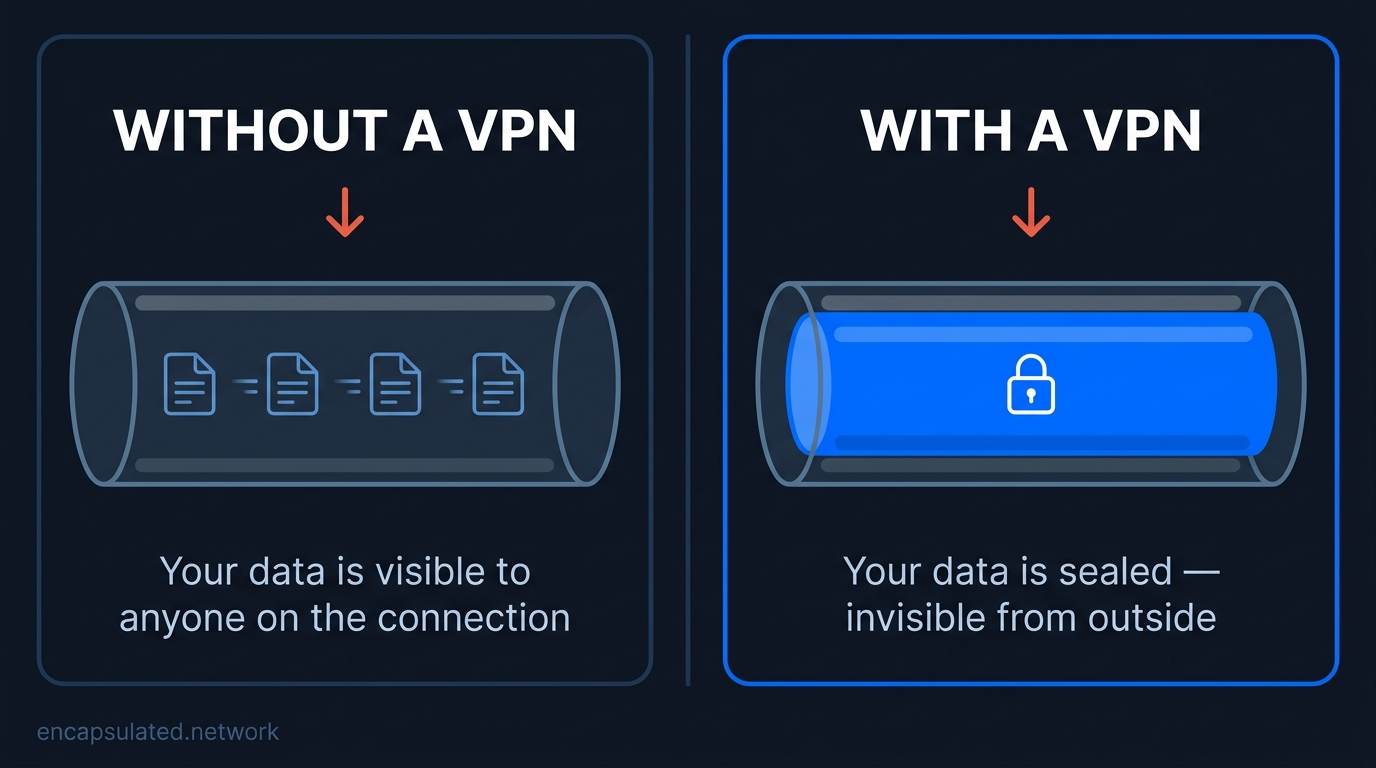
Encryption scrambles your data before it leaves your device. Even if someone intercepts the connection (on a café Wi-Fi network, on a hotel’s shared internet, or at the ISP level), what they capture is unreadable. It looks like random noise, not the websites you visited or the content you sent.
This matters most on networks you do not control. On your home broadband, you trust your router. On the airport Wi-Fi, you have no idea who else is on the network or whether the hotspot itself is legitimate. Encryption closes that gap.
For a full explanation of what that encryption consists of (what ciphers a VPN uses, why the cipher mode matters more than the key length, and how every packet is authenticated as well as encrypted), see VPN Encryption Explained.
It masks your location
Because websites see the VPN server’s IP address, they also see the server’s location, not yours. If the server is in the Netherlands and you are in Singapore, you appear to be in the Netherlands. This is how people access geo-restricted streaming libraries, banking apps that block foreign IPs, or local news platforms that are unavailable outside their home country.
How does a VPN work? (The short version)
When you connect to a VPN, your device and the VPN server establish a secure, encrypted tunnel before any data leaves your device. Every request you make (loading a page, sending a message, running an app) travels through that tunnel, sealed so that only your device and the server can read it. The VPN server then passes the request on to its destination on your behalf, and the response comes back the same way.
If you want to understand the full mechanism (the handshake, how encryption works, what happens to each data packet, and why the protocol your VPN uses matters), how a VPN works walks through every step in plain English.
Types of VPN: consumer, corporate, and the protocols underneath
The word “VPN” covers three different products that share one underlying mechanism: an encrypted tunnel between two endpoints.
Personal / consumer VPNs
A personal, or consumer, VPN is a service you subscribe to that routes your personal internet traffic through a server run by the provider. You install an app, connect to a server, and your IP address is replaced with the server’s. NordVPN, ProtonVPN, Mullvad, and ExpressVPN are all consumer VPN providers. They are designed for individual use: privacy on public Wi-Fi, geo-restriction bypass, ISP tracking prevention.
Corporate remote-access VPNs
When a company gives employees a VPN for working from home, it is not connecting them to a third-party server; it is connecting them to the company’s own private internal network. The VPN creates an authenticated tunnel between the employee’s device and internal systems that are not exposed to the public internet: file servers, internal tools, databases. The mechanism is identical to a consumer VPN; the destination is different. This is the original use case for VPN technology, predating consumer services by decades.
Site-to-site VPNs
A site-to-site VPN connects two entire networks to each other (typically two offices in different locations) rather than connecting a single device to a network. Both office routers maintain a permanent encrypted tunnel between them. Traffic between the offices travels through this tunnel automatically, without any individual device needing a VPN app installed. This is enterprise infrastructure, not something individual users configure.
The protocols underneath
All three types of VPN depend on a protocol: the set of rules that governs how the encrypted tunnel is built. The three most relevant in 2026 are WireGuard (fast, modern, recommended for most personal VPN use), OpenVPN (battle-tested over 20 years, better at evading censorship detection), and IKEv2/IPsec (common in corporate environments and mobile connections). The protocol determines speed, battery efficiency, and how detectable the VPN is to a network monitoring it. For a full comparison, see our WireGuard vs. OpenVPN guide.
What is a VPN used for?
Public Wi-Fi security
This is the most common reason people first reach for a VPN. Public networks (in airports, coffee shops, hotels, and shopping centres) are typically unencrypted. Anyone else on the same network can potentially intercept unprotected traffic. A VPN means that even on an untrusted connection, your data is encrypted before it leaves your device and cannot be read by other users on the same network.
Accessing geo-restricted content
Streaming libraries, news platforms, and many online services vary by country. A platform might offer different content in different regions, or be unavailable outside specific territories entirely. By connecting to a VPN server in the relevant country, your traffic appears to originate there, giving you access to that region’s version of the service.
Remote work
Most corporate VPN setups work on the same principle as consumer VPNs, with one difference: the destination is the company’s private internal network rather than the open internet. The VPN creates a secure, authenticated channel between an employee’s home device and internal systems (file servers, internal tools, intranet resources) that are not exposed to the public internet.
Stopping ISP tracking and ad profiling
Your internet provider can see every domain you visit and, in markets without strong net-neutrality protections, can sell data derived from that activity to advertising networks. A VPN hides your browsing destinations from your ISP. They can see that you are connected to a VPN server, but they cannot see which sites you are visiting or what you are doing. This shifts trust to your VPN provider: they become the party that can see your traffic, which is why choosing a provider with a verified no-logs policy matters.
Bandwidth throttling prevention
In the past, some internet providers have slowed down specific types of traffic (file sharing, video streaming) to manage network load or, in some documented cases, to push users toward competing services. Because a VPN hides what kind of traffic you are sending (your provider can only see encrypted data flowing to the VPN server), this kind of targeted throttling becomes harder to apply. That said, providers can still slow everyone’s connection during congestion or once a data cap is reached, and that applies through a VPN too.
Travel: accessing home services
Banking apps frequently block foreign IP addresses as a fraud-prevention measure. Local streaming services, regional news, and government portals may be unavailable outside their home country. Connecting to a VPN server at home resolves most of these blocks by making your traffic appear to originate from your home location.
Gaming
A VPN typically increases latency to a game server, since routing traffic through an additional server adds a network hop. Lower latency is possible in narrow cases: when a VPN’s route to the game server is more direct than the ISP’s default path, or when an ISP is throttling game traffic. Either way, it is uncommon and should not be assumed.
In games that use peer-to-peer lobbies rather than dedicated servers, other players can see your IP address directly. A VPN replaces it with the server’s, so it cannot be targeted. Most modern competitive titles run on dedicated servers and never expose player IPs, so this protection is narrower than it sounds, and it only helps if the VPN is connected before you join.
A VPN can also unlock region-restricted game content: early access windows, region-specific libraries, and betas limited to certain countries. Storefront terms are a real constraint here. Steam’s Subscriber Agreement prohibits using IP proxying to disguise your place of residence, whether to get around geographical restrictions on content or to buy at pricing for another region, and Valve reserves the right to terminate account access for it.
Policies on VPN use vary by publisher and platform and change over time. Some competitive titles restrict or flag VPN-originating connections as part of anti-cheat or region-integrity enforcement. Check the current terms of service for a specific game or storefront before relying on a VPN for matchmaking or purchases.
VPN vs. proxy vs. Tor vs. HTTPS: how they differ
A VPN is often confused with three other tools that touch the same problem from different angles.
| Tool | Encrypts traffic? | Hides IP? | Hides destination from ISP? | Covers all apps? |
|---|---|---|---|---|
| VPN | ✓ Yes | ✓ Yes | ✓ Yes | ✓ Yes |
| Proxy | ✗ No | ✓ Yes | ✗ No | ✗ One app only |
| Tor | ✓ Yes | ✓ Yes (3 hops) | ✓ Yes | ~ Browser only |
| HTTPS | ✓ Content only | ✗ No | ✗ No | ✓ Yes (automatic) |
HTTPS is the encryption most websites already use: it protects the content of your connection (the words on a webpage, your login credentials) but does not hide which website you are visiting from your ISP, and it does not replace your IP address. In 2026, HTTPS is the baseline, not a privacy tool.
A proxy hides your IP address for one specific application (a browser or torrent client configured to use it) but does not encrypt your traffic and does not cover anything else on your device. It is a routing tool, not a security tool. For a full breakdown, see our VPN vs. proxy guide.
Tor routes your traffic through three volunteer-operated servers (nodes), encrypting it at each hop, which makes it far harder to trace than a VPN. The trade-off is speed reduction and limited compatibility: Tor is primarily a browser-based tool, not a device-wide solution. For journalists, activists, and anyone who needs anonymity rather than privacy, Tor is the more appropriate tool. A VPN provides privacy; Tor provides a stronger form of anonymity. For a full breakdown, see our Tor vs. VPN guide.
These tools are not mutually exclusive. HTTPS runs underneath everything and is always active. A VPN and a browser using Tor can be used simultaneously. None of them replaces the others: they solve different problems at different layers.
What a VPN cannot do
It does not make you anonymous
A VPN hides your IP address and encrypts your traffic. It does not erase your identity. If you are logged into Google, Facebook, your bank, or any other account while using a VPN, those platforms still know exactly who you are. Your account login survives an IP change. Advertisers who track you through your Google account, not your IP address, continue tracking you. A VPN is a privacy tool; it is not an anonymity tool.
It does not protect you from malware or phishing
A VPN encrypts your traffic in transit. It does not scan what you download, warn you about malicious websites, or block phishing links. If you click a deceptive link or download infected software, the VPN provides no protection. For malware, you need an antivirus. For phishing, you need to be careful. A VPN is one layer of a privacy stack, not a complete security solution.
It does not hide your activity from your VPN provider
When you connect to a VPN, you stop your ISP from seeing your traffic, but your VPN provider now sits in that same position. They are the new intermediary. If they log your activity, they can potentially hand it over to authorities or sell it. This is why a verified, independently audited no-logs policy is not a marketing checkbox but a fundamental part of the privacy equation. If you do not trust your VPN provider at least as much as you trust your ISP, you have not improved your situation.
It does not defeat browser fingerprinting
Websites can identify you through means other than your IP address. Your browser configuration (the combination of your screen resolution, installed fonts, browser version, time zone, language settings, and dozens of other attributes) forms a fingerprint that is often unique to your device. Cookies stored in your browser also persist across sessions. A VPN masks your IP; it does not affect any of these. It is insufficient against surveillance-level tracking, though it still helps with everyday privacy concerns. See our guide on the limits of what a VPN protects for the fuller picture.
Do you need a VPN?
It depends on your situation. A VPN is not a necessity for every internet user, and overselling it does not help anyone decide well.
| Your situation | Verdict | Why |
|---|---|---|
| You regularly use public Wi-Fi (cafés, airports, hotels) | Yes | Public networks are unencrypted. Your traffic is visible to anyone on the same connection. |
| You travel internationally and need access to home services | Yes | Banking apps, streaming libraries, and local services often block foreign IP addresses. |
| You work remotely and need access to internal company systems | Yes | A VPN creates a private channel between your device and your employer’s network. |
| You want to stop your ISP from profiling your browsing for ads | Maybe | A VPN hides your activity from your ISP but shifts that trust to your VPN provider. Only worthwhile with a verified no-logs policy. |
| You only browse on a trusted home network, low-sensitivity use | Low priority | The privacy benefit over a trusted home connection is limited. Your ISP sees your traffic either way: a VPN moves that trust, not eliminates it. |
Yes, a VPN is worth it if you frequently connect to public Wi-Fi, travel internationally and rely on home-country services, work remotely with access to sensitive internal systems, or live in or travel to countries with high digital surveillance. In each of these situations, the practical privacy benefit is real and the risk of not using one is concrete.
Maybe, depending on priorities, if you want to limit ISP-level ad profiling, avoid location-based price discrimination for flights or subscriptions, or access geo-restricted content occasionally. These are legitimate uses, but the benefit-to-effort ratio depends on how much you care about each of them, and which VPN provider you end up trusting.
Low priority if you exclusively use a trusted home network for non-sensitive browsing and are not concerned about your ISP seeing which domains you visit. A VPN does not make bad passwords stronger, does not replace two-factor authentication, and does not eliminate tracking from platforms you are logged into. If your primary concern is account security rather than network privacy, other tools address it more directly.
What to look for in a VPN (if you decide to get one)
If you have decided a VPN is worth it, six criteria separate a provider that improves your privacy from one that quietly replaces your ISP with a worse intermediary.
An independently audited no-logs policy
Every VPN provider claims they do not log your activity. What separates a trustworthy claim from a marketing sentence is third-party verification: an independent security firm, brought in to inspect the actual server infrastructure, confirming that no logs exist. Providers that have never submitted to an external audit are operating on a promise. For a breakdown of which providers have been audited and what those audits cover, see our guide to no-log VPN policies and how to verify them.
Jurisdiction and corporate ownership
The country where a VPN provider is headquartered determines which government can legally compel it to hand over data. Providers based outside the 14 Eyes intelligence-sharing alliance face a higher legal bar for compelled disclosure. Equally important: who owns the company. A VPN sold under a recognisable brand name may be owned by a data-broker conglomerate with different priorities than its marketing suggests.
Protocol support: WireGuard as a baseline
A provider that does not support WireGuard or an equivalent modern protocol (NordLynx, Lightway) in 2026 is a provider that has not kept pace. WireGuard is faster, more battery-efficient on mobile, and has a smaller attack surface than older protocols. It should be the default connection method, not an optional extra.
Kill switch and DNS leak protection
A kill switch cuts your internet connection the moment the VPN drops, preventing your real IP from being momentarily exposed during a reconnection. DNS leak protection ensures your domain-name lookups travel through the encrypted tunnel rather than slipping through to your ISP’s servers. Both should be enabled by default, not buried in advanced settings. If a provider does not offer either, it is not a serious privacy product.
Server geography: country count over server count
Marketing materials frequently advertise total server counts (5,000 servers, 10,000 servers). What matters is country coverage: whether the provider has servers in the countries you need. A provider with 200 servers across 60 countries is more useful for most travellers than one with 5,000 servers concentrated in ten countries.
Pricing red flags
Lifetime VPN subscriptions are almost always a red flag. Running server infrastructure costs money on an ongoing basis: a provider selling permanent access for a one-time fee has an unclear long-term revenue model. Similarly, “free forever” tiers from providers with no visible paying subscriber base should be treated with scepticism. The Proton VPN free tier is funded by paying subscribers and has been audited; most others have not.
How do you get and turn on a VPN?
Getting a VPN means subscribing to a provider, installing its application on each device, and signing in. Turning it on means opening that application and starting the connection; most applications also offer an auto-connect or always-on setting so the VPN activates without a manual step each time.
The general process is similar across devices, but the specific steps differ by platform. For platform-specific instructions, see our guides to setting up a VPN on Linux, Android, a router, and a Firestick.
VPNs in high-surveillance contexts: journalists, activists, and travellers to restrictive countries
For most readers, a VPN is a privacy convenience. For journalists, activists, and people living in or travelling to countries with active network censorship, it can become a safety tool, and the requirements change accordingly.
In high-surveillance contexts, a standard consumer VPN is necessary but not sufficient. The additional considerations are:
Obfuscated or stealth protocols. Standard VPN traffic is detectable: its signature can be identified by deep-packet inspection (DPI) systems used by ISPs in countries like China and Russia. Obfuscated protocols disguise VPN traffic as ordinary HTTPS traffic, making it harder to detect and block. If you are in or travelling to a country that actively blocks VPN connections, look for a provider that offers obfuscation or a “stealth mode”; download the app before you arrive, since provider websites are frequently blocked in-country.
A kill switch is non-negotiable. In environments where being identified as a VPN user carries real risk, a momentary IP leak during a reconnection is not a minor inconvenience: it is a potential exposure. The kill switch must be enabled and verified before you rely on the VPN for protection.
A VPN is not anonymity. For journalists working with sensitive sources or activists in danger, a VPN alone is insufficient. The provider knows you are connected; a subpoena or government pressure can still reach them. Tor provides stronger anonymity for these scenarios. Signal provides end-to-end encrypted communications. A VPN is one layer: pair it with appropriate tools for the actual threat.
Warrant canaries and transparency reports. A warrant canary is a public statement a provider updates regularly to indicate they have not received government requests they are legally prohibited from disclosing. Its absence (the canary “dying”) is the signal. Transparency reports show the volume of data requests a provider receives and how they respond. Both are relevant when choosing a provider for high-risk use.
Is a VPN legal?
In the vast majority of countries, yes, VPNs are entirely legal, widely used by businesses and individuals, and regarded as a standard privacy tool. The list of exceptions is real but smaller than some coverage suggests, and the details matter: the same term (“VPN restriction”) can describe anything from a blanket criminal ban to a provider-licensing regime to a logging requirement on the companies that offer the service.
The clearest cases of VPN use being effectively off-limits for individual citizens are North Korea, Turkmenistan, and Belarus, where the technology is prohibited and ISP-level blocking is the primary enforcement mechanism.
A separate category (closer to China’s model than to an outright ban) is the state-approved-only approach. China permits VPN use only through government-authorised services; unauthorized use is illegal, though enforcement against foreign visitors has historically been selective. Iran operates the same model: only state-sanctioned VPNs are permitted, with the practical result that ordinary VPN use is illegal, even if enforcement is inconsistent.
Several countries have tightened their approach to VPN providers rather than individual users.
Russia does not ban VPN use outright but has blocked hundreds of non-compliant providers and removed dozens of major VPN apps from its local app stores since 2024.
Myanmar’s Cybersecurity Law No. 1/2025, which entered force on 30 July 2025, requires VPN providers to obtain Ministry approval; offering or establishing unauthorized VPN services is punishable by up to six months’ imprisonment. The law does not specify penalties for end users, but the regulatory environment is hostile.
In India, a 2022 directive from the national cybersecurity agency requires VPN providers to store user logs for five years and hand them over on request: a rule that prompted several major providers to remove their physical Indian servers entirely. VPN use itself remains legal in India, but the privacy guarantee is weaker than in jurisdictions where providers are not subject to mandatory logging.
The UAE is one of the most commonly misreported cases. VPN use itself is legal there, and millions of residents use VPNs daily. The widely-cited fines (ranging from AED 500,000 to AED 2 million) apply only when a VPN is used to commit a crime or to access services the government has specifically blocked, not to VPN use per se. If you are travelling to the UAE, using a VPN for general privacy is not a legal issue; using it to access unlicensed VoIP services or illegal content is.
One principle that applies universally: a VPN does not grant legal immunity. Doing something illegal while connected to a VPN is still illegal. If you travel to a country with VPN restrictions, check the current rules before you go: enforcement postures change, and VPN provider websites are often blocked in-country, making it harder to get set up once you arrive.
What is a VPN on your phone?
If you have seen a VPN toggle in your iPhone’s Settings or your Android’s network options, you have already encountered a built-in VPN client. The technology is identical to what runs on a computer: the same encryption, the same tunneling, the same protections. The only difference is that a phone runs it through a smaller processor, often on a mobile connection rather than broadband.
On iPhone
Using a VPN on iPhone works the same as on any other device: install an app, sign in, and connect. Under the hood, third-party VPN apps are built on Apple’s Network Extension framework. Apps offering a custom protocol like WireGuard use a packet tunnel provider, while the built-in VPN configuration in Settings uses iOS’s own IKEv2/IPsec support. In most markets, a VPN app on iPhone is distributed through the App Store; in the EU, Apple also permits alternative app marketplaces and distribution from a developer’s own website. Either way, VPN apps are reviewed under a dedicated policy, Guideline 5.4 of Apple’s App Review Guidelines, which requires them to use Apple’s VPN API, restricts them to developers enrolled as organisations, and requires a commitment in the privacy policy not to sell or disclose user data to third parties.
iCloud Private Relay is not a VPN. It covers Safari browsing, all DNS lookups from the device, and unencrypted HTTP traffic from apps, for subscribers to a paid iCloud+ plan, by splitting traffic through two separate relays so that no single party sees both a user’s identity and their destination. It does not cover the rest of your app traffic, which continues to use your real IP address, and it does not let you present yourself as connecting from a different country or region. A VPN protects all app traffic on the device and is a separate feature from Private Relay.
Always-on VPN, where the device blocks all network traffic unless the VPN is connected, is available on iPhone only through supervised device management, the configuration typically used for corporate or school-owned devices. A standard consumer iPhone has no system-level always-on VPN setting outside of whatever a specific VPN app implements as its own kill switch.
When is it most important on mobile? Primarily when you connect to Wi-Fi networks you do not own. Your mobile carrier’s 5G connection normally encrypts the radio link between your phone and the cell tower, which protects you from some forms of over-the-air interception. But your carrier still sees everything on the other side of that link: every domain you visit, every app sending data. A VPN hides that from your carrier in the same way it hides it from your home ISP.
Running a VPN on a phone does consume slightly more battery, because your device is continuously encrypting data. The extra drain is most noticeable during active browsing or streaming on a cellular connection, and often barely detectable during light use on Wi-Fi. Modern protocols like WireGuard are more efficient than older ones. For a full breakdown by scenario and protocol, see our guide on whether a VPN drains your phone’s battery.
It is safe to keep a VPN enabled on your phone. On any network you do not own, the case for leaving it on is straightforward: you have no way to verify who else is on the connection or whether the hotspot itself is legitimate. This covers every public Wi-Fi connection and, depending on your threat model, cellular connections too. The VPN toggle in your settings is not a warning; it is a feature you can use confidently.
Frequently asked questions
Is a VPN free?
Free VPN plans exist, but operating VPN server infrastructure has an ongoing cost that a free plan must cover somehow, typically by monetising user data. A small number of providers offer a free tier funded by their own paying subscribers rather than by data collection, usually with restrictions on device count, server choice, speed, or streaming and torrenting support. Whether a specific free plan is safe depends on how it is funded and whether its no-logs claim has been independently audited, not on the fact that it is free.
Is a free VPN safe to use?
Most free VPNs are not safe in the way you probably hope. Running VPN infrastructure (servers, bandwidth, support) costs real money. Free services have to recover that cost somehow, and many do it by logging and monetising the browsing data you are trying to protect. In 2025, security researchers uncovered a campaign of free VPN browser extensions with over 9 million combined installs that were silently intercepting visited URLs and sending them to remote servers. When two were removed from the Chrome Web Store, a near-identical replacement appeared two months later. Independent reviews consistently find that a majority of free VPN apps share user data with third parties.
The main exception is Proton VPN’s free tier, which is funded by paying subscribers rather than by selling data. It has been independently audited four consecutive years (most recently in 2025), confirming that the no-logs policy applies to free users. The trade-offs: one device, five server locations (randomly assigned, not chosen), slower speeds, and no support for streaming or torrenting. For an honest assessment of which providers have had their no-logs claims independently verified, see our dedicated guide.
Does a VPN slow down your internet?
Yes, to some degree, but usually less than people expect. On a modern device using a current protocol like WireGuard, the encryption overhead is small and often unnoticeable on a home connection. The bigger factor is distance: connecting to a VPN server in your own country usually has little measurable impact; connecting to one on the other side of the world routes all your traffic that extra distance, which adds latency regardless of which VPN you use. If a VPN is noticeably slowing you down, switching to a geographically closer server resolves it in most cases.
Should I leave my VPN on all the time?
Yes, on public or unfamiliar networks (café Wi-Fi, airport hotspots, hotel broadband, any connection you do not own), leaving your VPN on is a sensible default. These are the environments where the protection is most concrete. On a trusted home network, the direct security benefit is lower, though it still hides your browsing from your ISP. If battery life is a concern on mobile, you can use a rule-of-thumb: always-on when on an unfamiliar network, optional on trusted broadband at home. Some VPN apps let you set per-network rules so this happens automatically. For the battery question in detail, see our guide on VPN battery drain on mobile.
Does a VPN protect my phone calls and text messages?
No. A VPN only encrypts data sent over the internet: it covers your browser traffic, app data, and any other internet-based communication. Standard cellular voice calls and SMS text messages travel over your carrier’s phone network, not over the internet, and are entirely unaffected by a VPN. If you want encrypted voice calls and messages, you need an internet-based application that provides end-to-end encryption; Signal is the most widely recommended option for this. A VPN and an encrypted messaging app serve different functions and are complementary, not interchangeable.
Can I use one VPN account on multiple devices?
It depends on the provider, but most consumer VPN subscriptions allow between 5 and 10 simultaneous device connections on a single account, enough to cover a phone, laptop, and tablet at the same time. Some providers (Surfshark, IPVanish) offer unlimited simultaneous connections. The number of devices is distinct from the number of server locations: you can be connected to the same server on multiple devices simultaneously, or to different servers. If you want to cover every device on your home network without configuring each one individually, setting up a VPN directly on your router is the more scalable alternative.
What is the difference between a VPN and incognito mode?
Incognito mode (or private browsing) prevents your browser from saving your browsing history, cookies, and form data on your device: it is a local privacy tool. It does not hide your activity from your internet provider, your employer’s network, or the websites you visit. Your ISP can still see every domain you connect to; the website still receives your real IP address. A VPN works at the network level and hides your traffic from the network: your ISP cannot see which sites you visit, and websites see the VPN server’s IP rather than yours. Neither tool makes you anonymous; they solve different problems. Incognito is useful for keeping activity off your local device; a VPN is useful for keeping activity off your network connection.
The bottom line
A VPN is a software-defined encrypted tunnel that sits between your device and the rest of the internet. When it is on, your internet provider sees only that you are connected to a VPN server, not which websites you visit or what you do there. The destination website sees the VPN server’s IP address, not yours. Neither party has the full picture.
What a VPN is not: an anonymity tool, a malware blocker, or a substitute for strong passwords and two-factor authentication. It is one layer in a privacy stack: useful in the right circumstances, and an unnecessary expense in others. The right circumstances are clear: public Wi-Fi, international travel, remote work, and high-surveillance environments are where the protection is concrete. Home-only, low-sensitivity browsing is where it adds the least.
If you have decided a VPN is right for you, the next question is which one to trust. That decision turns almost entirely on a single factor: whether a provider’s no-logs policy has been independently audited and verified, not just written into a privacy policy. Our guide to no-log VPN policies and how to verify them covers what to look for and which providers have had their claims tested in the real world.
If you want to go deeper on the mechanism itself (the handshake, the encryption, the protocols, and exactly what your ISP can and cannot see), how a VPN works covers every step in plain English.