A VPN does drain your battery, but the real power cost is far smaller than your battery screen suggests and almost entirely within your control. If your phone has been hitting 20% by mid-afternoon since you installed one, the settings are almost certainly the culprit, not the VPN itself.
TL;DR
- Yes, but the real overhead is much smaller than battery screens suggest. Hardware instrumentation (West Coast Labs, 2026) found a well-configured VPN adds 1.6–2.1% to real power draw during active streaming and under 0.5% per hour at idle. Battery screens attribute far more because they track data volume rather than actual current: every encrypted byte is logged against the VPN regardless of what the power draw actually is.
- Protocol is the dominant variable. WireGuard and its commercial derivatives (NordLynx by NordVPN, Lightway by ExpressVPN) stay completely silent between packets, complete their handshake in a single round trip, and use ChaCha20-Poly1305, a cipher fast on any mobile processor. OpenVPN fires a keepalive every 10 seconds by default and runs in userspace on both iOS and Android; it is the worst mainstream protocol for mobile battery.
- Network type is the second variable. A cellular VPN connection consistently drains more than the same VPN over Wi-Fi: 4G testing measured approximately 50% higher consumption. The gap widens in weak-signal areas, where the modem retransmits unacknowledged encrypted packets at higher transmit power.
- Four configuration changes eliminate most of the remaining overhead: switch to WireGuard (or NordLynx/Lightway), enable split tunneling for streaming and gaming apps, set your home Wi-Fi as trusted, and connect to the nearest available server.
Under the Hood: Why Does a VPN Use Power?
A VPN doesn’t just create a private tunnel — it creates work. Three specific types of work, each with its own battery cost.
The Encryption Tax
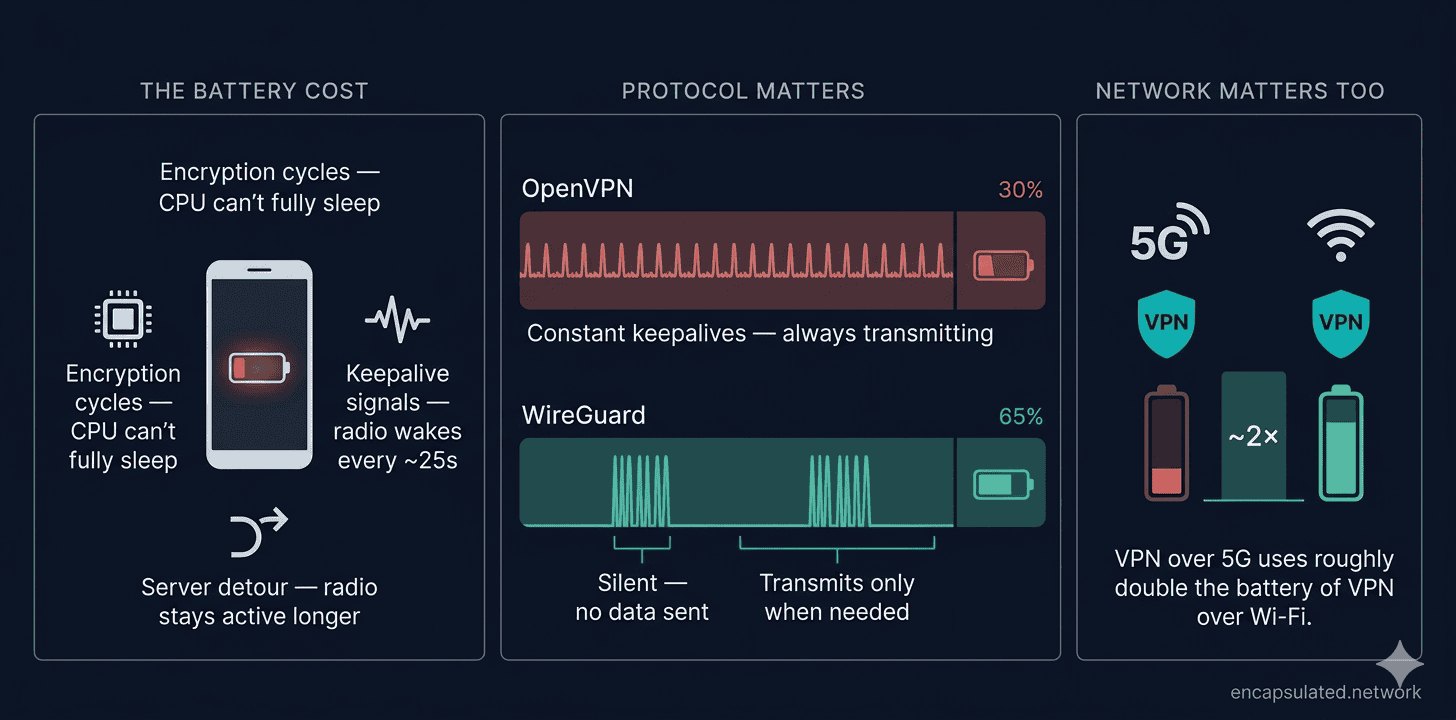
Every packet of data your phone sends or receives has to be scrambled (encrypted) before it leaves your device, and unscrambled (decrypted) when it arrives. That process requires extra CPU cycles per megabyte of data transferred.
Modern phones handle encryption in dedicated hardware — a circuit built into the processor that manages the bulk of the work without fully loading the main CPU. Even so, the CPU must still wake briefly for each packet, and repeated wakeups prevent the device from settling into its lowest-power sleep states.
The Digital Pulse
A VPN tunnel isn’t a static connection. Older protocols like OpenVPN send tiny “keepalive” heartbeat signals — every 10 seconds by default (the standard keepalive 10 120 setting) — to stop the tunnel from collapsing when no active data is flowing. Each pulse briefly wakes the network radio and CPU to fire the signal and confirm the server responded, then the device returns to sleep.
WireGuard takes a fundamentally different approach: by design, it stays completely silent when no data is being sent, only transmitting when a peer actually requests it. Commercial VPN apps do typically enable WireGuard’s persistent keepalive to handle NAT traversal (the process of keeping a tunnel reachable through your router), usually set to 25-second intervals — the value WireGuard’s own documentation recommends — but the underlying behaviour is still far leaner than OpenVPN’s constant-chatter model.
A Kill Switch adds to this overhead, monitoring your connection status constantly in the background and preventing the app from being put fully to sleep by your OS’s battery optimisation routines.
The Detour Problem
When you visit a website without a VPN, your data travels directly from your phone to the destination server and back. With a VPN, every packet takes a detour — it travels to a VPN server first, gets decrypted and forwarded to the destination, then returns the same way.
That extra hop keeps your phone’s network radio active longer on each request, waiting for acknowledgement packets to return from further away. Radio-on time is one of the most direct battery drain drivers. Longer round trips equal more drain, which is why server location matters more than most people realise.
The Engine Matters: Which VPN Protocol Is Best for Battery?
The protocol your VPN uses matters far more than the VPN brand. Two apps can use the same underlying protocol and drain battery almost identically.
WireGuard — The Efficiency King
WireGuard was built with efficiency as a core design goal. Its original Linux kernel implementation is approximately 4,000 lines of code, compared to OpenVPN’s 70,000–100,000+ — roughly 17–25 times smaller. That leanness translates directly into lower per-packet overhead and faster cryptographic operations.
On mobile phones, WireGuard and OpenVPN both run in userspace rather than in the kernel — in-kernel execution is a Linux desktop advantage that doesn’t apply to iOS or Android. What gives WireGuard its battery edge on phones is instead four specific design choices: its smaller codebase means less processing work per packet; it uses ChaCha20-Poly1305 as its cipher, which is fast on any processor even without dedicated AES hardware; its handshake completes in a single round trip rather than OpenVPN’s multiple exchanges; and it stays completely silent when no data is flowing, allowing the radio to sleep rather than waking every 10 seconds.
Real-world tests consistently show WireGuard drawing less battery than OpenVPN. If your VPN app offers WireGuard and you haven’t already switched to it, that single change is the most impactful thing you can do for your battery. The WireGuard vs. OpenVPN comparison covers the full technical breakdown.
OpenVPN — The Battery Heavyweight
OpenVPN is the veteran of VPN protocols — battle-tested, widely trusted, and excellent for security. On battery life, however, it’s the worst mainstream option available. On mobile phones, OpenVPN’s data channel runs in userspace, and its per-packet context-switching overhead — combined with a 10-second-by-default keepalive — creates significantly higher CPU and radio load than modern alternatives. (On Linux desktops and servers, OpenVPN’s Data Channel Offload can move encryption into the kernel to reduce this cost, but that path is not available on iOS or Android.)
On mobile specifically, avoid OpenVPN unless you’re on a network that actively blocks WireGuard and IKEv2. In that scenario, OpenVPN’s superior ability to disguise traffic as normal HTTPS may be worth the battery cost.
IKEv2/IPSec — The Reliable Middle Ground
IKEv2/IPSec sits between OpenVPN and WireGuard on battery efficiency — closer to WireGuard than to OpenVPN. It doesn’t carry OpenVPN’s constant-keepalive overhead, and its handshake is faster and leaner. Where IKEv2 has a genuine mobile-specific advantage is network switching: its MOBIKE extension (RFC 4555) preserves the existing security association when your device changes IP addresses — surviving a Wi-Fi to cellular handoff seamlessly without renegotiating the full tunnel. WireGuard also roams quickly by silently updating its peer endpoint on an IP change, so the practical difference between the two on most mobile connections is small.
On iOS specifically, IKEv2 is the OS-native VPN protocol and receives system-level scheduling treatment that third-party Network Extension apps don’t, giving it a real efficiency edge over other non-native protocols. If you’re on iOS and WireGuard isn’t available, IKEv2 is the right fallback.
Proprietary Options: Lightway and NordLynx
Two major VPN providers have developed their own protocols that share WireGuard’s efficiency goals, though they take very different approaches.
ExpressVPN’s Lightway is a from-scratch protocol built on the wolfSSL cryptographic library (rewritten from C to Rust in 2025 for memory safety, though wolfSSL remains the crypto foundation). ExpressVPN also offers its own WireGuard implementation, but Lightway remains the default. Independent testing rates Lightway as approximately equivalent to WireGuard in battery efficiency; one test rated it the most efficient protocol measured.
NordVPN’s NordLynx takes a different approach: it’s WireGuard directly, with a privacy-preserving double NAT layer that prevents the server from storing a persistent association between a user’s public key and their assigned IP. Both Lightway and NordLynx are far better mobile choices than OpenVPN.
Protocol Comparison at a Glance
| Protocol | Battery impact | Default keepalive behaviour | Mobile verdict |
|---|---|---|---|
| WireGuard | Lowest | Silent by default; optional 25 s persistent keepalive for NAT traversal | ✅ Best choice |
| NordLynx | Equivalent to WireGuard | Same as WireGuard (WireGuard-based with double NAT) | ✅ Best choice |
| Lightway | Equivalent to WireGuard | Efficient reconnect; low keepalive overhead | ✅ Best choice |
| IKEv2/IPSec | Moderate — closer to WireGuard than OpenVPN | Standard re-keying; MOBIKE preserves session on IP change | ✅ Good option, especially on iOS |
| OpenVPN | Highest | 10 s by default (keepalive 10 120); constant radio wakeups | ❌ Avoid on mobile unless required |
Which VPN App Uses the Least Battery?
The question “which VPN drains the least battery?” almost always resolves to protocol — but knowing which apps already default to the right protocol on mobile saves you the manual work of changing it yourself.
The outlier is older or budget apps that still default to OpenVPN — check and update the protocol setting in those.
| VPN app | Default mobile protocol | Notes | Battery verdict |
|---|---|---|---|
| NordVPN | NordLynx (WireGuard-based) | NordLynx is the explicit default across iOS and Android apps | ✅ Lean |
| ExpressVPN | Lightway | Default is “Automatic,” which selects Lightway; WireGuard also available | ✅ Lean |
| Mullvad | WireGuard only | OpenVPN removed entirely from all Mullvad apps as of January 2026 | ✅ Lean |
| ProtonVPN | WireGuard (via Smart protocol) | Smart protocol selection defaults to WireGuard on mobile | ✅ Lean |
From a battery perspective, all four are approximately equivalent in typical mobile use. The differences in measured drain between them are small enough that other factors (server distance, kill switch settings, network type) will matter more than the brand choice.
Lightway is a fully independent protocol built on wolfSSL/Rust, not a WireGuard derivative; NordLynx is WireGuard-based. Both are battery-efficient.
Kill switch defaults vary by app version and platform — check your current app settings rather than assuming. The one consistent note: Mullvad’s kill switch is always-on by design; it blocks all traffic whenever the tunnel drops, with a stricter “Lockdown mode” available as an opt-in setting. Apps with an always-on kill switch may show marginally higher background drain on Android due to more frequent Doze Mode interruptions.
The Network Gap: Cellular vs. Wi-Fi
The network your VPN runs on can matter as much as the protocol it uses.
Running a VPN over a cellular connection consistently uses more battery than the same VPN over Wi-Fi. In a NordVPN test conducted over a 4G connection, cellular consumption ran around 9% versus 6% on Wi-Fi over a one-hour period — roughly 50% more. (That test used 4G specifically; NordVPN’s 5G measurements produced results too variable to report, because devices kept switching between 4G and 5G in marginal coverage areas.) The gap depends heavily on signal quality and network mode.
A 5G radio draws more power than Wi-Fi: beamforming requires active computation across multiple antenna elements; Non-Standalone 5G (NSA) mode maintains a simultaneous 4G anchor connection alongside 5G for control signalling; and the higher peak throughputs 5G supports come with higher sustained power draw. Encrypted packet overhead is a proportionally larger cost on a cellular link.
The situation worsens in areas with weak signal. When your phone can’t get a clean connection, the modem increases transmit power and repeatedly resends unacknowledged packets at the radio link layer — a problem significantly amplified when those packets are already larger due to encryption. The result is rapid, repeated radio bursts that drain the battery quickly even when you’re not actively using your phone.
The practical takeaway: use your VPN on public Wi-Fi and when you genuinely need protection on cellular. On your trusted home network, where your ISP isn’t a meaningful threat vector, disabling the VPN costs you nothing meaningful in privacy and recovers a noticeable chunk of battery. If cellular drain is a concern while travelling, connect to the nearest available server — the fewer total hops your packets take, the less time the radio stays awake waiting for acknowledgements.
How Much Extra Battery Does Always-On VPN Use?
Whether always-on VPN costs meaningfully more battery depends on your protocol and platform.
Android: OS-Level Always-On
On Android, always-on VPN is a consumer-accessible system setting (Settings → Network → VPN → Always-on VPN). When enabled, the OS itself enforces the tunnel — the VPN stays active across app restarts and device reboots, with the system blocking all non-VPN traffic if the tunnel drops (when “Block connections without VPN” is also enabled).
The battery cost above a manually started VPN tunnel is primarily keepalive overhead and more frequent interruptions to Android’s Doze Mode. With WireGuard, that cost is minimal — the tunnel stays silent between packets, and the 25-second persistent keepalive (where enabled) is a brief, infrequent wakeup. With OpenVPN, always-on is meaningfully more expensive: the 10-second default keepalive fires continuously, waking the radio and CPU far more often than WireGuard’s silence-by-default design.
Verdict: WireGuard always-on on Android is a reasonable default for users who want leak-free protection. Always-on OpenVPN is worth avoiding unless your network specifically requires it.
iOS: What Consumers Can Actually Do
iOS’s true OS-level Always-On VPN is available only on supervised, MDM-managed devices configured through Apple Business Manager or Apple School Manager. It is not available to a consumer on a personal iPhone.
Consumer iOS users have two practical options that approximate always-on behaviour:
- App-level auto-connect: Most VPN apps offer their own “auto-connect on untrusted networks” or “connect on launch” setting. This is enforced by the app, not the OS, and is less ironclad — if the app is force-quit or the system aggressively suspends it, the VPN can lapse until the app reopens.
- On-Demand VPN: iOS supports VPN On-Demand via a configuration profile, which triggers the tunnel automatically when connecting to specified networks or domains. This is more reliable than pure app-level auto-connect because it hooks into the OS network stack, though the setup is more involved.
iOS’s Network Extension framework aggressively suspends idle VPN tunnel processes, so even a continuously “connected” VPN draws very little background power on iOS.
Android vs. iPhone: Does Your OS Change the Drain?
The two platforms handle the underlying mechanics differently, and those differences affect how the drain shows up in practice.
Android gives VPN apps more direct access to system-level networking features — native kill switch integration, Always-On VPN modes, and more granular control over how traffic is routed. The downside is that a running VPN process can interrupt Android’s Doze Mode more often than on iOS. Android’s Doze Mode operates in two tiers: a lighter set of restrictions kicks in whenever the screen has been off for a period (no motion required since Android 7), with deeper restrictions applying when the device is also stationary and unused for longer. VPN keepalive signals — particularly OpenVPN’s 10-second default — can interrupt the deeper Doze state more frequently than WireGuard’s silence-by-default design. On Android, it’s worth checking whether your VPN app has a battery optimisation exemption and whether you need it. The full process, alongside always-on VPN and kill switch configuration, is covered in the Android VPN setup guide.
iOS runs VPNs through Apple’s Network Extension Framework, which tightly controls background VPN processes. When the screen turns off and no active traffic is flowing, iOS suspends the VPN’s tunnel provider process and relaunches it when data flows again — the VPN configuration persists, but the process itself isn’t continuously running. This is excellent for battery life. The occasional side effect is a brief connection stutter when the device wakes, as the process resumes. It’s a minor nuisance rather than a real problem. iOS’s aggressive process suspension likely results in slightly lower idle background drain than Android, though this is an inference from the architecture rather than a measured result.
Neither platform has a clear-cut advantage for VPN users — Android gives you more control at the cost of more potential background activity, while iOS makes the battery decision for you and mostly makes it well.
Does a VPN Slow Down Your Phone?
Battery drain isn’t the only performance cost of running a VPN on mobile — it also adds latency and can affect throughput, though whether you notice it depends almost entirely on which protocol you’re using and how far away your server is.
Latency
Every request has to travel to the VPN server and back, adding a hop that increases round-trip time. Connecting to a nearby server typically adds tens of milliseconds of extra round-trip time. Connecting to a server on another continent can add 100 milliseconds or more.
The practical takeaway: choose the nearest server for everyday use. Latency overhead from VPN tunnelling itself is small; the dominant factor is physical distance to the server.
Throughput
WireGuard has negligible throughput overhead on fast connections — it routinely achieves near-line-rate on 5G and home Wi-Fi in independent benchmarks, with throughput reductions in the low single-digit percentages. OpenVPN’s data channel is single-threaded, making single-core CPU performance the bottleneck for throughput on mobile — older phones with weaker processors can see OpenVPN capping their usable bandwidth in a way WireGuard does not.
CPU and Phone Responsiveness
On modern phones, neither WireGuard nor OpenVPN causes perceptible UI sluggishness in everyday use — the hardware is fast enough to handle VPN overhead. On significantly older devices (circa 2019 and earlier), OpenVPN’s userspace processing and per-packet context-switching overhead can place enough load on a weaker CPU to cause occasional stutters during heavy sessions.
The key distinction: battery drain is always real with any VPN — that’s physics. Speed slowdown is conditional, and with WireGuard on a nearby server it’s effectively zero for most users.
Does a VPN Drain Battery While Gaming or Streaming?
Gaming and streaming are the two scenarios where VPN battery drain hits hardest — both flood the network radio with data, and the VPN multiplies that load through encryption and the server detour.
Mobile Gaming
VPN drain scales with data volume: more data means more encryption work and more radio-on time. For latency-critical genres — competitive shooters, real-time PvP, fighting games — OpenVPN is a poor choice: its higher per-packet overhead and 10-second keepalive make it unsuitable for games where milliseconds matter. WireGuard, NordLynx, and Lightway are far better for gaming with a VPN active; their lower latency overhead makes them workable for most real-time games. Turn-based and casual games are largely unaffected by protocol choice.
Quick verdict: Use WireGuard (or NordLynx/Lightway) if you game with a VPN. For competitive gaming on battery where every frame counts, consider disabling the VPN entirely — the protection benefit during a gaming session on a trusted network is minimal.
Streaming (Netflix, YouTube, Spotify)
Streaming apps transfer large volumes of data to servers that aren’t a meaningful local-network surveillance risk — the content is served over HTTPS to a CDN. Many users split-tunnel these apps off the VPN tunnel to save battery.
That said, split-tunnelling streaming traffic does leave it unprotected on the local network. It’s also worth knowing that SNI (the domain name in your TLS handshake) and DNS lookups can still reveal which service you’re using even on encrypted connections — streaming via a VPN hides traffic patterns from the local network, which split-tunnelling removes. How much that matters depends on how much you trust the local network you’re on.
Quick verdict: Split-tunnelling Netflix, YouTube, and Spotify off the VPN saves meaningful battery and is a reasonable call for most users. If you’re on a network you don’t trust, keep streaming inside the tunnel.
Video Calls
Video calls add moderate VPN overhead — the data volume is significant but lower than streaming. WireGuard, NordLynx, or Lightway is acceptable for video calls with a VPN. For long calls on cellular with limited battery, split-tunnelling the call app off the VPN is a reasonable trade-off.
6 Ways to Cut VPN Battery Drain
Most take under a minute to change.
1. Switch to WireGuard (or Lightway)
If your VPN app offers WireGuard and you’re still using OpenVPN or IKEv2, switching protocols is the single highest-impact change you can make. Open your VPN app’s settings, find the protocol selector, and switch to WireGuard. You’re looking at meaningfully less battery consumption from the VPN.
2. Use Split Tunneling
Split tunneling lets you choose which apps route through the VPN and which use your normal connection. Apps like banking and email benefit from VPN encryption on public networks. Apps like Spotify, YouTube, or Netflix are streaming large volumes of data to servers with low local-network surveillance risk — encrypting that traffic costs battery without adding meaningful protection for most users.
Routing high-bandwidth apps outside the VPN tunnel meaningfully reduces battery drain — less traffic encrypted means less CPU work and less radio-on time. Most major VPN apps support split tunneling in their settings.
3. Connect to the Nearest Server
Server distance has a direct relationship with battery drain. A packet that travels 50 ms to a nearby server and back keeps your radio active for 100 ms. A packet that travels 200 ms to a distant server keeps it active for 400 ms. Over thousands of requests per hour, that difference accumulates into a measurable battery impact.
Unless you specifically need a server in another country — to access geo-restricted content, for example — the “Recommended” or “Fastest” server option in your VPN app is almost always the nearest one.
4. Disable the VPN on Trusted Wi-Fi Networks
Home Wi-Fi is the environment where a VPN provides the least marginal privacy benefit. You control the router. The network isn’t shared with strangers. Your ISP can still see your DNS queries, but if that’s a concern, DNS over HTTPS handles it without the battery cost of a full VPN tunnel.
Most VPN apps let you set trusted Wi-Fi networks that automatically pause the VPN when you connect to them. Enabling this on your home network is the easiest way to cut VPN battery drain at home. An alternative worth knowing: setting up a VPN on your router offloads encryption from every device on the network to the router’s CPU entirely. Your phone, tablet, and laptop carry no VPN processing load at all, even with always-on protection across the whole network. This is the most effective approach for Firestick users specifically — the Firestick has no system-level VPN management, so the router is the only way to get always-on protection without the app handling all encryption. The Firestick VPN setup guide covers the full router setup.
5. Enable DNS-Level Ad Blocking
Several VPN apps — NordVPN’s Threat Protection and Mullvad’s built-in DNS blocking, for example — can block ad and tracker requests at the DNS level. Fewer ads loading means fewer HTTP requests, less data transferred, less CPU work rendering page elements, and less time the radio spends active. The battery savings are indirect but real, particularly on ad-heavy sites.
6. Battery Tips for Travelers
Travelers face the sharpest version of this trade-off: you need the VPN most on airport and hotel networks, but those are the conditions where battery life is hardest to protect — no charger nearby, cellular signal that fluctuates, and long sessions on unfamiliar Wi-Fi.
- Configure before you leave. Set up split tunneling and switch to WireGuard at home. Don’t troubleshoot settings at the airport.
- Connect to the nearest local server, not your home country’s. If you’re in Tokyo and you don’t need a UK IP address, connect to a Tokyo server. Routing through your home country adds round-trip distance and keeps the radio awake longer per request.
- Keep the VPN on at airport and hotel Wi-Fi — these are the high-risk environments it’s designed for.
- Disable the VPN on in-room wired ethernet or on hotel networks you’ve verified are not shared with other guests — a verified private connection gives you the same benefit as your home router without the tunnel overhead.
- Use Airplane Mode + Wi-Fi on long flights when you have access to inflight Wi-Fi. This drops the cellular radio’s idle draw and reduces the signal-hunt overhead that compounds VPN battery cost in variable coverage areas.
Is the Battery Drain Worth It?
Screen brightness is often responsible for the single largest slice of hourly battery drain on a smartphone — commonly in the 20–30% range or higher on modern high-brightness OLED displays. A single hour of video streaming can account for 10–15% of total drain. Social media apps, with their background syncs and autoplay video, can draw several percent per hour depending on usage pattern.
A well-optimised VPN — WireGuard protocol, nearest server, split tunneling configured — adds roughly 1–6% to total drain in typical use. Your screen, your streaming apps, and your signal strength are each doing more damage than your VPN.
Hardware-instrumented research makes this even clearer. In a 2026 study by West Coast Labs using current sensors rather than the device’s battery screen, researchers found that a well-configured VPN added just 1.6–2.1% to real power draw during an hour of video streaming. The phone’s battery-usage screen attributed far more to the VPN because it estimates usage by data volume. Idle background VPN overhead measured below 0.5% per hour. (The study was commissioned by NordVPN — worth bearing in mind when weighing the figures. The measurement approach, direct current sensors rather than the device’s battery screen, is what distinguishes it from the UI-attribution figures most other sources use.)
On a mobile device that uses public Wi-Fi, the trade-off is almost always worth taking. The VPN isn’t the reason your battery doesn’t last the day. It’s the easiest thing to blame because it runs visibly in the background — but the drain is happening elsewhere.
Switch to WireGuard, configure split tunneling, set your home network as trusted, and connect to a nearby server — and stop choosing between privacy and battery life.
Frequently Asked Questions
Does a VPN drain battery when the screen is off?
Yes, but minimally. On modern phones, idle drain with the screen off is typically under 1% per hour — WireGuard closer to 0.5% since it stays silent between sessions, OpenVPN higher due to its 10-second keepalive.
Does VPN battery drain differ between Android and iPhone?
Somewhat. iOS’s Network Extension Framework suspends VPN tunnel processes when idle and relaunches them on demand, which likely results in slightly lower idle background drain than Android — though this is an inference from the architecture rather than a measured result. Android gives you more control over the VPN’s behaviour, but that flexibility also means a poorly configured VPN can interrupt Doze Mode more often. In everyday use, protocol choice has a bigger impact on battery than OS platform.
Is WireGuard better for battery life than OpenVPN?
Yes, significantly. WireGuard transmits nothing between packets while OpenVPN pings the server every 10 seconds by default, and its codebase is 17–25 times smaller — meaning less processing work per packet on top of the keepalive savings. If your app offers WireGuard, use it.
Does a VPN drain more battery on cellular than Wi-Fi?
Yes. On 4G, cellular VPN connections measured about 50% higher drain than Wi-Fi in comparable conditions; 5G is higher still but varies too much with signal mode and coverage to give a single figure. Weak signal compounds the cost further, as the modem retransmits encrypted packets at higher power.
Is the battery drain from a VPN worth it?
For most users, yes. Hardware-instrumented testing found real power overhead at around 1–2% during active use — less than streaming or social media — while the VPN encrypts your traffic on public networks and hides DNS queries from your ISP. The one exception: on your home network, where you control the router, the privacy benefit is marginal and disabling the VPN is a reasonable call.
Does always-on VPN mode use significantly more battery?
It depends on protocol. On WireGuard, always-on adds minimal extra cost — the tunnel stays silent between packets, so the only overhead is an occasional 25-second keepalive pulse. On OpenVPN, the 10-second continuous keepalive makes always-on meaningfully more expensive. One iOS caveat: OS-level always-on is a managed-device (MDM) feature; consumer iPhone users use their app’s auto-connect setting or On-Demand VPN profiles instead.
Which VPN app drains the least battery?
Among the major apps, the answer is essentially equivalent: NordVPN (NordLynx), ExpressVPN (Lightway), Mullvad (WireGuard-only since January 2026), and ProtonVPN (WireGuard via Smart protocol) all default to modern, efficient protocols on mobile. Where you’ll see a meaningful difference is between these apps and older or budget VPN apps that still default to OpenVPN — those are the ones worth reconfiguring.
Does a VPN drain battery while gaming?
Yes, more than at idle. WireGuard, NordLynx, and Lightway are workable for most real-time games; OpenVPN’s latency overhead makes it a poor fit for anything competitive. Casual and turn-based games are barely affected. For competitive play on battery, disabling the VPN is the cleanest call.
The Bottom Line
A VPN does drain your battery. It’s physics. Encryption takes CPU cycles. Keepalives wake the radio. Routing through a server adds distance. But “it drains battery” and “it’s killing your battery” are very different claims, and the data only supports the first one.
For a well-configured VPN running WireGuard on a modern phone, hardware-instrumented testing puts the real-world power overhead at around 1–2% per hour during active use, with background drain under 0.5% per hour at idle. Your screen brightness, your streaming apps, and a weak cellular signal are each doing more damage than your VPN.
Switch to WireGuard, set your home network as trusted, turn on split tunneling for bandwidth-heavy apps, and connect to a nearby server. Do those four things and your VPN will become one of the least significant drains on your battery — and one of the most significant improvements to your privacy on every network that isn’t your own.
Travelers on hotel and airport Wi-Fi: WireGuard plus split tunneling on the nearest local server keeps drain minimal even without a charger. For gamers, WireGuard on a nearby server is workable for all but the most latency-critical sessions.
Privacy and a full day of charge aren’t in conflict. You just need the right settings.