
If you’ve been reading about VPNs, you’ve almost certainly come across OpenVPN — and if you’ve been paying attention recently, you’ve come across OpenVPN DCO.
For over two decades, OpenVPN was the industry’s gold standard: battle-tested, deeply auditable, and trusted by security professionals worldwide. But it carried one persistent weakness. Compared to newer protocols like WireGuard, it was noticeably slow — and the architecture behind that gap is exactly what DCO fixes.
No sysadmin experience required.
TL;DR
- OpenVPN DCO (Data Channel Offload) moves OpenVPN’s data encryption from user space into the operating system kernel. That puts it at the same architectural level WireGuard has always occupied. The control plane, which handles authentication and key negotiation, stays in user space. Only the repetitive, high-volume data processing moves, eliminating the per-packet round trips that capped OpenVPN’s throughput.
- The performance gain closes the gap with WireGuard. GL.iNet’s 2026 Mudi 7 router measured DCO-enabled OpenVPN at 700 Mbps versus WireGuard’s 600 Mbps on the same hardware; on a second model (the Flint 3), both tied. On modern server hardware, DCO can comfortably exceed 1 Gbps, a ceiling traditional OpenVPN couldn’t approach. DCO also adds multi-threaded encryption, distributing cryptographic work across all available CPU cores.
- DCO ships built-in with OpenVPN 2.7 and Linux kernel 6.16 (released July 2025). OpenVPN 2.7 is required for the mainline
ovpnkernel module; OpenVPN 2.6 uses the older out-of-treeovpn-dcomodule (UDP only, now in bugfix-only maintenance). Community OpenVPN 2.7 enables DCO automatically when conditions are met. The OpenVPN Connect app for Windows requires a manual toggle under Settings → Advanced Settings. - DCO does not support compression (LZO/LZ4), TAP mode, or non-AEAD ciphers. Configs using these fall back to the standard user-space path with a log warning rather than failing. The interface name (
tun0, or whatever--devspecifies) does not change when DCO is active; only the interface type reported byip -d link showchanges fromtuntoovpn. Authentication, keys, and Perfect Forward Secrecy work identically to non-DCO OpenVPN.
Which OpenVPN Are You Running?
Before going further, it’s worth knowing which OpenVPN you’re actually dealing with — because “enabling DCO” means four different things depending on the answer.
| Your setup | What DCO means here | On by default? |
|---|---|---|
| Community OpenVPN 2.7 | Auto-detected from the kernel module. No config directive required. | Yes — automatically enabled when the kernel module is present, an AEAD cipher is configured, and no disqualifying directive is in the config. |
| OpenVPN Connect app (Windows) | A client-side toggle exposed in the app settings. Requires Connect 3.4.0 or later. | Off by default. Enable at Settings → Advanced Settings → Enable DCO. |
| Access Server | Managed by the server administrator. AS 3.2.0+ installs the DCO module automatically. | On by default in Access Server 3.x. |
| Commercial VPN app | Handled server-side by your provider. If they support it, you benefit automatically. | Depends on provider. Keep your app updated; no other action is required. |
Why Was OpenVPN Slow in the First Place?
To understand DCO, you first need a quick mental picture of how your computer is organised internally.
The Two Floors of Your Computer
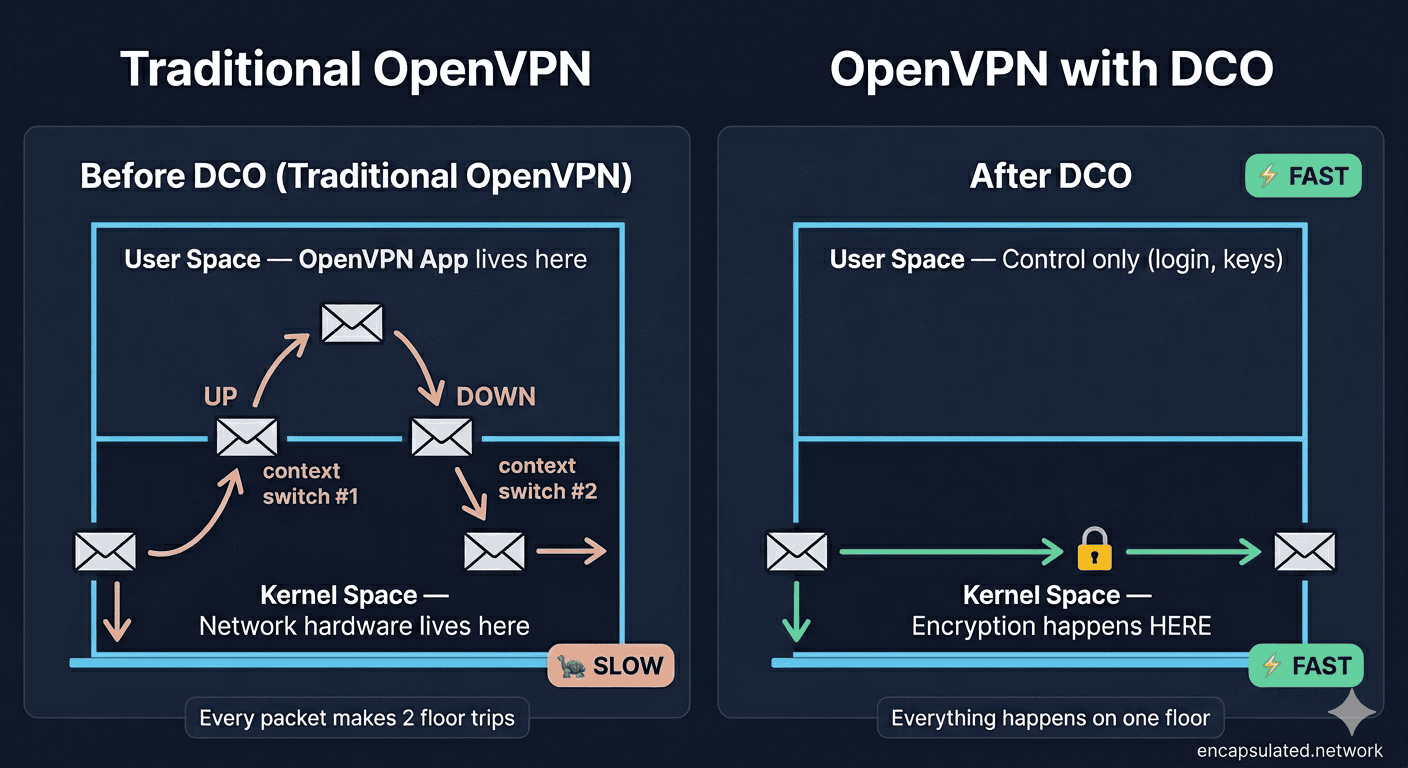
Think of your computer as a building with two floors.
The ground floor is called kernel space. This is where the operating system lives — the core software that talks directly to your hardware, manages memory, and controls all network traffic. It’s fast and tightly controlled.
The upper floor is called user space. This is where all your regular applications live — your browser, your email client, your VPN app. It’s flexible and comfortable, but it’s a step removed from the hardware. Any time an app on the upper floor needs something from the hardware, it has to send a request down to the ground floor and wait for a response.
Here’s the problem: traditional OpenVPN lived entirely on the upper floor.
The Ping-Pong Problem
When encrypted VPN traffic arrives on your device, it starts on the ground floor (kernel space). But because OpenVPN ran in user space, every single data packet had to make a round trip:
- Packet arrives in kernel space (ground floor)
- Gets sent up to OpenVPN in user space (upper floor) for decryption
- Travels back down to kernel space to be forwarded on
This constant shuttle service — called context switching — happens for every single packet your VPN handles. On a fast connection pushing thousands of packets per second, that overhead adds up fast. The result: higher CPU usage and a throughput ceiling that WireGuard — which was built to live entirely on the ground floor — simply didn’t have.
What Does OpenVPN DCO Actually Do?
DCO fixes this by permanently moving the data-handling work down to the ground floor, and it can do that cleanly because a VPN connection actually runs two separate jobs simultaneously.
Brain vs. Brawn — The Control Plane and the Data Plane
Every OpenVPN connection has two distinct jobs:
- The Control Plane — the “brain.” This handles authentication, key negotiation, and session management. It needs flexibility and complex logic. It stays in user space.
- The Data Plane — the “brawn.” This handles the actual encryption and decryption of your data packets. It’s repetitive, high-volume, and speed-critical.
DCO separates these two jobs cleanly. The control plane stays where it has always been — in user space, handled by OpenVPN as normal. The data plane moves permanently into kernel space.
The Fast Path
Once DCO is active, the packet journey looks completely different:
- Packet arrives in kernel space
- Gets encrypted or decrypted in kernel space — no round trip needed
- Gets forwarded from kernel space directly
No more shuttle trips. The bottleneck is gone.
DCO also adds a second major improvement: multi-threading. Traditional OpenVPN could only use one CPU core at a time, leaving the rest of your processor idle. With DCO, encryption work is spread across multiple cores simultaneously — which means your hardware is finally working at its full potential.
What Does This Mean for You? The Real-World Benefits
Significantly Faster Speeds
Depending on your hardware and connection, you can expect throughput improvements of 2x to 10x over traditional OpenVPN:
- A Raspberry Pi 4 running traditional OpenVPN is typically limited to around 100–150 Mbps. Community benchmarks show DCO pushing the same hardware to several times that throughput.
- On modern server hardware, DCO-enabled OpenVPN can comfortably exceed 1 Gbps — a ceiling traditional OpenVPN couldn’t approach due to context-switching overhead.
- ExpressVPN reported up to a 2,000% increase in performance on UDP traffic in internal testing after integrating DCO into their Windows OpenVPN client in March 2025.
- Norton VPN reported that connection speeds more than doubled and latency fell by 15% after integrating DCO in September 2025.
In plain terms: if you have a gigabit fibre connection, OpenVPN with DCO can actually use it. Traditional OpenVPN often couldn’t.
Lower Latency for Gaming and Video Calls
Faster throughput is only part of the story. Because DCO eliminates the context-switching overhead between kernel and user space, it also reduces latency (the delay between sending and receiving data) and jitter (inconsistency in that delay).
If you use a VPN while gaming, on video calls, or over VoIP services, you’ll notice this directly — connections feel snappier, calls stay stable, and the lag that made VPN gaming frustrating is significantly reduced.
Better Battery Life
Because DCO eliminates the constant context switching between kernel and user space, your CPU has to work much less to maintain an encrypted connection. On a laptop or mobile device, less CPU work means less heat and longer battery life — a genuine everyday benefit that goes beyond just speed numbers. Server-side gains reach all clients regardless of device. For a full breakdown of what drives VPN battery drain on phones — and five settings that reduce it — see the guide on VPN battery drain on mobile.
Is OpenVPN DCO Secure?
Yes, DCO is secure — here’s why.
Same Encryption, New Location
DCO changes where encryption happens, not how. The same rigorously vetted cryptographic algorithms — AES-256-GCM, AES-192-GCM, AES-128-GCM, and ChaCha20-Poly1305 — are used whether DCO is enabled or not.
Modern Ciphers Only — and That’s a Good Thing
DCO requires that you use one of those modern AEAD ciphers. Older ciphers like AES-256-CBC won’t activate the fast path — if they appear in your config, OpenVPN will log a warning, disable DCO, and connect normally using the standard user-space path. Those older ciphers have known weaknesses, and any well-configured VPN should already be using AES-GCM or ChaCha20 — DCO enforces that.
What About Kernel-Level Bugs?
Moving code into the kernel does raise a fair question: what happens if there’s a bug? A vulnerability in kernel space is potentially more serious than one in user space.
The OpenVPN team designed the DCO module with this in mind. The kernel module is intentionally kept “slim” — it handles only the repetitive data work, with all complex logic remaining in user space where it can be audited and patched more easily.
Early DCO versions did have issues — CVE-2025-50054, a buffer overflow vulnerability in the Windows DCO driver (ovpn-dco-win), was discovered and published in June 2025. The fix first shipped the same month and has been present in every stable release since OpenVPN 2.7.0 (February 2026). The vulnerability was Windows-specific — it did not affect the Linux kernel module. The fact that it was found, disclosed responsibly, and patched is a sign of a mature, actively maintained security project — not a reason for alarm. Keeping your VPN app up to date is the only precaution needed.
What DCO Changes Besides Speed
Moving the data plane into the kernel is not a purely invisible upgrade.
The Interface Type — and How to Read It
When DCO is active, the network interface OpenVPN creates changes its device type as reported by the kernel. Running ip -d link show on an active DCO connection will show the link type as ovpn (mainline module) rather than tun. The interface name — tun0 by default, or whatever your --dev directive specifies — stays exactly the same.
This distinction matters for two reasons. First, it’s the most reliable way to verify that DCO is actually active. Second, firewall rules, kill-switch scripts, and routing entries that reference the interface name are unaffected by DCO. Only tools that filter on interface type rather than interface name would see any difference.
What Doesn’t Change: Keys, Rekeying, and What Your Provider Sees
DCO leaves the control plane entirely in user space. That means:
- Authentication, certificate verification, and key negotiation happen exactly as before — no change to your security posture.
- Perfect Forward Secrecy works identically — the control plane negotiates fresh session keys on the same time-based schedule.
- What your VPN provider can see is unchanged — the data is encrypted by the same ciphers at the same point in the session; only the kernel layer doing the work has changed.
One nuance worth knowing: OpenVPN 2.7 warns and ignores the --reneg-bytes and --reneg-packets directives when DCO is enabled. Time-based rekeying (the default, every 3,600 seconds) is unaffected. If your config relies on byte- or packet-count-based rekeying triggers, those won’t fire under DCO — rekeying still happens on schedule by time, just not by the other counters.
When to Deliberately Turn DCO Off
Most users will never need this. But if you’re troubleshooting a DCO-related issue — or your configuration depends on a feature DCO doesn’t support — you can disable it cleanly with:
--disable-dco
Add this to your config file or pass it as a command-line flag. Available from OpenVPN 2.6.0 onward. With DCO off, OpenVPN falls back to its standard user-space path — slower, but compatible with everything.
The Trade-Offs — What DCO Doesn’t Support
DCO is a major improvement, but not a universal one.
UDP and TCP Support — What’s Changed
The original out-of-tree DCO module (ovpn-dco) only supported UDP. The mainline ovpn module — accepted by the Linux networking maintainers in April 2025 and shipped in Linux 6.16 that July — supports both UDP and TCP, including TCP port 443 that lets OpenVPN bypass restrictive firewalls.
This applies to the Linux mainline module only. FreeBSD’s if_ovpn module currently supports UDP only — TCP is not available in FreeBSD’s DCO implementation.
In practice, on a modern Linux server running kernel 6.16+, DCO works whether you’re on UDP or TCP. On older out-of-tree setups, TCP connections fall back gracefully to standard OpenVPN processing.
No Compression — and Here’s Why That’s Actually Good
DCO does not support OpenVPN’s legacy compression features (LZO and LZ4) — and that’s by design. Those compression methods are vulnerable to the VORACLE attack, a class of cryptographic exploit that can leak information when compression is combined with encryption. Disabling compression is the right call for security, and on modern networks with fast connections, compression provides no meaningful speed benefit anyway. DCO simply makes this best practice the only option.
If your existing config uses comp-lzo or compress, add compress migrate to your server config. OpenVPN will then push no-compress to clients, letting you clear the directive cleanly.
Version and Module Compatibility at a Glance
Three numbers decide whether DCO is available to you: your OpenVPN version, your kernel version, and which of the two kernel modules your system has.
| OpenVPN version | Linux kernel | Module | Transport |
|---|---|---|---|
| 2.7.x (current stable) | 6.16+ | ovpn — built into the kernel, no installation needed | UDP + TCP |
| 2.7.x | Older kernels | ovpn-backports — install separately; same capabilities as the mainline module | UDP + TCP |
| 2.6.x | 5.2–6.15 | ovpn-dco / ovpn-dco-v2 — out-of-tree, now in bugfix-only maintenance. Not compatible with OpenVPN 2.7. | UDP |
| FreeBSD / pfSense | — | if_ovpn | UDP only |
The key boundary is between 2.6 and 2.7: the mainline kernel module is compatible only with OpenVPN 2.7 and later. If you’re on 2.6 and can upgrade, upgrading to 2.7.x is the right move — it unlocks both the mainline module and TCP support.
System Requirements
The compatibility table above covers the Linux deployment paths. For other platforms:
- Windows 11 / Windows 10 — DCO is included in the OpenVPN Connect 3.4.0+ app for Windows via a separate driver (
ovpn-dco-win). Enable it under Settings → Advanced Settings. - macOS — DCO support on macOS is not yet available as of July 2026. Mac users connecting to DCO-enabled servers still benefit from the server-side improvements, but client-side DCO is not yet implemented.
- FreeBSD / pfSense — FreeBSD has its own kernel DCO module (
if_ovpn) used in pfSense and OPNsense deployments. Note thatif_ovpnsupports UDP only — TCP is not available on FreeBSD’s DCO implementation. Additional constraints apply: noiroutesupport,subnettopology only, and /30 or smaller tunnel networks are incompatible.
One note that applies across all paths: your connecting clients don’t need to match the server’s OpenVPN version — a DCO-enabled server improves performance for all clients regardless of what they’re running. Some consumer routers on older firmware cannot use DCO; check your kernel version with uname -r before expecting support.
Android and iOS
Client-side DCO is not yet available on Android or iOS as of July 2026. Neither the OpenVPN for Android app nor the OpenVPN Connect app for iOS appears in OpenVPN’s current list of DCO-capable clients.
Server-side DCO benefits reach all connecting clients regardless of platform — a DCO-enabled server reduces its own CPU overhead and improves aggregate throughput, including for sessions from mobile devices. What mobile clients miss is the additional gain from running their own data plane in the kernel. But the larger share of the DCO benefit lives on the server end.
Site-to-Site and High-Client-Count Servers
DCO’s multi-threading advantage scales with load. Traditional OpenVPN’s single-threaded data handling creates a per-core ceiling that becomes the bottleneck as concurrent client counts grow. With DCO, the kernel distributes cryptographic work across all available CPU cores — the throughput ceiling rises with hardware across all connected sessions simultaneously, not just for individual tunnels.
For site-to-site tunnels and gateway deployments carrying many concurrent connections, this is often where DCO’s benefit is most visible. The per-session efficiency gain compounds across the full client count. Access Server 3.x enables DCO by default.
FreeBSD’s if_ovpn covers appliance-style deployments on pfSense and OPNsense, subject to the UDP-only limitation.
OpenVPN DCO vs. WireGuard — Where Does the Debate Stand Now?
WireGuard’s biggest concrete advantage over OpenVPN was speed — specifically, the fact that it ran in kernel space while OpenVPN didn’t. The WireGuard vs. OpenVPN comparison covers where that debate stands today.
How DCO Closes the Speed Gap
With DCO, OpenVPN now operates on the same architectural level as WireGuard for data handling. According to GL.iNet’s product specifications for the Mudi 7 (GL-E5800), their 2026 5G travel router, OpenVPN with DCO achieved 700 Mbps versus WireGuard’s 600 Mbps on the same hardware — a manufacturer-reported figure, but one consistent with the architectural gains DCO delivers. On the same manufacturer’s Flint 3 (GL-BE9300), both protocols performed identically. Two years ago that result would have been unthinkable.
Where WireGuard Still Has the Edge
WireGuard still has advantages in:
- Mobile reconnections — WireGuard handles switching between networks (Wi-Fi to mobile data) more gracefully
- Handshake speed — initial connection setup is faster on WireGuard
- Codebase simplicity — WireGuard’s original kernel implementation had fewer than 4,000 lines of code, making it feasible for a single researcher to audit the entire implementation
The Best of Both Worlds
What WireGuard still can’t match is OpenVPN’s use of TCP on port 443, which looks identical to normal HTTPS traffic. On highly restrictive networks that block everything except standard web traffic, OpenVPN with TCP 443 connects when WireGuard can’t.
With DCO, you now get WireGuard-level performance on unrestricted networks, plus OpenVPN’s unmatched ability to bypass firewalls when you need it. That combination is genuinely new, and it changes the calculus of the WireGuard vs. OpenVPN debate significantly.
OpenVPN Legacy vs. OpenVPN DCO vs. WireGuard — Quick Comparison
| Feature | OpenVPN (Legacy) | OpenVPN + DCO | WireGuard |
|---|---|---|---|
| Runs in kernel space | ❌ No | ✅ Data plane yes | ✅ Yes |
| Throughput ceiling | Limited by context-switch overhead | 1 Gbps+ | 1 Gbps+ |
| Multi-threaded encryption | ❌ No | ✅ Yes | ✅ Yes |
| TCP port 443 support | ✅ Yes | ✅ Yes (Linux mainline) | ❌ No |
| Works on restrictive networks | ✅ Best in class | ✅ Best in class | ⚠️ Limited |
| Mobile reconnection speed | ⚠️ Moderate | ⚠️ Moderate | ✅ Excellent |
| Compression support | ✅ Yes (LZO/LZ4) | ❌ No (security) | ❌ No |
| Codebase size | Large | Large | Compact (original design) |
| Kernel maturity | ✅ 20+ years | ✅ 20+ years | ✅ In kernel since 2020 |
Which VPN Services Already Use DCO?
Several commercial VPN providers have publicly announced DCO support. All confirmed rollouts to date have started with Windows client apps — server-side adoption is rarely announced publicly:
- Windscribe — Windows app DCO support, announced March 2025
- ExpressVPN — DCO on OpenVPN for Windows, announced March 2025
- Norton VPN — Windows client integration, announced September 2025
- IPVanish — Windows app DCO update, announced July 2026
Many other providers are running it without a formal announcement. In April 2025, the ovpn module was accepted by the Linux networking maintainers and shipped in Linux 6.16 that July — meaning any provider running OpenVPN 2.7 on a modern Linux server has the capability built into the OS.
Do You Need to Do Anything?
If You Use a Commercial VPN
Almost certainly not. If your VPN app is up to date and you’re connecting to a provider running OpenVPN 2.7+ on modern servers, you’re already benefiting from DCO where it’s deployed. Keep your app updated and you’re done.
If You Self-Host OpenVPN
You’ll want to check a few things:
- Ensure your server is running OpenVPN 2.7.x (feature release: 2.7.0, February 2026). Note that only the server needs DCO for performance improvements to kick in; all connecting clients benefit regardless of their client version.
- Confirm your server’s Linux kernel version (
uname -r). Kernel 6.16+ includes the built-inovpnmodule with no installation needed. On older kernels, installovpn-backportsto get the same module. For the full OpenVPN setup on Linux, see the Linux VPN setup guide. - In your server config, add or confirm:
data-ciphers AES-256-GCM:AES-192-GCM:AES-128-GCM:CHACHA20-POLY1305 - On Windows, open the OpenVPN Connect app and go to Settings → Advanced Settings → Enable DCO (requires Connect 3.4.0+).
How to Verify DCO Is Active
The most reliable method is to check the interface type your kernel reports:
ip -d link show
With the mainline ovpn module (kernel 6.16+), the link type shown will be ovpn rather than tun. You can also confirm the module is loaded:
lsmod | grep ovpn
If DCO is not active, OpenVPN will log a warning on connection:
Note: Kernel support for ovpn-dco missing, disabling data channel offload.
If DCO Isn’t Active — What to Check
If your logs show the DCO-disabled warning, the cause is almost always a configuration issue. OpenVPN will warn you in the log and still connect normally.
The most common causes, in order of frequency:
- Non-AEAD cipher in the config. A
data-ciphersline that includes AES-256-CBC or any other non-AEAD cipher will trigger the fallback. Ensure your directive lists onlyAES-256-GCM,AES-192-GCM,AES-128-GCM, orCHACHA20-POLY1305. - Compression enabled. Any
comp-lzoorcompressdirective disqualifies DCO. Addcompress migrateon the server to push clients off compression, then remove the compression directive. - Incompatible tunnel mode or topology. DCO requires
dev tun(Layer 3). Adev tapconfig will not use DCO. On servers, only--topology subnetis supported; other topologies fall back. - Module not loaded. On kernels older than 6.16 without
ovpn-backportsinstalled, there is no module for OpenVPN to find. Confirm withlsmod | grep ovpn. If nothing appears, installovpn-backports(OpenVPN 2.7) or the legacyovpn-dcopackage (OpenVPN 2.6). - Static key mode or non-TLS config. A config using
--secret(static key mode) explicitly disables DCO. DCO requires TLS mode. - Proxy set via management interface. If a proxy is configured through the management interface at runtime, DCO is automatically disabled for that connection.
If none of those apply, add --disable-dco temporarily to confirm the connection works at all, then remove config directives one at a time until the DCO warning disappears and the link type shows ovpn.
Frequently Asked Questions
What does DCO stand for in OpenVPN?
DCO stands for Data Channel Offload. It refers to moving the data encryption and decryption work in OpenVPN from user space (where applications run) into kernel space (the core of the operating system), which is significantly faster and more efficient.
Does OpenVPN DCO change how secure my VPN is?
No. DCO changes where encryption happens, not how. The same strong encryption algorithms — AES-256-GCM, AES-192-GCM, AES-128-GCM, and ChaCha20-Poly1305 — are used with or without DCO active.
Is OpenVPN DCO faster than WireGuard?
On many hardware configurations, yes — or at minimum, very close. GL.iNet’s 2026 Mudi 7 router shows OpenVPN DCO at 700 Mbps versus WireGuard at 600 Mbps; on their Flint 3, both performed identically. WireGuard still has advantages in reconnection speed on mobile networks, but the raw throughput gap has closed entirely.
Why doesn’t OpenVPN DCO support compression?
DCO deliberately drops support for LZO and LZ4 compression because of the VORACLE attack — a cryptographic exploit that can leak information when compression is combined with encryption. Disabling compression is the secure choice. On modern high-speed connections, compression provides no meaningful benefit anyway. If your config uses comp-lzo, add compress migrate to transition off it cleanly.
Do I need to enable DCO manually?
It depends on which OpenVPN you’re using. Community OpenVPN 2.7 auto-detects and enables DCO when conditions are met — kernel module present, AEAD cipher configured, no disqualifying directives in the config. Access Server 3.x also enables it by default. The OpenVPN Connect app for Windows does not enable it automatically — toggle it on under Settings → Advanced Settings → Enable DCO (requires Connect 3.4.0). For commercial VPN apps, your provider handles it server-side; no action is needed on your end.
Which VPN services use OpenVPN DCO?
Confirmed public announcements include ExpressVPN, Windscribe, Norton VPN, and IPVanish — all starting with their Windows apps. Many other providers are running it without a formal announcement; any provider on OpenVPN 2.7 with a modern Linux server has the infrastructure for it. Server-side deployment is rarely disclosed publicly.
Does OpenVPN DCO break my VPN kill switch?
No. The network interface name that OpenVPN creates — tun0 by default, or whatever your --dev directive specifies — does not change when DCO is active. Kill-switch firewall rules and scripts that reference the interface name are unaffected. What does change is the interface type reported by the kernel (ip -d link show will show ovpn instead of tun), which is useful for verifying DCO status but has no effect on name-based rules.
Why is DCO not activating on my server?
The most common causes are a non-AEAD cipher in the data-ciphers directive, a comp-lzo or compress directive still in the config, a dev tap tunnel mode, or the kernel module not being installed. OpenVPN logs a warning when it falls back: “Note: Kernel support for ovpn-dco missing, disabling data channel offload.” Check that log line first — it names the specific cause.
Does OpenVPN DCO work on Android or iOS?
Not client-side, as of July 2026. Neither the OpenVPN for Android app nor the iOS OpenVPN Connect app appears in OpenVPN’s list of DCO-capable clients. That said, server-side DCO benefits reach all clients regardless of platform — a DCO-enabled server reduces CPU overhead and improves aggregate throughput for mobile connections too, even without client-side support.
Conclusion: The Future of Privacy is Fast
OpenVPN DCO isn’t a minor patch — it’s a fundamental change to how OpenVPN processes your data. By moving encryption to the kernel, adding multi-threading, and eliminating the constant back-and-forth between floors, DCO brings OpenVPN’s performance into the same tier as WireGuard while keeping everything that made OpenVPN the industry standard in the first place: its security, its auditability, and its unmatched ability to work on restrictive networks.
For most people, it’s already running in the background. For those configuring their own servers, it’s a version number and a config line away.
Either way, the era of “OpenVPN is secure but slow” is over.
For how VPN protocols fit together, see the VPN protocols guide and how a VPN actually works. Still deciding between OpenVPN and WireGuard? The WireGuard vs. OpenVPN comparison covers everything you need.