NordLynx is NordVPN’s WireGuard-based VPN protocol — a network architecture built above WireGuard that preserves its speed while solving the structural privacy limitation that makes WireGuard unsuitable for commercial no-logs providers in its default form.
Every NordVPN connection you make today almost certainly runs on NordLynx. Understanding what NordLynx actually is — and how it differs from the plain WireGuard protocol underneath it — requires understanding both the problem it was designed to fix and the specific mechanism NordVPN built to fix it. That mechanism, a double-NAT network layer, is the subject most coverage of NordLynx gets wrong or skips entirely. WireGuard’s handshake, cryptographic suite, and session mechanics are not covered — those are in WireGuard Explained.
TL;DR
NordLynx is NordVPN’s WireGuard-based VPN protocol. It was first released for Linux in July 2019, extended to all platforms in April 2020, and is the default connection method across all NordVPN apps today. It runs the WireGuard protocol completely unmodified — the Noise_IK handshake, ChaCha20-Poly1305 encryption, and session timers are identical to standard WireGuard — and adds a proprietary double-NAT layer above it that solves WireGuard’s static peer table problem. That double-NAT system works by having a first server interface assign every connected user the same internal IP address (stripping the peer table of any identifying value), while a second interface allocates a unique, temporary address per session for actual traffic routing. The shared-internal-IP design makes identity-to-traffic correlation by internal IP address architecturally impossible.
In 2024 and 2025, NordVPN added hybrid post-quantum key exchange to NordLynx using ML-KEM (the NIST standard published as FIPS 203), delivered through WireGuard’s built-in pre-shared key slot rather than any modification to the handshake. It is available on all supported platforms but is off by default and must be switched on manually — and several NordVPN features silently disable it when activated. NordLynx runs over UDP and produces a recognisable WireGuard traffic fingerprint; on restricted networks where it cannot connect, NordVPN’s NordWhisper protocol is the recommended alternative. The double-NAT architecture is proprietary and has not been the subject of a published independent technical audit — only the logging outcomes it produces have been independently verified.
What NordLynx is (and what it isn’t)
The distinction between the WireGuard protocol underneath and the infrastructure NordVPN built above it is the most important thing to understand about NordLynx — and the thing most coverage of it gets wrong.
NordLynx is not a fork of WireGuard
A significant number of published articles describe NordLynx as “a fork of WireGuard.” This is incorrect, and correcting it is not pedantry — it changes what NordLynx actually guarantees.
A fork modifies the underlying protocol. AmneziaWG is a genuine WireGuard fork: it replaces WireGuard’s fixed message-type headers with configurable values, adds junk-byte padding before the handshake, and modifies the packet structure in ways that make it no longer interoperable with standard WireGuard endpoints once its obfuscation parameters are enabled (with those parameters zeroed, it falls back to standard WireGuard behaviour). That is a protocol-level change.
NordLynx does not touch the WireGuard protocol. The Noise_IK handshake runs exactly as WireGuard specifies. ChaCha20-Poly1305 encrypts all session data exactly as WireGuard specifies. The BLAKE2s hashing, the session timers, the cryptokey routing model — all of it is the standard WireGuard implementation, unchanged. What NordVPN built is a network architecture layer that sits above the protocol and addresses a privacy limitation at the infrastructure level, not inside the protocol itself.
This distinction matters for one practical reason: NordLynx users receive the same cryptographic guarantees as any standard WireGuard connection. The security properties of the protocol — its formally verified handshake, its fixed modern cryptographic suite, its kernel-space efficiency on Linux — carry through to NordLynx unmodified. The proprietary component is what NordVPN built above the protocol, not what it changed inside it.
What NordLynx means in practice
Stripped of the architecture, NordLynx does one thing for a typical user: it gives you WireGuard’s speed while ensuring that the VPN server cannot tie your identity to your traffic through IP-based correlation. If you have not changed your protocol setting in the NordVPN app, you are already using it — no configuration required. The one optional action worth knowing about is enabling post-quantum encryption, which is off by default. The one scenario to recognise is that NordLynx fails on some restricted networks (certain corporate, hotel, and country-level filtering); if that happens, switching to NordWhisper resolves it in most cases.
A three-stage development history
NordLynx did not appear fully formed in 2020. It has a three-stage development history that reflects the engineering work required to solve the peer table problem at commercial scale.
In autumn 2018, NordVPN invited a small group of users to test a WireGuard implementation while the wider architecture was under development. That closed beta was the first public indication that NordVPN was working on WireGuard integration.
In July 2019, NordVPN released NordLynx for Linux users (reported by Phoronix on 31 July 2019). The Linux app still defaulted to OpenVPN at that point; NordLynx was opt-in, available to those who wanted to try it. Other platforms were not yet supported.
In April 2020, NordVPN published a formal press release announcing NordLynx for Windows, macOS, iOS, Android, and Linux. At that rollout, NordLynx still required manual selection from the protocol settings. It became the default protocol progressively in the period that followed, and today NordVPN’s apps surface it as “Auto (Recommended),” which resolves to NordLynx under normal network conditions.
NordLynx is NordVPN-exclusive. It cannot be self-hosted, used with any other provider’s infrastructure, or reproduced from a published specification. For context on how it fits within the broader landscape of VPN protocols, see the VPN protocols guide.
The problem NordLynx was built to solve
NordVPN is not the only provider that faced this problem. Any commercial VPN service that adopts WireGuard and operates under a no-logs policy faces the same structural conflict between WireGuard’s default design and a privacy commitment. Mullvad, ProtonVPN, and IVPN have each had to address it. NordLynx is NordVPN’s approach, but the underlying tension is an industry-wide consequence of WireGuard’s architecture.
WireGuard was designed for site-to-site tunnels and trusted networks where persistent peer identities are a feature, not a concern. Two properties of that design create the conflict.
The static peer table. WireGuard’s cryptokey routing model requires each server to maintain a peer table: a persistent mapping of each peer’s Curve25519 public key to its assigned internal IP address. This table is not a traditional activity log — it does not record what you browsed or when. But it is a durable record that links your public key (tied to your NordVPN account) to an internal IP address on that specific server. For a commercial VPN provider that claims to retain no logs, this is a structural conflict: the server holds information that could correlate a subscriber’s identity with their session.
The connectionless memory footprint. WireGuard has no session termination state. There is no “disconnect” message sent when you close the VPN; the session simply stops receiving traffic. Peer table entries are persistent configuration: once a peer is added, its public key and internal-IP mapping remain in the server’s WireGuard configuration until the VPN software explicitly removes them. They are not cleared when traffic stops. The 180-second REJECT_AFTER_TIME timer is a separate mechanism — it governs session-key validity, after which the current session keys expire and can no longer be used — but it does not delete the peer entry. This is precisely why an unmodified WireGuard server retains an identifiable mapping long after a session ends.
WireGuard’s creator, Jason Donenfeld, acknowledged this trade-off openly. WireGuard was designed for speed, simplicity, and trusted environments; anonymity was not a design goal.
NordVPN’s answer to this problem was not to modify WireGuard — which would have broken interoperability with standard WireGuard clients and required maintaining a custom protocol indefinitely. Instead, NordVPN built a network architecture layer above the unmodified protocol that eliminates the correlation problem at the server level. That architecture is NordLynx.
The double-NAT system: NordLynx’s privacy architecture
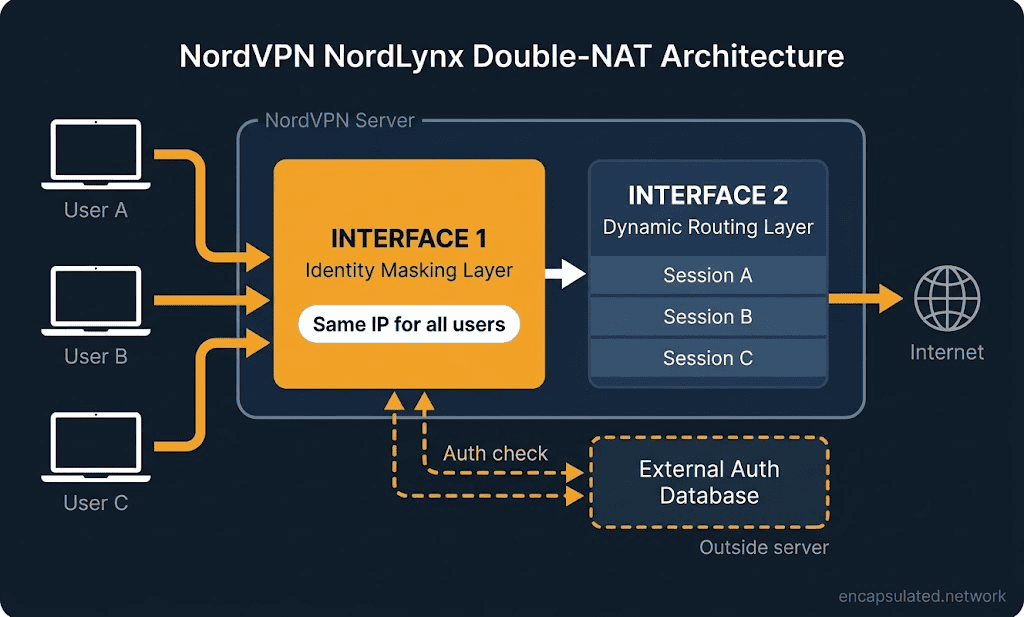
NordLynx addresses the peer table problem by splitting what a standard WireGuard server does — authenticating users and routing their traffic — across two separate network interfaces, each operating with different information. The architecture is called double-NAT because it applies Network Address Translation twice, at two successive interfaces, in ways that make identity-to-traffic correlation by internal IP address architecturally impossible.
Interface 1: the identity masking layer
When your device connects to a NordLynx server, the first network interface assigns you the same internal IP address as every other user currently connected to that server. NordVPN’s own documentation describes this mechanism directly: “the first interface assigns the exact same local IP address to every single user connected to a server.”
The WireGuard peer table on this interface still exists — the protocol requires it. But every entry in that table maps to the same shared internal address. An attacker who obtained this table would find a list of public keys all pointing to an identical IP address, with no way to associate any individual key with any individual user’s traffic through IP correlation. The table is present but stripped of its correlating function.
Interface 2: the dynamic routing layer
Traffic cannot be routed if every user shares the same internal address — the server would have no way to direct responses back to the right tunnel. That routing function falls to the second network interface, which uses Port Address Translation (PAT) to assign a unique address per active session. PAT distinguishes sessions not only by IP address but also by port, which allows multiple concurrent sessions to be multiplexed reliably without requiring persistent per-user records.
The session address on Interface 2 is temporary. It exists only for the duration of your connection. When your session ends, the address is released. No persistent record links that session address to an account, a public key, or anything stored on Interface 1. The routing interface knows where to send your traffic; it does not know who you are. The identity interface knows who you are — in the sense that your authenticated public key is in its peer table — but it cannot tell whose traffic is which.
The external authentication database
There is a third component to the architecture. Before the first interface can assign you an address, the server needs to confirm that you hold a valid NordVPN subscription. That authentication is handled through what NordVPN consistently describes as “a secure external database” — a system separate from the VPN server itself.
The VPN server receives a confirmation that you are an authenticated subscriber, assigns the shared Interface 1 address, and the session begins. At no point is the VPN server the place where your account identity and your active tunnel state coexist in a single record. Your account exists in the authentication system. Your tunnel exists on the server. The two do not intersect in a log.
NordVPN has not published the technical architecture of this database component. Its descriptions use the phrase “secure external database” consistently but without further specification. No independent audit has described this component in greater technical detail.
What a server seizure would and would not reveal
The double-NAT architecture is designed with a specific threat in mind: the risk that a VPN server is seized or accessed by a third party.
On Interface 1, an attacker finds the WireGuard peer table: a list of Curve25519 public keys, all mapped to the same shared internal IP address. The table contains no IP information that differentiates any user from any other user. Any attempt to correlate a public key with a specific session via internal IP is immediately blocked by the shared-address design.
On Interface 2, an attacker finds active session routing state: dynamic session addresses used for current or recent connections, with no link to account identities or the public keys on Interface 1. The routing interface holds no information about who owns any given session.
Absent from the server entirely: any mapping between a subscriber account and a specific session, any record of which address was assigned to which user, any connection timestamps, and the authentication database (which is external to the VPN server).
The sixth NordVPN no-logs audit, conducted by Deloitte Lithuania from 10 November to 12 December 2025 under ISAE 3000 (Revised), examined NordVPN’s infrastructure and configurations and confirmed that no traffic-related metadata — IP addresses, timestamps, bandwidth usage, or session identifiers — is retained. This is the sixth engagement in a series that began with PricewaterhouseCoopers in 2018, with PwC conducting two audits (2018, 2020) and Deloitte conducting four (2022, 2023, 2024, 2025).
What those audits verify is the outcome: that NordVPN’s systems are configured not to retain identifying data. They are no-logs assurance engagements. No published audit has specifically examined whether the double-NAT architecture works as NordVPN describes at the technical design level. The mechanism that produces the verified outcome has not been the subject of a separate independent architectural review.
Post-quantum NordLynx
In 2024 and 2025, NordVPN added hybrid post-quantum key exchange to NordLynx. ExpressVPN and Mullvad had shipped post-quantum protection before NordVPN — ExpressVPN from October 2023 and Mullvad’s desktop default from January 2025 — making NordVPN an early adopter among major consumer providers rather than a pioneer. The capability is now available on all NordVPN platforms. It is also off by default, must be manually enabled, and is silently disabled by several NordVPN features when they are activated. Understanding what it does and what turns it off is more useful than knowing it exists.
The 2024–2025 rollout
NordVPN shipped post-quantum encryption (PQE) to NordLynx in phases, beginning with Linux in September 2024 and then extending to Windows, macOS, iOS, Android, Android TV, and tvOS through 2025, with a full cross-platform announcement in May 2025. As of mid-2026, the feature is available on every supported NordVPN platform.
Enabling it requires a deliberate action. On Windows, the toggle is under Settings, then Connection and security, then Post-quantum encryption. On Android, tap the profile icon in the bottom navigation bar, open Settings, then tap Post-quantum encryption and enable it. On Linux, it is nordvpn set pq on. It is not enabled during installation, not prompted during onboarding, and not shown as a recommended setting in most interface flows. Users who have not specifically sought it out are almost certainly not using it.
How the hybrid works: ML-KEM via WireGuard’s PSK slot
WireGuard includes a built-in optional pre-shared key slot in its handshake, part of the Noise_IKpsk2 construction. This slot was designed for exactly this kind of extension: adding a layer of symmetric protection on top of the existing asymmetric key exchange. NordVPN’s post-quantum implementation uses this existing slot rather than modifying the WireGuard handshake — which is why post-quantum NordLynx, like NordLynx itself, does not require any change to the underlying protocol.
When post-quantum encryption is enabled, an ML-KEM key-encapsulation step negotiates a 32-byte symmetric key. That key is injected as the WireGuard pre-shared key for the session. ML-KEM is the post-quantum algorithm standardised by NIST and published as FIPS 203 in August 2024. NordVPN has not publicly specified which ML-KEM security level it uses.
The result is a hybrid key exchange: both classical X25519 (WireGuard’s existing Curve25519-based key exchange) and ML-KEM must be broken simultaneously for the session to be compromised. If a future quantum computer executes Shor’s algorithm against the X25519 component, the ML-KEM layer still holds. If the ML-KEM algorithm has a flaw not yet discovered, the X25519 component still holds. The hybrid model requires defeating two independent cryptographic systems at once.
The PSK-slot mechanism also confirms that NordLynx does not fork or modify WireGuard. NordVPN is using a feature the WireGuard protocol’s designers included precisely to allow this kind of extension.
90-second key rotation when PQE is enabled
Standard WireGuard initiates a rekeying handshake every 120 seconds — the REKEY_AFTER_TIME constant — generating fresh session keys to provide perfect forward secrecy. When NordVPN’s post-quantum encryption is enabled, the system runs a new hybrid key-encapsulation exchange every 90 seconds instead. The ML-KEM pre-shared key is re-derived and the session is re-established on that shorter interval.
The practical effect is that even if a future adversary obtained a session key, the volume of data exposed would be limited to 90 seconds of traffic rather than the full session. NordVPN has patented this approach as part of Nord Security’s intellectual property portfolio. The 90-second rotation applies only when post-quantum encryption is toggled on; without it, NordLynx rekeys at WireGuard’s standard 120-second interval.
Opt-in, off by default, and silently incompatible
The most practically useful thing to understand about NordLynx’s post-quantum encryption is not how it works — it is what turns it off.
PQE is a NordLynx-only feature. It is available only when the NordLynx protocol is active and cannot be combined with the following NordVPN features: OpenVPN (either TCP or UDP mode), Obfuscated Servers, dedicated IP connections and Meshnet tunnels. When you first enable PQE, NordVPN displays a confirmation modal listing dedicated IP, Obfuscated Servers, and Meshnet as incompatibilities and asking you to confirm before proceeding. What the modal does not cover is the reverse: if PQE is already enabled and you then activate one of these features, PQE is silently disabled with no notification.

The scenario where this matters most is the one where a user would most expect protection: switching to Obfuscated Servers to bypass a restrictive network in a censorship-active country. A user who had enabled PQE at home, then switched to Obfuscated Servers (which requires OpenVPN) while travelling, would have PQE silently disabled for the duration of that connection. Returning to NordLynx restores the ability to enable PQE, but does not automatically re-enable it.
This is an architectural constraint, not an oversight. Obfuscated Servers requires OpenVPN; PQE is a NordLynx-only WireGuard extension. The two cannot coexist on the same connection. But the absence of any UI notification means users bear the burden of remembering to re-enable PQE after switching features and back.
Why post-quantum protection matters
Quantum computers capable of breaking today’s VPN key exchange do not yet exist. The relevant threat model is “harvest now, decrypt later”: adversaries recording encrypted VPN traffic today, intending to decrypt it once sufficiently powerful quantum hardware is available. For most users, this is not an immediate concern. For users whose communications need to remain confidential for years — journalists protecting sources, lawyers handling sensitive cases, people subject to sustained state-level surveillance — enabling PQE and verifying that it remains active is meaningful due diligence. For the full treatment of this threat model, see the post-quantum section in WireGuard vs OpenVPN.
Where NordVPN, Mullvad, and ExpressVPN sit on post-quantum
Three major providers have shipped post-quantum key exchange as of mid-2026.
| Provider | Protocol | Mechanism | Default or opt-in | Disclosed security level |
|---|---|---|---|---|
| NordVPN (NordLynx) | WireGuard | ML-KEM via WireGuard PSK slot | Opt-in (toggle in Settings) | Not publicly disclosed |
| Mullvad | WireGuard | Classic McEliece + ML-KEM via ephemeral peers and PSK slot | Default on all platforms (desktop Jan 2025; mobile Feb 2025) | Not publicly disclosed |
| ExpressVPN | Lightway ((D)TLS 1.3) | ML-KEM-1024 via TLS 1.3 hybrid key exchange | Default on all platforms | ML-KEM-1024 (NIST Level 5, the highest) |
| ProtonVPN | WireGuard | Groundwork announced; not yet deployed | Not yet available | N/A |
NordVPN and Mullvad both inject ML-KEM material through WireGuard’s built-in PSK slot. ExpressVPN’s Lightway — a (D)TLS 1.3 protocol — carries ML-KEM through TLS 1.3’s native hybrid key exchange instead. The mechanisms differ, but the shared lesson is that post-quantum extension did not require forking any of these protocols.
Performance
NordLynx inherits WireGuard’s design and its ChaCha20-Poly1305 cryptography across all platforms. The double-NAT layer adds one extra address translation per packet — a routing operation that takes place on the same server hardware as the WireGuard interface — and introduces no measurable latency penalty in NordVPN’s infrastructure.
On Linux, WireGuard runs as a kernel module, processing packets entirely in kernel space and eliminating the per-packet context switches between kernel and user space that limit OpenVPN’s throughput. NordLynx on Linux inherits this efficiency. On macOS and iOS, WireGuard runs in user space via a Network Extension — there is no native WireGuard kernel module on those platforms. On standard non-rooted Android devices, WireGuard typically runs in user space rather than as a kernel module. On Windows, the reference WireGuard implementation uses WireGuardNT, a kernel-mode driver; whether NordVPN’s NordLynx implementation uses this or its own user-space build on Windows is not publicly documented. The kernel-space efficiency advantage applies to Linux specifically.
What is consistent across all platforms is ChaCha20’s computational profile. ChaCha20 operates on ARX arithmetic — additions, rotations, and XOR operations — that run efficiently in software on any processor without dedicated cryptographic hardware instructions. This makes it fast and battery-efficient on mobile devices regardless of whether WireGuard is running in kernel space or user space. For a detailed breakdown of how protocol choice affects battery drain on mobile hardware, see Does a VPN Drain Your Battery?
Published speed benchmarks test NordVPN as a service, not the double-NAT layer in isolation. The double-NAT architecture itself has not been benchmarked independently; performance claims are replicated at the provider level and cannot be attributed to the architecture alone.
NordLynx’s limitations
Proprietary and non-portable. NordLynx is NordVPN’s implementation, built for NordVPN’s infrastructure and available only through NordVPN’s apps. Switching providers means leaving NordLynx behind. WireGuard and OpenVPN work across hundreds of providers, can be self-hosted on any Linux server, and have published specifications that anyone can implement. NordLynx has none of these properties. The double-NAT privacy layer is inseparable from NordVPN’s server architecture.
The auditability gap. WireGuard’s cryptographic protocol has been formally verified through symbolic and computational proofs and independently audited multiple times. NordLynx’s double-NAT layer is proprietary. NordVPN has not commissioned or published an independent audit of the double-NAT mechanism itself. NordVPN’s six no-logs assurance engagements (PricewaterhouseCoopers in 2018 and 2020; Deloitte in 2022, 2023, 2024, and 2025) verify that NordVPN’s systems are configured not to retain identifying data. That is a meaningful assurance. It is not the same as an independent review confirming that the double-NAT architecture itself behaves as claimed.
UDP-only and DPI-identifiable. NordLynx uses UDP exclusively and produces a recognisable WireGuard traffic fingerprint. Any network that blocks UDP on non-standard ports can block NordLynx, and deep packet inspection systems can identify WireGuard traffic by its packet structure even on non-standard ports. On corporate networks with protocol-level filtering, university networks, some hotel infrastructure, and the censorship systems in countries with active VPN filtering, NordLynx connections will fail. NordVPN acknowledges this directly and recommends NordWhisper for these environments.
No self-hosting. NordLynx’s double-NAT layer is an infrastructure feature of NordVPN’s server network. There is no published specification that would allow independent implementation, and the external authentication database is not accessible outside NordVPN’s systems. Users who want WireGuard-level performance with full control over their infrastructure should run WireGuard directly on a self-hosted server.
When NordLynx doesn’t connect: NordWhisper
When NordLynx is blocked — by UDP filtering, deep packet inspection, or active censorship infrastructure — NordVPN’s answer is NordWhisper, a separate protocol launched in January 2025 that uses what NordVPN calls “web tunnel technology” to disguise VPN traffic as ordinary web browsing, making it significantly harder for network filters to detect and block. NordVPN recommends NordWhisper when NordLynx and other standard protocols are blocked. The two are designed to complement each other: NordLynx for any network where it connects, NordWhisper for the networks where it does not.
How NordLynx compares to other providers’ WireGuard implementations
NordLynx is not the only solution to WireGuard’s static peer table problem. Mullvad and ProtonVPN have each addressed it, and the approaches fall into two distinct categories rather than three.
| Provider | Approach | Peer table | Identity correlation | Independent audits |
|---|---|---|---|---|
| NordVPN (NordLynx) | Double NAT; shared internal IP; external auth database | Exists, but every entry maps to the same shared IP — no per-user IP identifier | IP-based correlation architecturally impossible; timing-based correlation prevented by verified no-logs configuration | No-logs outcomes audited (PwC/Deloitte ×6); double-NAT design not independently reviewed |
| ProtonVPN | Double NAT; shared hardcoded internal IP (10.2.0.2); per-session IP via server-side NAT | Shared internal IP — same architectural solution as NordLynx | IP-based correlation architecturally impossible; timing-based correlation prevented by verified no-logs configuration | No-logs infrastructure audited with on-site server access (Securitum ×4, 2022–2025) |
| Mullvad | Standard WireGuard with rotating static keys; policy commitment; no per-session activity logging | Persistent per-user mapping (public key, tunnel IP, account number stored); static keys rotated on a schedule to limit exposure window | IP-based correlation theoretically possible; policy commitment not to log per-session activity | WireGuard infrastructure audited with direct server access: Cure53 (2020, 2024), Assured AB (2022), Radically Open Security (2023); logging verified disabled |
NordLynx and ProtonVPN both solve the peer table problem the same way: a shared hardcoded internal IP for all users, with server-side NAT providing per-session uniqueness. The shared-internal-IP design makes identity-to-traffic correlation by internal IP address architecturally impossible — no session can be linked to a specific user via the internal IP, because all users share the same one. Timing-based correlation would require the operator to log transient handshake and session-assignment state, which independent audits confirm is not retained. ProtonVPN hardcodes its WireGuard connections to the internal address 10.2.0.2, applies a first NAT to assign a unique per-session address, and a second NAT to route traffic to the internet — the same double-NAT pattern as NordLynx. The meaningful difference between the two is audit transparency: ProtonVPN’s WireGuard infrastructure has been audited with on-site server access by Securitum annually since 2022, while NordLynx’s double-NAT design has not been independently reviewed at the technical level.
Mullvad takes a structurally different approach. It maintains a standard WireGuard peer table with genuine per-user mappings (public key, tunnel IP, and account number stored per configured peer). Rather than making the peer table uninformative by design, Mullvad rotates its WireGuard static keys on a schedule to limit the window of exposure, and relies on a policy commitment not to retain per-session activity — no traffic logs, no DNS logs, no connection timestamps, no source IP addresses. Mullvad’s WireGuard infrastructure has been audited with direct server access by Cure53 (2020, 2024), Assured AB (2022), and Radically Open Security (2023), and auditors confirmed that logging was entirely disabled. Note that DAITA — Mullvad’s defence against AI-guided traffic analysis — is a separate feature unrelated to the peer table or post-quantum question.
The architectural divide is straightforward. NordLynx and ProtonVPN eliminate the IP-based identifier from their peer tables by design, making that form of correlation impossible regardless of operator intent. Mullvad retains a standard peer table but commits not to log activity and rotates keys to limit exposure. Both approaches produce strong privacy outcomes, with different trade-offs between architectural enforceability and operator transparency.
How to enable NordLynx
NordLynx is the default protocol on all NordVPN apps. If you are using NordVPN and have not changed the protocol setting, you are already on NordLynx — typically displayed as “Auto (Recommended)” in the app interface.
Windows
Open Settings (gear icon, lower-left) and go to Connection and security, then VPN protocol. NordLynx should be selected by default. To enable post-quantum encryption, go to Settings, then Connection and security, then Post-quantum encryption, and toggle it on. To switch to NordWhisper on a restricted network, return to VPN protocol and select NordWhisper.

macOS
Select the profile icon in the top-right corner of the NordVPN app, then Settings, then General, then VPN protocol. Confirm NordLynx is selected. Post-quantum encryption is also under Settings, then General. To switch to NordWhisper, return to VPN protocol in the same menu.
Android
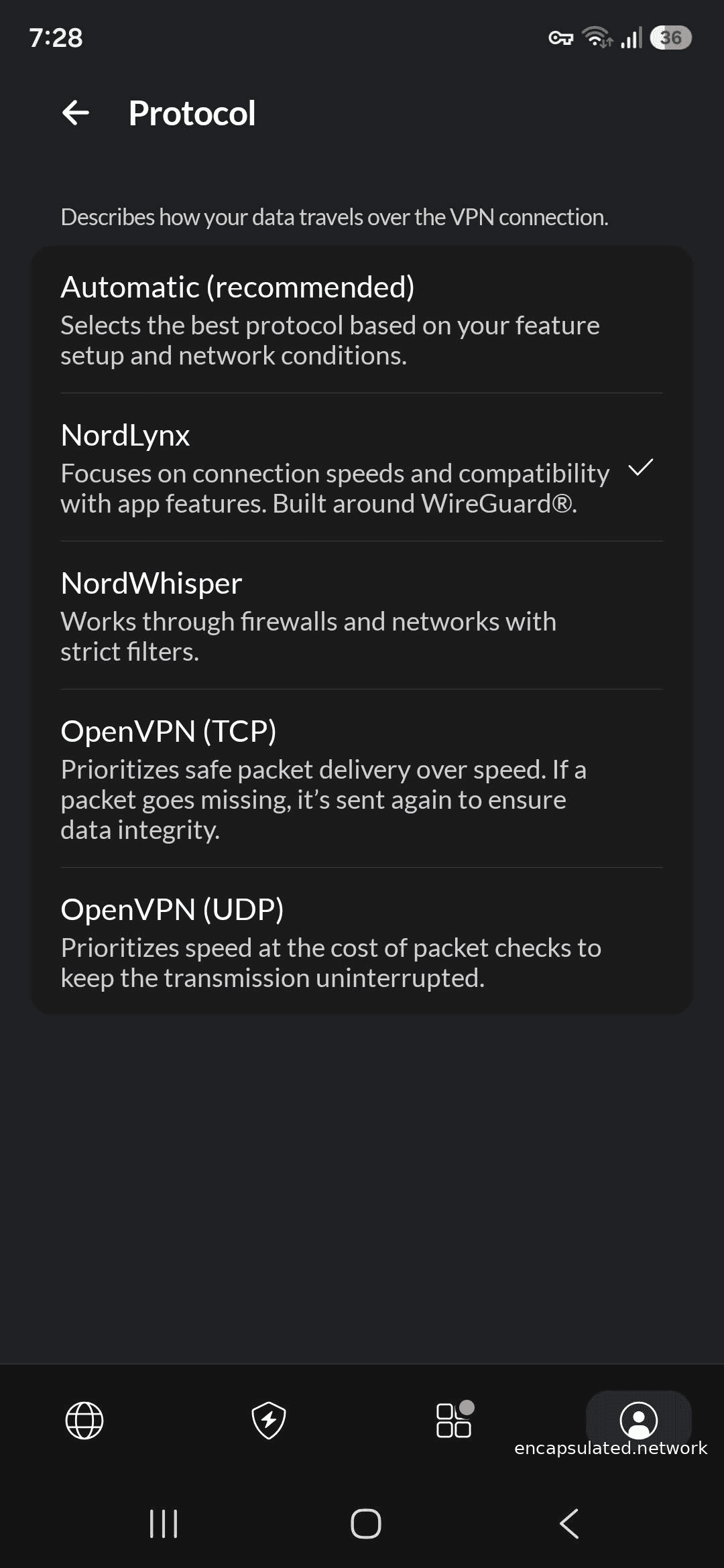
Tap the profile icon in the bottom navigation bar, go to Settings, then protocol, and confirm NordLynx is selected. Post-quantum encryption is under Settings, then Post-quantum encryption (on Android there is no Connection and security sub-section to navigate through — it is a direct settings item). NordWhisper is available from the same VPN protocol menu.
iOS
Open the NordVPN app, go to Settings, then Protocol, and confirm NordLynx is selected. If this path does not match the current app, check NordVPN’s iOS support documentation for the latest navigation.
Linux (CLI)
Use nordvpn set technology nordlynx to set or confirm NordLynx as the active protocol. Use nordvpn set pq on to enable post-quantum encryption and nordvpn set pq off to disable it. NordWhisper availability on the Linux CLI has not been confirmed in current documentation; verify current options in the NordVPN Linux support documentation if you need obfuscation on Linux.
Which NordVPN protocol should you use?
For most users the default is already the right choice.
| Situation | Recommended protocol | Why |
|---|---|---|
| All normal use — browsing, streaming, gaming | NordLynx (default) | Fastest, most battery-efficient, modern cryptography |
| You handle communications that need to remain private for years | NordLynx + PQE enabled | Hybrid quantum-resistant key exchange; verify PQE remains on after switching features |
| NordLynx fails to connect (corporate, hotel, or country-level filtering) | NordWhisper | Web tunnel technology; designed for restrictive networks where NordLynx is blocked |
| Both NordLynx and NordWhisper fail, or legacy compatibility required | OpenVPN TCP on port 443 | Last resort; traffic bypasses most port-based firewalls; no PQE |
Using NordLynx on a router
Whether NordLynx is active on your router depends on which firmware and connection method you use — the range is narrower than it might appear.
NordVPN does not offer a router-resident app for DD-WRT, Asus Merlin, or Tomato firmware, and does not produce its own consumer router. Configuration guides for DD-WRT, Asus Merlin, and Tomato use OpenVPN — those firmware types connect to NordVPN via manual OpenVPN configuration and do not support NordLynx. If you have set up NordVPN manually on one of these firmwares, you are using OpenVPN, not NordLynx.
NordLynx is available at the router level through two specific routes: pre-configured partner routers such as the Privacy Hero 2 from FlashRouters (which supports NordLynx natively), and stock AsusWRT routers using the VPN Fusion feature with a NordVPN access token. On both, the double-NAT architecture operates server-side as normal — it is an infrastructure feature of NordVPN’s servers applied to all NordLynx connections, not a client-side function.
For guidance on which specific router models and firmware versions currently support NordLynx, consult NordVPN’s router support documentation directly, as firmware compatibility changes over time.
Post-quantum reminder
If you have post-quantum encryption enabled and then switch to Obfuscated Servers, dedicated IP, Meshnet, PQE is silently disabled for that connection. When you return to NordLynx, verify the PQE toggle is still on in Settings before assuming quantum protection is active.
Frequently asked questions
Is NordLynx the same as WireGuard?
No. WireGuard is the open VPN protocol that runs underneath NordLynx, completely unmodified. NordLynx is the proprietary network architecture NordVPN built above it: a double-NAT system that strips WireGuard’s static peer table of its IP-identifying function, combined with an external authentication database. The cryptographic guarantees of WireGuard carry through to NordLynx unchanged; what differs is the infrastructure above the protocol.
Why does NordVPN use NordLynx instead of plain WireGuard?
Plain WireGuard requires every server to store a static mapping between user public keys and internal IP addresses. For a VPN provider with a no-logs policy, that record is a structural conflict — the server holds information that could correlate a subscriber’s identity with their session via internal IP. NordLynx’s double-NAT layer resolves this: the peer table on Interface 1 still exists (WireGuard requires it), but every entry maps to the same shared internal IP address, making IP-based correlation impossible.
Is NordLynx secure?
Yes, with two nuances. The cryptographic layer is identical to standard WireGuard: the formally verified Noise_IK handshake, ChaCha20-Poly1305 authenticated encryption, and BLAKE2s hashing. Hybrid post-quantum key exchange (ML-KEM, FIPS 203) is available and adds meaningful protection against future quantum attacks — but it must be enabled manually and is disabled by several NordVPN features. The second nuance is the auditability gap: NordVPN’s six no-logs audits verify that no identifying data is retained on servers, but NordVPN has not commissioned a published independent audit of the double-NAT mechanism itself.
Is NordLynx open source?
Partially. The WireGuard protocol that runs underneath NordLynx is fully open source: the Linux kernel module under GPLv2 and the user-space tools under MIT and ISC licences. NordVPN’s double-NAT layer and external authentication system are proprietary — the source code is not publicly available and no technical specification has been published. The post-quantum pre-shared key mechanism uses WireGuard’s own built-in PSK slot, which is part of the open WireGuard specification.
Can NordLynx be detected and blocked?
Yes. NordLynx uses UDP and carries a recognisable WireGuard traffic fingerprint. Deep packet inspection can identify it regardless of port, and networks that block UDP — corporate firewalls, hotel Wi-Fi, and the censorship infrastructure in countries such as China and Iran — will block NordLynx connections. NordVPN recommends NordWhisper for these environments.
What is the difference between NordLynx and NordWhisper?
NordLynx is NordVPN’s default protocol for general use: WireGuard-based, UDP, optimised for speed on any network where it can connect. NordWhisper is a separate protocol launched in January 2025 that uses “web tunnel technology” (NordVPN’s own term) to disguise VPN traffic as ordinary web browsing, making it significantly harder for network filters to detect. The two protocols are complementary: NordLynx for all networks where it works, NordWhisper for restricted networks where it does not.
Does NordLynx have post-quantum protection?
It can, but it is not on by default. NordVPN makes post-quantum encryption available via a toggle — on Windows under Settings, then Connection and security, then Post-quantum encryption; on Android via the profile icon, then Settings, then Post-quantum encryption — active only when NordLynx is the selected protocol. The mechanism uses ML-KEM (FIPS 203) delivered through WireGuard’s built-in pre-shared key slot alongside classical X25519 — both must be broken simultaneously for the session to be compromised. Note that enabling Obfuscated Servers, dedicated IP, Meshnet disables PQE silently — verify the toggle is still on if you switch between these features and then return to NordLynx.
Should I use NordLynx or OpenVPN on NordVPN?
NordLynx for almost everything. It is faster, more battery-efficient, uses modern cryptography, and is the only NordVPN protocol compatible with post-quantum encryption. OpenVPN TCP on port 443 is the fallback if both NordLynx and NordWhisper fail to connect on a highly restrictive network, or for specific legacy compatibility requirements. On networks that block NordLynx, NordWhisper should be the first alternative to try before switching to OpenVPN.
Is the NordLynx double-NAT system independently audited?
Not at the architectural level. NordVPN’s six no-logs assurance engagements — conducted by PricewaterhouseCoopers in 2018 and 2020, and by Deloitte in 2022, 2023, 2024, and 2025 — verify that NordVPN’s systems are configured not to retain identifying data. These are outcomes audits: they confirm that no identifying records exist on the servers. NordVPN has not commissioned a published audit of the double-NAT mechanism itself. The assurance is meaningful; it covers a different question than a technical architectural review would.
Can I use NordLynx on a router?
Yes, but only through two routes. DD-WRT, Asus Merlin, and Tomato firmware support only manual OpenVPN configuration and do not support NordLynx. NordVPN does not produce its own consumer router. The two NordLynx router routes are the Privacy Hero 2 from FlashRouters and stock AsusWRT via VPN Fusion with a NordVPN access token.
What ML-KEM security level does NordLynx use?
NordVPN has not publicly specified which ML-KEM security level its implementation uses. The algorithm is confirmed as ML-KEM (FIPS 203, the NIST post-quantum standard), but NordVPN’s documentation does not state whether it is operating at Level 1 (ML-KEM-512), Level 3 (ML-KEM-768), or Level 5 (ML-KEM-1024). For comparison, ExpressVPN has publicly confirmed Level 5 (ML-KEM-1024, the highest available) for its Lightway protocol. Until NordVPN publishes the specification, the security level of NordLynx’s ML-KEM implementation cannot be independently confirmed.