A self-hosted VPN puts you in control of the server. You install the software, define the logging policy, and hold the cryptographic keys. What it does not give you is more privacy than a well-configured commercial provider.
Two architectural distinctions determine almost everything: whether you host on hardware at home or on a rented server at a datacenter, and whether either arrangement matches the problem you are trying to solve. Neither is a general-purpose privacy upgrade. Each is the right answer for a specific set of requirements and the wrong answer for others.
TL;DR
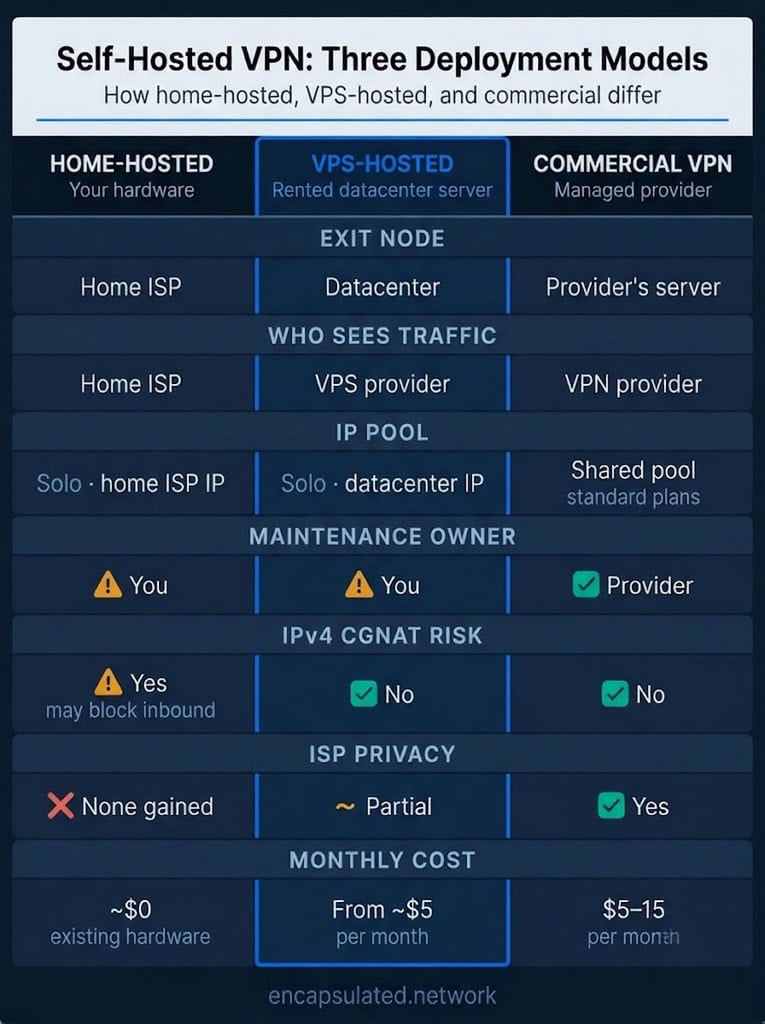
- A self-hosted VPN is a VPN where you operate the server: you provision it, run the VPN software, hold the keys, and set the logging policy. The two deployment models are home-hosted (your hardware, your home ISP as exit node) and VPS-hosted (a rented datacenter server, a datacenter IP as exit).
- Home-hosted is a network access tool. It provides secure, authenticated remote access to your own LAN. It does not change what your home ISP sees. Many ISPs assign shared IPv4 addresses through Carrier-Grade NAT (CGNAT), which blocks inbound connections to a home server over IPv4; confirm your ISP’s configuration before building on home hardware.
- VPS-hosted shifts trust from a commercial VPN provider to a VPS provider and their jurisdiction. The third party changes; it is not removed. You choose the datacenter country, which is a primary factor in the jurisdiction governing the server. One qualification: a VPS provider headquartered in the United States can be compelled to produce data stored anywhere, regardless of datacenter country.
- Self-hosting gives you control, not anonymity. A solo VPS IP is an anonymity set of one: all traffic from that address traces to one account. It also does not give you streaming access. Datacenter IPs are classified by ASN and subnet from the day they are provisioned; a solo operator has no ability to rotate to a fresh address when a range is flagged. Commercial providers mitigate the streaming limitation through active IP rotation, and provide anonymity cover through pool size — two different properties of the shared model.
- Like any VPN, a self-hosted deployment encrypts traffic between your device and the server. Anyone on the same local network — a coffee shop, hotel, airport — cannot read that tunnelled traffic or see where it is going. What changes with self-hosting is the exit-point trust and what the exit-node operator can see, not whether the local access hop is protected. Under a split-tunnel configuration, traffic routed outside the tunnel remains visible on the local network — this applies to any VPN, not only self-hosted.
- Software options: WireGuard for straightforward remote access, OpenVPN for enterprise authentication requirements, AmneziaWG for environments where standard WireGuard is blocked, SoftEther for mixed-client infrastructure. In every case, maintenance, patching, and peer management transfer from the provider to you.
Readers new to VPNs should start with how a VPN works before continuing.
What a self-hosted VPN is
A self-hosted VPN is a VPN where you operate the server. The infrastructure is not rented from a provider running a shared fleet; it is under your direct control, on a machine you own or rent, running software you install and configure. You set the logging policy, hold the cryptographic keys, and decide what the server does with traffic.
“Self-hosting” means hosting the VPN server, not running a VPN client. Client applications run on your devices regardless of which deployment model you use.
Commercial VPN infrastructure operates as a shared fleet: many users route traffic through servers they did not provision, cannot inspect directly, and do not control. A self-hosted VPN is a dedicated endpoint with one defined operator. You are the operator. Linux deployment is covered in Linux VPN Setup.
Tailscale, ZeroTier, and NetBird are mesh overlay networks: a different architecture that builds direct peer-to-peer links between devices coordinated through a control plane, rather than routing all traffic through a single server exit point. Self-hosting the Tailscale coordination server via Headscale removes the third-party coordination dependency, but the architecture remains mesh, not a single-exit VPN. By default, a Headscale network still relays traffic through Tailscale’s public relay servers when two devices cannot connect directly; Headscale’s own relay is off unless you turn it on, and turning it on adds it alongside Tailscale’s relays rather than replacing them. Headscale’s example configuration also leaves off the client logging that Tailscale’s own service turns on by default. Mesh networks handle private multi-device access with automatic NAT traversal; a classic self-hosted VPN provides a defined exit endpoint and a jurisdiction choice.
Home-hosted vs VPS-hosted
Home-hosted
A home-hosted VPN runs on hardware inside your home: a Raspberry Pi, a spare PC, a home router running OpenWRT or DD-WRT, or a NAS device with VPN server support. The exit node is your home internet connection. Your home ISP assigns the public IP and sees the outbound traffic.
This model provides no protection from your home ISP’s visibility into outbound traffic. It provides secure, authenticated remote access to your home LAN: NAS storage, home automation, self-hosted applications, or any internal resource. Here the server is the VPN gateway for your home network. It is a network access tool, not a privacy or exit-node tool. Uptime depends on your home power supply and ISP connection, with no service-level guarantee.
One practical constraint: a significant portion of residential connections now sit behind Carrier-Grade NAT (CGNAT), where the ISP assigns a shared IPv4 address rather than a dedicated public one. Under IPv4 CGNAT, your router receives a private address at the ISP layer; inbound TCP/UDP connections from the internet cannot reach your home server without a workaround. Confirm whether your ISP provides a direct public IPv4 address before committing to home hardware.
If inbound connectivity through a commercial VPN is what you need rather than control over the server itself, some commercial providers offer VPN port forwarding, which is a feature that opens a specific inbound port at the provider’s server and tunnels it to your device, without requiring you to operate the infrastructure.
Where your ISP provides native IPv6 with a stable address prefix, inbound IPv6 connections bypass the CGNAT constraint entirely. This only works if the network you connect from also has IPv6. Many mobile, corporate, and public Wi-Fi networks remain IPv4-only, which makes an IPv6-only home endpoint unreachable from those locations.
A common approach when IPv4 CGNAT is the barrier: a low-cost VPS relay. Your home server initiates an outbound tunnel to the VPS (outbound flows from behind CGNAT are mapped normally at the carrier layer); inbound connections arrive at the VPS’s public IP and are forwarded through that tunnel to your home server. The VPS handles routing only, not storage or compute. Other approaches include an ISP static-IP upgrade that removes your connection from CGNAT, direct IPv6 connectivity where the ISP provides it, and mesh coordination tools.
VPS-hosted
A VPS-hosted deployment runs on a rented Linux server at a datacenter. The datacenter IP is the exit node. Your ISP sees encrypted traffic going to a datacenter address; it cannot see the destination.
Cost starts from around $5 per month for a basic instance. Choosing a VPS means choosing the datacenter country, which is a primary factor in the jurisdiction governing your server. This matters for teams with compliance requirements around data location. One qualification: a VPS provider headquartered in the United States can be compelled under the CLOUD Act, through valid legal process, to produce data held on a server located in any country, regardless of datacenter geography — limited to data the server actually retains. Provider nationality and datacenter location both determine applicable jurisdiction, and they do not always point in the same direction.
Trust shifts to the VPS provider and their jurisdiction. A third party remains in the chain: a different one from a commercial VPN provider, one that you choose.
Pairing the self-hosted server with a commercial exit takes this further: neither party holds both the source address and the destination, the model a two-provider routing setup applies by design.
What self-hosting actually changes
What changes
Self-hosting changes four things.
You define the logging policy. No session data is collected unless you configure it to be. No third party makes that decision on your behalf, and no third party can be compelled to produce records they were not retaining.
You know which server your traffic transits — a verifiable fact, not a policy promise.
You control the cryptographic keys. They are generated on your infrastructure and remain there.
Your traffic does not share an exit IP with users you cannot audit. On a shared commercial server, activity from other users affects your exit IP’s standing with services and platforms. A dedicated endpoint removes that dependency.
What a self-hosted VPN still protects
One security property a self-hosted VPN delivers in full — the one most users need on an untrusted network — is that everything routed through the tunnel between your device and your server is encrypted. An observer on the same local network — a coffee shop, hotel, or airport — cannot read that traffic or see the destinations you are connecting to.
That encryption covers the first hop: your device to your server. On a home-hosted deployment, your home ISP still sees traffic exiting your server. On a VPS-hosted deployment, the VPS provider sees it at the server. Neither arrangement is different from a commercial VPN in this respect — any VPN, for the traffic it routes through the tunnel, provides the same local-network encryption. Under a split-tunnel configuration, traffic routed outside the tunnel remains visible on the local network regardless of which VPN model you use. What differs with self-hosting is exit-point trust and what the exit-node operator can see, not whether the local access hop is protected.
What does not change
You still trust someone. On a VPS, the provider has hypervisor-level access to the physical hardware. Trust moves to a different party.
Your ISP still sees encrypted traffic leaving your device. The observable fact of VPN-like behaviour remains; the destination does not.
Traffic on a solo VPS IP traces entirely to that address, which maps to a single account attributable to one operator. There is no crowd to provide cover.
See No-Log VPNs Explained for how a verified no-log policy compares to self-managed logging.
Who self-hosting is actually for
The privacy-motivated individual
Self-hosting on a VPS is the right architecture when the threat model is: “I do not trust commercial VPN providers, and I am willing to trust a VPS provider and their jurisdiction instead.” You select the provider, the datacenter location, and the logging configuration.
The VPN market is substantially consolidated. Nord Security owns NordVPN and Surfshark, completing their merger in 2022. Kape Technologies owns ExpressVPN, CyberGhost, Private Internet Access, and ZenMate. Ziff Davis owns IPVanish and StrongVPN. Avoiding a specific provider name does not always mean avoiding its parent company. Self-hosting removes that ambiguity entirely.
It is not the right architecture for anonymity. A solo VPS IP is an anonymity set of one: every connection traces to a single account. Commercial VPN servers on standard plans carry many concurrent users through shared exit IPs; attributing a specific action to a specific person requires isolating them within that pool. Self-hosting removes the pool entirely.
The homelab and remote access user
Home-hosted is the correct architecture for this use case and likely the most common self-hosted VPN deployment. The goal is authenticated, encrypted access to your own LAN from outside: NAS storage, a home automation system, a locally hosted application, or any internal resource. It is a network access tool. ISP visibility is not the concern; private remote access to your own infrastructure is.
A VPS is not necessary for this use case unless IPv4 CGNAT is a constraint. Confirm your ISP assigns a direct public IPv4 address — or that both your ISP and the networks you connect from support IPv6, in which case a relay is unnecessary even under IPv4 CGNAT. If a direct public IPv4 or end-to-end IPv6 is available, the hardware cost can be zero where a suitable device already exists.
The small team
A team needing remote access for five to twenty users has an operational case for self-hosting: control over infrastructure, jurisdiction selection aligned with compliance requirements, and integration with existing identity systems through RADIUS or LDAP. A single VPS instance serving the whole team is one flat monthly figure. Commercial business VPN platforms charge per seat and bundle device management, MFA, SSO, and support that a self-hosted tunnel does not provide. The cost advantage applies to the tunnel; the feature scope differs.
Someone must own the server. Key management when a team member departs, uptime response when the service goes down, and software patching are that person’s responsibility, not a support team’s. OpenVPN Access Server‘s free tier supports two simultaneous connections.
Before you set up: four decisions
These four decisions precede installation.
- Home hardware or a VPS? Home hardware for reaching your own LAN; a VPS for a new exit node outside your home network, or where IPv4 CGNAT makes home-hosted impractical without a relay.
- Which software? WireGuard for the general case; OpenVPN for enterprise authentication requirements; AmneziaWG for environments where standard WireGuard is suppressed by DPI; SoftEther for mixed-client infrastructure.
- Exit region and jurisdiction. VPS only: which datacenter country, and whether the provider’s headquarters introduces a second legal jurisdiction regardless of server location.
- Who owns maintenance? Patching, uptime response, peer management, and key rotation need a named person before the server goes live. WireGuard has no built-in rotation of static identity keypairs; it is a manual administrative task, though some orchestration tools automate it. For a team this is a role, not an assumption.
Prerequisites common to every deployment: a host you control (your own hardware or a rented VPS), a reachable public address (direct public IPv4, stable native IPv6, or a relay where CGNAT applies), and a VPN client on each device that will connect.
Software options
These are categories and their leading implementations, not rankings.
WireGuard
WireGuard is the default choice for self-hosted deployments. Its core implementation runs to fewer than 4,000 lines in the original 2017 design, it operates at the kernel level on Linux since version 5.6 (March 2020), and it is available as a package on all current stable Ubuntu and Debian releases. Connection establishment is fast, the configuration surface is minimal, and the protocol has been formally analysed and its cryptographic primitives (ChaCha20-Poly1305, Curve25519, BLAKE2s) have formally verified reference implementations. wg-easy adds a browser-based management interface for peer provisioning without command-line access.
IKEv2/IPsec via strongSwan covers deployments where native OS client support is needed without installing anything on endpoints. Windows 10 and 11, iOS, and macOS all include IKEv2/IPsec natively; strongSwan provides the self-hosted server side (latest stable 6.0.7, June 2026). Configuration complexity is higher than WireGuard. For current Apple platforms: iOS 26 and macOS 26 Tahoe (both September 2025) removed DES, 3DES, SHA-1, and Diffie-Hellman groups below Group 14 from their IPsec implementations, with no user setting to restore them. A strongSwan server configured with any of those legacy cipher suites will not connect from either platform. A correctly configured server using AES-256/AES-GCM, SHA-2, and DH Group 14 or above is unaffected; older configurations commonly break. See L2TP/IPsec Explained for the full cipher-removal detail.
For the full protocol comparison see WireGuard vs OpenVPN.
OpenVPN
OpenVPN is the right choice when the deployment has requirements WireGuard does not natively support: RADIUS or LDAP authentication backends, per-client certificate management through a PKI, or TAP-mode Layer 2 network bridging. Its configuration surface is substantially larger, which means more flexibility and proportionally more surface to misconfigure. OpenVPN Access Server packages the server with a web management interface. Performance improved with the mainline in-kernel DCO module (ovpn), merged in Linux 6.16, which moves packet processing into kernel space. See OpenVPN Explained for the full treatment including DCO, cipher configuration, and tls-crypt-v2.
AmneziaWG
AmneziaWG is a fork of WireGuard that modifies the protocol’s packet structure to defeat deep packet inspection, available as both a userspace implementation and a Linux kernel module. Standard WireGuard’s handshake produces a fixed, universally recognisable fingerprint; AmneziaWG replaces those fixed values with configurable, per-packet randomised alternatives, removing the signature DPI systems match against. The cryptographic core is identical to standard WireGuard. The kernel module requires KVM virtualisation or bare-metal hardware; LXC containers cannot load it. The right choice for self-hosted deployments in environments where standard WireGuard is blocked by DPI. See AmneziaWG Explained for the obfuscation mechanism, version history, and deployment constraints.
SoftEther
SoftEther is a multi-protocol VPN server package that simultaneously accepts connections from its native SSL-VPN protocol alongside OpenVPN, IPsec, L2TP, MS-SSTP, L2TPv3, and EtherIP, all terminating into a single software-emulated Layer 2 switch called the Virtual Hub. A mixed environment with Windows devices using SSTP, mobile devices using L2TP/IPsec, and Linux workstations using OpenVPN can connect to one SoftEther server without separate server infrastructure per protocol. Configuration complexity is high. The right choice for mixed-client environments where protocol consolidation is the requirement, or for Layer 2 site-to-site bridging. See SoftEther Explained for the Virtual Hub architecture, SecureNAT versus Local Bridge, and the full protocol detail.
What self-hosting does not give you
Anonymity
A solo VPS IP is an anonymity set of one. Every connection from that IP traces to a single VPS account, attributable to one operator. A commercial VPN server on a standard plan carries many concurrent users through a shared exit IP; attributing a specific action to a specific person requires isolating them within that pool. Self-hosting removes the pool entirely.
A fresh, unlisted VPS IP with no accumulated abuse history often does not resemble a catalogued VPN exit point — which is why commercial providers offer dedicated IP options. That is about detectability. Attribution is the separate issue: when traffic leaves that IP, there is one candidate.
Streaming and service access
A solo VPS IP on a major hosting provider’s network is classified as a datacenter address from the day it is provisioned, based on the provider’s ASN and subnet range. Streaming platforms maintain lists of those ranges and block connections from them. Once a range is flagged, a solo operator has no mechanism to rotate to a fresh address. Commercial providers address this through pool scale and active IP management, retiring flagged addresses and cycling in replacements. The advantage is rotation capacity, not any inherent property of shared IPs.
The same ASN-based classification applies to financial institutions and payment platforms, which use IP reputation and ASN-type feeds to flag connections from hosting ranges as elevated risk, frequently blocking them or requiring additional verification. The motive differs from streaming (fraud prevention and anti-money-laundering compliance rather than geo-licensing), but the underlying detection mechanism is the same.
Two distinct properties carry different verdicts. Whether a VPS IP resembles a VPN exit point, and whether it is linkable to one identifiable individual, are separate questions. A fresh, clean VPS IP with no VPN-exit database listing fares better than a heavily used commercial pool IP on the first. On linkability, the solo IP is worse: all activity traces to one account. The verdict differs by axis.
Censorship resistance
Standard WireGuard or OpenVPN on a VPS is detectable by DPI infrastructure in Russia, China, Iran, and comparable environments. Both protocols produce fingerprints that active filtering systems hold signatures for. Self-hosting relocates the server; it does not remove the protocol fingerprint. AmneziaWG addresses this for self-hosted deployments in Russia and Iran. Against the GFW specifically, which since 2024 has intensified its active probing, deep-packet inspection, and IP-range blocking of circumvention traffic, it is less reliable; a TLS-camouflage transport such as VLESS+REALITY is the stronger self-hosted option for China. Everything else requires a separate obfuscation transport, either wrapping the standard protocol or replacing it with a camouflage layer. For the full technique taxonomy see What Is an Obfuscated VPN?.
Maintenance is yours
When you operate the server, these responsibilities transfer from a provider’s infrastructure team to you.
- Keep software patched. The VPN software and host OS must be updated on a defined cadence. An unpatched VPN server with an open port is a public endpoint.
- Use key-based SSH only. Disable password authentication entirely.
- Never expose management interfaces to the public internet. Bind admin UIs and management ports to the loopback interface or a private address, not to the public IP.
- Scope each peer’s AllowedIPs to the address it should use. A per-peer AllowedIPs of
0.0.0.0/0allows that peer to send packets with any inner source IP, collapsing the source-address isolation between peers on a shared server. WireGuard rejects any client whose public key is not in your peer table regardless of AllowedIPs, so the risk here is inter-peer spoofing, not unauthorised access. - Monitor for outages. No one else will detect or report when the service goes down.
- Manage peer removal promptly. WireGuard’s peer table is persistent — entries remain until explicitly removed. Removing a peer requires manually deleting their entry from the server’s peer configuration and reloading the interface. Removal blocks new connection attempts immediately. An already-active session can persist for up to three minutes under WireGuard’s rekey and session-expiry timers, unless the interface is restarted. Orchestration tools such as wg-easy and wg-portal add per-peer disable and expiry options on top of the base design.
For a personal deployment, this overhead is manageable. For a team deployment, it requires an assigned owner who understands the stack and is reachable when things go wrong.
When a commercial VPN is the better choice
Commercial wins clearly in these situations.
| Situation | Why commercial wins |
|---|---|
| Streaming and geo-unblocking | Pool scale and active IP rotation. When a range is flagged, providers retire those addresses and bring in replacements. A solo operator has no equivalent capability. |
| Anonymity in a crowd | Shared servers on standard plans carry many concurrent users through shared exit IPs. Attributing a specific action to a specific person requires isolating them from that pool. A solo VPS provides no pool. |
| No maintenance | Commercial by definition. No patching, uptime response, or peer management required from the user. |
| Travel to censorship-active countries | Commercial obfuscation is pre-configured and available in one step. VPN provider portals and configuration interfaces are consistently blocked inside the countries where circumvention is most needed; configuring a self-hosted server from within those environments is difficult and, in the most tightly filtered (notably China), generally not possible without pre-existing circumvention access. |
| Mobile users switching networks frequently | Commercial apps handle reconnection, kill switch, and split tunnelling in a managed interface. Session persistence across network transitions is handled by the app. |
| Multi-region exit coverage | One VPS gives one exit region. Each additional region requires provisioning and maintaining a separate server. |
| No sysadmin capacity | Maintenance requires someone with the technical capability and availability to own the server. If that person does not exist, commercial is the correct choice. |
Is running a self-hosted VPN legal?
In most jurisdictions, self-hosting a VPN server is as lawful as VPN use itself. The relevant question is what that jurisdiction’s law says about operating VPN infrastructure, not which software is used.
In restrictive jurisdictions, running a self-hosted VPN places you in the position a commercial provider would otherwise occupy. No company sits between you and the regulatory authority.
Russia. Federal Law 276-FZ targets VPN providers on the supply side, requiring registration with Roskomnadzor and compliance with the blocked-resources registry. Individual use is not criminalised under the statute. Three developments are relevant: advertising or promoting VPNs has been prohibited since September 2025; additional protocols were added to the blocked list in December 2025; and in April 2026, Russian authorities moved to restrict hosting providers from supplying server capacity to operators enabling access to blocked content. Whether an individual running a self-hosted VPN constitutes a registrable provider under 276-FZ is legally unsettled; enforcement has focused on commercial services. The practical position is personal exposure without a corporate intermediary to absorb regulatory risk.
China. State Council Decree 195, Article 6 prohibits any unit or individual from independently establishing or using a non-state-sanctioned cross-border internet channel. The “establish” language directly reaches a self-hoster.
Iran. VPN use is prohibited by a Supreme Council of Cyberspace resolution that came into effect in February 2024. No additional prohibition specifically targets self-hosting; running a self-hosted VPN server carries the same legal status as using a VPN. The SCC is a policy body rather than a legislature; Iranian legal scholars dispute whether the resolution constitutes criminal law under the principle of legality of crimes and punishments.
Frequently asked questions
Does a self-hosted VPN protect me on public Wi-Fi?
Yes, for tunnelled traffic. The tunnel encrypts your connection across any local network — a coffee shop, hotel, or airport — so no one sharing it can read that traffic or see where you are going. Under a split-tunnel configuration, traffic routed outside the tunnel stays visible on the local network; that is a property of the split-tunnel setup, not of self-hosting. What changes with self-hosting is the exit point, not the local protection.
Is Tailscale a self-hosted VPN?
Not as a single-exit VPN server. Tailscale, ZeroTier, and NetBird are mesh overlay networks — they connect devices peer-to-peer rather than routing all traffic through one server exit point. Self-hosting the coordination server (via Headscale for Tailscale) keeps the control plane private; by default, relayed traffic still passes through Tailscale’s public relay servers. The architecture stays mesh.
What is a self-hosted VPN?
A self-hosted VPN is one you run yourself — on your own hardware or a rented server — with full control over the software, logging policy, and cryptographic keys. The two main forms are home-hosted (your hardware, your home ISP as the exit node) and VPS-hosted (a rented datacenter server, a datacenter IP as the exit).
Is a self-hosted VPN more private than a commercial VPN?
More controlled, not necessarily more private. Self-hosting gives you direct authority over the logging policy and cryptographic keys. It does not give you anonymity: a solo VPS IP is an anonymity set of one, with all traffic attributable to one account. It does not give you reliable streaming access: datacenter IPs are classified on an ASN and subnet basis and cannot be rotated when flagged. Whether self-hosting improves on a given commercial provider depends entirely on the use case and threat model.
What is the difference between home-hosted and VPS-hosted?
Home-hosted runs on hardware inside your home; your home ISP is the exit node, and your ISP’s visibility into outbound traffic is unchanged. It is a network access tool for reaching your own LAN from outside. VPS-hosted runs on a rented datacenter server; the datacenter IP is the exit, and trust shifts to the VPS provider and their jurisdiction. Home-hosted carries IPv4 CGNAT risk for inbound connections; VPS-hosted does not. Neither eliminates a third party from the trust chain.
What software do I need to run a self-hosted VPN?
WireGuard for the general case. OpenVPN for enterprise authentication backends or Layer 2 bridging. AmneziaWG where standard WireGuard is blocked by DPI. SoftEther for mixed-protocol environments.
How much does a self-hosted VPN cost?
Home-hosted: the cost of the hardware plus electricity; zero ongoing cost where a suitable device already exists. VPS-hosted: from around $5 per month for a basic instance.
Can I use a self-hosted VPN for streaming?
Not reliably. VPS IPs sit in datacenter address ranges that streaming platforms block by ASN, and a solo operator cannot rotate to a fresh address when a range is flagged. Commercial providers cycle through IP pools specifically to solve this; a solo server cannot. For sustained streaming access, commercial is the right choice.
Is a self-hosted VPN anonymous?
No. A solo VPS IP points to one account — there is no crowd. Commercial shared servers put many concurrent users behind the same exit IP, making individual attribution far harder. If anonymity matters more than control, self-hosting is the wrong choice.
What are the risks of running your own VPN server?
Misconfiguration (an improperly hardened VPN server with an open port is a public endpoint), ongoing maintenance responsibility (software updates, uptime, peer management), legal exposure in restrictive jurisdictions without any corporate intermediary, and uptime dependence on infrastructure you manage directly. For team deployments, there is also the organisational risk that comes with operational knowledge concentrated in one person.
Do I need a VPS or can I use my home router?
The use case determines the choice. A home router or Raspberry Pi is the right approach for remote access to your own LAN. Check first whether your ISP provides a direct public IPv4 address: if they use CGNAT, inbound IPv4 connections will fail without a relay or a static-IP upgrade. Where your ISP provides stable IPv6 and the networks you connect from also have IPv6, direct inbound IPv6 connectivity can work without a VPS relay. A VPS is the right choice for a new exit node outside your home network, or where IPv4 CGNAT makes home-hosted impractical without a relay.
Is a self-hosted VPN legal?
In most jurisdictions, yes. In Russia, China, and Iran, VPN operation is restricted or prohibited; in those jurisdictions a self-hosted operator carries the exposure a commercial provider would otherwise absorb, with no corporate intermediary between them and regulatory authority.