VPN port forwarding opens a numbered port on your VPN provider’s server and routes inbound traffic through the encrypted tunnel to your device, making it reachable from the internet despite sitting behind the VPN.
By default, a VPN blocks all unsolicited inbound connections to your device. Port forwarding carves an exception into that firewall at the VPN server level, not at your router.
TL;DR
- VPN port forwarding opens a numbered port on your VPN server’s public IP and tunnels inbound connections to your device. Without it, the VPN blocks all unsolicited inbound traffic by design. That is the correct default.
- You need it for torrenting, where your client is flagged as not connectable or “firewalled” and seeding performance matters, and for hosting a server or service that others need to reach over the internet. For privacy, streaming, or public Wi-Fi protection, port forwarding adds an open inbound entry point with no benefit. Leave it off.
- Most major VPNs do not offer it on standard plans. PIA, ProtonVPN, and AirVPN all offer it on paid plans. NordVPN’s standard plans and Dedicated IP add-on do not; its Dedicated Server add-on does. Mullvad removed it on 1 July 2023; IVPN fully removed it on 30 September 2023.
- An open forwarded port is a publicly reachable entry point: any service listening on it must be kept patched and maintained. Rotating port assignment is more private than static. A static port on a shared VPN exit IP is a persistent session identifier.
What Is a Port?
A port is a 16-bit number identifying a service on a networked device. Every connection specifies an IP address (which device) and a port number (which service). Ports range from 0 to 65,535, giving 65,536 total. Ports 0 through 1023 are the well-known ports, assigned by IANA to established protocols; port 0 is reserved within that range and not used for listening services. Ports 1024 through 49151 are registered ports for applications. Ports 49152 through 65535 are available for dynamic or private use.
Common port numbers to recognise: 443 (HTTPS), 80 (HTTP), 1194 (OpenVPN UDP, the IANA-registered default), and 51820 (WireGuard, the conventional default; configurable per deployment).
Ports are closed by default. Your operating system and firewall silently discard traffic arriving at a port with no service listening on it.
What Happens to Your Ports When You Use a VPN
The VPN server as a NAT firewall
When a VPN is active, your device’s traffic exits from the VPN server’s IP rather than your own. The VPN server acts as a NAT gateway: NAT (Network Address Translation) allows many devices to share one public IP address, and the gateway tracks outbound sessions while dropping inbound traffic that has no matching session mapping. It relays your outbound connections and returns the responses to your device. All unsolicited inbound traffic is dropped at the server’s firewall. See how a VPN works for the full tunnelling and routing detail. This blocking is protective by design.
Why router port forwarding stops working
On a standard home network, a router port forwarding rule tells the router to send inbound connections arriving on a given port to a device on the local network. Port forwarding configured on a home router does not function while a VPN is active.
Routing asymmetry. Once the VPN tunnel is established, your device’s default route is the encrypted tunnel. Any response to an inbound connection leaves via the tunnel rather than back through the router to the original requester. The connection never completes.
Wrong reachable IP. Inbound connections from the internet must now target the VPN server’s exit IP, not the home router’s public IP. The router’s forwarding rule on the home IP is bypassed before it can act.
Your router’s port forward rule is not broken. It is pointing at the wrong IP. Once a VPN is active, the publicly reachable address is the VPN server’s exit IP, not your router’s. An inbound port can only be opened at the VPN server level.
For users running a self-hosted VPN on home hardware, port access varies by deployment model and ISP address assignment.
What VPN Port Forwarding Actually Does
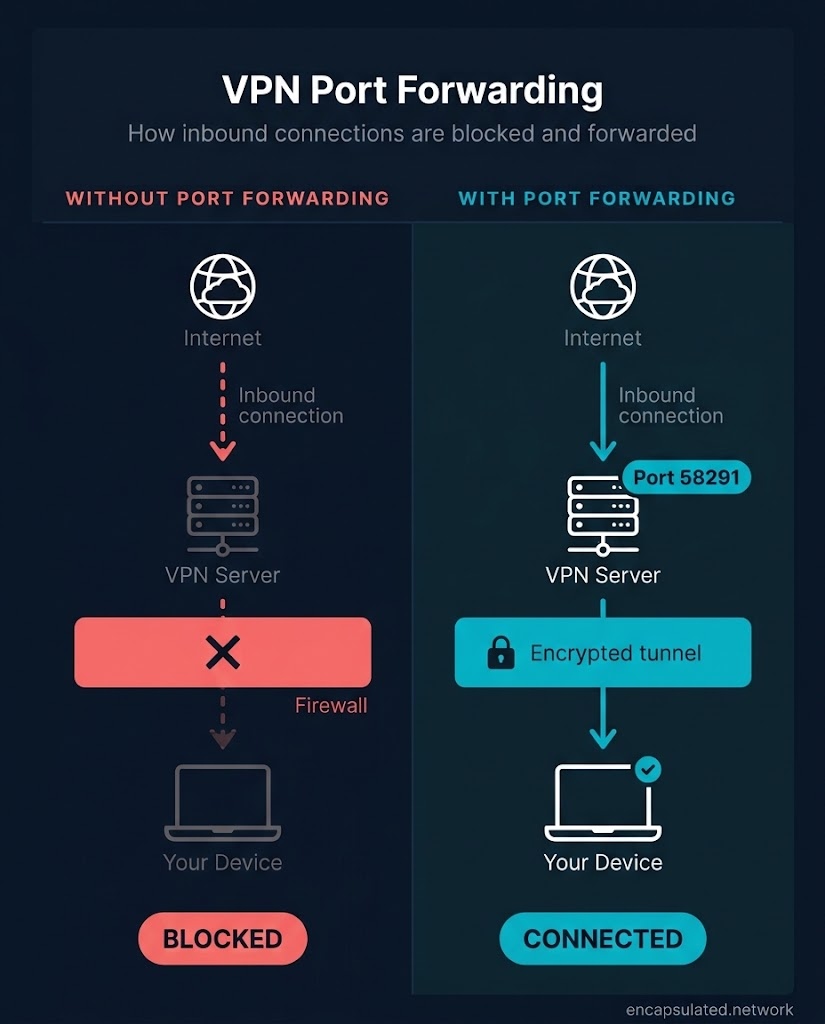
A VPN provider offering port forwarding opens a port on the VPN server’s public IP address and maps inbound traffic arriving at that port through the encrypted tunnel to your device. Your device is the destination; the VPN server is the publicly reachable entry point.
The sequence of a port-forwarded connection:
- You request a port forward from your provider through an in-app toggle or a web account panel.
- The provider opens that port on their server (for example, port 58291 on the server’s exit IP).
- A peer, player, or remote client connects to [VPN exit IP]:58291.
- The VPN server receives the inbound connection and tunnels it to your device.
- Your device receives the connection.
In standard networking terminology, VPN port forwarding is a form of remote port forwarding: the remote server listens on a public port and forwards inbound connections back through the tunnel to the local device. The other types in the taxonomy are local port forwarding and dynamic port forwarding; dynamic port forwarding creates a SOCKS proxy and is unrelated to the VPN provider feature. VPN providers handle the implementation; you interact only with the port number assigned to you.
When You Actually Need It
Port forwarding is necessary in three situations: when your torrent client is not connectable through the VPN, when you are hosting a game server, and when you are running a service that requires inbound connections from the internet. In all other common VPN use cases, the feature is unnecessary and opens an inbound entry point that serves no purpose.
Torrenting and P2P
Without port forwarding, a torrent client behind a VPN is not connectable. qBittorrent flags this condition as “firewalled”: the client can reach out to connectable peers listed by the tracker, but no peer can initiate a connection inward to it. Two not-connectable clients cannot connect to each other. The result is a smaller effective peer pool, reduced seeding ratios, and slower downloads on files where the peer population is sparse.
Port forwarding makes the client connectable: any peer in the swarm can connect to it. This expands the effective peer pool, improves seeding ratios, and increases download speeds on files where every available peer connection matters. A not-connectable client can still seed because it can initiate outbound connections to connectable peers, but performance is degraded compared to a connectable client.
If you torrent with port forwarding enabled, pair it with a kill switch so a VPN dropout does not briefly expose your real IP to the peer swarm.
Game server hosting
Hosting a game server requires other players to connect inbound to your machine. A VPN blocks those attempts; players see timeouts or connection-refused errors. Port forwarding opens the inbound path at the VPN server level.
For a Minecraft Java Edition server, the default listening port is TCP 25565. Players must be able to reach that port at the VPN exit IP. Bedrock Edition uses UDP 19132. Do not apply Java Edition port numbers to a Bedrock deployment.
Hosting requires port forwarding; playing through a VPN does not.
NAT type and VPN. Gamers typically encounter this as a NAT type problem rather than a port forwarding problem. The vocabulary differs by platform: Xbox and most Windows PC games label inbound connectivity open, moderate, or strict; PlayStation uses Type 1, 2, and 3; and Nintendo Switch uses Type A through F. Every scheme describes the same spectrum. An open NAT (Type 1, Type A) accepts unsolicited inbound connections, so the device can host sessions and reach players on any NAT type. A strict NAT (Type 3, the restrictive Switch types) blocks almost all unsolicited inbound, so the device can reach only players whose NAT is open and generally cannot host. A moderate NAT (Type 2, Type B) sits between the two: it connects to open and moderate peers but not strict ones, and usually will not be chosen as the session host.
A VPN presents the equivalent of strict NAT for inbound traffic: the VPN server discards all unsolicited connection attempts by default, which prevents other players from reaching a hosted server. Port forwarding resolves this. It is not related to UPnP settings or the NAT type shown in your console’s network settings; both reflect your local router configuration, which the VPN has already bypassed.
Remote access and self-hosted services
Running a web server, accessing a NAS (Network Attached Storage) device while travelling, or reaching home security cameras remotely all require inbound connections that a VPN blocks by default. Port forwarding opens that pathway at the VPN server level.
For remote access to your own authorised devices, a mesh overlay network such as Tailscale or ZeroTier may be a more appropriate architecture. Both use NAT traversal with encrypted relay fallback to create direct connections between devices you control, without opening any public-facing inbound port on your router. Cloudflare Tunnels provides an equivalent no-open-port approach for hosting web services publicly, using outbound-only connections to Cloudflare’s edge network.
Tailscale and ZeroTier give private, authorised access only: the connecting party must be enrolled in your network. They are not a substitute for a public server open to arbitrary users. Cloudflare Tunnels covers HTTP and web traffic; raw TCP protocols such as a game server require Cloudflare Spectrum, an enterprise product unavailable to individuals. For a public server open to anyone, port forwarding or a dedicated public-endpoint tunnelling service is the appropriate mechanism.
If you are using a VPN for privacy, streaming, or public Wi-Fi protection, none of these use cases apply. Port forwarding opens an inbound entry point without contributing to any of those goals. Leave it off.
Which VPNs Offer Port Forwarding, and Which Don’t
Port forwarding support across major providers:
| Provider | Port forwarding | Plan required | Port type | Note |
|---|---|---|---|---|
| PIA | Yes | Paid | Rotating | One port at a time; OpenVPN and WireGuard |
| ProtonVPN | Yes | Paid (not free tier) | Rotating | Windows, macOS, Linux only; uses NAT-PMP |
| AirVPN | Yes | Paid | Static | Multiple ports; persist per account while subscription is active |
| AzireVPN | Yes | Paid | — | WireGuard only |
| TorGuard | Yes | Paid | — | OpenVPN and WireGuard |
| NordVPN | Dedicated Server add-on only | Business tier | — | Standard plans and Dedicated IP add-on: no |
| ExpressVPN | No | — | — | VPN servers: no; Aircove router has separate router-to-LAN feature |
| Surfshark | No | — | — | Cites increased attack surface (open ports as a network entry point) as rationale |
| Mullvad | Removed | — | — | Removed 1 July 2023 |
| IVPN | Removed | — | — | Fully removed 30 September 2023 |
Providers that currently offer it
PIA (Private Internet Access). Available on all paid plans over OpenVPN and WireGuard. The assigned port rotates on each session reconnection and is displayed in the app interface once connected. One port forward is active at a time.
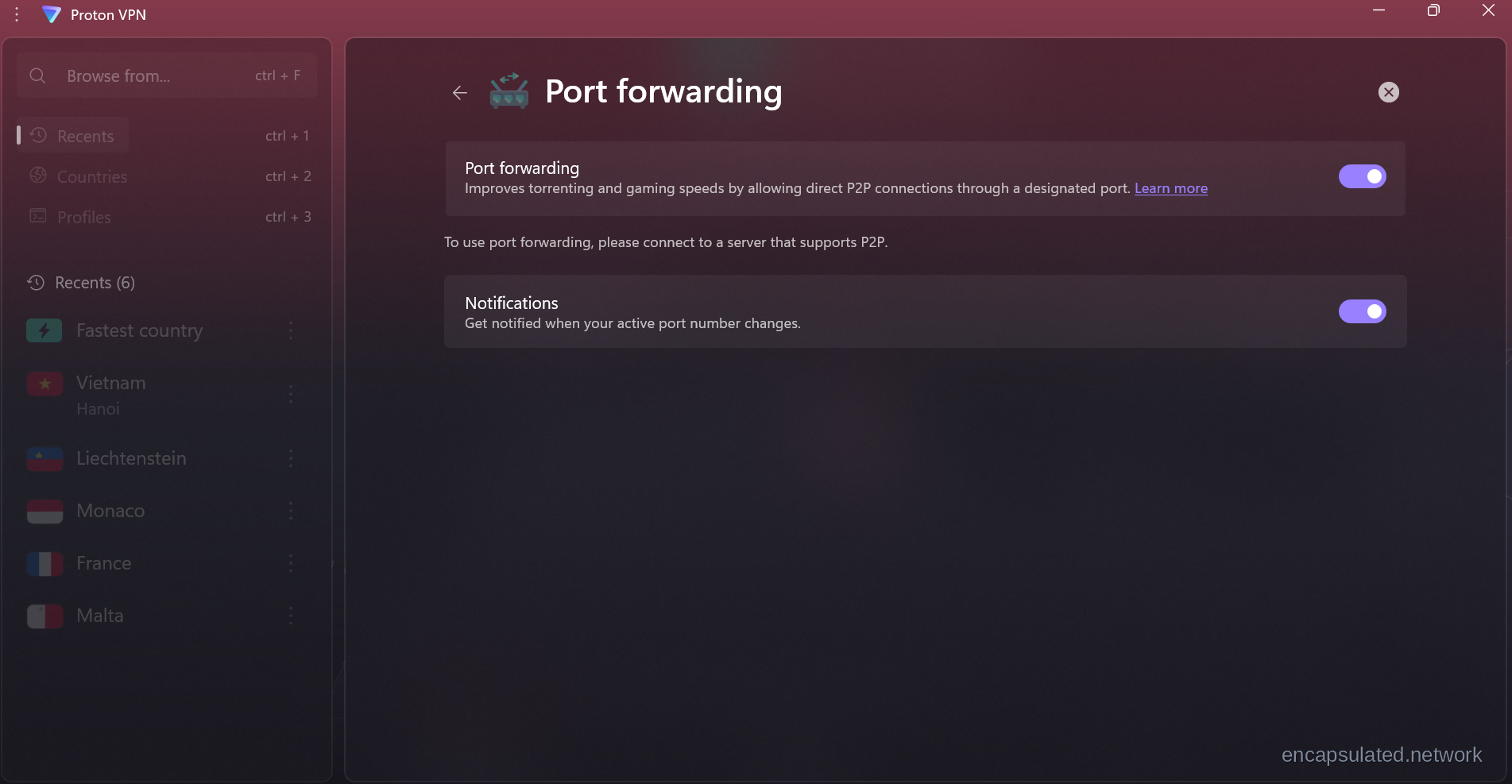
ProtonVPN. Available on paid plans; the free tier is excluded. The feature uses NAT-PMP. The assigned value is displayed as the “Active port” in the app and usually changes on reconnection. Supported on the official Windows, macOS, and Linux apps. Manual configuration is available for third-party clients via the OpenVPN +pmp suffix or the WireGuard NAT-PMP option. iOS and Android are not supported.
AirVPN. Configured through the AirVPN client area on the website, not through the app. Any port from 2048 upward can be requested manually (2048 inclusive). Ports are static: they remain reserved to the account for the duration of the subscription and do not rotate between sessions. Multiple simultaneous port forwards are available; verify the current upper limit in the AirVPN client area documentation.
AzireVPN. Supported over WireGuard, managed through the AzireVPN account manager.
TorGuard. Supported over OpenVPN and WireGuard. The number of port forwards available varies by plan.
No reputable mainstream free VPN tier offers port forwarding. ProtonVPN and Windscribe both require a paid upgrade. The feature demands dedicated server infrastructure that free tiers do not sustain. If a free provider claims to offer it, examine how they are funding that infrastructure before trusting it with your traffic.
Providers that do not offer it on standard plans
NordVPN. Standard shared VPN servers: no port forwarding. Dedicated IP add-on: no port forwarding. Dedicated Server add-on, a business-tier product separate from the standard consumer plans: port forwarding is included. NordVPN’s Meshnet feature enables device-to-device routing among authorised devices but is not public-facing port forwarding.
ExpressVPN. VPN server infrastructure: no port forwarding. The Aircove router firmware includes a separate router-to-LAN port forwarding feature, not a substitute for VPN server port forwarding. ExpressVPN set a 31 March 2026 cut-off after which non-Aircove routers would no longer connect to its dedicated router application.
Surfshark. Does not offer VPN-level port forwarding. Surfshark’s own documentation attributes the decision to the increased attack surface that port forwarding creates: it describes an open port as a network entry point that exposes devices to unauthorised connections and undercuts the protection the VPN provides.
Why two major privacy-focused providers removed it
Mullvad and IVPN removed port forwarding within months of each other in 2023. Their announcements are the most transparent account of why port forwarding is a sustained operational liability for privacy-focused providers.
Mullvad announced discontinuation in a blog post dated 29 May 2023, citing three explicitly stated reasons: law enforcement contact, IP blacklisting, and hosting providers cancelling contracts due to abuse. All existing forwarded ports were removed on 1 July 2023.
IVPN announced its phase-out on 29 June 2023. From that date, new Pro customers could no longer obtain forwarded ports and existing customers could not reserve new ones. IVPN’s stated reasons echo Mullvad’s: enabling large-scale abuse and the distribution of objectionable material, with a surge in new customer accounts following Mullvad’s announcement adding to the load. All remaining ports were disabled on 30 September 2023.
Neither decision was technical. Both were responses to documented operational consequences: regulatory contact, infrastructure cancellations, and large-scale abuse by a small number of users who had enabled the feature.
The Security Trade-offs
Attack surface expansion
An open forwarded port is a publicly reachable entry point to your device. Any service listening on that port is exposed to the internet from the moment the port opens. Open ports are probed by automated scanners within minutes of exposure. The risk scales with what is listening: a maintained torrent client carries less exposure than an unpatched remote desktop or management service. Forward only the ports you need, verify each is necessary, and close them when done.
The Port Fail vulnerability (November 2015)
Port Fail was disclosed by Perfect Privacy in November 2015. Its defining property is that the victim does not need port forwarding enabled. Only the attacker does.
The mechanism: an attacker with an account on the same VPN provider as the victim enables port forwarding on their account, then causes the victim to initiate a connection to a resource routed through that port. Because the victim’s device uses its real IP as the default route to reach the VPN server, the attacker learns the victim’s real IP.
Three conditions are required for the attack to succeed: the attacker holds an account on the same VPN provider as the victim; the attacker knows the victim’s VPN exit IP; the attacker has port forwarding active on their account.
Reputable providers patched against Port Fail following the 2015 disclosure. ProtonVPN states explicitly that its implementation is not vulnerable. Port Fail is a historical vulnerability, not a current risk for users of well-maintained providers. It illustrates what port forwarding architecturally opens up at the provider level.
Rotating vs. static port assignment
Providers differ on whether the assigned port number changes between sessions. AirVPN uses static port assignment: the port remains reserved to the account across all sessions until the user removes it. ProtonVPN and PIA use rotating port assignment: the port changes on each reconnection.
A static forwarded port on a shared VPN exit IP is a persistent session identifier. Because many users share the same exit IP, the combination of exit IP and your assigned port distinguishes your traffic across time. Any service logging that combination can correlate your sessions. Rotating port assignment breaks that cross-session fingerprint: the port changes on every reconnection, removing the persistent exit-IP-plus-port marker. Within a single session the port is still fixed, so rotating mitigates cross-session correlation rather than eliminating identification entirely.
Between the two, rotating is the more private option. If you have a choice of provider, prefer one that uses rotating port assignment over one that uses static.
Should You Enable It?
Enable it if your use case requires inbound connections: your torrent client is flagged as not connectable or “firewalled” and seeding performance matters to you; you are hosting a game server and players cannot connect; you are running a service that others need to connect to over the internet. If you have a choice of provider, prefer one with rotating port assignment over static.
Leave it off if you are using a VPN for privacy, streaming, or public Wi-Fi protection. Port forwarding opens an inbound entry point that serves none of those goals. Discarding all unsolicited inbound connections is the correct default.
Not applicable if your current plan does not include port forwarding. The VPN firewall discards inbound connections by default. No action is required.
How to Enable Port Forwarding on Your VPN
In-app method (for example, ProtonVPN)
- Open your VPN app’s settings. The port forwarding option may appear under a section labelled Network, Privacy, or Advanced depending on the provider.

Port forwarding lives in ProtonVPN’s Connection settings tile grid, alongside Kill switch and Split tunneling. The tile shows the current state — On or Off — without opening the dedicated panel. - Enable the port forwarding toggle.
- Connect to a server that supports port forwarding. Not all server locations on a provider’s network offer the feature; check your provider’s documentation for a list of compatible locations.

ProtonVPN’s P2P-filtered server list. Port forwarding only activates when connected to one of these 145 locations. Select any country from this list before enabling port forwarding to ensure the Active port appears after connecting. - Once connected, the assigned port number appears in the app interface.

ProtonVPN connected to a P2P server with port forwarding active. Port 65530 appears in the right sidebar under the Port forwarding label. This number changes on each reconnection. Copy it into your torrent client’s listening port field before you start a session. - Copy that number and paste it into your application’s listening port field. In qBittorrent on Windows and Linux: Tools → Options → Connection → “Port used for incoming connections.” On macOS: qBittorrent → Preferences → Connection.
Account/web panel method (for example, AirVPN)
- Log in to your provider’s client area on the website.
- Navigate to the port forwarding section and request a port. AirVPN accepts any port from 2048 upward (2048 inclusive).
- Copy the assigned port number.
- Paste it into your application’s listening port field.
- AirVPN’s ports are static: the assigned number persists across sessions. You do not need to update your application after each reconnection unless you request a new port.
Verify the port is reachable
An assigned port is not guaranteed to be reachable until you confirm it. While the VPN is connected and your application is running and listening on the assigned port, visit canyouseeme.org or portchecker.co and enter the port number. If the result is “closed,” the server location you are connected to may not support port forwarding. Switch to a compatible server location and repeat the check.

Port binding in qBittorrent
Binding qBittorrent to the VPN network interface prevents your real IP from appearing in the peer swarm if the VPN connection drops unexpectedly. In qBittorrent on Windows and Linux: Tools → Options → Advanced → “Network Interface” → select your VPN adapter from the list. On macOS: qBittorrent → Preferences → Advanced.
When the VPN interface goes down, qBittorrent loses its bound interface and stops transmitting rather than falling back to the physical network adapter. It complements a system-level kill switch rather than replacing it: interface binding protects qBittorrent’s traffic specifically, whereas a system kill switch blocks all outbound traffic across all applications during a dropout. Both are worth enabling.
If your provider uses rotating port assignment, the port number changes on each VPN reconnection. Update the listening port field in qBittorrent each time you reconnect.
Frequently Asked Questions
Should I enable port forwarding on my VPN?
Only if your use case requires inbound connections. The valid reasons are: your torrent client is showing as not connectable or “firewalled” and seeding performance matters; you are hosting a game server that players cannot reach; you are running a service that others need to connect to over the internet. For privacy, streaming, or public Wi-Fi protection, port forwarding adds an open inbound entry point without contributing to those goals. Leave it off otherwise.
Is there a free VPN with port forwarding?
No. Port forwarding requires dedicated server infrastructure that free tiers do not sustain. If a free provider claims to offer it, examine how they are funding that infrastructure before trusting them with your traffic.
Is port forwarding better for gaming?
For hosting a game server, yes: it resolves the strict NAT that prevents other players from connecting to your instance. For playing games through a VPN, no: latency and routing overhead are the relevant factors, not inbound connectivity. For gaming performance on a VPN, switching to a geographically closer server or to the WireGuard protocol will have more effect.
Does port forwarding increase vulnerability?
Yes. An open port exposes any service listening on it to the internet immediately. The risk scales with what is listening: a maintained torrent client is lower risk than an unpatched remote service. Open only what you need and close it when done.
Do I need port forwarding if I use a VPN?
Most users do not. The VPN’s default behaviour, blocking all unsolicited inbound connections, is correct for privacy, streaming, and general browsing. Port forwarding is necessary only if your situation requires inbound connections the VPN is blocking: torrenting with a not-connectable status, game server hosting, or running a service that others need to reach from the internet.
Does port forwarding cost money?
Accessing it requires a paid VPN plan. ProtonVPN excludes its free tier. PIA and AirVPN include it in standard paid subscriptions. Some providers charge extra for a higher number of simultaneous ports. No reputable free tier offers it.
Will port forwarding reduce lag?
No. Port forwarding improves inbound connectivity, helping when peers or players cannot connect to you. It does not reduce outbound latency. If a VPN is adding lag to your browsing or gaming, switching to a geographically closer server or to the WireGuard protocol will be more effective than enabling port forwarding.
What VPN uses port forwarding?
PIA, ProtonVPN (paid plans), AirVPN, AzireVPN, and TorGuard all offer VPN-level port forwarding. NordVPN’s standard plans and Dedicated IP add-on do not; its Dedicated Server add-on does. ExpressVPN’s VPN servers do not support it; the Aircove router firmware has a separate router-to-LAN forwarding feature. Surfshark does not offer it. Mullvad removed it on 1 July 2023; IVPN fully removed it on 30 September 2023.
Is a dedicated IP the same as port forwarding?
No. These are separate features that solve different problems. A dedicated IP gives you a fixed, non-shared VPN exit address: your traffic always leaves from the same IP. It does not open any inbound port. Port forwarding opens a specific inbound path at the VPN server; it can run on a shared exit IP and does not require a dedicated one. NordVPN’s Dedicated IP add-on illustrates this: a personal fixed exit IP with no port forwarding. NordVPN’s Dedicated Server add-on does include port forwarding.