A VPN tunnel is an encrypted, encapsulated connection between your device and a VPN server, through which your internet traffic is routed. Your original data packet is wrapped inside a new outer packet addressed to the server; the inner payload is encrypted; and every intermediate node on the path sees only the outer header, not the contents.
TL;DR
- A VPN tunnel is the encrypted, encapsulated connection between your device and a VPN server. It is one component of the VPN, not the VPN system itself, which also handles IP replacement, authentication, and DNS routing.
- The tunnel is built by encapsulation: your original packet is wrapped inside a new outer packet addressed to the VPN server. Routers read the outer header and forward it; the inner payload is encrypted and opaque to every node on the path. When the packet reaches the VPN server, the server decrypts the inner payload and forwards your request to its real destination.
- Tunnels differ by what they encapsulate. L3 tunnels (WireGuard, OpenVPN in tun mode, IKEv2) carry IP packets and are the architecture every consumer VPN uses. L2 tunnels (OpenVPN in tap mode, L2TPv3) carry full Ethernet frames and are used when remote networks need to share a broadcast domain; L2TPv2 is also an L2 tunnel but carries PPP frames and cannot bridge a broadcast domain. IPsec has two modes. Tunnel mode encrypts the entire original packet and adds a new outer IP header; it is required whenever either end is a gateway. Transport mode encrypts only the payload and preserves the original IP header in plaintext, and is typically used between two hosts and under L2TP/IPsec.
- A VPN tunnel can be bypassed without its encryption being broken. TunnelVision (CVE-2024-3661) demonstrated this: a rogue DHCP server on your local network pushes classless static routes that divert your traffic outside the tunnel while the VPN connection shows as “Connected.” Android is immune because it does not implement DHCP option 121; Windows, macOS, iOS, and Linux are affected.
What a VPN tunnel is and how it differs from the VPN
The VPN tunnel is one component of the VPN system. The system includes the server infrastructure, IP replacement, DNS routing, authentication, and the client application on your device. The tunnel is what the system creates between your device and the VPN server: the encrypted, encapsulated connection through which your traffic moves.
Every VPN application creates a tunnel as a core function. Clientless SSL-VPN portals are the edge case: they proxy specific application traffic over HTTPS without building a network-layer tunnel. For consumer VPN applications, the tunnel is not the same as the VPN.
When you ask whether your VPN tunnel is secure, you are asking about one component of the system. A secure tunnel does not mean a trustworthy provider. The tunnel protects traffic in transit between your device and the VPN server; the provider’s logging practices, jurisdiction, and audit record determine what happens to your data beyond the VPN server. Some configurations extend the path through a second provider to split what either one can observe the approach a tandem VPN route takes.
What qualifies as a network tunnel and what does not
A network tunnel is any mechanism that transports packets from one network context to another using encapsulation. Tunnelling and encryption are independent: a tunnel can exist without encryption, and several widely deployed networking technologies demonstrate this.
GRE (Generic Routing Encapsulation) encapsulates packets of one network protocol inside another protocol’s packets, with no encryption by default (RFC 2784). It is used to carry traffic across networks that would not otherwise understand the encapsulated protocol. Adding IPsec to GRE creates an encrypted tunnel; GRE alone is not a VPN tunnel.
MPLS (Multiprotocol Label Switching) forwards packets along label-switched paths that define virtual circuits, with no payload encryption. It qualifies as a tunnelling mechanism in the sense that those paths are logically distinct from physical routing, but its mechanics differ from IP-encapsulation tunnels such as GRE.
Standalone L2TP tunnels PPP frames but provides no encryption. IPsec must be paired with it to add confidentiality, which is why the combination is always written L2TP/IPsec.
IP-in-IP encapsulates IP packets inside other IP packets (RFC 2003), with no encryption. It is used for multicast routing and network engineering tasks, not privacy.
SSH tunnelling in its common port-forwarding form creates an encrypted channel at the application layer (Layer 7). It covers only the specific traffic the user configures for forwarding, does not route all device traffic, and is not a network-layer tunnel. (OpenSSH has a rarely-used tun mode that does create a Layer 3 interface, but this is not what most users or documentation mean by SSH tunnelling.)
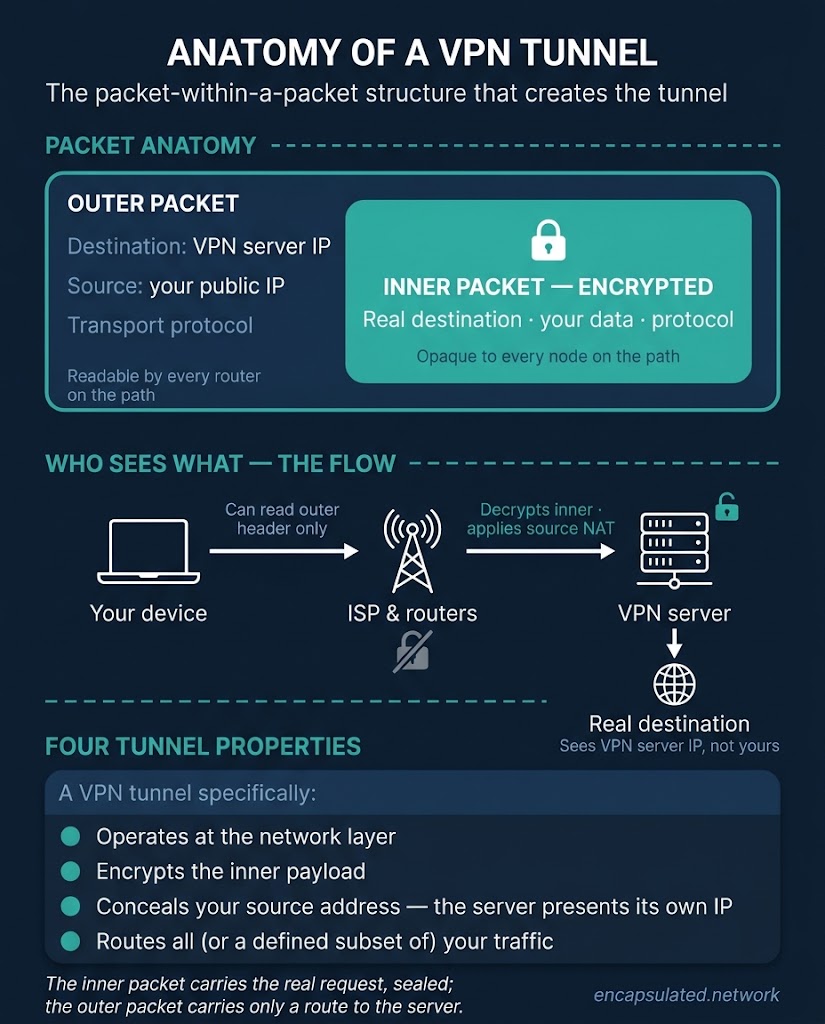
A VPN tunnel is a network-layer mechanism that encrypts the inner payload, conceals your real source address inside it so that the VPN server presents its own IP to the destination, and routes all your device traffic, or a defined subset of it, through that encrypted connection. Those four properties together distinguish a VPN tunnel from the other tunnel types. The IP address that the destination sees is replaced by the server through source NAT after the tunnel terminates; concealment inside the tunnel and IP replacement at the server are two steps of the same system, not a single tunnel property.
The tunnel’s packet structure: outer header and encrypted payload
Encapsulation is the mechanism that builds the tunnel. Your original data packet, including the IP header that identifies your real source address and the real destination, becomes an encrypted inner payload. A new outer packet is constructed around it, addressed to the VPN server, and that outer packet traverses the public internet.
Routers on the public internet need a readable destination address to forward any packet. Encrypting the entire original packet, including its IP header, would make it unroutable: no intermediate node could determine where to send it. Encapsulation solves this by separating the routing information from the payload. The outer packet provides a readable route to the VPN server; the inner packet carries the real request, opaque to any intermediate node.
The source address that reaches the VPN server is your public IP; your router’s NAT translates your device’s local address to it before the packet enters the internet. The destination is the VPN server’s IP address. The outer header also carries the transport protocol. This header is visible to every router between your device and the VPN server, and to your ISP. It reveals only that encrypted traffic is moving between your device and the VPN server’s address; it reveals nothing about the real destination or the content of your data.
The inner packet contains your original request: the real destination address, the data you are sending, and the protocol in use. It is encrypted with a session key negotiated during the handshake; for how that exchange works in full, see how a VPN actually works. The ciphers used to encrypt the inner payload are AES-256-GCM and ChaCha20-Poly1305; see VPN encryption explained for a full treatment.
The tunnel is not a separate physical connection. It is the persistent, opaque quality of this encapsulated, encrypted flow across the ordinary public infrastructure your data has always used.
A packet’s round trip through the tunnel
A single request makes four moves as it crosses the tunnel and returns.
- Egress. Your device encrypts the original packet and wraps it inside a new outer packet addressed to the VPN server. The outer header is readable; the inner payload is sealed and carries the real destination, content, and protocol.
- Transit. Every router on the path, including your ISP’s infrastructure, reads only the outer header and forwards accordingly. The inner payload is opaque at every hop between your device and the VPN server.
- Server. The VPN server decrypts the inner packet, removes the outer wrapper, and forwards your original request to its real destination using the server’s own IP address as the apparent source.
- Return. The destination sends its response to the VPN server. The server re-encrypts it, wraps it in a new outer packet addressed to your device, and sends it back through the tunnel. Your VPN client decrypts it on arrival.
Encapsulation adds overhead to every packet. WireGuard carries approximately 60 bytes of overhead on IPv4 (around 80 bytes on IPv6); OpenVPN in UDP mode carries approximately 70 bytes, varying by cipher and IP version. This overhead reduces the effective maximum transmissible packet size on any path, which is why VPN connections require MTU adjustment on some networks. The difference between the two figures reflects different measurement bases, not a direct throughput comparison.
Tunnelling TCP traffic inside a TCP-based VPN transport creates a conflict between two independent TCP retransmission engines. When the outer connection drops a packet and retransmits, the inner TCP engine, which has no visibility into the outer connection’s state, interprets the resulting latency spike as a packet loss event. It responds by retransmitting its own data and reducing its congestion window, which compounds the outer connection’s load. The resulting feedback loop can collapse throughput. This is why WireGuard, OpenVPN in UDP mode, and IKEv2 do not use TCP as their default transport: they keep the tunnel as a datagram pipe and let the tunnelled application’s own TCP handle reliability end-to-end. (IKEv2 negotiates over UDP port 500, then carries data as ESP, IP protocol 50, which runs directly over IP rather than TCP or UDP; behind NAT, both move into UDP port 4500.)
Layer 2 and Layer 3 tunnels: what the protocol encapsulates
VPN tunnelling protocols operate at different layers of the network stack. That layer determines what they encapsulate, what the virtual interface presents to the operating system, and which types of traffic can traverse the tunnel. L3 tunnels carry IP packets; L2 tunnels carry link-layer frames.
Layer 3 tunnels: carrying IP packets
An L3 tunnel strips the Ethernet frame and encapsulates only the IP packet, specifically the IP header plus the transport-layer payload. The Ethernet addressing is discarded before encapsulation because the tunnel provides its own point-to-point connection between two IP endpoints. WireGuard, OpenVPN in tun mode, and IKEv2/IPsec in tunnel mode are all L3 tunnels.
At the operating system level, an L3 tunnel is presented as a tun interface. On Linux, the tun interface is implemented through the /dev/net/tun character device. On macOS, the equivalent is a utunN adapter (utun0, utun1, and so on). On Windows, the Wintun driver provides an open-source Layer 3 TUN adapter used by WireGuard, OpenVPN 2.6, and other clients. The OS treats the tun interface as a point-to-point IP device: it processes raw IPv4 and IPv6 packets directly, with no MAC addressing and no ARP resolution required. This eliminates the 14 bytes of Ethernet header overhead per packet that a tap interface carries.
WireGuard’s traffic is identifiable by deep packet inspection systems. Its fixed cryptographic suite produces invariant packet signatures: handshake initiation packets are always 148 bytes, response packets are always 92 bytes, and message types are fixed 32-bit values. These give DPI systems a reliable heuristic regardless of the port in use. UDP port 51820 is WireGuard’s conventional default but is user-configurable; the packet shape, not the port, is the fingerprint. Tools such as AmneziaWG obfuscate this signature for deployments on networks that block WireGuard traffic.
Layer 2 tunnels: carrying link-layer frames
An L2 tunnel encapsulates the full link-layer frame, or a link-layer payload such as PPP. At the operating system level, it is presented as a tap interface, which the OS treats as a physical Ethernet NIC. The tap interface is assigned a MAC address and sends and receives raw Ethernet frames, including ARP, 802.1Q VLAN tags, and multicast traffic.
TAP interfaces are required for non-IP protocols and PXE network booting, both of which depend on link-layer broadcast mechanisms that a routed L3 tunnel cannot carry natively. DHCP over tunnels and mDNS/Bonjour/ZeroConf broadcast discovery need a TAP interface to operate natively; DHCP relay agents and mDNS reflectors (such as avahi in reflector mode) provide L3 workarounds that carry these protocols across a routed TUN segment without full L2 bridging.
TAP bridging carries a scaling cost. Extending an L2 broadcast domain over a WAN link propagates all broadcast and multicast traffic across that link. This wastes bandwidth, creates broadcast storm risk, and introduces scaling bottlenecks in large deployments. These are the reason routed L3 tunnels are preferred wherever L2 bridging is not architecturally required.
The main L2 tunnelling protocols:
- L2TPv2 (RFC 2661) is the common form of L2TP. It tunnels PPP frames, not Ethernet frames, and carries no MAC addresses or VLAN tags. L2TP itself provides no encryption; for VPN use, IPsec is paired with it, hence L2TP/IPsec. The complete encapsulation stack is: PPP frame inside an L2TP header, inside UDP on port 1701, inside IPsec ESP in transport mode, inside an outer IP header. IPsec operates in transport mode here rather than tunnel mode because L2TP already handles the tunnelling; IPsec only needs to encrypt the L2TP/UDP packet itself.
- L2TPv3 (RFC 3931) extends L2TP to carry full Ethernet frames, including MAC addresses, VLAN tags, and other L2 payloads. It is used for pseudowire services and Ethernet-over-IP deployments.
- OpenVPN in tap mode carries full Ethernet frames and is used when L2 bridging is specifically required for the deployment.
- PPTP tunnels PPP frames via an enhanced GRE data channel, with a TCP control channel on port 1723 (RFC 2637). PPTP must not be used. Its authentication mechanism (MS-CHAPv2) is broken: the security reduces to a single 56-bit DES brute force, and a captured handshake was crackable in under a day with 2012 hardware; with 2026 computing resources, the time is far shorter. Its encryption layer (MPPE) uses RC4, which has well-documented statistical biases. PPTP provides no data integrity checks, leaving traffic vulnerable to bit-flipping attacks, and no forward secrecy.
Why consumer VPNs use L3
MAC addresses are link-local and have no meaning beyond the local network segment. Once traffic crosses to the VPN server’s side, the source MAC address from your device is irrelevant: encapsulating it adds bytes per packet with no functional benefit. L2 overhead is only justified when two locations must share a broadcast domain or when non-IP protocols must traverse the tunnel. For the point-to-device architecture of a consumer VPN, an L3 tunnel via a tun interface is the correct choice.
For a full comparison of tunnelling protocols and their performance and security trade-offs, see the VPN protocols guide.
IPsec tunnel mode and transport mode
IPsec can protect a packet in two ways. In tunnel mode, ESP (Encapsulating Security Payload) encrypts the whole original packet, including its IP header, and adds a new outer header addressed to the two tunnel endpoints, so the original addresses are hidden. In transport mode, ESP protects only the payload and the original IP header stays readable. The standard requires tunnel mode whenever either end is a security gateway, so VPN gateways use it; transport mode is typically used between two hosts and under L2TP/IPsec. Packet layouts and a worked example are in What Is an IPsec VPN?
Voluntary and compulsory tunnelling
The distinction between voluntary and compulsory tunnelling is who initiates the tunnel: the client device, or the carrier network.
Voluntary tunnelling
In voluntary tunnelling, the client software on your device initiates the tunnel. The VPN application handles authentication with the server, the cryptographic handshake, creation of the virtual network interface, and modification of the device’s routing table. The user controls when the tunnel is active. Every consumer VPN application operates on this model.
Compulsory tunnelling
In compulsory tunnelling, the network infrastructure initiates the tunnel on the user’s behalf. When a user connects to an access network, a Network Access Server (NAS) acting as an L2TP Access Concentrator (LAC) intercepts the session and establishes a tunnel to the destination L2TP Network Server (LNS). The user’s device requires no VPN client software; the tunnel is transparent to it.
The LAC-to-LNS tunnel is typically persistent and shared across many concurrent user sessions. New connections ordinarily reuse an existing tunnel rather than triggering fresh negotiation. This is an enterprise edge deployment model: IT provisions tunnel connectivity at the network boundary, ensuring all traffic from endpoint devices is tunnelled regardless of what software they run. The network controls whether the tunnel is active, and individual users may be unaware that tunnelling is in use at all.
Remote-access and site-to-site tunnels: where the tunnel ends
A VPN tunnel always terminates at a specific endpoint. The choice of endpoint determines the architecture, who manages the tunnel, and what protection traffic receives beyond it.
In a remote-access tunnel, your device is one endpoint and a VPN server in a data centre is the other. The tunnel terminates at the VPN server. Beyond the server, your traffic leaves the VPN tunnel and travels from the VPN server’s IP address to its final destination. Application-layer encryption such as TLS and HTTPS continues to protect that onward path where it is present; the VPN provides no protection to the segment between the server and the final destination. This is the architecture of every consumer VPN.
In a site-to-site tunnel, two network gateways are the endpoints: a router or firewall at each location. Individual devices behind each gateway do not run VPN client software. They route traffic to their local gateway, which transparently encapsulates it into the tunnel. Each side sees the other network as a local extension.
In a mesh VPN, each device is an endpoint. Devices open tunnels directly to the devices they talk to, and a coordination service hands out their keys and addresses without carrying traffic. When a direct path is blocked, a relay forwards the encrypted packets, but the tunnel still ends at the other device.
For remote-access VPNs, your device is an active participant: it holds the session key, manages the virtual network interface, and owns the routing table modification. A compromise of the VPN server does not give the attacker your device’s private keys, but a server that remains operational after compromise decrypts all traffic passing through it in plaintext, subject to any application-layer TLS the connection carries. For site-to-site VPNs, your device is behind the tunnel: it sends packets to the gateway, and the gateway handles all tunnel operations. A compromise of the gateway compromises the tunnel for every device behind it, regardless of what those devices individually do. Security focus in site-to-site deployments is on gateway hardening, not endpoint software.
Split tunnelling routes only a defined subset of traffic through the VPN tunnel while the rest connects directly. For a full treatment of how it works, when to use it, and its risks, see the guide to VPN split tunnelling.
Can a VPN tunnel be broken or bypassed?
A VPN tunnel can be bypassed without its encryption being broken. Breaking encryption attacks the cryptographic layer; bypassing the tunnel attacks the routing layer.
Breaking the encryption
Breaking the symmetric encryption protecting the tunnel payload is not a practical threat with current ciphers. AES-256-GCM and ChaCha20-Poly1305 have no known practical vulnerabilities, and no attack on either cipher has been demonstrated outside theoretical bounds.
TunnelVision: bypassing the tunnel without breaking it
TunnelVision (CVE-2024-3661, disclosed 6 May 2024) is an attack that diverts traffic outside a VPN tunnel by manipulating the victim device’s routing table, without touching the tunnel itself or its encryption. An attacker on the same local network operates a rogue DHCP server and uses DHCP option 121 (classless static route, RFC 3442) to push routing rules onto the victim’s device. Those rules direct traffic out via an attacker-controlled path that bypasses the VPN tunnel interface. The VPN connection shows as “Connected” throughout; the tunnel itself never drops.
Disconnection-triggered kill switches do not protect against this attack because the tunnel never disconnects. Fail-closed, firewall-based kill switches, which block all non-VPN traffic at the firewall level regardless of routing table state, can prevent it. Windows, macOS, iOS, and Linux are affected; any operating system whose DHCP client implements option 121 is vulnerable. Android is immune: it does not implement DHCP option 121. Running the VPN inside a Linux network namespace is a documented mitigation for advanced Linux users.
Intentional bypass: split tunnelling
Split tunnelling routes designated traffic outside the VPN tunnel. It is not an attack; it is a configuration that carries risks when misconfigured.
What “Connected” means on your device
When a VPN application displays “Connected,” four things have taken place on your device simultaneously.
- A session key has been negotiated with the VPN server and is held in volatile memory on your device.
- A virtual network interface has been created and assigned an internal IP address by the VPN server. The interface name varies by OS and protocol:
tun0on Linux with OpenVPN;wg0on Linux with WireGuard;utun0or a higher-numbered equivalent on macOS; a Wintun adapter on Windows. - Your device’s routing table has been modified, directing traffic through the virtual VPN interface rather than the physical adapter.
- Your DNS resolver has typically been changed to the VPN provider’s servers, redirecting all domain name lookups through the encrypted tunnel.
When the tunnel tears down, whether by user disconnection, network interruption, or kill switch, all four changes are reversed. The virtual interface is deleted, the routing table is restored to its pre-tunnel state, the DNS resolver reverts, and the session key should be zeroised from memory. Zeroisation is a design requirement for correctly implemented VPN clients; whether any specific client performs it is implementation-dependent.
When a tunnel drops unexpectedly, traffic reverts to the physical interface’s default route in the interval before the routing table is restored, and exits over your real IP address. A kill switch prevents this exposure by enforcing fail-closed firewall rules: it blocks all traffic not destined for the VPN interface, so if the tunnel drops, no traffic leaves the device by any other path until the tunnel restores. This is firewall enforcement, not route restoration. It is also why fail-closed kill switches can block TunnelVision (which leaves the tunnel active while bypassing it via routing) whereas disconnection-triggered kill switches cannot, provided the kill switch disallows all non-tunnel egress.
For DNS leak testing, see what a DNS leak is.
Frequently asked questions
Is a VPN the same as a VPN tunnel?
No. The VPN is the full system: server, client app, IP replacement, DNS routing, and authentication. The tunnel is one component of that system: the encrypted conduit between your device and the VPN server. Every VPN app creates a tunnel to function, but the VPN is more than the tunnel alone.
What is encapsulation’s role in building a VPN tunnel?
Encapsulation is how the tunnel takes shape. Your original data packet is wrapped inside a new outer packet addressed to the VPN server. The outer packet carries a readable IP header so routers can forward it; the inner packet, your actual request, is encrypted and opaque to every intermediate node.
What is the difference between IPsec tunnel mode and transport mode?
Tunnel mode encrypts the entire original IP packet, including its IP header, and adds a new outer IP header. This hides your original source and destination addresses from every node between the two VPN endpoints. Transport mode encrypts only the IP payload and preserves the original IP header in plaintext; no new outer IP header is added. Tunnel mode is required whenever either end is a gateway. Transport mode is typically used between two hosts and under L2TP/IPsec.
What is the difference between an L2 and L3 VPN tunnel?
An L3 tunnel encapsulates IP packets and presents itself to the OS as a tun interface. WireGuard, OpenVPN in tun mode, and IKEv2 are all L3 tunnels. An L2 tunnel encapsulates link-layer frames and presents itself as a tap interface. L2TPv3 and OpenVPN in tap mode carry Ethernet frames; L2TPv2 and PPTP carry PPP frames. Consumer VPNs use L3 because MAC addresses are meaningless beyond the local network segment; L2 overhead is only justified when two locations need to share a broadcast domain or when non-IP protocols must traverse the tunnel.
Can a VPN tunnel be bypassed without breaking the encryption?
Yes. TunnelVision (CVE-2024-3661, disclosed 6 May 2024) demonstrated this: an attacker on the same local network can use a rogue DHCP server to push classless static routes via DHCP option 121 that divert traffic outside the VPN tunnel while the connection shows as active. The encryption is never touched; traffic exits via a different route. Android is immune because it does not implement DHCP option 121. Windows, macOS, iOS, and Linux are affected.
What is the difference between voluntary and compulsory tunnelling?
In voluntary tunnelling, client software on your device initiates the tunnel: authentication, handshake, interface creation, and routing table modification all happen on the device. This is how every consumer VPN application works. In compulsory tunnelling, the carrier or access network initiates the tunnel on your behalf via a Network Access Server, with no VPN client required on your device. The LAC-to-LNS tunnel is typically persistent and shared across many sessions; new connections reuse the existing tunnel rather than triggering fresh negotiation.
Does every VPN application use the same type of tunnel?
No. The tunnel type depends on the protocol and its configuration. WireGuard and OpenVPN in tun mode create L3 tunnels via a tun interface. OpenVPN in tap mode creates an L2 tunnel via a tap interface. IKEv2/IPsec uses tunnel mode by default. The protocol determines what is encapsulated, at which network layer, and via which virtual interface type.
Is a VPN tunnel the same as Zero Trust Network Access?
No. A traditional VPN tunnel authenticates once per session and grants broad network-level access: your device receives an internal IP address and can reach the broader network. Zero Trust Network Access (ZTNA) enforces continuous, per-application verification, evaluating identity, device posture, and context for each access request. It creates encrypted connections only to specific authorised applications while keeping the underlying network invisible to the connecting device. VPN tunnels and ZTNA address overlapping but distinct problems and are not interchangeable.
What do post-quantum threats mean for a VPN tunnel?
The symmetric ciphers that encrypt the tunnel payload, AES-256-GCM and ChaCha20-Poly1305, retain meaningful security against quantum attack. The more theoretically vulnerable component is the asymmetric key exchange used to establish the tunnel. Shor’s algorithm, run on a sufficiently capable quantum computer, could break the Diffie-Hellman or elliptic-curve exchange that produces the session key without touching the data cipher. The “harvest now, decrypt later” threat model holds that adversaries may record encrypted VPN sessions today and attempt decryption once capable quantum hardware exists. Hybrid key exchange pairing a classical exchange with ML-KEM (standardised as FIPS 203 in August 2024) is now shipping in production VPN implementations; a recorded session requires breaking both the classical and the post-quantum layer.
Is a VPN tunnel end-to-end encrypted?
No. A VPN tunnel is not end-to-end encrypted in the sense the term carries in messaging applications. It protects the device-to-server segment only; the VPN server holds your traffic in plaintext after decryption, unlike Signal-style E2EE, where no intermediary ever does. Beyond the VPN server, your traffic travels to the final destination relying on whatever application-layer encryption that connection already carries, typically TLS via HTTPS. The VPN adds no protection to that onward segment.
Does a VPN tunnel make me anonymous?
No. A VPN tunnel protects your traffic in transit between your device and the VPN server and replaces your IP address with the server’s. It does not make you anonymous. The VPN provider occupies the position your ISP previously held: they can observe your traffic (the destinations, DNS queries, timing, and the content of anything not protected by application-layer TLS), whether or not they log it. The tunnel is one component of the privacy architecture; what the provider does with the traffic that exits the tunnel determines the privacy outcome. Whether you are identifiable depends on the provider’s logging practices, jurisdiction, and whether any third-party audit has verified the no-log claim, not on the existence of the tunnel itself.
Is a VPN tunnel the same as a proxy?
No. A proxy reroutes traffic, sometimes for one application and sometimes system-wide (as with SOCKS, transparent, or network-level proxies), typically at the application layer and usually without encryption. A VPN tunnel is a network-layer, encrypted conduit that wraps your traffic in an outer packet, authenticates and encrypts the payload, and routes all your device’s traffic, or a defined subset, through it. Both change the IP address a destination sees, but the differences are encryption and full-packet encapsulation at the network layer: a proxy reroutes; a VPN tunnel wraps and encrypts.
How do I know my VPN tunnel is working?
Three checks confirm the tunnel is carrying your traffic correctly. First, verify your public IP address: with the VPN connected, an IP lookup should return the VPN server’s address, not your real one. Second, run a DNS leak test: the DNS servers listed should belong to your VPN provider, not your ISP; if your ISP’s DNS servers appear, your DNS queries are leaving the tunnel unprotected. Third, check for IPv6 leaks: a VPN that encrypts IPv4 traffic but leaves IPv6 unprotected will expose your real IPv6 address to any destination that supports it.