No, a VPN does not protect against all cyber threats. It operates at the network layer: it encrypts traffic in transit between your device and the VPN server and replaces your IP address. Threats that operate at any other layer are outside its scope by design, not by deficiency.
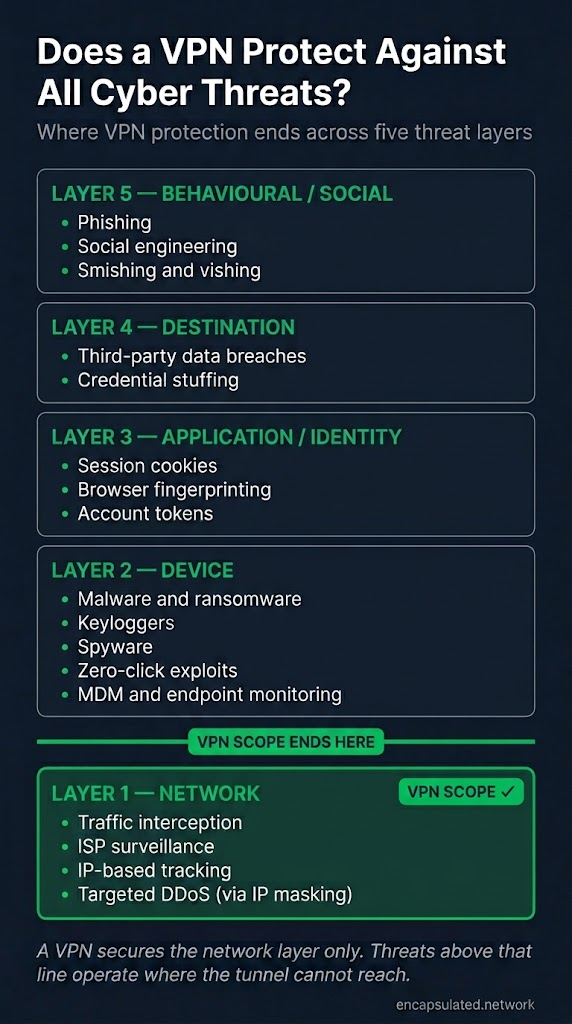
Where a VPN’s protection stops depends on which of those five layers a threat operates at: network, device, application/identity, behavioural/social, and destination.
TL;DR
A VPN does not protect against all cyber threats. It encrypts traffic in transit between your device and the VPN server and replaces your IP address. Traffic interception on public Wi-Fi, ISP monitoring of your browsing destinations, and IP-based tracking by websites are the threats it addresses.
Everything else operates at a layer the VPN cannot reach. A VPN processes data after it leaves your device; malware, keyloggers, and spyware execute on the device before that point. A VPN delivers content faithfully; it encrypts the connection to a phishing page as accurately as to a legitimate site, and will encrypt stolen credentials en route to the attacker. A data breach exposes credentials stored on a company’s servers, which were never in your tunnel. Changing your IP address has no effect on the session cookies and account tokens that platforms use to identify you.
Even the network-layer protection a VPN provides can be undermined by misconfiguration: DNS leaks expose browsing destinations to your ISP, WebRTC leaks expose your real IP through the browser, and TunnelVision (CVE-2024-3661) can divert traffic outside the tunnel entirely while the connection displays “Connected.”
Each unprotected category has a purpose-built tool at the right layer: antivirus and EDR for device-layer threats, browser phishing warnings and phishing-resistant MFA for behavioural threats, unique passwords combined with 2FA and breach monitoring for credential exposure. A VPN is the right tool for what it covers. It is not a substitute for the tools that cover the rest.
If Something Already Went Wrong
If you are reading this after a phishing attack, account takeover, malware infection, or data breach while running a VPN, each of the most common incidents traces to a specific layer:
- Malware installed or ransomware executed. Device layer. The VPN encrypts what leaves your device; it has no visibility into what executes on it.
- Credentials phished via a fake login page. Behavioural/social layer. The VPN delivered the phishing page faithfully.
- Account compromised after a company you use was breached. Destination layer. Your stored credentials were exposed at the other end, where the VPN’s protection never reached.
- Real IP address or browsing activity exposed despite the VPN being connected. Configuration gap. DNS leak, WebRTC leak, or TunnelVision: the VPN was working but something bypassed it.
What a VPN Protects: The Network Layer
A VPN secures the core categories of threat at the network layer.
- Traffic interception on hostile networks, including man-in-the-middle attacks (MITM). The VPN encrypts all data before it leaves your device. On an unencrypted public network, other users on the same connection see only ciphertext addressed to the VPN server. A MITM attacker who intercepts the connection cannot read or modify the encrypted payload.
- ISP visibility into destinations and connection metadata. Routing traffic through the VPN server hides which websites and services you connect to from your internet provider. Your ISP can see that you are connected to a VPN server; it cannot see what lies beyond it.
- IP-based tracking and geolocation by websites. Websites and services receive the VPN server’s IP address, not yours. This replaces your approximate physical location and service provider identity with the server’s.
- Passive traffic analysis of non-HTTPS applications. Applications that do not use HTTPS expose their traffic in plaintext on the network. The VPN encrypts all outbound traffic regardless of whether the application does so itself.
Protection ends at the VPN server. IP masking also provides incidental protection against personal, IP-targeted DDoS: an attacker who targets your connection by IP address hits the VPN server’s IP instead of your home connection. For the full mechanics of these protections, see how a VPN works and what a VPN is.
Five Layers, Five Threat Categories
A VPN addresses threats at exactly one of five layers.
Network layer. Traffic in transit between the device and the VPN server. Encryption and IP replacement operate here.
Device layer. Processes, files, and software executing on the machine. The VPN receives data after it leaves the application and enters the network stack. What executes before that point is outside the tunnel’s reach.
Application/identity/tracking layer. How platforms identify users above the network level: session cookies, account tokens, and browser fingerprinting attributes. Changing the IP address is a network-layer operation and has no effect on any of these identifiers.
Behavioural/social layer. User decisions. The attack targets human judgment, which no network control can reach.
Destination layer. Data at rest at third-party services. A server-side breach is entirely independent of what happened in transit.
Each layer above the network layer requires a different tool. Pairing one control at each layer is defense in depth.
Device-Layer Threats
Malware, spyware, keyloggers, and mobile exploits execute on the device before or independently of the network stack. The VPN encrypts what leaves the device; it has no visibility into what is running on it.
Malware and Ransomware
The VPN tunnel is transparent to the process executing on the device. All application traffic is merged into a single encrypted stream with identical transport headers; the tunnel cannot attribute traffic to a specific process and cannot inspect, classify, or quarantine what is generating it.
Ransomware is delivered via email attachment, drive-by download, or removable media and executes independently of whether a VPN is running. Once on the device, it operates at the process layer: encrypting files, modifying system configuration, and communicating with its operator. The VPN cannot intercept file execution or block payload delivery at the process layer because it operates below that layer in the stack.
Modern ransomware uses HTTPS or TLS for command-and-control (C2) communications. The VPN encrypts that C2 beacon identically to any other HTTPS session; it cannot distinguish a connection to a ransomware operator from a search query. The VPN’s encryption may make C2 communications harder for network monitoring tools to detect.
The correct tool is antivirus software or endpoint detection and response (EDR): software that operates at the process and file layer, scanning files on access, monitoring process behaviour, detecting anomalous activity, and quarantining malicious code before it executes or spreads.
Keyloggers
A keylogger captures keystrokes before data enters the application, before it enters the network stack, and therefore before the VPN can encrypt it. The sequence is: the keylogger captures the keystroke; the input enters the application; the application passes data to the network stack; the VPN encrypts it.
Whether a VPN is running is irrelevant to what a keylogger has already collected. The keylogger’s exfiltration of that data passes through the VPN tunnel encrypted, indistinguishable from any other outbound traffic. The VPN encrypts the theft’s delivery channel; it does not prevent the theft.
The correct tool is endpoint security software that detects and removes the keylogger at the device level, operating with the OS-level access a VPN lacks.
Spyware, MDM, and Zero-Click Exploits
Spyware has direct access to the device: files, clipboard, screen, microphone, camera. Its exfiltration traffic exits through the same network stack as legitimate traffic. The VPN encrypts it identically; it cannot distinguish spyware exfiltration from any other outbound connection. The VPN operates on data after it reaches the network stack, not before.
MDM and corporate endpoint monitoring agents operate at the OS level, logging application usage, file access, and device activity independently of the network path. A VPN encrypts the path between the device and the VPN server; it does not change what the MDM agent records on the device before that traffic is encrypted. On a corporate-managed device, a personal VPN does not prevent the employer from observing device-level activity. The practical solution is to use a personal device for personal activity.
Zero-click mobile exploits require no user interaction. They target vulnerabilities in system-level processes, specifically background daemons that automatically parse incoming data such as media files, messages, or push notifications.
Zero-click exploits achieve initial code execution inside a sandboxed system process. Exploit chains then escalate through additional sandbox-escape and privilege-escalation vulnerabilities to reach OS- or kernel-level control. Execution occurs inside system processes, outside the reach of user-space applications including VPN clients.
A VPN client operates at the network layer and has no mechanism to intercept or prevent an exploit executing inside system processes, whether at the initial sandboxed-daemon stage or after escalation.
Standard mobile antivirus tools run in sandboxed user space without the elevated OS privileges required to inspect what executes at the system or kernel level. These exploits are also typically zero-days with no existing signatures for detection tools to match against. Detection requires specialised backup analysis. The Mobile Verification Toolkit (MVT), developed by Amnesty International’s Security Lab, is the recognised tool for parsing iOS and Android device backups for forensic indicators of known compromise campaigns. MVT is a command-line forensic tool intended for researchers and investigators, not a consumer self-assessment app; individuals who suspect they have been targeted should seek professional assistance.
Application/Identity/Tracking-Layer Threats
Changing the IP address is a network-layer operation. Platforms identify users through mechanisms that operate above the network layer. A VPN has no effect on any of them.
Session Cookies and Logged-In Accounts
Session cookies are stored in the browser and sent with every HTTP request to the relevant domain regardless of which IP address the request originates from. The browser attaches the cookie to the request before the network stack sees it; the cookie travels through the VPN tunnel encrypted alongside everything else, arriving at the destination unchanged.
Application-layer identity, the account ID, session token, and login cookie that a platform uses to associate a request with a specific user, is entirely separate from network-layer identity (the IP address). A VPN changes the latter and has no effect on the former. A user logged into any service while connected to a VPN is identified to that service by their account credentials and session token, not their IP address.
Browser Fingerprinting
Browser fingerprinting identifies a user through the combination of attributes the browser reports to websites: screen resolution, installed fonts, browser version and build, time zone, language settings, installed plugins, canvas rendering output, and other parameters. The specific combination of these attributes is often unique to a single device, making it a persistent identifier that survives across sessions and IP address changes.
These attributes are reported at the application layer and are entirely independent of IP address. A VPN replaces the IP and has no effect on any of the attributes that compose a fingerprint. A user running a VPN is fingerprinted identically to the same user without one, because the fingerprint is assembled from what the browser reports, not from the network path.
The correct tool is browser hardening: using a privacy-focused browser that normalises or restricts the attributes exposed to fingerprinting scripts.
Behavioural/Social-Layer Threats
Phishing and social engineering are not network exploits. They target human judgment. A VPN encrypts the network path; it has no mechanism to intercept or evaluate a decision the user makes.
Phishing
A phishing page served over HTTPS is a structurally valid HTTPS response. The VPN delivers it faithfully: it encrypts the connection to the phishing server exactly as it would encrypt a connection to the legitimate site. Loading a fake bank login page and loading the real one are identical operations from the tunnel’s perspective.
If a user enters credentials into a phishing page while connected to a VPN, the VPN encrypts those credentials en route to the attacker’s server. It does not prevent the theft; it encrypts the delivery.
Some VPN products include threat-protection add-ons that provide partial coverage. The scope of these add-ons varies by product and should not be mistaken for genuine phishing protection. Surfshark CleanWeb, ProtonVPN NetShield, and NordVPN’s standard tier (formerly Lite) work by blocking connections to domains on known-malicious blocklists (at the DNS level in the VPN apps; Surfshark’s CleanWeb 2.0 browser extension additionally filters at the browser level); they can only catch threats where the phishing domain is already in the database and cannot perform heuristic or behavioural analysis. NordVPN’s desktop Threat Protection Pro (being rebranded to Scam, phishing, and malware protection) adds inline URL inspection and real-time download scanning, which extends beyond DNS-only filtering, but it still does not provide on-access file scanning, behavioural process monitoring, or heuristics equivalent to dedicated antivirus or EDR software. None of these add-ons substitutes for browser phishing warnings or phishing-resistant MFA.
Browser phishing warnings address phishing at the browser layer, where the destination can be evaluated before the user interacts with it. Google Safe Browsing (integrated into Chrome, Firefox, Safari, and Brave) and Microsoft SmartScreen (integrated into Edge) check URLs against databases of known-malicious sites and warn before the page loads.
Standard two-factor authentication methods, including SMS one-time codes, time-based OTPs, and push notification approvals, are vulnerable to adversary-in-the-middle (AiTM) phishing attacks. In an AiTM attack, the attacker operates a proxy between the victim and the legitimate service. The victim authenticates through the proxy; the real service issues a session cookie or access token; the attacker captures that token. The 2FA challenge succeeds, yet the attacker obtains an authenticated session, because what was stolen is not the OTP itself but the session token issued after authentication completed.
FIDO2/WebAuthn hardware keys and passkeys are resistant to this attack by design. They bind the credential cryptographically to the specific domain for which it was registered. The credential cannot produce a valid signature for any other domain, including an attacker-controlled proxy domain. When authentication is attempted on a phishing site, the origin does not match the registered domain, and the authentication fails at the cryptographic level before any token is issued. NIST SP 800-63B-4 (Digital Identity Guidelines: Authentication and Lifecycle Management, 2025) classifies SMS OTP, TOTP, and push notifications as susceptible to verifier impersonation and FIDO2/WebAuthn as verifier-impersonation-resistant.
Social Engineering
Pretexting, vishing, and smishing operate entirely outside the network layer. A VPN has no visibility into phone calls, SMS messages, or in-person manipulation.
An attack that manipulates a person into a decision, regardless of whether that decision later results in an internet transaction, operates outside the tunnel at the point the manipulation occurs.
Destination-Layer Threats
A VPN secures traffic in transit between your device and the VPN server. It has no bearing on data stored at a destination service.
Third-Party Data Breaches
When an attacker breaches a company’s database, they access data at rest on that company’s servers: credentials, payment information, and personal details collected over the lifetime of the user’s account. That data was never in the VPN tunnel. The tunnel secured the transit path; it has no relation to how the service stores data on its infrastructure.
Whether the user connected via VPN is irrelevant to whether their stored data is exposed in a breach. The VPN did its job. The breach happened on the other end, to data that exists independently of how the user connected. This is the least-intuitive gap in the VPN’s scope: the tool performed correctly and the protection still failed, because the threat operated at a different layer.
Credential Stuffing
A breach at one service rarely stays contained to that service. Credentials stolen from a breach are aggregated and tested systematically against other services, using automated tools, in a technique known as credential stuffing. The attacker does not need to breach the second service independently; valid credentials from a breach elsewhere are sufficient to authenticate if the user reused the same password.
The victim’s VPN is irrelevant to this chain. The attacker connects to the target service from their own infrastructure, using stolen credentials over a normal authentication flow. From the target service’s perspective, a credential stuffing attempt with valid credentials is indistinguishable from a legitimate login. The victim’s device plays no part in the attacker’s transaction.
This chain is broken by unique passwords per service, so that a breach at one service yields credentials that do not work at another; a password manager makes unique passwords practical. Two-factor authentication means stolen credentials alone are insufficient to access the account. Breach monitoring services such as Have I Been Pwned alert users when their credentials appear in known breach datasets, allowing compromised passwords to be changed before they are used; coverage is limited to public breach datasets, so newly stolen credentials not yet indexed will not trigger an alert immediately.
Configuration Gaps That Look Like VPN Failures
These are not fundamental limitations of the VPN. They are misconfiguration or architectural gaps where the VPN is working correctly at the network layer but information leaks through a separate path.
DNS leaks. A misconfigured VPN can route DNS queries outside the encrypted tunnel, exposing the domains you visit to your ISP even while the rest of your traffic is protected. The VPN is functioning; the DNS resolver is not routing through it correctly. For causes, testing procedure, and platform-specific fixes, see what a DNS leak is.
WebRTC leaks. The browser’s WebRTC API sends STUN requests via UDP through the operating system’s networking stack in a way that browser-extension VPNs and some system-level VPN configurations do not intercept. These requests expose the device’s real IP address to any site that queries them, regardless of whether the VPN tunnel is active. The fix is applied at the browser level. For browser-specific instructions and verification, see the WebRTC leak guide.
TunnelVision (CVE-2024-3661, disclosed 6 May 2024). An attacker on the same local network can operate a rogue DHCP server and use DHCP option 121 (classless static route) to push routing rules onto the victim’s device. Those rules divert traffic outside the VPN tunnel interface while the VPN connection displays “Connected.” The tunnel never drops; the encryption is not broken; traffic exits via a different route. Android does not implement DHCP option 121 and is immune. Windows, macOS, iOS, and Linux are affected. Fail-closed, firewall-based kill switches that block all non-VPN traffic at the firewall level prevent the bypass; disconnection-triggered kill switches do not, because the tunnel never disconnects. For the full technical treatment and kill switch implications, see what a VPN tunnel is.
VPN gateway compromise. A VPN client is only as secure as the server it connects to. The VPN gateway is an internet-facing endpoint and can be targeted by attackers seeking to access traffic at the point of decryption. If the server is compromised, the attacker can observe the client’s real IP address paired with destination metadata: DNS queries, SNI hostnames, and destination IPs, as well as the full content of any unencrypted HTTP traffic. HTTPS/TLS traffic remains encrypted end-to-end to the destination because the VPN server is not part of the TLS handshake between the client and the destination site; a compromised VPN server cannot decrypt application-layer TLS payloads. This is an endpoint compromise, not a cryptographic break: the tunnel’s AES-256-GCM or ChaCha20-Poly1305 encryption is not defeated. The server that legitimately holds the decryption key is the compromised component. For evaluating provider infrastructure and verifying no-log claims, see what a no-log VPN is.
VPN provider as a trust decision. Connecting to a VPN shifts trust from the ISP to the VPN provider. The encryption is real; the question is whether the provider’s no-log policy is real. A provider that retains connection metadata can expose destinations, timestamps, and the user’s real IP regardless of how strong the tunnel encryption is.
Common Scenarios: What a VPN Does and Doesn’t Cover
In every case: it secures the network path and nothing else. Which layer your risk lives on determines whether the VPN addresses it.
Public Wi-Fi. This is where a VPN provides its most direct protection. Traffic interception and MITM attacks by other users on the same network are fully addressed by the VPN’s encryption. The remaining risks on public Wi-Fi (malware, phishing, account compromise) sit at device, behavioural/social, and destination layers the VPN does not reach.
Online banking and shopping. HTTPS already encrypts the content of your transactions with your bank or payment service. The VPN adds network-layer privacy on top: it hides from your ISP that you are connecting to the bank at all, and it protects the connection on any untrusted network. The genuine risks to online banking (phishing of credentials, malware capturing keystrokes, a breach at the bank’s own servers) operate at the behavioural/social, device, and destination layers the VPN cannot reach. A VPN secures the connection; it does not secure the account.
Gaming and streaming. A VPN hides your real IP from other players and services. This protects against targeted personal DDoS: an attacker aiming at your connection by IP address hits the VPN server’s IP instead of your home connection. It provides no protection against DDoS aimed at a game’s servers, since that traffic is not directed at your IP. It has no bearing on account security, in-game exploits, or platform breaches.
Remote work on a personal device. A personal VPN and a corporate VPN serve different purposes. A personal VPN routes your traffic to a third-party server for privacy on untrusted networks. A corporate VPN connects you to your employer’s internal network. Running a personal VPN on a device you also use for work does not substitute for the corporate VPN, and it does not affect access controls or monitoring on the company systems you reach through the corporate network.
Mobile devices. A VPN on a mobile device provides the same network-layer protection as on a desktop: it encrypts traffic on public Wi-Fi, hides your IP from apps and services, and protects against network-level interception. It does not protect against mobile malware, app-layer tracking via account identity and session cookies, or zero-click exploits; all operate at layers above or independently of the network path.
A Layered Security Stack: What Covers Each Gap
A VPN’s scope is the network layer. The gaps above are not failures; they are the correct boundaries of one tool. The table maps each threat category to the tool that owns that layer: a VPN vs antivirus vs firewall vs password manager role map.
| Threat category | Layer | Right tool |
|---|---|---|
| Traffic interception, ISP tracking, IP exposure | Network | VPN |
| Malware, ransomware, viruses | Device | Antivirus / EDR |
| Keyloggers | Device | Endpoint security software |
| Zero-click mobile exploits | Device | OS and app updates; MVT for forensic detection of known campaigns (command-line tool, professional use) |
| Corporate / MDM monitoring on managed devices | Device | Personal device for personal activity |
| Session cookie and account token tracking | Application / Identity | Account compartmentalisation; log out of services when done |
| Browser fingerprinting | Application / Identity | Browser hardening; privacy-focused browser |
| Phishing and deceptive sites | Behavioural / Social | Browser phishing warnings (Google Safe Browsing for Chrome, Firefox, Safari, Brave; Microsoft SmartScreen for Edge); phishing-resistant MFA (FIDO2/WebAuthn) |
| Social engineering | Behavioural / Social | Security awareness |
| Third-party data breaches and credential stuffing | Destination | Unique passwords per service; password manager; 2FA; breach monitoring |
| DNS leaks | Configuration gap | VPN DNS leak protection |
| WebRTC leaks | Configuration gap | Browser-level WebRTC fix |
| TunnelVision routing bypass | Configuration gap | Firewall-based kill switch |
| VPN gateway compromise | Configuration gap | Provider with independently verified infrastructure and RAM-only servers |
If you address only one layer at a time, this is the order of impact:
- Network layer: enable a VPN on any network you do not control, particularly public Wi-Fi.
- Device layer: install antivirus or EDR and keep your OS and all applications updated.
- Destination layer: use a unique password per service (a password manager makes this practical) and enable 2FA on all accounts that support it, preferring FIDO2/WebAuthn where available.
- Behavioural/social layer: treat unsolicited links, attachments, and requests for credentials as suspect regardless of how convincing they appear.
- Configuration: verify the VPN with a DNS leak test, check your browser’s WebRTC handling, and enable a firewall-based kill switch.
A VPN is a network privacy tool, not a complete security product. Deploying it correctly means knowing what layer it covers and pairing it with the tools that cover the remaining four. No single tool covers all five layers.
Frequently asked questions
Does a VPN protect against ransomware?
No. Ransomware operates at the device layer: it is delivered and executes on the machine, independently of the network path. The VPN cannot inspect, block, or quarantine file execution. Antivirus software and endpoint detection and response (EDR) software operate at the process and file layer.
Can a VPN stop phishing emails or phishing pages?
No. A VPN encrypts the connection to a phishing page as faithfully as to a legitimate one. Some VPN add-ons block known phishing domains at the DNS level, but this only catches domains already in a blocklist database. Browser phishing warnings and phishing-resistant MFA (FIDO2/WebAuthn) are the primary defences.
I was attacked while using a VPN. What went wrong?
The VPN was doing its job: it secured the network layer. The attack operated at a different layer. Malware infections occur at the device layer, phishing at the behavioural/social layer, account compromises from third-party breaches and credential stuffing at the destination layer, and IP or DNS exposure at a configuration gap.
Does a VPN protect me if a company I use gets breached?
No. A server-side breach exposes data stored at the company’s servers. That data was never in your VPN tunnel; whether you connected to the service via VPN is irrelevant to whether your stored data is exposed. Unique passwords per service, a password manager, 2FA, and breach monitoring limit the damage when a breach occurs.
Can malware communicate through a VPN tunnel?
Yes. Malware uses the same network stack as legitimate applications. The VPN encrypts all outbound traffic without distinguishing which process generated it; a malware C2 beacon is encrypted identically to any other HTTPS connection. Modern malware uses HTTPS or TLS for C2 traffic to blend with legitimate activity.
Does a VPN prevent account takeovers?
Not directly. Account takeovers follow from stolen credentials: through phishing, a third-party breach, or credential stuffing using reused passwords. The victim’s VPN is irrelevant to each of these. Phishing-resistant MFA (FIDO2/WebAuthn) is the right defence: it makes stolen credentials alone insufficient and, unlike SMS OTPs or push notifications, cannot be captured by an adversary-in-the-middle proxy because the credential is cryptographically bound to the legitimate domain and cannot produce a valid signature for any other origin.
Is a VPN enough to be safe online?
No. A VPN covers one layer of a five-layer threat landscape. It is the right tool for the threats it addresses: traffic interception, ISP surveillance, and IP-based tracking. For the remaining four layers, it needs to be paired with the right tool at the right layer. A VPN does not substitute for any of them.
Does a VPN protect you from hackers?
It depends on what the hacker is doing. A hacker attempting to read or intercept your traffic on the network (a Wi-Fi eavesdropper or a MITM attacker) is stopped by the VPN’s encryption. A hacker phishing your credentials, planting malware on your device, or breaching a service you use operates at the behavioural/social, device, or destination layer. The VPN provides no protection at those layers. Whether a VPN stops a hacker depends on which layer the attack operates at.
Does a VPN protect against DDoS attacks?
A VPN hides your IP from attackers targeting your connection by address, but not from DDoS aimed at a service you use: that traffic goes to the service’s servers regardless of your IP. Two limits apply: if the attacker already knew your real IP before you connected, hiding it is ineffective against them, and the VPN server itself can be overwhelmed by a large enough attack.
Do free VPNs provide the same protection?
Not reliably. A VPN shifts your trust from your ISP to your VPN provider. A free provider must recoup infrastructure costs somewhere: many do so by logging and reselling browsing data, injecting advertising into traffic, or running weak, misconfigured, or entirely absent encryption; the most severe documented cases involve no encryption at all, with traffic transmitted in plaintext despite the VPN label. Each undermines the network-layer protection the VPN is supposed to provide: a logging provider reverses the privacy gain; ad injection modifies traffic in transit; weak or absent encryption defeats the tunnel’s confidentiality entirely. A low-quality free VPN does not just offer less protection than a paid one; it can leave you worse off than no VPN at all by adding a second party with commercial incentive to monetise your traffic. A small number of free tiers funded by paying subscribers have been independently audited and verified. Treat any free VPN without a published, current audit as providing no meaningful privacy guarantee.