You opened your VPN app, went into settings, and found a list of protocols — WireGuard, OpenVPN, IKEv2. Maybe you picked one without quite knowing what it meant. Maybe your app picked it for you. Either way, IKEv2 is quietly handling more mobile VPN connections than almost any other protocol, and most people who use it every day have never heard its name.
This is the complete explanation: what IKEv2 and IPsec actually are and why they are two different things bundled under one name, how the two-exchange handshake works, why it stays connected when other protocols drop, and exactly when it is the right choice — and when it is not.
If you are new to VPNs entirely and want to understand how encryption and tunnelling work before diving into protocol specifics, start with our guide to how a VPN actually works and come back here.
TL;DR
IKEv2 (Internet Key Exchange version 2, RFC 7296) is the protocol that negotiates and manages the secure session — it handles the handshake, verifies identities, and agrees on cryptographic rules. IPsec is the framework that encrypts and authenticates your actual traffic. In an IKEv2/IPsec VPN the two work together: IKEv2 sets the rules; IPsec moves the data. The standout feature is MOBIKE (RFC 4555): when your device switches from Wi-Fi to mobile data, IKEv2 rebinds the existing session to your new IP address without re-authentication, keeping the tunnel alive through the transition. It is the protocol built into Windows, macOS, and iOS at the OS level — no third-party app required — and the reason your VPN survives the commute.
Understanding the Duo: IKEv2 and IPsec Are Two Different Things
The slash in “IKEv2/IPsec” causes more confusion than it resolves. Most guides treat it as a single name for a single thing. It is not. IKEv2 and IPsec are two separate protocols that work together in an IKEv2/IPsec VPN — understanding what each one does is the foundation for understanding the whole system.
IKEv2 — The Negotiator
IKEv2 (Internet Key Exchange version 2) is the control plane. Think of it as a diplomatic negotiator: before any of your actual data moves, IKEv2 steps in and handles all the formalities. It introduces your device to the VPN server, verifies that both parties are who they claim to be, and negotiates which cryptographic algorithms the session will use. Once that agreement is in place and both sides have confirmed each other’s identities, IKEv2’s primary job is done.
IKEv2 is specified in RFC 7296 (2014), which obsoletes RFC 5996. The full revision chain is RFC 4306 (2005) → RFC 5996 (2010) → RFC 7296 (2014) — three generations of refinement, each one tightening the specification and closing implementation ambiguities left by its predecessor.
IPsec — The Armored Truck
IPsec (Internet Protocol Security) is the data plane — the armored truck that does the actual work once IKEv2 has set the rules. It takes your data packets, encrypts them, authenticates them, and moves them across the network. IPsec runs continuously for the life of the session, protecting every packet in transit. IKEv2 negotiated the terms; IPsec enforces them.
IKEv2 does not carry user traffic itself, and IPsec needs keys from somewhere: in an IKEv2/IPsec VPN, IKEv2 supplies them. IPsec can also take its keys from the older IKEv1 or from keys configured by hand. The slash is shorthand for a partnership, not a compound name.
IPsec Architecture: AH, ESP, and Tunnel Mode
IPsec offers two security protocols for protecting packets, and they are not equivalent.
Authentication Header (AH) — defined in RFC 4302 — authenticates packets but does not encrypt them. It proves the packet has not been tampered with in transit, but leaves the payload readable to anyone who intercepts it. AH is also incompatible with NAT, and NIST’s guide to IPsec VPNs says it should not be implemented or deployed.
Encapsulating Security Payload (ESP) — defined in RFC 4303 — provides both encryption and authentication. IPsec VPNs rely on ESP.
IPsec also offers two operating modes. Transport mode encrypts only the packet payload, leaving the original IP header exposed — used for host-to-host connections where the endpoints are both the communicating parties. Tunnel mode wraps the entire original packet — header and payload — inside a new encrypted outer packet. The original IP header is hidden; the outer header shows only the addresses of the communicating VPN endpoints.
An IKEv2/IPsec VPN to a gateway uses tunnel mode, because the standard requires it whenever either end is a gateway; the original addresses travel encrypted inside the new packet. L2TP/IPsec is different: IPsec runs in transport mode underneath an L2TP tunnel. It relies on the older IKEv1, which the IETF deprecated in 2023, so it should not appear in any new deployment. Apple still lists L2TP over IPsec on iOS, iPadOS and macOS, while Android’s built-in settings have offered only IKEv2/IPsec types for new profiles since Android 12L.
One more concept worth knowing before moving to the handshake: the Security Association (SA). An SA is the formal agreement between two endpoints on how to protect traffic — it stores the encryption algorithm, the keys, the lifetime, and a Security Parameter Index (SPI) that identifies it. IKEv2 manages two types of SA simultaneously: the IKE SA, which protects the control channel between device and server, and the CHILD SA, which protects the actual IPsec data traffic. Understanding this distinction makes the handshake below much clearer.
How IKEv2 Works: The Two-Exchange Handshake
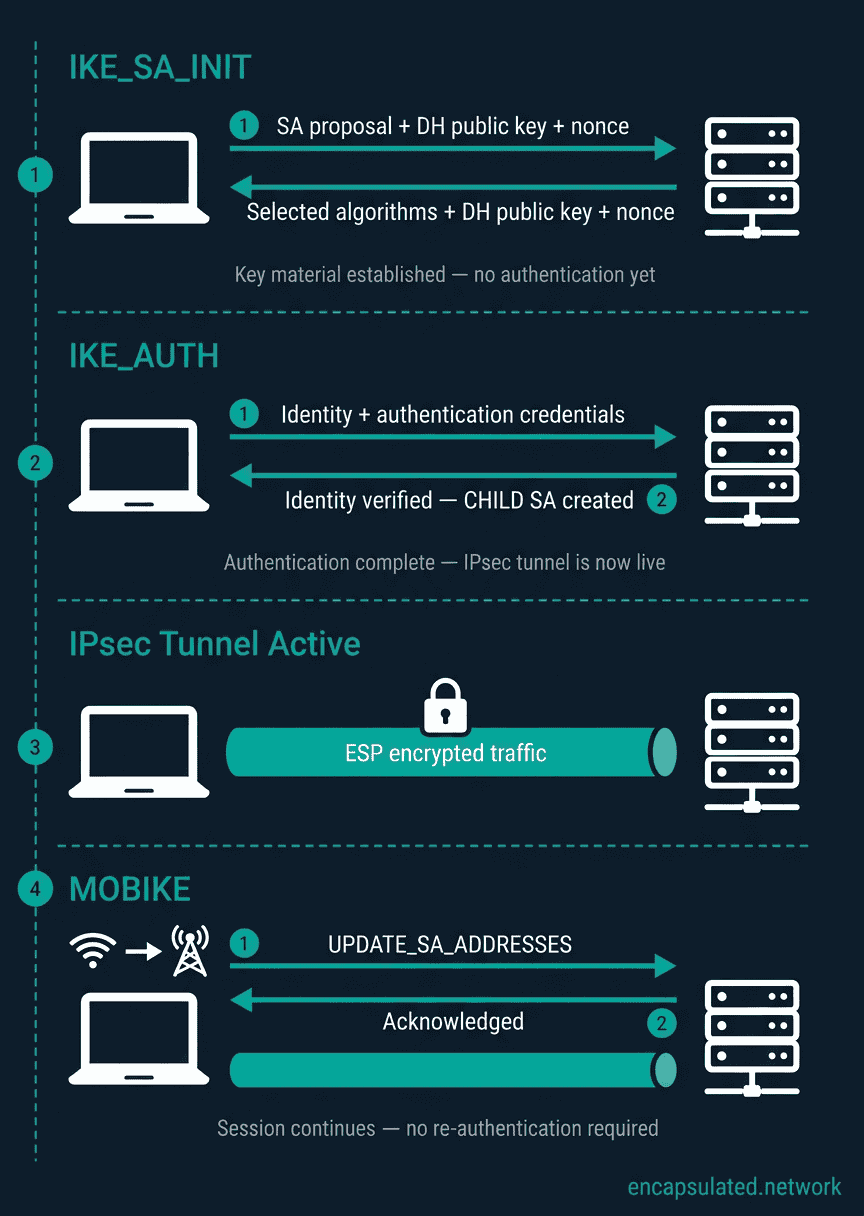
IKEv2 replaced IKEv1, and the most immediate improvement was speed. IKEv1 required between six and nine messages to complete authentication and establish the data tunnel — six in Aggressive Mode plus Quick Mode, nine in Main Mode plus Quick Mode. IKEv2 does the same work in exactly four messages: two exchanges, each consisting of a request and a response. Per RFC 7296, those four messages establish both the IKE SA and the first CHILD SA.
Exchange 1: IKE_SA_INIT
The first exchange establishes the IKE SA — the secure channel that will protect all subsequent IKEv2 control messages. Your device (the initiator) sends a proposal listing the cryptographic algorithms it supports: which encryption algorithm, which integrity algorithm, which Diffie-Hellman group, and which pseudorandom function. The server (the responder) selects from that proposal and responds with its chosen algorithms, along with its own DH public value and a nonce — a random number used to ensure freshness and prevent replay attacks.
Both sides now perform the Diffie-Hellman computation using each other’s public values, independently arriving at the same shared secret without ever transmitting it. From that shared secret, combined with the exchanged nonces, both sides derive the keying material for the IKE SA.
Critically: no identity authentication has occurred yet. IKE_SA_INIT only establishes key material. Authentication comes next.
Exchange 2: IKE_AUTH
The second exchange runs inside the IKE SA just established: it is encrypted and integrity-protected, apart from its message header. Here, both parties prove their identities using whichever authentication method was configured: a pre-shared key (PSK), a certificate (RSA or ECDSA), or an EAP method such as EAP-TLS or EAP-MSCHAPv2.
Once authentication succeeds, the first CHILD SA is created — piggybacked onto IKE_AUTH in the same four-message exchange. This CHILD SA is what actually carries your IPsec-protected traffic. The moment IKE_AUTH completes, the tunnel is live.
Together, IKE_SA_INIT and IKE_AUTH are what IKEv1 called Phase 1; RFC 7296 makes this mapping itself.
This two-exchange structure has a clean separation of concerns: the IKE SA secures the control channel; the CHILD SA secures data. A single IKE SA can support multiple simultaneous CHILD SAs — for example, routing different traffic flows through separate tunnels, which is the mechanism behind IKEv2’s native split tunneling support in enterprise deployments.
Rekeying: Keeping the Session Fresh
Both the IKE SA and CHILD SAs have configurable lifetimes — typically measured in hours or in bytes transferred. IKEv2 renegotiates them before they expire, generating fresh keying material without dropping the tunnel or requiring re-authentication. When a rekey includes a fresh Diffie-Hellman exchange, which IKEv2 requires for the IKE SA and allows for child SAs, keys from one period cannot be used to read traffic from another. This is Perfect Forward Secrecy.
To renew its own Phase 1 SA, IKEv1 had to run a new authenticated exchange; IKEv2 rekeys the IKE SA with CREATE_CHILD_SA, without re-authenticating. This is one of several operational improvements that make IKEv2 significantly less disruptive in long-running sessions.
IKEv1 vs IKEv2: What Actually Changed
IKEv2 is not a patched IKEv1 — it is a complete redesign. The original IKE, retroactively named IKEv1, was specified across multiple separate RFCs and accumulated extensions over the years: RFC 3947 for NAT traversal, RFC 3706 for Dead Peer Detection, and others. IKEv2 consolidated all of it into a single coherent specification — RFC 4306 (2005), superseded by RFC 5996, then RFC 7296 — and rebuilt the handshake from scratch. The two protocols are not wire-compatible: an IKEv2 initiator cannot establish a session with an IKEv1 responder.
| Feature | IKEv1 | IKEv2 |
|---|---|---|
| Handshake messages | 6–9 (Main Mode + Quick Mode, or Aggressive Mode + Quick Mode) | 4 (IKE_SA_INIT + IKE_AUTH — two request/response pairs) |
| NAT traversal | Separate extension (RFC 3947) — not universally implemented | Built-in — UDP/4500 encapsulation is part of the core specification |
| EAP authentication | No native support | Native — EAP-TLS, EAP-MSCHAPv2, and others supported directly in IKE_AUTH |
| Mobility (MOBIKE) | Not supported | RFC 4555 — UPDATE_SA_ADDRESSES keeps sessions alive across IP changes without re-authentication |
| Rekeying | Renewing the Phase 1 SA needs a new authenticated exchange | Fresh keying material generated without restarting the session or re-authenticating |
| Dead Peer Detection | Separate extension (RFC 3706) | Built-in via INFORMATIONAL exchange — no extension required |
| Message fragmentation | No standard — implementation-dependent workarounds | RFC 7383 — standard fragmentation when messages exceed path MTU |
| Wire compatibility | — | Not compatible with IKEv1 — separate negotiation, different header format |
IKEv1 should not appear in any new deployment. Beyond the architectural gaps above, Aggressive Mode — one of IKEv1’s two main handshake variants — exposes the pre-shared key hash to offline dictionary attack before the encrypted channel is established. The proliferation of separate extensions also made consistent, interoperable implementation difficult across vendors. Every major VPN stack in 2026 supports IKEv2; there is no compatibility reason to reach for IKEv1.
MOBIKE: Why IKEv2 Was Built for Mobile (RFC 4555)
MOBIKE — the Mobility and Multihoming Protocol — is the extension that separates IKEv2 from every other mainstream VPN protocol on mobile. Understanding it requires first understanding the problem it solves.
When you leave a building and your phone transitions from Wi-Fi to mobile data, your IP address changes. To a standard VPN protocol, this is a catastrophe: the tunnel was established between your old IP address and the server, and that relationship no longer exists. The protocol must tear down the tunnel, re-run the handshake, re-authenticate, and re-establish the CHILD SA from scratch. During that window — which can be several seconds — your traffic is either unprotected or stopped entirely.
What MOBIKE Actually Does
MOBIKE, specified in RFC 4555, solves this differently. When your IP address changes, your device sends an UPDATE_SA_ADDRESSES notification to the server containing the new address. The server updates its routing for the existing IKE SA and CHILD SA, binds them to the new address, and responds. The session continues without re-authentication, without a new Diffie-Hellman exchange, and without generating new keying material.
This exchange is protected by the existing IKE SA’s encryption and integrity keys — the mobility operation itself is authenticated, not an unauthenticated address update that could be spoofed. The attacker cannot redirect your session to a different address by sending a forged UPDATE_SA_ADDRESSES, because the notification must be correctly authenticated with the symmetric integrity key only your device and the server hold.
MOBIKE also handles changes in NAT mapping — the “Multihoming” part of the RFC 4555 title. When you switch between networks with different NAT configurations (different public IP and port mappings), MOBIKE adjusts the UDP encapsulation accordingly, keeping the NAT traversal working correctly through the transition.
For comparison: WireGuard detects that a handshake is needed when packets stop flowing and initiates a new one — fast, but not instantaneous, and a full new handshake. OpenVPN re-establishes the TLS session from scratch. IKEv2 with MOBIKE rebinds the existing SAs — no re-authentication, no key re-derivation, the fastest possible recovery from a network change.
Battery Efficiency: The Less-Chatty Protocol
IKEv2 has a second mobile advantage that rarely gets discussed: it is quieter than OpenVPN during idle periods. OpenVPN must send keepalive packets continuously to maintain the session — each packet wakes the phone’s radio, which is one of the highest-power components on a mobile device. IKEv2 manages the session more efficiently, and native OS implementations on Windows, iOS, and macOS run at the operating system level rather than as user-space applications, reducing CPU overhead further.
The result is measurably lower battery drain compared to OpenVPN over equivalent usage periods — not as low as WireGuard (which is the most power-efficient mainstream protocol available), but significantly better than OpenVPN. For commuters and travellers running a VPN all day, this is a meaningful practical difference.
The Cryptographic Suite
IKEv2’s approach to cryptography differs from WireGuard’s in one fundamental way: it negotiates. WireGuard uses a fixed cryptographic suite — ChaCha20-Poly1305, Curve25519, BLAKE2s — with no configuration options and no negotiation. You get one strong option, and that is by design. IKEv2 advertises a list of supported algorithms during IKE_SA_INIT and lets the responder select. This enables compatibility across a wider range of hardware and legacy systems, but it also means the security of a session depends partly on what the server is configured to accept.
Encryption: Two AEAD Options
IKEv2 supports two modern authenticated encryption algorithms:
AES-GCM (Galois/Counter Mode) — available in 128-bit and 256-bit key sizes — is the most widely deployed. It is an AEAD scheme: it provides confidentiality and integrity in a single operation, replacing the older combination of AES-CBC (encryption) plus HMAC (integrity check) that required separate passes. Hardware-accelerated AES has been available on Intel CPUs since 2010 (Westmere) and AMD CPUs since 2011 (Bulldozer), and is present on virtually every mainstream processor manufactured since the mid-2010s.
ChaCha20-Poly1305 — specified for IKEv2 and IPsec in RFC 7634, with the assigned transform ID ENCR_CHACHA20_POLY1305 — is also an AEAD scheme and is supported by major IKEv2 implementations including strongSwan, Libreswan, and iOS. It is WireGuard’s exclusive cipher, but it is not WireGuard’s invention and it is not WireGuard-only. On hardware without dedicated AES acceleration, ChaCha20-Poly1305 can be faster than AES-GCM.
The practical distinction between IKEv2 and WireGuard on encryption is not about which ciphers are available — both support ChaCha20-Poly1305. The distinction is that WireGuard uses it exclusively, with no alternatives and no negotiation. IKEv2 negotiates, which means a misconfigured server can select a weaker option if it supports one. Flexibility is simultaneously the feature and the risk.
For a full explanation of what AES-GCM mode actually does — what GCM mode means, how AEAD authentication produces a tamper-evident tag in a single pass, and how it compares to ChaCha20-Poly1305 — see VPN Encryption Explained article.
Key Exchange: Diffie-Hellman Groups
The strength of the IKE_SA_INIT key exchange depends on which Diffie-Hellman group is used. Current recommendations per RFC 8247 (“Algorithm Implementation Requirements and Usage Guidance for IKEv2”):
| DH Group | Type | Key Size | Status in 2026 |
|---|---|---|---|
| Group 19 | ECDH (P-256) | 256-bit | ✅ Recommended |
| Group 20 | ECDH (P-384) | 384-bit | ✅ Recommended |
| Group 31 | ECDH (Curve25519) | 256-bit | ✅ Recommended |
| Group 14 | MODP | 2048-bit | ⚠️ Acceptable minimum |
| Group 5 | MODP | 1536-bit | ❌ Not recommended |
| Group 2 | MODP | 1024-bit | ❌ Deprecated — SHOULD NOT use |
A server configured to accept Group 2 or Group 5 weakens the handshake regardless of what cipher is selected for the data channel. Strong data-channel encryption cannot compensate for a weak key exchange. When evaluating a VPN provider’s IKEv2 implementation, the DH group configuration is worth checking if the provider publishes it.
Integrity and the Pseudorandom Function
For integrity protection and key derivation, IKEv2 uses HMAC-SHA-256 as the minimum acceptable standard in 2026, with HMAC-SHA-384 and HMAC-SHA-512 as stronger options. The Pseudorandom Function (PRF) derives keying material from the Diffie-Hellman shared secret and the exchanged nonces — it is the mechanism that turns the raw DH output into usable session keys.
Post-Quantum Readiness
Quantum computers capable of breaking current public-key cryptography — including the Diffie-Hellman exchange at the heart of IKEv2’s handshake — do not yet exist at the scale required. But the “Harvest Now, Decrypt Later” threat model is already active: adversaries can record encrypted VPN sessions today and attempt to decrypt them once sufficiently capable quantum hardware arrives.
IKEv2 has a documented mitigation: PQ-PSK (Post-Quantum Pre-Shared Keys), specified in RFC 8784. A pre-distributed symmetric key is mixed into IKEv2’s key derivation function as an additional input. If the Diffie-Hellman exchange is broken by a future quantum computer, the session cannot be decrypted without also knowing the PPK — which was never transmitted and cannot be derived from traffic alone. This is the same mitigation available to WireGuard via its own PQ-PSK extension, and several VPN providers have begun implementing it.
Native OS Integration
IKEv2/IPsec is built directly into Windows, macOS and iOS, with no third-party application required, and it is the only VPN type Android’s built-in settings offer for new profiles.
| Platform | Native IKEv2 support | Notes |
|---|---|---|
| Windows | ✅ Since Windows 7 | Available via Settings → VPN. IKEv2 is the recommended built-in protocol for Windows VPN connections in 2026. |
| macOS | ✅ Built-in | Available via System Settings → VPN. No third-party app required. |
| iOS | ✅ Built-in | Settings → VPN. Apple’s Always-On VPN feature for MDM-managed enterprise deployments uses IKEv2. |
| Android | ⚠️ Built-in — enterprise use only | IKEv2/IPsec is the only protocol available for new built-in VPN connections on Android 12L and later (PPTP and L2TP/IPsec are no longer offered for new profiles). However, the built-in client is designed for enterprise IT-provisioned servers. Consumer VPN providers do not support it. For Android VPN setup, see our Android VPN setup guide. |
What “built-in” means in practice: native OS implementations are maintained by the OS vendor and updated through OS security patches — not dependent on a third-party app’s update cycle or continued development. For enterprise environments where software installation is restricted, IKEv2’s native availability is a significant operational advantage.
Is IKEv2 Secure in 2026?
A correctly configured IKEv2/IPsec deployment — using ECDH key exchange with recommended DH groups, AES-GCM-256 or ChaCha20-Poly1305, and certificate-based authentication — has no known practical attack against it. The protocol has a strong security track record across more than a decade of widespread enterprise deployment.
That said, IKEv2’s security profile is more configuration-dependent than WireGuard’s, and the differences are worth understanding.
Authentication Method Tradeoffs
IKEv2 supports three authentication methods, and they are not equivalent in security:
Certificate-based authentication (RSA, ECDSA) is the strongest option. The server and client each present a digital certificate signed by a trusted Certificate Authority. Authentication cannot be brute-forced because the private key never leaves the device. This is the correct choice for any deployment handling sensitive data, and the standard for enterprise IKEv2.
Pre-shared keys (PSK) are simpler to configure but vulnerable to offline dictionary attacks if a weak passphrase is chosen. A strong, randomly generated PSK is acceptable in controlled environments; a human-memorable password is not.
EAP (Extensible Authentication Protocol) enables username-and-password authentication and integration with RADIUS or Active Directory backends. EAP-TLS (certificate-based) is strong. EAP-MSCHAPv2 (password-based) has documented weaknesses — the MS-CHAP exchange can be attacked offline — and should not be used without an additional layer of protection. For consumer VPN services, EAP is rarely used.
The One Structural Weakness: Firewall Blocking
IKEv2’s most significant practical limitation is firewall visibility. It uses UDP port 500 for the initial key exchange and UDP port 4500 for NAT traversal — both specific, non-standard ports that any network administrator or government-level firewall can block by simply dropping those UDP ports.
Unlike OpenVPN, IKEv2 normally runs over UDP only. A 2022 standard, RFC 9329, lets IKE and IPsec run over TCP, on port 4500 by default, but only when both ends have been configured for it in advance. On a restrictive network that blocks non-HTTP/HTTPS traffic (corporate firewalls, hotel networks, high-censorship countries), IKEv2 in its usual UDP form will fail outright. This is the scenario where OpenVPN over TCP port 443 is the correct tool, not IKEv2. Windows users can reach TCP port 443 natively through SSTP, with no software to install.
Is IKEv2 Traffic Detectable by DPI?
Yes — straightforwardly. IKEv2 traffic on UDP port 500 and UDP port 4500 carries a characteristic header structure: a fixed 28-byte IKE header containing Security Parameter Index values, an exchange type field, and a flags byte. Any stateful firewall or deep packet inspection engine looking for IKEv2 will identify it from the header structure alone, without needing to decrypt the payload.
IKEv2 has no built-in obfuscation mechanism. Unlike OpenVPN’s TCP-443 mode — which makes VPN traffic resemble standard HTTPS to a basic firewall — or protocols designed with obfuscation layers such as Shadowsocks or obfs4, IKEv2 makes no attempt to disguise what it is. Some VPN providers wrap IKEv2 inside a TLS tunnel as a proprietary non-standard extension, but this is not a protocol feature and is rarely offered. Blocking IKEv2 is trivial; the protocol itself provides no answer to the problem of being identified on the wire.
Implementation Size and Attack Surface
WireGuard’s codebase is approximately 4,000 lines of code — deliberately minimal, independently auditable in a reasonable timeframe. IKEv2 implementations are substantially larger: strongSwan, the most widely deployed open-source IKEv2 stack, runs to several hundred thousand lines when its full dependency chain is included. This is not a reason to distrust IKEv2 — it has an excellent security record earned over many years of real-world deployment. It does mean that the auditing effort required is proportionally larger, and the historical rate of implementation vulnerabilities (distinct from protocol vulnerabilities) has been higher than WireGuard’s brief but clean history.
IKEv2’s fragmentation handling is also worth noting: when IKEv2 messages exceed the UDP MTU, fragmentation is required per RFC 7383. Implementations that handle fragmentation incorrectly are a known source of connection failures — not a security issue, but a reliability one that can surface in specific network environments.
IKEv2 vs WireGuard vs OpenVPN
| Dimension | IKEv2/IPsec | WireGuard | OpenVPN |
|---|---|---|---|
| Network switching / roaming | ✅ Best — MOBIKE rebinds the session without re-authentication | ⚠️ Good — initiates a new handshake on network change | ⚠️ Fair — re-establishes TLS session from scratch |
| Native OS support (no app required) | ✅ Windows, macOS, iOS built-in | ❌ App required on all platforms | ❌ App required on all platforms |
| Firewall traversal | ❌ UDP 500/4500 by default, easily blocked; TCP (RFC 9329) only where both ends are configured for it | ❌ UDP only — easily blocked | ✅ TCP port 443 mode — traffic resembles standard HTTPS |
| Enterprise auth (certificates, RADIUS) | ✅ Certificate, EAP-TLS, RADIUS/AD integration native | ❌ Pre-shared keys only — no EAP or RADIUS support | ⚠️ Certificate support; limited EAP backend options |
| Codebase / audit surface | ❌ Large — strongSwan runs to several hundred thousand lines | ✅ ~4,000 lines — most auditable of the three | ⚠️ ~100,000 lines (core daemon) |
| Post-quantum option | ✅ PQ-PSK — RFC 8784 | ✅ PQ-PSK extension | ⚠️ Via OpenSSL 3.x updates — provider-dependent |
| Best for | Mobile commuters, enterprise deployments, native OS VPN | Everyday use, streaming, gaming, battery life | Restrictive networks, self-hosted servers, legacy hardware |
IKEv2 wins in three specific contexts that neither WireGuard nor OpenVPN can match: native OS integration on Windows, macOS, and iOS with no third-party software required; MOBIKE for seamless VPN persistence across mobile network transitions; and enterprise authentication backend support — certificate-based auth, EAP-RADIUS, Active Directory integration, and multiple simultaneous CHILD SAs for complex traffic routing. For everything else — everyday browsing, streaming, gaming, and general privacy — WireGuard is faster, simpler, and the better default. For restrictive networks that block UDP traffic, OpenVPN over TCP port 443 gets through where IKEv2 cannot. For a full side-by-side of all three protocols across speed, battery, firewall traversal, and security, see our VPN protocols guide.
Troubleshooting Common IKEv2 Errors
IKEv2 is reliable when the network path supports it. When it fails, it tends to fail in recognisable ways. Here are the three most common problems and their fixes.
| Error / Symptom | Most likely cause | Fix |
|---|---|---|
| Windows Error 809 — “The network connection between your computer and the VPN server could not be established because the remote server is not responding” | A firewall or NAT device between your machine and the VPN server is blocking UDP port 500 or UDP port 4500 — the ports IKEv2 requires for key exchange and NAT traversal. Common on hotel, corporate, and school networks. | Switch to a protocol with TCP-443 support — OpenVPN over TCP port 443 will get through most restrictive networks. On Windows, SSTP is a native alternative that uses TCP port 443 by design and requires no additional software. If you control the router, check that “VPN passthrough” for IKEv2/IPsec is enabled and that UDP 500 and 4500 are not being dropped. |
| Windows Error 13801 — “IKE authentication credentials are unacceptable” | Two common causes: (1) a certificate problem — expired certificate, untrusted Certificate Authority, incorrect Subject/SAN, or missing Server Authentication EKU on the server certificate; (2) device clock significantly out of sync — IKEv2 certificate validation checks NotBefore and NotAfter fields, and a clock offset causes those checks to fail. | For certificates: download a fresh configuration from your provider or IT department. For clock: enable automatic date and time in your device settings (Settings → Time → Automatic), then retry. |
| IKEv2 keeps disconnecting on mobile | On iOS and Android, the OS may suspend or kill the VPN process to conserve battery when the app is in the background. On desktop, repeated disconnections usually indicate an unstable UDP path — packet loss or an intermediate device timing out the session. | Mobile: enable Always-On VPN in your device settings so the OS reconnects automatically on drops. Desktop: try a geographically closer server to reduce the chance of an unstable network path, or switch protocols if the instability persists. |
Should You Use IKEv2?
The right answer depends on what you are doing and where.
Use IKEv2 if: you are on a mobile device that moves between networks throughout the day — commuting, travelling, switching between home Wi-Fi and mobile data — and you want the tunnel to survive those transitions without reconnecting. Use it if you want a native OS VPN connection on Windows, macOS, or iOS without installing a third-party application. Use it if you are connecting to a corporate or enterprise server that uses certificate or EAP authentication and requires protocol-level features (multi-CHILD SA, RADIUS integration) that WireGuard does not support.
Skip IKEv2 if: you are on a network that restricts non-HTTPS traffic — a hotel, a school, a corporate network with aggressive firewall rules, or a country with heavy internet censorship. IKEv2 normally runs over UDP only. If UDP 500 and 4500 are blocked, you will see Error 809 immediately and need to switch to OpenVPN. Also skip IKEv2 if your VPN provider does not offer a well-maintained implementation — the protocol’s security is configuration-dependent in ways WireGuard’s is not, and a poorly configured server undermines the protocol’s inherent strengths.
For everyday VPN use: WireGuard remains the faster, simpler default. IKEv2 is not a general replacement — it is the right tool for specific circumstances, and in those circumstances, nothing else matches it.
Frequently Asked Questions
Is IKEv2 the same as IPsec?
No. IKEv2 and IPsec are two separate protocols that work together in an IKEv2/IPsec VPN. IKEv2 (Internet Key Exchange version 2) handles the control plane: it performs the handshake, authenticates both parties, and negotiates which cryptographic algorithms the session will use. IPsec is the data plane: it encrypts and authenticates the actual traffic using the rules IKEv2 established. The “/” in “IKEv2/IPsec” reflects this partnership: two distinct protocols used as a pair.
What is the difference between IKEv1 and IKEv2?
IKEv2 is a complete redesign of IKEv1, not an incremental update, and the two are not wire-compatible. The headline differences: IKEv2 completes the handshake in 4 messages versus IKEv1’s 6–9; it builds NAT traversal, EAP authentication, MOBIKE, Dead Peer Detection, and message fragmentation directly into the core specification rather than relying on separate extension RFCs; and it eliminates IKEv1’s Aggressive Mode, which exposed the pre-shared key hash to offline attack before the encrypted channel was established. There is no compatibility reason to use IKEv1 in 2026 — every major VPN implementation supports IKEv2, and IKEv1 should not appear in any new deployment.
Is IKEv2 secure in 2026?
Yes, when correctly configured. A deployment using ECDH key exchange with current DH groups (P-256, P-384, or Curve25519), AES-GCM-256 or ChaCha20-Poly1305 for encryption, and certificate-based authentication has no known practical vulnerability. The caveats: IKEv2’s security is more configuration-dependent than WireGuard’s because it negotiates its cryptographic suite. A server configured to accept deprecated DH groups (Group 2 or Group 5) weakens the handshake regardless of data-channel cipher strength. Verify your provider’s implementation if you handle sensitive data.
Why does iOS use IKEv2 by default?
Because Apple built IKEv2/IPsec into iOS at the OS level, and IKEv2’s MOBIKE extension makes it a natural fit for a mobile device. iOS devices move between Wi-Fi and cellular constantly — MOBIKE keeps the VPN session alive through those transitions without re-authentication. Apple’s Always-On VPN feature for enterprise MDM deployments is built on IKEv2. For consumer use, most iOS VPN apps still default to their own protocol (usually WireGuard-based), but the native built-in client uses IKEv2.
What is the difference between IKEv2/IPsec PSK, RSA, and EAP?
These are the three authentication methods IKEv2 supports, and they represent different tradeoffs between security and complexity. PSK (Pre-Shared Key) is the simplest: both sides share a secret passphrase configured in advance. Easy to set up, but vulnerable to dictionary attacks if the passphrase is weak. RSA/ECDSA (certificate-based) is the most secure: each party presents a digital certificate signed by a trusted Certificate Authority. The private key never leaves the device and cannot be brute-forced. This is the correct choice for enterprise and any sensitive deployment. EAP (Extensible Authentication Protocol) enables username-and-password login and integrates with enterprise authentication backends like RADIUS and Active Directory. EAP-TLS (certificate-based EAP) is strong; EAP-MSCHAPv2 (password-based) has documented weaknesses — the underlying MS-CHAP exchange is vulnerable to offline attack, a limitation most prominently demonstrated against PPTP. Over IKEv2, EAP-MSCHAPv2 runs inside the encrypted IKE SA tunnel, which changes the attack surface, but the inherent weakness of the MS-CHAP authentication mechanism remains a reason to prefer EAP-TLS wherever certificate infrastructure is available.
Can IKEv2 be blocked by a firewall?
Yes, and it is relatively easy to block. IKEv2 uses UDP port 500 for the initial key exchange and UDP port 4500 for NAT traversal. A network administrator can block both ports with a single firewall rule, cutting off all IKEv2 traffic. IKEv2 normally runs over UDP only. A 2022 standard (RFC 9329) allows IKE and IPsec over TCP, on port 4500 by default, but only when both ends have been configured for it in advance. If you are on a restrictive network that blocks VPN traffic and IKEv2 fails to connect (you will see Windows Error 809 or a generic connection timeout), switch to OpenVPN over TCP port 443 as your fallback.
Can DPI detect IKEv2 traffic?
Yes. IKEv2 traffic on UDP port 500 and UDP port 4500 has a characteristic header structure that deep packet inspection engines identify without difficulty — no decryption required. The protocol makes no attempt to disguise what it is. This means IKEv2 works reliably on networks that allow VPN traffic, and fails entirely on networks that block VPN protocols by fingerprint rather than just by port number. There is no built-in obfuscation layer; if evading DPI detection is a requirement for your situation, OpenVPN with a stealth or obfuscation layer (or a provider offering Shadowsocks bridges) is the appropriate tool, not IKEv2.
Should I use IKEv2 or WireGuard?
WireGuard for most everyday use: it is faster, has a smaller and more auditable codebase, and is the better default for browsing, streaming, and gaming. IKEv2 for specific situations where its advantages matter: you move between networks frequently and want MOBIKE to keep the session alive, you need a native OS VPN on Windows, macOS, or iOS without installing a third-party app, or you are connecting to a corporate server that requires certificate or EAP authentication. If your provider offers WireGuard and your network does not block UDP traffic, WireGuard is the right default. If you are commuting or need enterprise authentication, IKEv2 earns its place.
Does IKEv2 drain battery on iPhone?
Less than OpenVPN, more than WireGuard. IKEv2 is quieter than OpenVPN during idle periods — it does not need to send continuous keepalive packets to maintain the session, which means the phone’s radio wakes less frequently. iOS implements IKEv2 natively at the OS level, which adds further efficiency compared to a user-space VPN application. In real-world use, the battery impact of IKEv2 on iPhone is moderate — noticeable over a full day but not dramatic. If battery life is your primary concern, WireGuard-based provider apps consume significantly less power.