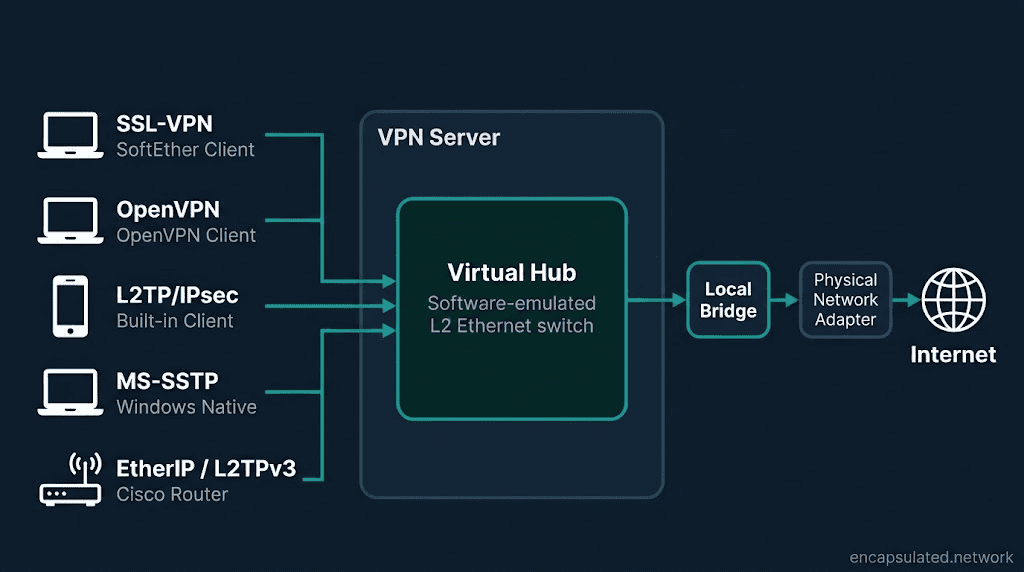
SoftEther is a multi-protocol VPN server package: a single server that simultaneously accepts connections from five different VPN protocols and routes them all through a software-emulated Layer 2 Ethernet switch. One of those five protocols is SoftEther’s own native SSL-VPN protocol, which tunnels Ethernet frames over TLS on TCP port 443. The other four are OpenVPN, L2TP/IPsec, MS-SSTP, and EtherIP/L2TPv3, each accepted without any modifications to the connecting client.
If you are new to VPN protocols generally, How Does a VPN Work? and VPN Protocols Explained provide the essential background.
TL;DR
SoftEther VPN is a free, open-source multi-protocol VPN server package developed as a master’s thesis at the University of Tsukuba, Japan, and open-sourced under GPLv2 on 4 January 2014 (relicensed to Apache 2.0 on 21 January 2019). Its native SSL-VPN protocol tunnels Ethernet frames (Layer 2) over TLS on TCP port 443, making it indistinguishable from HTTPS to stateless firewalls. The server simultaneously accepts OpenVPN, L2TP/IPsec, MS-SSTP, and EtherIP/L2TPv3 connections without any client-side modifications. The architectural centre is the Virtual Hub, a software-emulated Layer 2 Ethernet switch into which all incoming sessions terminate regardless of protocol. The current stable release is v4.44 Build 9807 RTM (April 2025). Two named third-party security audits exist: a 2017 fuzzing audit by Guido Vranken commissioned by the Max Planck Institute for Molecular Genetics (11 vulnerabilities, all patched in Build 9656) and a 2023 code review by Cisco Talos researcher Lilith (6 CVEs, all patched in Build 9798). Server certificate verification is disabled by default in the SoftEther VPN Client and must be enabled manually. SoftEther is the only mainstream VPN software that can tunnel traffic over ICMP or DNS when all TCP and UDP is blocked, and the only self-hosted option that consolidates five legacy VPN client types behind a single endpoint.
Three Things Called SoftEther
The name “SoftEther” refers to three distinct things, and the confusion stems from treating them as one.
The native SSL-VPN protocol
SoftEther’s own VPN protocol encapsulates Ethernet frames (Layer 2) inside a TLS session and transmits them over TCP port 443 by default. It is not SSTP: SSTP tunnels PPP sessions (Layer 3); SoftEther’s protocol tunnels Ethernet frames (Layer 2). The distinction determines what each protocol can carry and how each traverses firewalls. For the full treatment of SSTP, see SSTP Explained.
The software package
SoftEther VPN consists of four components: the VPN Server (the element administrators deploy), the VPN Client (a GUI application on Windows; a command-line vpnclient on Linux and macOS), the VPN Bridge (for site-to-site deployments), and vpncmd (a command-line management utility that runs on all platforms). The VPN Client is optional. Any device with a built-in L2TP/IPsec or SSTP client connects to a SoftEther server without installing the SoftEther software at all.
The SoftEther Project
The academic project at the University of Tsukuba that develops and distributes the software. There is no company behind it, no commercial support tier, and no paid version. The source code is available under Apache License 2.0.
Is SoftEther Right for You?
SoftEther can do more than any other self-hosted VPN, and for most people that is precisely the reason to choose something else. Running a SoftEther server requires creating Virtual Hubs, configuring authentication, choosing between SecureNAT and Local Bridge, managing TLS certificates, and understanding which of five protocol paths your clients will use. That configuration surface is unavoidable; it is the cost of the flexibility.
A reader who needs a personal VPN for one device, one protocol, and one use case is better served by WireGuard: smaller codebase, faster setup, kernel-level performance, and nothing to configure beyond key pairs and a peer table. SoftEther’s multi-protocol architecture becomes the correct choice when the environment already has heterogeneous clients that cannot be migrated to a single protocol, when Layer 2 bridging is a hard requirement, or when the target network blocks every standard VPN port including TCP 443. If none of those conditions apply, the flexibility is overhead with no payoff.
Origin: A Blocked Campus Port, a Master’s Thesis, and a Decade of Commercial Licensing
Daiyuu Nobori began building SoftEther in 2003 during his first year at the University of Tsukuba. The campus Wi-Fi passed only TCP ports 80 and 443, which blocked Microsoft Remote Desktop (TCP 3389) and prevented him from reaching his home PC from campus. He built SoftEther 1.0 as a personal solution, aged 18. The name means “Software Ethernet.”
The project received Japanese Government research funding in 2003, subsidised by the Ministry of Economy, Trade and Industry (METI) and administered by the Information-technology Promotion Agency (IPA) under the MITOH programme.
The first commercial release, branded “SoftEther CA,” launched in April 2004 under an exclusive distribution contract with Mitsubishi Materials Corporation. That contract ran for ten years, until April 2014. After it ended, SoftEther Corporation sold the commercial edition directly under the name PacketiX VPN. PacketiX VPN and SoftEther VPN share the same codebase; the changelog carries entries for both products under identical build numbers. PacketiX VPN continued as a commercially supported edition after SoftEther VPN was open-sourced; they ran in parallel, not in sequence.
Nobori’s master’s thesis, “Design and Implementation of SoftEther VPN,” was presented on 16 January 2013. The binary release followed on 8 March 2013. The source code was open-sourced under GPLv2 on 4 January 2014. On 21 January 2019, the licence switched to Apache License 2.0.
Quick Facts
| Field | Detail |
|---|---|
| Protocol type | Multi-protocol VPN server package |
| Developer | Daiyuu Nobori / SoftEther Project |
| Institution | University of Tsukuba, Japan |
| Open-source release | 4 January 2014 (GPLv2) |
| Current licence | Apache License 2.0 (from 21 January 2019) |
| Current stable build | v4.44 Build 9807 RTM, 16 April 2025 |
| Default TCP ports | 443, 992, 5555 |
| Transport | TCP (primary); UDP (NAT traversal mode) |
| Tunnel layer | Layer 2 (Ethernet frames), native protocol |
| Protocols accepted by server | SSL-VPN, OpenVPN, L2TP/IPsec, MS-SSTP, EtherIP/L2TPv3 |
| TLS versions supported | 1.0, 1.1, 1.2, 1.3 (individually toggleable) |
| Codebase size | 330,000+ lines of C source (~450,000 including headers) |
| Platforms (server) | Windows, Linux, macOS, FreeBSD, Solaris |
| Platforms (native client) | Windows (GUI); Linux/macOS (command-line vpnclient) |
| Security audits | 2017: Guido Vranken / MPI-MG. 2023: Cisco Talos (Lilith) |
The Architecture: Virtual Hub, Virtual Adapter, and the Layer 2 Philosophy
SoftEther operates at Layer 2, the data link layer, where it tunnels Ethernet frames rather than IP packets. Operating at Layer 2 means any protocol that runs over Ethernet can traverse the tunnel: IPv4, IPv6, NetBEUI, IPX/SPX, and broadcast-dependent Windows file-sharing traffic. The official documentation names NetBEUI and IPX/SPX explicitly as supported examples. Legacy VPN protocols that operate at Layer 3 carry only IP traffic; SoftEther carries anything Ethernet carries.
The Virtual Hub
The Virtual Hub is a software-emulated Layer 2 Ethernet switch. Every VPN session that connects to a SoftEther server terminates into a Virtual Hub, regardless of which protocol it arrived on. The Hub maintains a Forwarding Database (FDB) exactly like a physical Ethernet switch: it learns MAC addresses from incoming frames and forwards traffic only to the correct port. Devices on the same Hub communicate at Layer 2. Devices on different Hubs are isolated. One VPN Server can host multiple independent Hubs simultaneously.
Five different protocols terminate into the same Hub. The protocol a client used to connect is irrelevant once its session is live inside the Hub.
The Virtual Network Adapter
The client-side counterpart to the Virtual Hub. When the SoftEther VPN Client is installed, it creates a Virtual Network Adapter: a software-emulated Ethernet NIC that the operating system treats as physical hardware. The OS assigns it an IP address via DHCP from the Virtual Hub’s network, the same way it would handle a real NIC. Traffic sent to this adapter is encrypted and forwarded through the VPN tunnel.
Local Bridge
A Local Bridge connects a Virtual Hub to a physical network adapter on the server machine. This extends the VPN’s Layer 2 domain onto the physical LAN, giving VPN clients Layer 2 adjacency with physical devices on the server’s network. Local Bridge mode delivers full performance and is the correct choice for production deployments. SecureNAT is the alternative for deployments where Local Bridge access or root privileges are unavailable.
Virtual Layer-3 Switch
A software router that handles IP routing between otherwise isolated Virtual Hubs. When two Hubs need to exchange traffic without full Layer 2 merger, a Virtual Layer-3 Switch provides controlled inter-Hub routing.
Cascade Connections
Virtual Hubs on different physical server instances can be linked via cascade connections. A cascade connection behaves as a virtual uplink cable between two Ethernet switches: once established, the two Hubs’ Ethernet segments are united into a single segment. Computers connected to either Hub can communicate at Layer 2 as though on the same physical switch.
Two operational notes: cascade connections require Local Bridges at each site to reach physical devices on the LAN. Cascade also does not support Spanning Tree Protocol, so looped topologies between Hubs will produce broadcast storms.
Clustering
SoftEther VPN Server supports a clustering mode that distributes VPN sessions across multiple server nodes. The load-sharing algorithm compares each node’s load and assigns new sessions accordingly. When a cluster member fails, its sessions are taken over by other members automatically without any client-side intervention.
A cluster has two node types: one cluster controller and one or more cluster member servers. The controller manages session distribution across members. By default the controller also processes VPN sessions itself; an optional mode limits it to coordination only. The official features documentation states clustering makes it possible to host several tens of thousands of concurrent sessions if the hardware capacity allows. A single VPN Server without clustering handles approximately 4,096 sessions at its documented ceiling.
The cluster controller is a single point of failure. The standard clustering configuration provides no automatic fault-tolerance for the controller. The official manual recommends maintaining a separate backup controller machine and switching to it manually if the primary fails.
How the Native SSL-VPN Protocol Works
SoftEther’s native protocol tunnels Ethernet frames, not IP packets and not PPP sessions. The VPN adapter that appears on the client operating system is a full Ethernet interface with a MAC address, not simply an IP tunnel endpoint.
The connection sequence
The sequence has six steps, and no Ethernet frames flow until all six are complete.
Step 1. The client opens a TLS connection to the server on TCP 443, 992, or 5555. All three ports provide identical functionality; the client selects whichever the network allows. Port 443 mimics HTTPS; port 992 mimics TELNETS (a port now rarely used by legitimate traffic); port 5555 is SoftEther’s own default, not tied to any well-known public service.
Step 2. Inside the TLS channel, the client sends an HTTP POST request. To a stateless firewall inspecting the connection, this is indistinguishable from ordinary HTTPS.
Step 3. The SoftEther protocol header negotiates the Virtual Hub name, authentication method, and session parameters.
Step 4. User authentication completes. Supported methods are standard password, RADIUS, NT Domain / Active Directory, and X.509 certificate (including PKCS#11 smart cards and USB tokens).
Step 5. The client validates the server’s TLS certificate, but only if “Always Verify Server Certificate” is enabled in the connection settings. In the default configuration this check does not run, and no certificate validation occurs.
Step 6. The session is established. Ethernet frames begin flowing into the Virtual Hub.
Parallel TCP channel optimisation
A single VPN session can be multiplexed across between 1 and 32 parallel TCP connections, configurable by the user. Half-duplex mode splits these connections between upload and download directions. The benefit is real on high-latency, wide-bandwidth links: multiple independent TCP streams can collectively approach the available bandwidth more closely than a single stream can. On low-bandwidth links, fewer connections perform better because control overhead consumes a larger proportion of capacity.
This is not a solution to TCP Meltdown. The structural cost of tunnelling TCP inside TCP applies regardless of channel count. The parallel channels address latency-induced throughput limits; they do not address the compounding retransmission behaviour on lossy links.
VPN over ICMP and VPN over DNS
SoftEther can encapsulate Ethernet frames inside ICMP packets or DNS packets for networks that block all TCP and UDP traffic. ICMP is passed on nearly every network that blocks conventional VPN protocols; DNS is passed on almost any network with internet access at all. Throughput in these modes is low; treat them as last-resort fallbacks, not performance options. They are specific to the SoftEther SSL-VPN protocol and client. The other four server-side protocol paths (OpenVPN, L2TP/IPsec, SSTP, EtherIP) do not use ICMP or DNS transport. The client selects these fallback transports automatically; the server must have the VPN over ICMP/DNS function enabled.
UDP mode
A separate NAT traversal mode using UDP allows a SoftEther server behind NAT to accept inbound connections without port forwarding. This is distinct from the primary SSL-VPN TCP mode.
The Multi-Protocol Server: One Endpoint, Every Client
When SoftEther VPN Server is running, it simultaneously listens for five protocol types. Each incoming session terminates into a Virtual Hub, regardless of which protocol it used.
Native SSL-VPN
The SoftEther VPN Client for Windows connects using the native protocol. This is the only path to parallel TCP channels and the full Virtual Network Adapter experience. On Linux and macOS the native client runs as the vpnclient command-line program; no GUI is provided on those platforms. No native SoftEther VPN Client exists for iOS or Android.
OpenVPN
Any standard OpenVPN client connects without modification. Existing .ovpn configuration files work against a SoftEther server; no client reconfiguration is required. For OpenVPN’s own mechanics, see OpenVPN Explained.
L2TP/IPsec
Any device’s built-in L2TP/IPsec client connects natively: Windows, iOS (iOS 25 and earlier; iOS 26 applied the same 3DES/SHA-1/weak DH group removal as macOS 26 Tahoe, breaking connections to legacy gateways), Android 11 and earlier, and macOS with legacy gateways. The client deprecation trajectory (Android 12 removed L2TP from the built-in VPN client interface; Android 13 removed the legacy stack entirely; macOS 26 Tahoe broke connections to gateways using 3DES/SHA-1/weak DH groups) applies to the clients, not to SoftEther’s ability to accept them. A fully updated SoftEther server accepting L2TP/IPsec remains functional; the constraint is on the client side. For the full L2TP/IPsec deprecation picture, see L2TP/IPsec Explained.
MS-SSTP
Windows native VPN client connects without additional software. iOS SSTP Connect (a third-party App Store application) also connects to SoftEther’s SSTP listener. SoftEther implements a clone of Microsoft’s SSTP server function, compatible with Windows Vista SP1 and later SSTP clients.
EtherIP/L2TPv3
Both protocols use IPsec over UDP 500/4500. L2TPv3 is compatible with Cisco IOS L2TPv3 VPN clients and YAMAHA RTX routers. EtherIP provides Ethernet frame bridging over IPsec. Both serve enterprise and ISP site-to-site use cases involving Cisco and other routing hardware.
The practical implication
A network running Windows machines on SSTP, Android and iOS devices on L2TP/IPsec, Linux workstations on OpenVPN, and Cisco equipment on EtherIP can connect all of them to a single SoftEther server. No separate server infrastructure per protocol. No additional client software on any device except the Windows machines that want the native client’s additional features. No other self-hosted VPN solution matches this.
SecureNAT: A VPN Server Without Admin Rights
SecureNAT is a virtual NAT and DHCP server implemented in a proprietary user-mode TCP/IP stack inside the VPN Server process. When enabled on a Virtual Hub, connecting clients receive IP addresses from the virtual DHCP server and route outbound traffic through the virtual NAT, which exits via the server machine’s normal network interface. No Local Bridge is required. No kernel TAP driver is needed. No root privileges on the host machine are required.
A SoftEther server with user-mode SecureNAT can run inside a corporate network without any changes to the network’s routers, firewalls, or switches, and without administrator access to the host operating system’s kernel.
SecureNAT has three configurations: user-mode, kernel-mode, and RAW-IP. The “no kernel interaction” property applies to user-mode SecureNAT only. When the VPN Server runs with root privileges, RAW-IP mode engages iptables and does interact with the kernel for performance gains.
The trade-off: user-mode SecureNAT adds a processing step versus Local Bridge mode. For performance-sensitive deployments, Local Bridge with a properly configured kernel TAP adapter delivers higher throughput. User-mode SecureNAT is the portability option, not the performance option.
Firewall Bypass: How SoftEther Differs from SSTP
SoftEther’s native protocol and SSTP both use TLS over TCP port 443, and both are indistinguishable from HTTPS to a stateless firewall. That shared baseline means SSL-inspection appliances can identify both by TLS fingerprint, and both pay the TCP Meltdown cost on lossy connections. Three differences between the two protocols are worth establishing here.
Layer 2 vs Layer 3
SSTP tunnels a PPP session: the client receives an IP address and routes IP packets through the tunnel. SoftEther’s native protocol tunnels Ethernet frames: the VPN adapter appears as a full Ethernet interface, passes non-IP traffic, and operates at the broadcast domain level. This distinction determines which applications and protocols the VPN can carry.
Parallel channels vs single connection
SSTP uses one TCP connection per session. SoftEther multiplexes up to 32 parallel TCP connections per session. On high-latency, wide-bandwidth links this produces measurably better aggregate throughput.
VPN over ICMP and DNS
SSTP has no equivalent to VPN over ICMP or VPN over DNS. On networks that block all TCP and UDP, SoftEther can still establish a tunnel. SSTP cannot.
On DPI resistance: SoftEther’s TLS fingerprint is identifiable by SSL-inspection appliances in the same way as other TLS-wrapping approaches. It provides stateless firewall bypass, but not the deep protocol impersonation that makes a VPN server indistinguishable from a genuine HTTPS website under active probing. The full framework for evaluating obfuscation depth is in What Is an Obfuscated VPN?
SoftEther Against National Firewalls and Active Probing
SoftEther’s port-443 disguise stops a stateless firewall reliably. A firewall that actively probes suspicious connections is a different adversary.
On restrictive corporate networks, hotel Wi-Fi, and university filters that block standard VPN ports, TCP 443 mode works. These networks use stateless or lightly stateful filtering; they pass TLS on port 443 without inspecting its content. SoftEther’s HTTP POST handshake is invisible to them. For networks that pass nothing except ICMP or DNS queries, VPN over ICMP and VPN over DNS can establish a tunnel that no other mainstream protocol can, though throughput in those modes is low.
Against the Great Firewall of China and comparably capable systems, the picture is different. These systems use deep packet inspection that analyses TLS fingerprints (JA3/JA4 signatures), connection behavioural patterns, and active probing (sending test packets to suspected VPN endpoints to confirm what is running). SoftEther’s active-probing exposure is a matter of observed server behaviour rather than any official claim from the project: a default SoftEther install identifies itself in nmap scans as “SoftEther VPN httpd,” and connections that do not carry the SoftEther protocol watermark are closed with a logged note that a non-SoftEther client connected. The embedded web administration pages are hardcoded and cannot be replaced with a convincing cover response through any supported configuration option. SoftEther’s own firewall-resistance claims concern passive DPI (the HTTPS camouflage that prevents a firewall from classifying the tunnel in transit), not active probing. Peer-reviewed research (Ensafi et al., “Examining How the Great Firewall Discovers Hidden Circumvention Servers,” IMC 2015) documented that the GFW actively probed and identified SoftEther servers. For environments running active-probing DPI, SoftEther’s port-443 mode provides the same level of protection as stunnel-based TLS wrapping: it passes signature-based inspection but does not withstand the probe.
The practical verdict: SoftEther is the correct tool for restrictive networks that do not run active probing. It is not a substitute for purpose-built obfuscation tools in environments that do.
Security: The Complete Audit Picture
The codebase
SoftEther’s codebase is large. The Cedar VPN engine and Mayaqua OS-abstraction layer, from which the server, client, bridge, and management tools are all built, account for approximately 309,000 lines of C. The full stable repository totals over 330,000 lines of C source and approximately 450,000 lines including headers. The VPN Server, Client, Bridge, and management executables are thin wrappers over these two core libraries.
For comparison: WireGuard’s Linux kernel module runs to approximately 4,000 to 5,000 lines (see WireGuard Explained); OpenVPN’s core daemon runs to approximately 70,000 to 100,000 lines. A larger codebase means a proportionally larger attack surface and a more demanding audit requirement.
What OpenSSL provides
SoftEther delegates all TLS operations to OpenSSL. TLS 1.0 through 1.3 are supported and individually toggleable. The cipher suite is whatever TLS negotiates between client and server via OpenSSL. For context on AEAD ciphers and what AES-256-GCM provides, see VPN Encryption Explained.
The certificate verification default
SoftEther VPN Client does not enforce server certificate verification by default. The option “Always Verify Server Certificate” is present in the connection settings and must be enabled manually. A client connecting without this option enabled cannot detect a man-in-the-middle attack at the TLS layer: the TLS session will encrypt the connection but will not authenticate the server’s identity. For any deployment where security matters, enabling this option is the first configuration step.
Audit 1: 2017, Guido Vranken / Max Planck Institute for Molecular Genetics
A fuzzing-based security audit commissioned by the Max Planck Institute for Molecular Genetics and conducted by security researcher Guido Vranken over approximately 80 hours in late 2017. The fuzzer covered buffer handling, packet parsers for IPv4, DHCP, RADIUS, SSTP, OpenVPN, PPP, IKE, and DNS, along with IPC handling and SSL certificate processing. The audit found 11 vulnerabilities. All were disclosed to the SoftEther team and patched in Build 9656 RTM, released 15 January 2018. The methodology was fuzzing, which assessed input handling and parser robustness rather than the cryptographic design.
Audit 2: 2023, Cisco Talos (Lilith)
A high-level code review conducted in cooperation with the SoftEther Project between April and June 2023, by security researcher Lilith of the Cisco Talos division. The review found six vulnerabilities, all fixed in Build 9798 RTM released 30 June 2023.
| CVE | Description | Attack requirement |
|---|---|---|
| CVE-2023-27395 | Heap overflow in DDNS client; theoretical arbitrary code execution | MitM at ISP or DNS infrastructure level |
| CVE-2023-22325 | Integer overflow in DDNS client | MitM at ISP or DNS infrastructure level |
| CVE-2023-32275 | Information disclosure in 32-bit admin process | Local administrator |
| CVE-2023-27516 | Authentication bypass in CiRpcServerThread | Network access to management interface |
| CVE-2023-32634 | Authentication bypass in CiRpcAccepted | Network access to management interface |
| CVE-2023-31192 | Information disclosure in ClientConnect | MitM position |
The DDNS vulnerabilities (CVE-2023-27395 and CVE-2023-22325) require an attacker to control the ISP-level internet connection, Wi-Fi infrastructure, or reference DNS servers used by the VPN server. The arbitrary code execution risk in CVE-2023-27395 is theoretical; neither the discoverer nor the developers demonstrated it in practice. The authentication bypass CVEs (CVE-2023-27516 and CVE-2023-32634) targeted the management RPC interface and are the more operationally concerning findings because network access to port 5555 is the only prerequisite.
TunnelCrack protection
Build 9799 beta (31 August 2023) introduced TunnelCrack protection in the SoftEther VPN Client, addressing both the LocalNet attack and the ServerIP attack documented in the USENIX Security 2023 paper by Xue, Malla, Xia, Pöpper, and Vanhoef (“Bypassing Tunnels: Leaking VPN Client Traffic by Abusing Routing Tables”). This protection is a client-side feature. It works by blocking TCP and UDP connections over the physical local network while a VPN connection is active. There is no server-side TunnelCrack feature. Build 9807 RTM (April 2025) includes this protection in the stable release line.
The audit gap
Two named third-party audits over 11 years. For comparison: OpenVPN has accumulated 25 years of continuous community scrutiny and multiple named third-party audits; WireGuard was introduced in an academic paper at NDSS 2017 and underwent the Linux kernel inclusion review process. For administrators in regulated industries with formal security assurance requirements, the gap between SoftEther’s audit history and that of its principal competitors is a material consideration.
Disputed CVEs
Since Build 9798, community researchers have raised additional CVE-numbered findings against SoftEther. The project team has publicly disputed some, specifically entries that affect only a local administrator operating their own tooling, or stress-testing utilities with no untrusted input. The project changelog documents these disputes transparently. Readers evaluating SoftEther for security-sensitive deployments should review the changelog and CVE record directly rather than relying on aggregate CVE counts, which may include disputed or low-impact entries.
Operational recommendations
Run Build 9807 RTM (current stable, April 2025) or later. Enable “Always Verify Server Certificate” on all SoftEther VPN Client connections. Restrict the management interface (TCP port 5555 by default) to trusted networks and do not expose it to the internet.
Leak Protection, Kill Switch, and Tunnel-Drop Behaviour
TunnelCrack protection (stable in Build 9807 RTM) guards against the LocalNet and ServerIP routing-table attacks documented in the USENIX Security 2023 paper. It does not address DNS-leak behaviour or what happens when the tunnel drops unexpectedly.
SoftEther VPN Client has no built-in kill switch. When the VPN session drops, the operating system reverts to its default network routing. Any traffic generated during the gap between session drop and reconnection travels outside the tunnel. On a self-hosted deployment, preventing this requires a firewall rule on the client machine: an iptables rule on Linux that blocks all outbound traffic except on the VPN interface, or an equivalent Windows Firewall rule, configured independently of the VPN client itself. DNS leak behaviour depends on the server’s deployment mode. When SecureNAT is active on a Virtual Hub, its built-in DHCP server can distribute a custom DNS resolver address to connected clients; this is configurable in DHCP-only sub-mode without enabling Virtual NAT. In Local Bridge mode, DNS is provided by the physical LAN’s own DHCP server, not by SoftEther, and no equivalent DNS-push mechanism is available from the VPN server itself. Without a DNS resolver being pushed via DHCP, DNS resolution falls back to the OS default when the tunnel is absent, producing a DNS leak.
A self-hosted VPN moves these protections from a vendor’s feature list to the administrator’s configuration responsibility. Whether SoftEther leaks DNS or drops traffic unprotected depends entirely on how the deployment is configured; this is not a weakness specific to SoftEther but a property of any self-hosted VPN tool.
VPN Gate: Free Relays and No Privacy Guarantee
VPN Gate is a separate academic project of the University of Tsukuba. Volunteers worldwide run SoftEther servers and register them with a public directory at vpngate.net. Despite the similar name, VPN Gate is a set of volunteer relays, not a VPN gateway. The vpngate.net web server is hosted at the University of Tsukuba; the relay servers are hosted by private individuals. Servers are concentrated in Japan and South Korea. No official country-breakdown figure is published.
VPN Gate is not a privacy tool. Logging is enabled by default on volunteer-run servers, with connection logs retained for months. Individual operators set their own retention policies. There is no central logging guarantee, no privacy audit, and no policy equivalent to a commercial no-log provider. The trust model is categorically different from a self-hosted server (where the administrator controls logging) or a verified commercial provider (where a logging policy has been independently audited).
VPN Gate is appropriate for accessing geographically restricted public content, not for privacy-sensitive use.
Platform Support
| Platform | Server | Native client | Protocol fallback (no SoftEther client required) |
|---|---|---|---|
| Windows | Full | Yes (official GUI client) | SSTP (native), L2TP/IPsec (native), OpenVPN (third-party app) |
| Linux | Full | vpncmd only | OpenVPN, L2TP/IPsec (strongSwan + xl2tpd) |
| macOS | Full | vpncmd only | L2TP/IPsec (broken on macOS 26 Tahoe against legacy gateways; see L2TP/IPsec Explained), OpenVPN |
| FreeBSD / Solaris | Full | vpncmd only | Protocol-dependent |
| iOS | No server | None | L2TP/IPsec, SSTP Connect (third-party), OpenVPN Connect |
| Android | No server | None | L2TP/IPsec (removed Android 13), OpenVPN |
The native SoftEther SSL-VPN protocol has no official iOS or Android client. Mobile users connecting to a SoftEther server use L2TP/IPsec or OpenVPN and inherit the limitations of those protocols.
Development Status: v4, v5, and the Maintenance Picture
The current stable release is v4.44 Build 9807 RTM, dated 16 April 2025, and is the first stable RTM after Build 9798 (June 2023), which carried the Cisco Talos security patches. Security fixes do not always wait for RTM releases: Build 9798’s critical CVE patches arrived in a non-RTM build before the next stable RTM was cut. Administrators should monitor the GitHub repository and apply security-relevant builds when they appear rather than waiting for RTM-only update cycles.
The v5 developer branch (currently at 5.02.5180) is not for production use. It is not a rewrite of the codebase: it is the same Cedar/Mayaqua codebase extended with new components including a WireGuard submodule, post-quantum submodules, and a CMake build system. No stable v5 release exists as of mid-2026.
This differs from WireGuard, which is maintained as part of the Linux kernel mainline and updated continuously, and from OpenVPN, which maintains an active 2.7.x stable branch with regular releases. The difference is not evidence of insecurity, but it is a relevant operational factor for environments with formal security update requirements.
Is SoftEther Legal to Use?
SoftEther is software you run yourself, not a service you subscribe to. That distinction reshapes the legality question: the issue is not what a provider does with your traffic but what you do with the software. In the vast majority of jurisdictions where VPN use is lawful, self-hosting a SoftEther server is equally lawful. There is no commercial entity, no centralised logging, and no terms of service beyond the Apache License 2.0.
In jurisdictions where VPN use is restricted or prohibited (China, Iran, Russia, Turkmenistan), running a SoftEther server is subject to the same restrictions as any other VPN. Obfuscation capability does not change legal status. The operator of a self-hosted VPN server carries the legal responsibility that a commercial provider would otherwise bear, which means there is no company to absorb the regulatory exposure if the deployment attracts scrutiny in a restrictive jurisdiction.
When SoftEther Earns Its Place
Mixed-client self-hosted infrastructure
SoftEther is the correct choice when the organisation has clients across multiple VPN protocol families that need to connect to a single endpoint without per-protocol server infrastructure. Windows machines connecting via SSTP, mobile devices on L2TP/IPsec, Linux workstations on OpenVPN, and Cisco hardware on EtherIP all connect to one SoftEther server. No separate server instance per protocol, no additional client software on devices that have native protocol support, no licence costs.
Protocol migration bridge
SoftEther removes the requirement for a hard cutover when migrating from one VPN protocol to another. During a migration from L2TP/IPsec to OpenVPN, legacy clients continue connecting via L2TP while new deployments use OpenVPN, both terminating into the same Virtual Hub. When migration is complete, L2TP is disabled at the Hub level. No parallel infrastructure. No client disruption during the transition period.
Extreme firewall bypass
Networks that block all TCP and UDP are an edge case but a real one: some captive portals and aggressively filtered enterprise networks pass only ICMP or DNS. VPN over ICMP and VPN over DNS handle these scenarios. No other mainstream VPN protocol offers an equivalent. These modes are specific to the SoftEther SSL-VPN protocol and require the SoftEther VPN Client: the GUI application on Windows, or vpnclient via command line on Linux and macOS. They are not available through the L2TP/IPsec, OpenVPN, SSTP, or EtherIP protocol paths. The client selects ICMP or DNS transport automatically as a last-resort fallback when TCP and UDP connections fail; the server must have the VPN over ICMP/DNS function enabled to accept such sessions.
Layer 2 and industrial networking
Industrial environments with SCADA systems, PLCs running BACnet or Modbus over Ethernet, or VLAN bridging requirements between remote sites need Layer 2 adjacency across geographic separation. The Virtual Hub handles multi-site Layer 2 bridging directly. OpenVPN’s TAP mode approximates Layer 2 bridging but does not provide the same architectural clean separation between sessions as SoftEther’s Virtual Hub model.
Network simulation
The Virtual Hub includes a built-in packet delay, jitter, and packet loss generator, configurable via the hub’s extended access list. Specific traffic flows within the Hub can be targeted; no external hardware is required.
Where SoftEther Does Not Earn Its Place
Everyday privacy use
No commercial SoftEther service exists. Readers seeking a privacy-first VPN for browsing and streaming need a commercial provider with a verified no-log policy.
Performance-first deployments on stable broadband
WireGuard’s kernel-space UDP architecture outperforms SoftEther’s userspace TCP stack on stable, low-latency connections. SoftEther’s parallel TCP channels compensate on high-latency links but do not close the gap on reliable broadband.
Mobile users who need network roaming
SoftEther has no native SSL-VPN client for iOS or Android. Mobile users fall back to L2TP/IPsec or OpenVPN, both of which lack the seamless session preservation across network changes that IKEv2 provides via MOBIKE. For devices that move between Wi-Fi and mobile data throughout the day, IKEv2/IPsec is the correct choice.
High-audit-requirement environments
Two named third-party audits over 11 years. Administrators in regulated industries with formal security assurance requirements should assess whether SoftEther’s audit record meets their organisation’s standards before deployment.
SoftEther vs the Alternatives
| SoftEther (SSL-VPN) | OpenVPN (TCP 443) | WireGuard | IKEv2/IPsec | |
|---|---|---|---|---|
| Protocol type | Multi-protocol server / L2 tunnel | Single protocol / L3 tunnel | Single protocol / L3 tunnel | Single protocol / L3 tunnel |
| Tunnel layer | Layer 2 (Ethernet) | Layer 3 (IP) | Layer 3 (IP) | Layer 3 (IP) |
| Transport | TCP primary; UDP (NAT-T mode) | TCP or UDP | UDP only | UDP only |
| Port-443 bypass | ✅ Native | ✅ TCP mode | ❌ No | ❌ No |
| VPN over ICMP / DNS | ✅ Yes | ❌ No | ❌ No | ❌ No |
| Parallel TCP channels | 1–32 per session | 1 | N/A (UDP) | N/A (UDP) |
| Multi-protocol server | ✅ Five protocols | ❌ No | ❌ No | ❌ No |
| Codebase | 330,000+ lines C | ~70,000–100,000 lines | ~4,000–5,000 lines | Varies by implementation |
| Independent audits | 2 (2017, 2023) | 25+ years scrutiny, multiple named third-party audits | NDSS 2017 paper + kernel review | RFC-standardised, multiple implementations |
| Native mobile client | ❌ No (L2TP/SSTP fallback) | ❌ App required | ❌ App required | ✅ iOS, macOS, Windows, Android |
| Commercial VPN support | Rare | Universal | Universal | Universal |
| Best for | Mixed-client self-hosted, L2 bridging, extreme firewall bypass | Restrictive networks, enterprise self-hosted | Daily use, performance | Mobile, enterprise auth, native OS |
Frequently Asked Questions
What is SoftEther VPN?
SoftEther VPN is a free, open-source multi-protocol VPN server package developed at the University of Tsukuba in Japan. It runs five VPN protocols simultaneously on a single server: its own native SSL-VPN protocol, OpenVPN, L2TP/IPsec, MS-SSTP, and EtherIP/L2TPv3. All incoming sessions, regardless of protocol, terminate into a Virtual Hub, a software-emulated Layer 2 Ethernet switch. The current stable release is v4.44 Build 9807 RTM (April 2025), available under Apache License 2.0.
What does “SoftEther” mean?
“SoftEther” is an abbreviation of “Software Ethernet.” The name reflects the core mechanism: virtualising the Ethernet layer in software rather than hardware.
Is SoftEther a VPN protocol or a VPN software package?
It is both, under the same name. SoftEther the software package is a VPN server that accepts five different VPN protocols. One of those five is SoftEther’s own native SSL-VPN protocol, which also carries the SoftEther name. The software package and the native protocol are two different things. When people say “SoftEther uses port 443,” they are describing the native protocol. When they say “SoftEther accepts OpenVPN clients,” they are describing the server package.
How is SoftEther different from SSTP if both use TCP port 443?
Both use TLS over TCP 443 and are indistinguishable from HTTPS to a stateless firewall. Three structural differences separate them. First, SSTP tunnels PPP sessions (Layer 3); SoftEther’s native protocol tunnels Ethernet frames (Layer 2), carrying non-IP traffic. Second, SSTP uses a single TCP connection per session; SoftEther supports up to 32 parallel TCP connections per session, improving throughput on high-latency links. Third, SoftEther can fall back to tunnelling over ICMP or DNS when all TCP and UDP is blocked; SSTP has no equivalent.
Do I need to install the SoftEther client to connect to a SoftEther server?
No. Any device with a built-in L2TP/IPsec or SSTP client connects to a SoftEther server without the SoftEther VPN Client installed. Android and iOS devices use L2TP/IPsec. Windows devices can use SSTP or L2TP/IPsec natively. Linux and macOS can use OpenVPN. The SoftEther VPN Client is required only if you want the native SSL-VPN protocol or its specific features such as parallel TCP channels. On Windows it is a GUI application; on Linux and macOS it runs as vpnclient via command line.
What is a Virtual Hub in SoftEther?
A Virtual Hub is a software-emulated Layer 2 Ethernet switch running inside the SoftEther VPN Server process. Every VPN session terminates into a Virtual Hub, regardless of which protocol was used to connect. The Hub maintains a Forwarding Database of MAC addresses and forwards Ethernet frames between sessions exactly as a physical Ethernet switch would. One server can host multiple independent Hubs; devices on the same Hub communicate at Layer 2, and devices on different Hubs are isolated.
What is SecureNAT and when should I use it?
SecureNAT is SoftEther’s user-mode virtual NAT and DHCP server. In user-mode configuration, it runs entirely inside the VPN Server process: no kernel TAP driver, no root privileges, no changes to the host network infrastructure. Connecting clients receive IP addresses from the virtual DHCP server and route outbound traffic through the virtual NAT. Use SecureNAT when you need to deploy a SoftEther server in an environment where you do not have kernel-level access or administrator rights on the network. For any deployment where throughput is a priority, use Local Bridge mode instead; SecureNAT adds a processing step that Local Bridge mode does not.
Is SoftEther safe to use in 2026?
SoftEther has received two named third-party security audits: a 2017 fuzzing audit by Guido Vranken commissioned by the Max Planck Institute for Molecular Genetics (11 vulnerabilities, all patched in Build 9656) and a 2023 code review by Cisco Talos researcher Lilith (6 CVEs, all patched in Build 9798). The current stable release is Build 9807 RTM (April 2025). Three configuration items require explicit attention: server certificate verification must be enabled manually in the VPN Client; the management interface (port 5555) must be restricted to trusted networks; and the current stable build must be maintained rather than running older releases. The audit record is thinner than OpenVPN’s or WireGuard’s, and this is a material consideration for regulated environments.
Is SoftEther faster than OpenVPN?
SoftEther’s own documentation has cited figures up to 13 times faster than OpenVPN in internal benchmarks. These figures predate WireGuard as a frame of reference, reflect SoftEther’s own testing conditions, and have not been independently replicated in peer-reviewed comparisons. The parallel TCP channel mechanism is the architectural basis for the performance claim: on high-latency, wide-bandwidth links, 32 parallel TCP streams can collectively approach available bandwidth more closely than OpenVPN’s single stream. On stable, low-latency broadband, the gap between SoftEther and OpenVPN TCP 443 is narrower, and WireGuard outperforms both due to its kernel-space UDP architecture.
Does SoftEther support WireGuard?
The v4 stable release does not include WireGuard support. The v5 developer branch (not for production use as of mid-2026) includes a WireGuard submodule as part of its ongoing development.
What is VPN Gate and is it private?
VPN Gate is a separate academic project of the University of Tsukuba in which volunteers worldwide run SoftEther servers and register them in a public relay directory. Logging is enabled by default on volunteer-run servers, with connection logs retained for months. Individual operators control their own logging configuration. There is no central privacy guarantee or audit. VPN Gate is not a privacy tool. It is appropriate for accessing geographically restricted public content.
Should I use SoftEther or WireGuard for a self-hosted VPN?
Use WireGuard when you have one client type, one protocol to support, a stable low-latency network, and performance is the priority. Its kernel-space architecture, minimal codebase, and extensive audit record make it the correct default for new, single-purpose self-hosted deployments. Use SoftEther when you have multiple client types using different VPN protocols that need to reach a single server, when you need Layer 2 bridging between sites, when you are migrating between protocols without a hard cutover, or when the target network blocks all standard VPN ports and even TCP 443 is insufficient. SoftEther’s complexity is the cost of its flexibility.
How do I set up a SoftEther VPN server?
Setting up a SoftEther server involves four core steps: installing the VPN Server on Windows or Linux (vpncmd is the management tool for headless hosts), creating a Virtual Hub, adding a user account for authentication, and choosing between SecureNAT (no kernel privileges required, lower throughput) and Local Bridge (requires root or admin access, full performance). On the client side, the first mandatory step is enabling “Always Verify Server Certificate” in the SoftEther VPN Client connection settings. Ports 443, 992, and 5555 all need to be open on the server’s firewall for the native protocol. The SoftEther Project’s official manual covers the full installation and configuration sequence.
Does SoftEther work in China or against the Great Firewall?
Partially. SoftEther’s native protocol (TLS over TCP 443) passes stateless firewalls reliably, including many restrictive corporate and institutional networks. Against the Great Firewall of China, which uses deep packet inspection including TLS fingerprinting and active probing, SoftEther is detectable. A default SoftEther server identifies itself to port scanners as “SoftEther VPN httpd” and closes non-SoftEther connections with a logged message; the embedded web pages are hardcoded and cannot be replaced with a convincing cover response. Peer-reviewed research (Ensafi et al., IMC 2015) documented that the GFW actively probed and identified SoftEther servers. VPN over ICMP and VPN over DNS extend bypass capability to networks that block all TCP and UDP, but throughput in these modes is too low for practical daily use. SoftEther’s own firewall-resistance claims cover passive DPI, not active probing. For consistent operation against the GFW, purpose-built obfuscation tools with active-probing resistance are the appropriate tools.
Does SoftEther have a kill switch or DNS leak protection?
SoftEther VPN Client does not include a built-in kill switch. When the VPN session drops, the OS reverts to its default routing and any traffic generated before reconnection travels outside the tunnel. Preventing this requires a client-side firewall rule configured independently: on Linux, an iptables rule blocking all outbound traffic except on the VPN interface; on Windows, an equivalent Windows Firewall rule. DNS behaviour depends on deployment mode: when SecureNAT is active, its built-in DHCP server can push a custom DNS resolver address to clients, which directs DNS through the tunnel while it is active. In Local Bridge mode, DNS is provided by the physical LAN’s DHCP server and SoftEther has no equivalent push mechanism. TunnelCrack protection against routing-table attacks (LocalNet and ServerIP) is present in the VPN Client from Build 9807 RTM onward.
Is SoftEther legal to use?
In most jurisdictions, self-hosting a SoftEther server is as lawful as VPN use itself. SoftEther is software distributed under Apache License 2.0; there is no commercial service agreement and no centralised logging. In jurisdictions where VPN use is restricted or prohibited (China, Iran, Russia, Turkmenistan), running a SoftEther server is subject to the same restrictions as any other VPN. The operator of a self-hosted server carries the legal responsibility that a commercial provider would otherwise bear: there is no company to absorb regulatory exposure if the deployment is scrutinised in a restrictive jurisdiction.