
An always-on VPN is a VPN connection that a device starts by itself, for example when it starts up or when the user signs in, and keeps running. Whether it also blocks internet traffic while the VPN is down depends on the platform and on how the setting is configured.
The term mainly covers four features: Microsoft’s Always On VPN on Windows work PCs, the Always-on VPN setting in Android, Apple’s Always-on VPN on iPhones and iPads that an organisation manages, and the always-on settings of business VPN apps, each written the way its maker writes it. All four connect automatically, but they differ in who controls the setting and in whether traffic stops when the VPN fails.
TL;DR
- What it does: An always-on VPN connects by itself, for example when the device starts or the user signs in, and keeps the VPN running. Stopping traffic when the VPN fails is a kill switch’s job: some always-on versions include it, and others need a separate setting.
- Windows: Microsoft’s Always On VPN can connect company PCs through a device tunnel before anyone signs in, so IT can manage the PC, and through a user tunnel after sign-in. Microsoft lists traffic blocking only for a separate LockDown VPN profile and presents Always On VPN as the replacement for DirectAccess, its older remote access technology.
- Android: Android’s Always-on VPN starts the VPN app when the phone starts and keeps it running, while the app keeps the tunnel connected. Traffic stops when the VPN fails only with Block connections without VPN on, and even then system apps can bypass the VPN.
- iPhone and iPad: An organisation sets Apple’s Always-on VPN on iPhones and iPads enrolled in its device management, and the feature drops traffic while the tunnel is down, apart from a few exceptions. On other iPhones and iPads, a VPN app’s auto-connect setting or Connect On Demand rules start the VPN automatically.
- Should you use it: On a work device, the organisation sets always-on VPN through device management or a business VPN client, and it may stop you turning it off. On a personal Android phone, it saves you starting the VPN yourself; with blocking on, you also have no internet until the VPN connects.
What is always-on VPN?
Always-on VPN is a connection mode, not a type of VPN or a protocol. It decides when the VPN connects and who can turn it off.
The four features that carry the name differ on whether traffic is blocked:
| Feature | Where you find it | Who controls it | Blocks traffic when the VPN is down? |
|---|---|---|---|
| Microsoft Always On VPN | Windows PCs set up by an organisation | The organisation | Only with a separate LockDown VPN profile |
| Android Always-on VPN | Android Settings, per VPN app | You, or your organisation on a managed phone | Only with Block connections without VPN on |
| Apple Always-on VPN | iPhones and iPads enrolled in device management | The organisation | Yes, apart from a few exceptions |
| Always-on in business VPN apps | Company laptops running a business VPN client | The IT department | Depends on how the IT department configures it |
Microsoft writes Always On VPN, while Android and Apple’s newest documentation write Always-on VPN. Microsoft’s documentation also shortens Always On VPN to AOVPN, and Apple’s deployment documentation calls the Connect On Demand feature VPN On Demand.
How always-on VPN works
Every always-on VPN does two jobs without the user: it starts the VPN, for example when the device starts or the user signs in, and it keeps the VPN running afterwards. Some versions also stop traffic while the VPN is down, which is a kill switch‘s job. The platform decides which jobs the operating system does and which the VPN app does: Android, for example, starts the VPN app, but the app keeps the tunnel connected.
Microsoft Always On VPN
Microsoft Always On VPN is the remote access VPN built into Windows and Windows Server. An organisation sets it up so that company laptops, and staff-owned devices it allows, connect to the company network automatically.
Windows PCs outside an organisation
On a personal Windows PC, a VPN app can start the VPN and block traffic instead: an auto-connect setting starts the VPN when Windows or the app starts, and a kill switch blocks internet traffic if the VPN drops.
Device tunnel vs user tunnel
Always On VPN can run two tunnels: a device tunnel for the computer and a user tunnel for the person signed in. Both tunnels use IKEv2, and the organisation can let the user tunnel fall back to SSTP when a network blocks IKEv2.
| Tunnel | When it connects | What it is for | Protocol | Devices |
|---|---|---|---|---|
| Device tunnel | Before anyone signs in | Lets IT manage the PC when no user is signed in | IKEv2 only | Domain-joined PCs; Microsoft’s setup guide names Enterprise and Education, and its device management reference also lists Pro |
| User tunnel | After the user signs in | Access to company resources | IKEv2, with optional fallback to SSTP | Domain-joined, workgroup and Microsoft Entra ID-joined PCs |
The device tunnel authenticates the computer with a machine certificate. The organisation must set it up as a split tunnel, so it carries only the traffic the organisation routes into it, and Microsoft’s sample setup limits it to traffic for management servers. The device tunnel and the user tunnel are separate VPN profiles, and Windows can connect both tunnels at the same time.
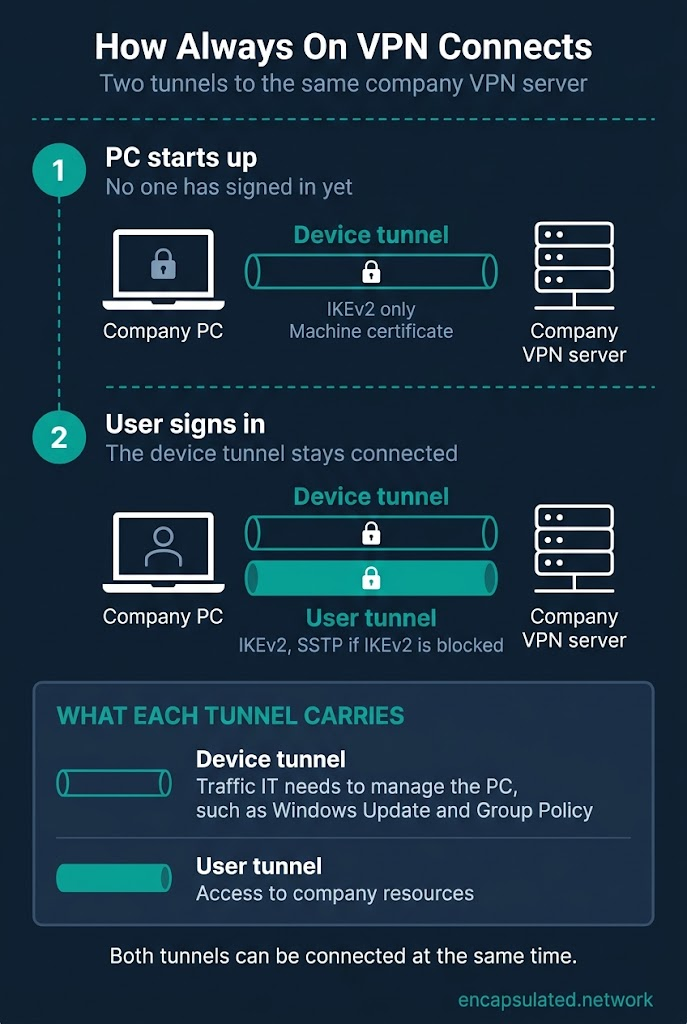
Why Always On VPN is on your work PC
The device tunnel carries the traffic IT needs to manage the PC before anyone signs in. Microsoft’s examples include Windows Update, Group Policy and Configuration Manager updates, a first sign-in on a PC that has no saved credentials, and password resets.
The user tunnel shows up in Windows’ network settings, such as the VPN button in Quick Settings, and you can usually disconnect it there. An organisation can remove the Disconnect button, and then you cannot.
Does Always On VPN block traffic when it disconnects?
Microsoft lists traffic blocking only for a separate LockDown VPN profile, not for the standard Always On VPN setup. In the standard setup, Windows connects the profile automatically when the user signs in, when the network changes and when the screen turns on, and the user can usually disconnect it.
A LockDown VPN profile allows network traffic only through the VPN, so the device has no connection when the VPN is down. The user cannot disconnect a LockDown profile, change it or delete it. A device can have only one LockDown profile, and Windows’ built-in VPN client supports LockDown only with IKEv2.
Trusted Network Detection
Trusted Network Detection keeps the VPN from connecting when the PC is already on the company network. Windows treats a network as the company network when its DNS suffix matches one the organisation lists and the network is set as private or was set up by the organisation’s device management.
What an organisation runs behind it
In Microsoft’s reference setup, an organisation runs a VPN server, a RADIUS server such as Microsoft’s Network Policy Server, and a certificate authority that issues the certificates devices sign in with. The VPN server can be Windows Server’s Routing and Remote Access or a compatible IKEv2 gateway from another vendor, and it is the VPN gateway where the tunnels end. The organisation sends the VPN profile to devices with Intune, Configuration Manager, PowerShell or another device management tool.
Always On VPN and DirectAccess
Microsoft presents Always On VPN as the replacement for DirectAccess, its older always-connected remote access technology. Microsoft has deprecated DirectAccess and recommends Always On VPN instead; DirectAccess still works on supported Windows Server versions, including Windows Server 2025, but Microsoft says it will be removed from a future release.
Always On VPN and DirectAccess differ in how they reach and recognise the company network. Microsoft says Always On VPN works with IPv4 and IPv6 without the IPv6 transition technologies DirectAccess depends on, such as IP-HTTPS. DirectAccess clients check a network location server to tell whether they are inside the company network, while Always On VPN’s Trusted Network Detection uses the network’s DNS suffix.
As of October 2026, Microsoft has not announced any end of support for Always On VPN, and its list of deprecated Windows features names DirectAccess, not Always On VPN. Microsoft also sells Entra Private Access, a cloud service it describes as a way to replace your VPN, but it has not announced Entra Private Access as Always On VPN’s successor.
Always-on VPN on Android
Android’s Always-on VPN starts the chosen VPN app when the phone starts and keeps it running, and a second switch, Block connections without VPN, decides whether other traffic is blocked while the VPN is not connected.
What Always-on VPN does
Android has offered Always-on VPN since Android 7.0. It starts the VPN app when the phone starts up, but keeping the tunnel connected is the VPN app’s job, not Android’s. From Android 8.0, Android shows a notification that cannot be dismissed if the connection drops or the VPN cannot connect.
Block connections without VPN
Block connections without VPN works only when Always-on VPN is turned on. With both switches on, Android blocks network traffic that does not go through the VPN, and apps have no internet connection until the VPN connects. Even with blocking on, Android’s developer documentation says system apps can always bypass the VPN.
Android’s code and its device management tools call this blocking behaviour lockdown, while stock Android labels it Block connections without VPN on screen.
Why the switches can be greyed out
- Always-on VPN is off: Block connections without VPN stays unavailable until Always-on VPN is on.
- The app has opted out: Most VPN apps can use Always-on VPN, but an app can opt out. On an app that has opted out, both switches are greyed out and Settings shows “Not supported by this app”.
- Your organisation manages the phone: On a work phone or work profile, the organisation’s device management can choose the always-on VPN app and turn on blocking. It can also stop you changing VPN settings, and the switches then show as set by the administrator.
School and work Chromebooks
On school or work Chromebooks, an administrator can make an Android VPN app always on. Google says ChromeOS then blocks user traffic if the VPN fails, while system traffic such as ChromeOS updates never goes through the VPN.
Always-on VPN on iPhone and iPad
Apple’s Always-on VPN is a device management feature: an employer or school sets it through the system it uses to configure its devices. Apple’s deployment guide lists it for enrolled iPhones and iPads. It sends all IP traffic through an IKEv2 tunnel, apart from a few exceptions.
iPhones and iPads outside device management
On an iPhone or iPad outside device management, a VPN app can offer its own auto-connect setting, or set Connect On Demand rules, which start the VPN automatically when the device joins chosen Wi-Fi networks, or when it cannot look up chosen domains without the VPN. The WireGuard vs IKEv2 comparison covers how both protocols use these rules on an iPhone.
A VPN app can also block traffic when the VPN drops. An app can turn on Apple’s includeAllNetworks option, which sends most traffic through the tunnel. Apple says the system then drops network traffic while the VPN is not connected, although some system traffic always stays outside the tunnel.
Two ways an organisation sets it up
Apple offers an older profile method and a newer declarative method, and both methods use IKEv2 only.
| Method | Devices | Supervision | Can the user turn it off? |
|---|---|---|---|
| Profile (older) | iPhones and iPads | Required | Only if the organisation allows it |
| Declarative configuration (newer) | iOS 27, iPadOS 27 and visionOS 27 or later, including Shared iPad | Not required; Apple’s deployment guide lists Device Enrollment and Automated Device Enrollment | Only if the organisation allows it |
The older profile can set separate tunnels for Wi-Fi and mobile data. Apple describes a supervised iPhone or iPad as one that an organisation generally owns, and supervision gives the organisation more control over the device’s settings and restrictions. Enrolling a device through Automated Device Enrollment supervises it automatically.
What happens when the tunnel is down
Apple says that while an always-on tunnel is down, the device drops all IP traffic. For the older profile method, Apple’s developer documentation adds that the system always leaves network control traffic, such as DHCP, outside the tunnel. The organisation can also let some traffic skip the tunnel, such as captive Wi-Fi login pages, voicemail, AirPrint, mobile carrier services and named apps, but none of these exceptions is on by default.
Always-on VPN on a Mac
Apple lists neither always-on method for macOS. Microsoft’s Azure VPN Client for Mac has an Always On option for connections to Azure VPN Gateway. It is a setting inside that app, not a built-in macOS setting. On a personal Mac, a VPN app’s auto-connect setting and kill switch do the same jobs as they do on a personal Windows PC.
Always-on VPN in business VPN apps
Several business VPN clients have their own always-on mode, which the IT department sets. Whether it also blocks traffic while the VPN is down depends on how IT configures it.
In Cisco Secure Client, for example, the always-on mode connects after the user logs in and when it detects an untrusted network, and it keeps retrying. A setting called the connect failure policy decides blocking. A closed policy, the default, blocks all traffic while the VPN cannot connect, except traffic to the secure gateways the computer may connect to. An open policy leaves network access in place. The administrator can also list hosts that stay reachable while the VPN is disconnected, and can lift the restrictions for a set number of minutes so the user can sign in to a hotel or airport Wi-Fi page.
Always-on VPN vs kill switch, auto-connect and On Demand
An always-on VPN controls when the VPN connects, and a kill switch controls what happens to traffic when the VPN drops. Auto-connect and Connect On Demand are other ways to start the VPN automatically.
| Feature | Who sets it | What it does | Blocks traffic when the VPN is down? |
|---|---|---|---|
| Microsoft Always On VPN | The organisation | Connects on sign-in, network change and screen on; the device tunnel connects before sign-in | Only with a separate LockDown VPN profile |
| Android Always-on VPN | You or your organisation | Starts the VPN app at start-up and keeps it running | Only with Block connections without VPN on |
| Apple Always-on VPN | The organisation | Keeps traffic in an IKEv2 tunnel on enrolled iPhones and iPads | Yes, apart from a few exceptions |
| Kill switch (VPN app) | You, in the app | Blocks internet traffic if the VPN drops | Yes, that is its job |
| Auto-connect (VPN app) | You, in the app | Connects when the device or app starts | No, not by itself |
| Connect On Demand (Apple) | The VPN app or a configuration profile | Starts the VPN by rules, such as on chosen Wi-Fi networks | Apple’s documentation does not say |
On Android and on personal devices with a VPN app, the features work together: an always-on setting decides when the VPN connects, and a kill switch or Block connections without VPN decides whether traffic can leave without it. Apple’s Always-on VPN, managed Chromebooks and some business VPN clients block traffic as part of the always-on setting itself. Some VPN apps give the name “always-on” to a kill switch mode that blocks traffic whenever the VPN is off, but that mode is a kill switch setting, not an always-on VPN.
Should you use always-on VPN?
On a work device, the organisation makes the choice. On a personal Android phone, always-on VPN suits people who want the VPN connected whenever the phone is online, and blocking adds protection at the cost of no internet while the VPN is not connected.
On a work device
The organisation may stop you turning always-on VPN off, depending on how it set the device up. If the setting gets in your way, ask the IT department rather than removing the configuration.
On a personal device
With Always-on VPN on a personal Android phone, you do not have to remember to start the VPN before you use public Wi-Fi. On other personal devices, a VPN app’s auto-connect setting starts the VPN. The guide to VPN battery drain covers battery use, and What Is a VPN? covers whether to keep any VPN on all day.
Hotel and airport Wi-Fi sign-in pages
Some always-on setups can stop a hotel or airport Wi-Fi sign-in page from working, because the sign-in has to happen before the VPN can connect. Apple’s Always-on VPN and some business VPN clients let the organisation allow the sign-in page as an exception.
On a personal iPhone or iPad, Apple says the system always lets the traffic that signs a device in to a Wi-Fi hotspot pass outside the tunnel, even when a VPN app has turned on includeAllNetworks. On other personal devices, if a sign-in page does not load while a kill switch or Block connections without VPN is on, switch the blocking setting off, sign in, and switch it back on straight away. On a work device, ask the IT department.
How to turn always-on VPN on or off
You turn always-on VPN on yourself on a personal Android phone. On Windows PCs, enrolled iPhones and iPads and work phones, an organisation usually sets it up and may have locked the setting so that you cannot turn it off.
Android
On stock Android, open Settings, then Network & internet, then VPN, and tap the Settings icon next to the VPN app. If your phone shows a different menu, search Settings for VPN.
- To turn it on: switch on Always-on VPN, then switch on Block connections without VPN if you also want blocking.
- To turn it off: switch off Block connections without VPN, then switch off Always-on VPN.
If the switches show as set by your administrator, ask the IT department. The Android VPN setup guide covers the full setup.
Windows
An organisation turns Always On VPN on by sending a VPN profile to the PC, through a tool such as Intune, Configuration Manager or a PowerShell script. On a personal PC, turn on a VPN app’s auto-connect setting, if the app has one.
To stop Always On VPN connecting by itself, clear the Connect automatically checkbox for the VPN profile. Windows remembers your choice, unless the organisation has locked the checkbox. You can usually disconnect the user tunnel from the VPN button in Quick Settings, unless the organisation has removed the Disconnect button. You cannot disconnect a LockDown VPN profile, so a LockDown setup needs the IT department.
iPhone and iPad
An organisation turns Apple’s Always-on VPN on through device management on enrolled devices. On other iPhones and iPads, turn on a VPN app’s auto-connect setting, or use a VPN app or configuration profile that sets Connect On Demand rules.
On an enrolled device, you can turn Apple’s Always-on VPN off only if the organisation allows it. If a VPN configuration uses Connect On Demand, Settings shows a Connect On Demand switch for it, and you can turn it off unless the organisation has locked the switch. You switch off a VPN app’s auto-connect setting inside the app.
Business VPN apps and Chromebooks
The IT department decides whether you can turn off a business VPN client’s always-on mode. On a managed Chromebook, the administrator can stop users disconnecting the VPN.
If your internet stays blocked
Connect the VPN, or switch off the blocking setting: Block connections without VPN on Android, or the VPN app’s kill switch. On a managed device with a LockDown VPN profile, Apple’s Always-on VPN or a closed connect failure policy, contact the IT department.
Frequently asked questions
Should I use always-on VPN?
On a work device, your employer decides, and the setting may be locked. On a personal Android phone, Always-on VPN is worth turning on if you want the VPN running whenever you are online. Adding blocking leaves most apps offline whenever the VPN is not connected. On other personal devices, a VPN app’s auto-connect setting starts the VPN.
What happens if the VPN is always on?
The VPN starts by itself, for example when the device starts or you sign in, and it keeps running without you opening the app. If blocking is also on, most apps lose internet access whenever the VPN is not connected and regain it once the VPN connects.
Why is my VPN always on?
Several settings can keep a VPN on: device management set by an organisation, Android’s Always-on VPN switch, Apple’s Connect On Demand rules, or an auto-connect option inside a VPN app. Check the VPN settings on your phone or computer first. On a work device, ask the IT department, because the organisation may have locked the setting.
Is the iPhone VPN always on?
A VPN app can keep an iPhone’s VPN on automatically through its auto-connect option or Connect On Demand rules. On iPhones enrolled in an organisation’s device management, the organisation can also turn on Apple’s Always-on VPN, which keeps traffic in the tunnel apart from a few exceptions.
Can I turn off always-on VPN on a work device?
You may not be able to turn it off, because your organisation controls it. The organisation can lock the setting through device management, hide the Disconnect button in Windows or use a LockDown VPN profile that no user can disconnect. If always-on VPN causes problems, ask the IT department before you change or remove anything.
Is Microsoft Always On VPN being discontinued?
Microsoft had not announced an end of support for Always On VPN as of October 2026. The product Microsoft has deprecated is DirectAccess, and Microsoft presents Always On VPN as its replacement. Entra Private Access is a separate Microsoft cloud service, and Microsoft has not named it as Always On VPN’s successor.
Why does my Android phone show a VPN notification I can’t dismiss?
The notification means an always-on VPN has disconnected or cannot connect, and Android has shown it since Android 8.0. It stays until the VPN app restores the connection or you switch Always-on VPN off. If it keeps appearing, check the VPN app and your network connection.
Does always-on VPN send all my traffic through the VPN?
Always-on VPN does not always send all traffic through the VPN. On Windows, the organisation chooses whether the user tunnel carries all IP traffic or only the traffic it routes into the tunnel, and the device tunnel always carries only the routed traffic. Apple’s Always-on VPN sends all IP traffic through the tunnel, apart from a few exceptions.
Does always-on VPN stop all traffic leaving outside the VPN?
Always-on VPN does not always stop traffic leaving outside the VPN. Microsoft lists traffic blocking only for a separate LockDown VPN profile. Elsewhere, Android lets system apps bypass the VPN, managed Chromebooks keep system traffic out of it, and Apple says iOS always leaves network control traffic such as DHCP outside an always-on VPN profile.
Is always-on VPN the same as a kill switch?
Always-on VPN is not the same as a kill switch. Always-on VPN decides when the VPN connects, and a kill switch blocks traffic when the VPN drops. Some always-on versions do both jobs, while Android splits them into two switches: Always-on VPN and Block connections without VPN.