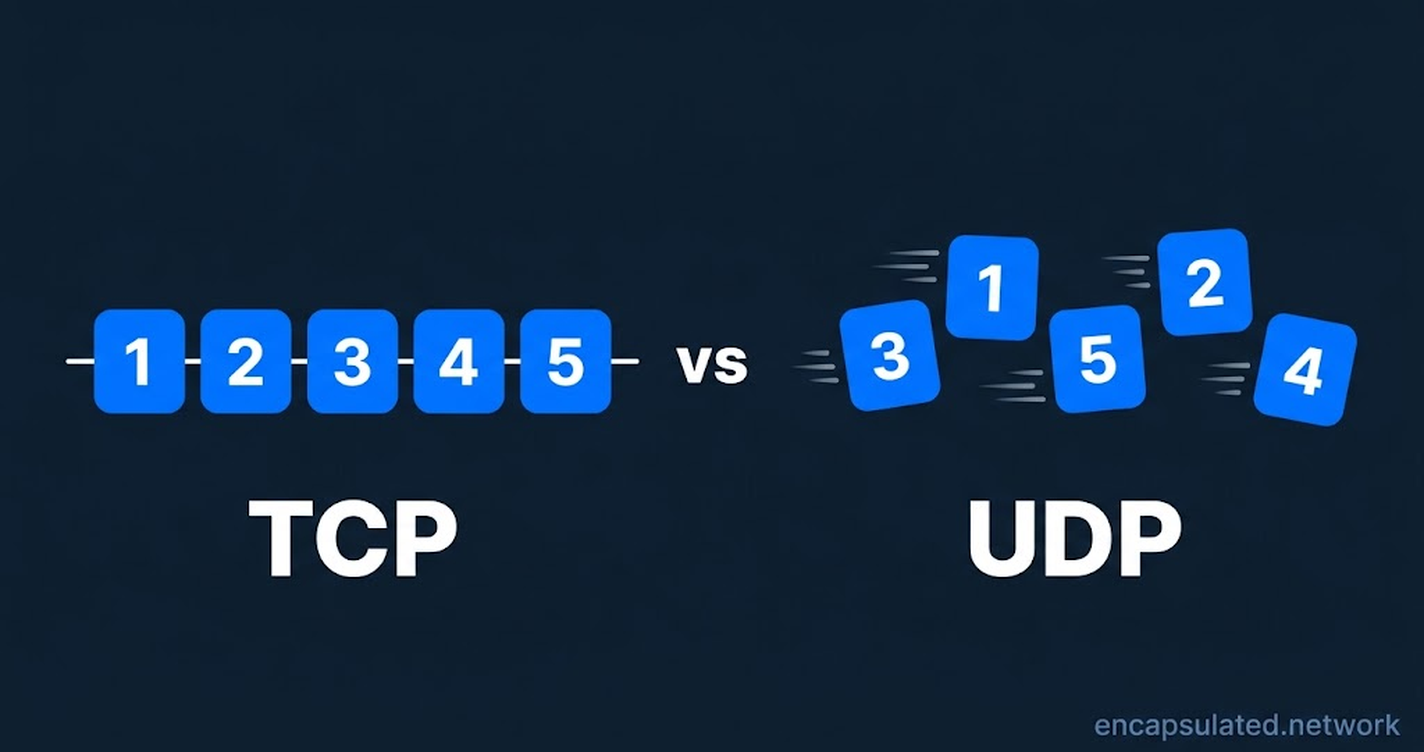
TCP delivers every byte complete and in order by opening a connection, acknowledging what arrives and resending what is lost, while UDP sends each packet once, with no connection, no acknowledgement and no resending. UDP can therefore deliver its first data sooner, and it never holds data back while it waits for a lost packet. Neither protocol encrypts anything. For a VPN, UDP is the better default, and TCP is the fallback for networks that block UDP.
A VPN app makes this choice only for its own connection to the VPN server. The apps inside the tunnel keep using TCP or UDP as before.
TL;DR
- How each delivers data: TCP numbers every byte so the receiver can spot missing data. The cost is waiting, because one lost packet holds back all the data behind it until the resend arrives. UDP does not number its data, so an application that needs recovery has to build its own.
- What uses each: Mail protocols such as SMTP and IMAP, and web pages loaded over HTTP/1.1 or HTTP/2, use TCP. DNS lookups use UDP by default, and calls send their audio and video over UDP. QUIC, the transport under HTTP/3, runs on top of UDP, and applications that use QUIC can still get reliable delivery without TCP.
- Speed and security: UDP does not increase how much data the network can carry; UDP only skips TCP’s opening handshake and the wait for lost packets. Security comes from TLS, QUIC or the VPN itself, not from TCP or UDP.
- In a VPN: WireGuard, OpenVPN and IKEv2 avoid TCP by default. A VPN over TCP carries the apps’ TCP connections inside its own, and when the outer connection loses packets, the inner connections can resend data that was not lost and slow the tunnel further. The IETF, which publishes the internet’s technical standards, calls this spiral TCP meltdown.
- When to switch to TCP: On a network that blocks UDP, switch to a protocol that can run over TCP, such as OpenVPN, or to an app setting that wraps WireGuard, which is UDP only, in TCP. TCP port 443, the port HTTPS uses on TCP, passes a filter that blocks by port alone, but TCP does not make a VPN more reliable on a poor connection.
What is the difference between TCP and UDP?
TCP is connection-oriented: it opens a connection with a handshake before sending and delivers one stream of bytes complete and in order. UDP is connectionless: it sends separate messages called datagrams, with no delivery check and no ordering.
TCP stands for Transmission Control Protocol, and UDP stands for User Datagram Protocol. Both work at the transport layer, on top of IP, the Internet Protocol, which does not guarantee that a packet arrives. Each application chooses the transport it uses, and some applications use both. DNS, for example, sends ordinary lookups over UDP and switches to TCP when an answer is too large for UDP. QUIC, the transport under HTTP/3, runs on top of UDP.
| TCP | UDP | |
|---|---|---|
| Connection | Connection-oriented: opens a connection with a handshake before sending data | Connectionless: sends straight away, with no connection |
| Data unit | Continuous byte stream; no message boundaries | Separate datagrams; message boundaries kept |
| Delivery check and resending | The receiver acknowledges data; the sender resends what is lost | No acknowledgement; nothing is resent |
| Order | Delivered in the order sent | No ordering |
| Congestion control | Built in; slows down when the network is congested | None in UDP itself; IETF guidance says the application should add its own |
| Ports | 0 to 65535, separate from UDP’s | 0 to 65535, separate from TCP’s |
| Header | At least 20 bytes | 8 bytes |
| Time to first data | At least one round trip, for the handshake | No handshake delay |
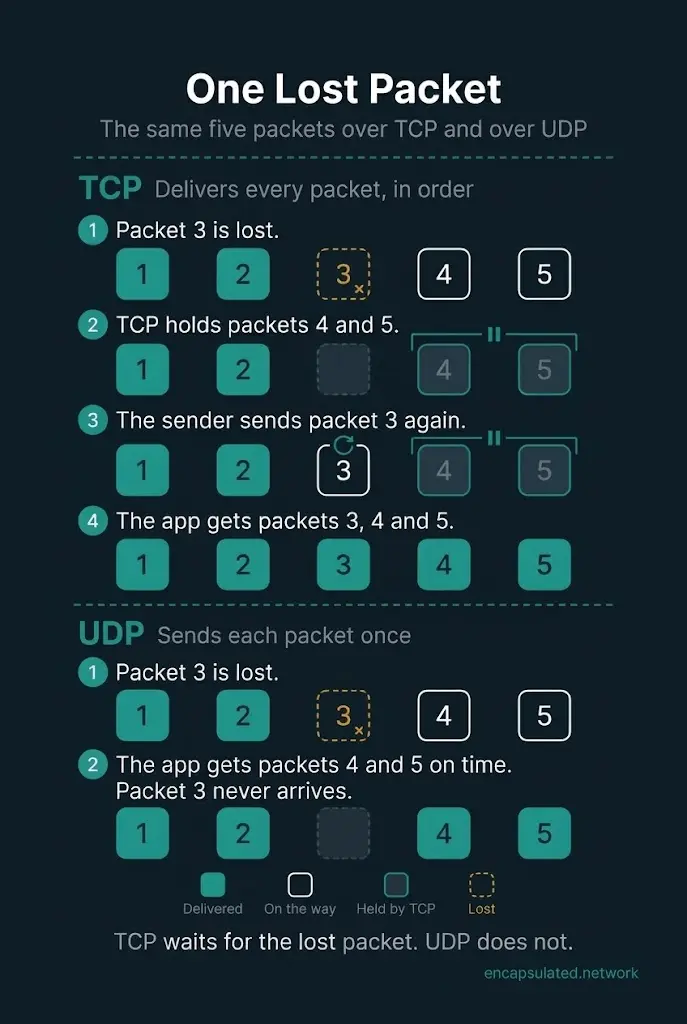
| Lost packet | Holds back later data until the resend arrives | The lost packet never arrives; later data arrives on time |
| Encryption | None | None |
| Typical uses | Web pages over HTTP/1.1 and HTTP/2, email (SMTP, IMAP, POP3), FTP, SSH | DNS lookups, calls, QUIC and HTTP/3 |
| Role in a VPN | Fallback when a network blocks UDP; used by SSTP and SSL VPNs | Only transport for WireGuard; default for OpenVPN; used by IKEv2 |
Do TCP and UDP use the same ports?
TCP and UDP number their ports separately, from 0 to 65535 each, so TCP port 443 and UDP port 443 are two different ports. A firewall can allow one while blocking the other, so a port rule has to cover the transport that the application uses. An application that uses both TCP and UDP works fully only when both transports are allowed. IANA, the body that records port assignments, lists HTTPS on both TCP port 443 and UDP port 443.
How TCP works
TCP turns IP’s delivery, which makes no guarantee, into a reliable stream of bytes that arrives complete, in order and without duplicates. IP packets can arrive damaged, duplicated, out of order or not at all.
TCP opens a connection with a three-way handshake. The client sends a SYN, the server replies with a SYN-ACK, and the client answers with an ACK. TCP makes the receiving application wait until the handshake is complete, so the first data arrives at least one round trip later than it would without a handshake.
TCP sends data in segments, TCP’s units of data, and numbers every byte it sends, so the receiver can tell which data has arrived and which is missing. The receiver acknowledges the data it gets. When the sender gets no acknowledgement for a segment in time, the sender sends that segment again.
TCP also controls how fast it sends:
- Flow control: the receiver tells the sender how much more data it can accept, and TCP does not send more than that amount.
- Congestion control: TCP treats a lost packet as a sign of congestion and cuts its sending rate whenever it detects a loss. The standard algorithms are slow start, congestion avoidance, fast retransmit and fast recovery.
When one TCP segment is lost, TCP holds back all the data that arrived after it. The receiving application gets that later data only after the missing segment has been sent again and has arrived. The IETF, the body that publishes the internet’s technical standards, calls this delay head-of-line blocking.
The TCP header is at least 20 bytes long, and options can make it longer.
How UDP works
UDP sends each datagram once, with no handshake, and does not acknowledge datagrams, resend lost ones or put them back in order. An application using UDP sends its first datagram straight away.
UDP keeps each datagram as a separate unit, so the receiving application gets each message with its boundaries intact. TCP, by contrast, delivers one continuous stream and does not keep the boundaries between the sender’s separate messages.
The UDP header is 8 bytes long and holds four fields: the source and destination ports, the length and a checksum. UDP provides no other delivery service, so an application that uses UDP has to add its own recovery and ordering if it needs them. IETF guidance also says the application should control how fast it sends, because UDP has no congestion control of its own.
Is UDP faster than TCP?
UDP can get data to the application sooner, for example when sending starts and after a lost packet, but it does not increase how much data the network can carry.
- At the start: UDP can deliver its first data without waiting, while TCP delivers its first data at least one round trip later because of its handshake.
- After a loss: UDP never holds later data back while it waits for a lost packet, because UDP does not resend anything. TCP holds back all the data behind a lost segment until the resend arrives.
Is TCP or UDP more secure?
Neither TCP nor UDP is more secure, because neither protocol has built-in encryption or authentication. Encryption comes from another protocol, such as TLS, QUIC or a VPN protocol.
TLS, the encryption behind HTTPS, needs a reliable byte stream and so runs over TCP. DTLS is the version of TLS for UDP, and QUIC builds TLS into its own design.
TCP and UDP checksums detect data that was corrupted in transit, but the checksums cannot detect deliberate tampering. Authenticated encryption detects any change to the data it protects. WireGuard, and OpenVPN with its default ciphers, check every data packet for tampering, and IPsec does the same when its integrity check is enabled. The receiving end rejects any packet that fails the check.
Each protocol has its own weakness:
- UDP: UDP does not check that a packet comes from the address it claims. An attacker can therefore send small UDP requests with a victim’s address as the source and make servers flood the victim with replies.
- TCP: in a SYN flood, an attacker sends many connection requests and never completes them, which fills the server’s queue of half-open connections.
What uses TCP and what uses UDP?
Applications that need every byte delivered in order use TCP or QUIC, and real-time applications such as calls send their media over UDP because they cannot wait for a lost packet to be sent again.
| Application | Transport |
|---|---|
| Web pages over HTTP/1.1 and HTTP/2 | TCP |
| Web pages over HTTP/3 | QUIC, which runs over UDP |
| Email (SMTP, IMAP, POP3) | TCP, both when servers pass mail on and when a mail app fetches it |
| File transfer with FTP | TCP |
| Remote login over SSH | TCP |
| DNS lookups | UDP by default; TCP for answers too large for UDP |
| Calls (audio and video) | UDP, with TCP as a fallback in browser calls |
| Online video in HTTP Live Streaming (HLS) | The transport of its HTTP version: TCP for HTTP/1.1 and HTTP/2 |
| Multiplayer games | Can run over UDP |
| VPN tunnels | UDP for WireGuard and by default for OpenVPN; TCP as a fallback or for SSTP |
DNS. By default, DNS lookups use UDP port 53, because UDP has lower overhead and better performance for DNS. When a DNS answer is too large for the UDP reply, the server marks the reply as truncated, and the client asks again over TCP. DNS software must support TCP as well as UDP. Encrypted DNS uses other protocols: DNS over TLS, for example, runs on TCP port 853.
Calls. RTP, the standard protocol for carrying real-time audio and video, typically runs on top of UDP. With UDP, a lost packet never holds up the packets behind it. Browser calls built on WebRTC must be able to switch to TCP, or to a relay server reached over TCP, when a firewall blocks UDP.
Online video. HTTP Live Streaming, a format for online video, normally carries the video over HTTP. HLS video therefore uses whichever transport its HTTP version uses. With HTTP/1.1 or HTTP/2, that transport is TCP.
Games. Networking libraries built for multiplayer games can run over UDP, and several game protocols use UDP. Some of these libraries add their own reliable messages on top of UDP, so a game can choose which messages must arrive.
QUIC: reliable delivery built on UDP
QUIC runs on top of UDP and adds its own loss recovery, per-stream ordering and congestion control, so applications that use QUIC can get reliable delivery without TCP.
QUIC splits a connection into separate streams, and a lost packet delays only the stream it belongs to. TCP, with one stream per connection, holds back everything behind the loss.
QUIC builds TLS 1.3 into its own handshake. QUIC authenticates every packet and encrypts as much of each packet as is practical, including the packet number.
HTTP/3, the newest version of the web’s protocol, runs over QUIC. HTTP/3 uses UDP port 443 by default, the same port number HTTPS uses on TCP. Some networks block UDP, so an HTTP/3 client should try an older version of HTTP over TCP when it cannot open a QUIC connection.
TCP or UDP for a VPN: which should you use?
Use UDP for a VPN, and switch to TCP only when the network blocks UDP.
A VPN that tunnels the device’s IP traffic carries both the TCP and the UDP traffic of every app, whether the tunnel itself runs over UDP or TCP.
Why WireGuard, OpenVPN and IKEv2 avoid TCP
WireGuard, OpenVPN and IKEv2 avoid TCP by default. A VPN does not need a second TCP layer: applications that use TCP already resend their own lost data from end to end, and they slow down when packets are lost. Carrying TCP inside TCP can also significantly reduce performance.
OpenVPN adds its own acknowledgement and resend system only for its control messages, the messages that set up keys and the session. OpenVPN does not resend lost data packets.
A VPN tunnel over UDP never delays a call’s packets to wait for a lost one. A VPN tunnel over TCP resends lost packets, and that delay holds up real-time traffic inside the tunnel, such as calls.
TCP meltdown: why TCP inside TCP slows down
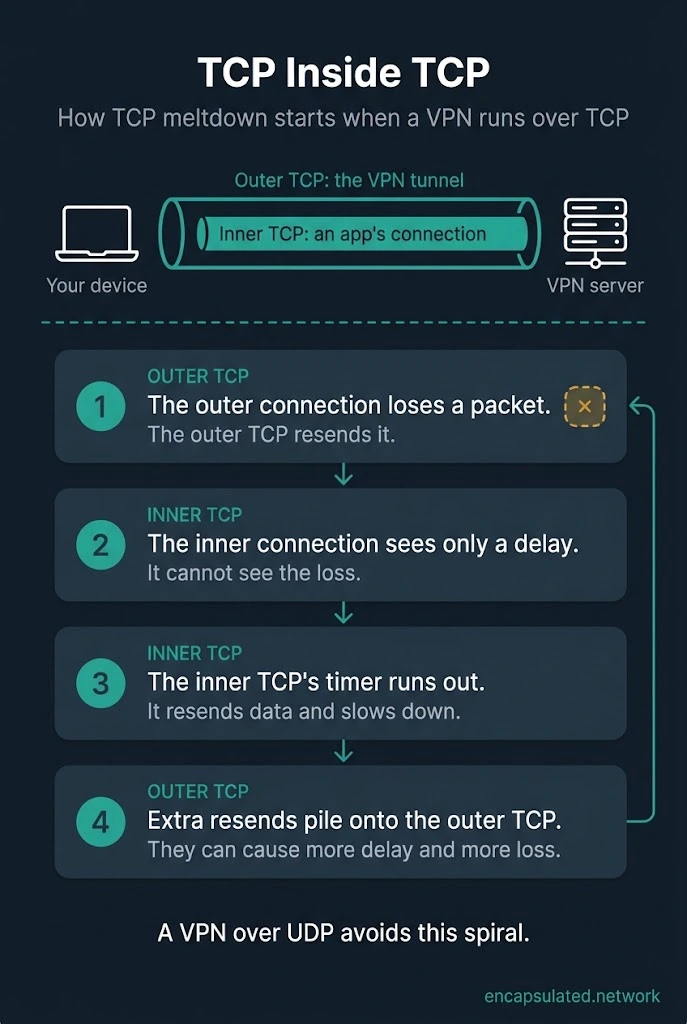
TCP meltdown is a spiral of extra resends and slowdowns that can affect a VPN running over TCP. Such a VPN carries the apps’ TCP connections inside its own TCP connection:
- The outer connection loses a packet, and the outer TCP resends it.
- The inner connection sees only a delay.
- If the delay outlasts the inner TCP’s timer, the inner TCP wrongly decides its data was lost, resends it and slows down.
- These extra resends pile onto the outer connection faster than it can send them, which can cause more delay and more loss.
RFC 9329, the IETF standard for carrying IKE and IPsec over TCP, calls this arrangement TCP-in-TCP and this spiral “TCP meltdown”. The WireGuard project calls the same arrangement TCP-over-TCP. TCP meltdown starts when the outer connection loses packets.
When its timer runs out, the inner TCP can cut its sending rate even though none of its own data was lost: the outer TCP was still resending the missing packet.
OpenVPN’s own documentation recommends UDP for the tunnel to avoid TCP meltdown.
When TCP is the better choice
TCP is the better choice when UDP does not work, for example on a network that blocks UDP. OpenVPN’s manual says OpenVPN works best over UDP and offers TCP for cases where UDP cannot be used.
TCP does not make a VPN more reliable on a poor connection. OpenVPN’s manual warns that TCP is usually somewhat less efficient and less robust than UDP on unreliable or congested networks.
TCP port 443 passes a filter that blocks by port alone, but deep packet inspection, which examines the structure of traffic, can still identify OpenVPN traffic from byte patterns and packet sizes. The comparison of WireGuard and OpenVPN covers which of the two to choose on a network that blocks UDP.
Which VPN protocols use TCP and which use UDP?
WireGuard runs over UDP only, OpenVPN uses UDP by default, IKEv2/IPsec uses UDP and ESP, IPsec’s own packets, and SSTP runs over TCP.
| VPN protocol | Transport |
|---|---|
| WireGuard | UDP only, on any port |
| OpenVPN | UDP by default; TCP as an option |
| IKEv2/IPsec | UDP 500 and 4500 plus ESP; TCP on port 4500 only where both ends are configured for it |
| SSTP | TCP, over HTTPS on port 443 |
| L2TP/IPsec | L2TP on UDP 1701, carried inside IPsec (UDP 500 and 4500 plus ESP) |
| PPTP | TCP 1723 for control; data over GRE |
| SSL VPNs | TLS over TCP; some products add DTLS over UDP |
| Lightway | UDP, with TCP as an option |
| SoftEther | TLS over TCP, including port 443; can also use UDP |
OpenVPN, SSTP, SoftEther and many SSL VPNs can run on TCP port 443.
Can WireGuard run over TCP?
WireGuard cannot run over TCP on its own: the WireGuard project supports only UDP, because TCP inside TCP performs poorly. Running WireGuard over TCP needs an extra tool that wraps each UDP packet in a TCP connection.
Some VPN apps build this in: Mullvad, for example, offers a setting called UDP-over-TCP, which it lists among its obfuscation methods. The wrapping can help on networks that block UDP, but Mullvad warns that obfuscation can significantly increase latency and reduce speed.
WireGuard can listen on UDP port 443, but it cannot use TCP port 443 without an extra tool. The WireGuard project leaves disguising its traffic to separate obfuscation tools.
How to switch between UDP and TCP in a VPN app
Use UDP, and switch to TCP only when the VPN fails to connect on a particular network.
- Check which transport the app uses. Some apps show the VPN protocol in their settings, and some choose it automatically. WireGuard itself always uses UDP, but some apps offer a setting that wraps WireGuard in TCP. OpenVPN uses UDP unless its configuration file names TCP.
- Start with UDP. Choose WireGuard or OpenVPN over UDP if the app offers them.
- Switch to TCP on the network that fails. Choose OpenVPN over TCP or the app’s TCP option, if it has one.
- Try obfuscation if TCP also fails. When TCP fails even on port 443, the network may be inspecting traffic. Some VPN apps offer an obfuscation setting for these networks.
- Switch back to UDP on other networks. TCP does not make a VPN more reliable on a poor connection, so return to UDP wherever the network allows it.
Frequently asked questions
Should I use TCP or UDP for a VPN?
Use UDP for a VPN, and switch to TCP only on a network that blocks UDP. Over TCP, a lost packet on the VPN’s own connection can make the TCP connections inside the tunnel resend data that was not lost, and these extra resends can slow the tunnel further. OpenVPN’s manual also warns that TCP is usually somewhat less robust than UDP on unreliable networks.
Is OpenVPN TCP or UDP?
OpenVPN uses UDP by default and can also run over TCP. The configuration line proto udp selects UDP, and proto tcp-client selects TCP on the client. Its manual says OpenVPN works best over UDP.
Is WireGuard TCP or UDP?
WireGuard is UDP only, and it can listen on any UDP port, including port 443. The WireGuard project does not support TCP, so running WireGuard over TCP needs an extra tool that wraps its packets, which some VPN apps build in.
Why do some applications use UDP instead of TCP?
DNS uses UDP by default for its lower overhead and better performance. Real-time applications such as calls use UDP because they need each packet within a few hundred milliseconds, which usually leaves no time to resend a lost packet.
Do online games use TCP or UDP?
Online games can use UDP: networking libraries built for multiplayer games run over UDP, and some add their own reliable messages so a game can choose which messages must arrive. Over TCP, one lost segment holds back all the data behind it until the resend arrives.
What is TCP meltdown?
TCP meltdown is the slowdown that can happen when TCP runs inside a TCP tunnel. When the outer connection loses a packet, the inner TCP sees only a delay, and if the delay outlasts its timer, the inner TCP resends data and slows down. The extra resends pile onto the outer connection and can cause more delay and more loss.
Is HTTPS TCP or UDP?
HTTPS can run over TCP or over UDP. HTTPS over HTTP/1.1 and HTTP/2 runs over TCP, and HTTP/3 runs over QUIC, which uses UDP port 443 by default, the same port number HTTPS uses on TCP. Some networks block UDP, so an HTTP/3 client should try an older version of HTTP over TCP when it cannot open a QUIC connection.
Does a VPN carry UDP traffic?
Yes, if the VPN tunnels the device’s IP traffic: it then carries every app’s TCP and UDP traffic, whether its own tunnel runs over UDP or TCP. A browser extension that works as a proxy is different: it sends only the browser’s web requests through the VPN server, and it does not carry UDP traffic.
Is a VPN less secure over UDP?
A VPN is not less secure over UDP than over TCP. OpenVPN and IPsec protect each packet the same way over either transport. A VPN’s security comes from the VPN protocol’s own encryption and checks, not from TCP or UDP.
Why does my VPN work on mobile data but not on hotel Wi-Fi?
Some networks, including some public hotspots, block all UDP traffic, so a VPN that uses UDP can connect on one network and fail on another. Try the app’s TCP option on the network where the VPN fails.