You’ve probably seen the advice before: “just use a free proxy” — usually as a shortcut alternative to paying for a VPN. Both tools hide your IP address. Both can make you appear to be somewhere you’re not. So what’s the actual difference, and does it matter?
It matters a lot. A VPN is a security tool. A proxy is a routing tool. That one sentence is what this article unpacks — including the specific situations where a proxy is genuinely the better choice, and the ones where using a proxy instead of a VPN is a real mistake.
How They Actually Work
The most important difference between a VPN and a proxy isn’t encryption — it’s scope. The two tools intercept your traffic at completely different points, which is why they behave so differently in practice.
VPN — a tunnel for your entire device
When you connect to a VPN, it creates a virtual network interface that captures every packet leaving your device before it touches the internet. Your browser traffic, your background app updates, your DNS queries, your mail client checking for new messages — all of it goes through the encrypted tunnel, with no exceptions. The VPN handles everything at the device level, which is why it protects traffic from applications you didn’t even think about.
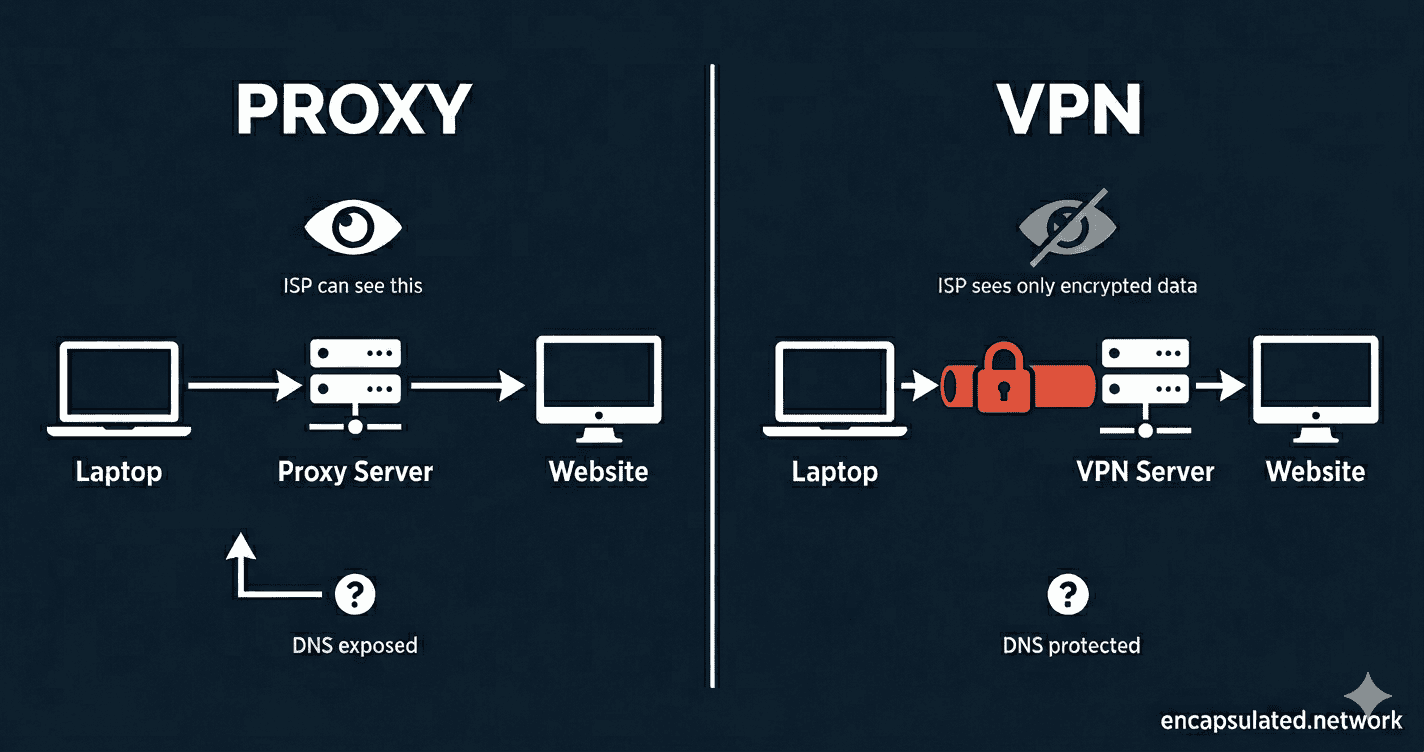
The destination website sees a request from the VPN server’s IP address, not yours. Your internet provider sees an encrypted stream going to a VPN server — and nothing else.
Proxy — a bridge for one application
A proxy sits between one specific application and the internet. You configure your browser, your torrent client, or your scraping tool to route traffic through the proxy server, and that server forwards your requests on your behalf — so the destination sees the proxy’s IP, not yours.
Everything else on your device — every other application you didn’t explicitly configure — connects to the internet directly, unaffected. That’s not a flaw in most proxy implementations. It’s the design. Proxies operate at the application level by intention.
The tunnel vs. bridge analogy
A VPN is an encrypted tunnel. Nobody outside can see what’s moving through it — not the content, not the destinations. A proxy is a bridge to a new location. Your traffic is still visible on the bridge to anyone watching, unless the application itself adds encryption on top — which brings us to the section most proxy guides skip entirely.
Encryption — The Definitive Difference
This is where the two tools diverge most sharply, and where the consequences of choosing the wrong one are most serious.
VPN encryption is mandatory and covers everything
In a standard full-tunnel configuration — which is the default on virtually every consumer VPN app — every packet that leaves your device is encrypted. There is no exception for specific apps, no traffic that slips through unprotected. Your internet provider sees encrypted data moving to a VPN server — and that’s it. They cannot see which websites you’re visiting, what you’re sending, or what’s coming back. (Some VPN clients offer split tunneling, which lets you route only specific apps through the tunnel — but that’s an opt-in configuration, not the default.)
This protection extends to things you don’t think about. When your device connects to a VPN, the background update your operating system quietly downloads at 2am is encrypted. The telemetry ping your browser sends is encrypted. The DNS query that translates a domain name into an IP address — encrypted, routed through the VPN, invisible to your ISP.
Proxy encryption is optional — and most proxies have none
A standard proxy does not encrypt your traffic. What you get depends entirely on which type of proxy you’re using:
HTTP proxy — the most basic type, handles web traffic only. Everything passes through in plain text. Your ISP, the proxy operator, and anyone monitoring the connection can read exactly what you’re doing.
HTTPS proxy — uses the HTTP CONNECT method to create an opaque tunnel between your browser and the destination server. The TLS connection runs end-to-end between your device and the destination, so the proxy relays encrypted bytes it cannot read. What the proxy can see is the destination domain from the initial CONNECT request, and traffic volume and timing. What your ISP can see depends on how you connect to the proxy itself: if the client-to-proxy connection is unencrypted, your ISP can read the CONNECT headers and see which domains you’re visiting; if that connection is encrypted, your ISP sees only that you’re talking to the proxy. Either way, the proxy operator knows your destination domains even if it can’t read the content. Note: corporate SSL-inspection proxies work differently — they install a trusted certificate on your device to intercept and re-encrypt traffic — but that’s a specialised enterprise configuration, not what most users encounter.
SOCKS5 proxy — protocol-agnostic and faster than HTTP proxies because it doesn’t inspect or modify your traffic. Still no built-in encryption. If you’re loading an HTTPS website through a SOCKS5 proxy, the site’s TLS protects the content — but the proxy and your ISP can still see the domains you’re connecting to.
What “no encryption” means in practice
If you’re on public Wi-Fi using only a proxy, your device is still broadcasting unencrypted traffic to anyone on the same network who cares to look. A proxy changes where your traffic appears to come from. It doesn’t seal it in transit. For security on untrusted networks — coffee shops, hotel Wi-Fi, airports — a proxy provides no meaningful protection. Only a VPN’s encrypted tunnel does.
If your VPN connection ever drops unexpectedly, a kill switch cuts your internet access entirely so your real IP is never exposed. Proxies have no equivalent fail-safe — a dropped proxy connection fails silently, and your traffic continues over your regular connection without warning.
Speed and Performance
Proxies have a genuine speed advantage over VPNs, and it’s worth being honest about why — and when it actually matters.
The encryption overhead
Encrypting and decrypting every packet costs processing time. On a modern device using WireGuard — the fastest current VPN protocol — that overhead is small enough to be imperceptible for most tasks. On older hardware, or with older protocols, the gap is more noticeable. For a detailed breakdown of how modern VPN protocols compare on speed, see our WireGuard vs. OpenVPN comparison.
Why proxies win on raw speed
No encryption overhead means a SOCKS5 proxy delivers lower latency than a VPN on the same route, with no additional CPU cost. For tasks that involve firing large numbers of requests — web scraping, automation, high-frequency data collection — that difference is real and compounds quickly. For casual browsing, streaming a video, or loading a webpage, the gap is imperceptible to a human.
SOCKS5 vs. VPN for gaming
SOCKS5 often shaves a few milliseconds of latency compared to a VPN because there’s no encryption overhead in the connection path. For gaming, where latency is everything, that sounds significant. In practice, the difference is rarely meaningful compared to the much larger impact of choosing a server geographically close to the game server.
There’s a more important trade-off to consider: a SOCKS5 proxy only covers the application you’ve configured it in. Every other app, service, and protocol on your device — voice chat clients, game launchers, background processes — still communicates using your real IP address. An attacker who discovers your real IP through any of those channels can target you at the network level. A VPN covers all device traffic, so your real IP is masked everywhere, not just inside the game client. For competitive gaming where targeted DDoS attacks are a genuine concern, a VPN — specifically WireGuard, which minimises the latency cost — is the safer choice.
Which One Should You Use?
The right answer depends entirely on what you’re trying to do. Here are the four most common use cases, with an honest verdict for each.
Web scraping and automation
Use a proxy — specifically, a residential proxy pool. This isn’t a close call.
Large-scale scraping requires IP rotation: sending requests from thousands of different IP addresses to avoid anti-bot detection systems. A VPN gives you one IP address per server. A residential proxy service gives you access to millions of IP addresses that look like real home connections. For this use case, a VPN is architecturally the wrong tool. Residential proxies exist precisely to solve this problem.
The speed advantage matters here too. When you’re making thousands of requests per minute, the per-request overhead adds up. SOCKS5 proxies handle this more efficiently than an encrypted VPN tunnel.
Streaming and geo-bypassing
Use a VPN. Streaming platforms — Netflix, BBC iPlayer, Disney+ — actively detect and block proxy traffic. A basic proxy is identified and blocked quickly, often within days of a new IP being deployed. Premium VPN providers counter this with obfuscation: traffic-masking technology that makes VPN connections look like ordinary HTTPS traffic, making them significantly harder to detect and block.
For reliable, stable access to geo-restricted content over time, a VPN from a provider that actively maintains its streaming infrastructure is the only dependable option.
If you are streaming on an Amazon Fire TV Stick, setup follows the same principle but the available methods differ depending on whether your device runs Fire OS or Amazon’s newer Vega OS. The Firestick VPN setup guide covers both.
Torrenting
A VPN with a kill switch is the safer choice. Here’s why the distinction matters.
A SOCKS5 proxy configured inside your torrent client will hide your IP address from other peers in the swarm while the proxy is working. But if the proxy connection drops — which happens — most torrent clients fail silently and continue downloading over your real connection. Your actual IP address is now visible to every peer in the swarm, often for minutes before you notice.
A VPN with a kill switch prevents this entirely. If the VPN drops, the kill switch cuts your internet connection before a single packet can leave over your real IP. There’s no silent failure mode. For this reason, a VPN is the safer default for anyone who torrents regularly and cares about not exposing their IP address.
Public Wi-Fi and remote work
Use a VPN. A proxy is not a viable option here.
On an open network — a coffee shop, airport, hotel — an attacker on the same Wi-Fi can intercept unencrypted traffic. A proxy does not prevent this. Only a VPN’s encrypted tunnel protects your traffic in transit between your device and the VPN server. If you’re accessing work systems, logging into anything sensitive, or handling financial data on public Wi-Fi, a proxy provides no meaningful security layer.
Unencrypted proxy traffic also leaves your DNS queries exposed — your ISP, and anyone monitoring the connection, can see every domain you visit even if the content itself is protected by HTTPS. A reputable VPN routes DNS queries through the encrypted tunnel. For more on how DNS exposure works and why it matters, see our guide to DNS leaks.
The Hidden Risks of Free Proxy Services
The “just use a free proxy” advice is where this topic gets genuinely dangerous, and it deserves its own section.
Running proxy infrastructure costs real money — servers, bandwidth, maintenance. Free proxy services have to recover that cost somehow. Many do it by logging every request that passes through their servers and selling that data to advertisers or data brokers. The exact behaviour you’re using the proxy to prevent becomes the service’s revenue model.
Some free proxies go further. HTTP proxies — where traffic travels in plain text — make it trivially easy for the proxy operator to harvest session cookies, login tokens, and form submissions passing through the connection. Some inject advertisements into unencrypted pages. Some are operated specifically as honeypots: tools designed to collect credentials from users who believe they’re being protected.
The self-hosted exception is worth noting. A SOCKS5 proxy running on a VPS you control is a meaningfully different trust relationship — you’re the operator, so there’s no third party logging your traffic. For technically capable users, a self-hosted proxy for specific use cases is a legitimate option. The risk is specific to third-party free proxy services, not the technology itself.
For a VPN, the equivalent concern is the no-log policy. A provider whose no-log claims have been verified by an independent external audit creates a fundamentally different level of accountability than one operating on a promise in their privacy policy. That distinction matters — and it’s worth checking before you trust a provider with your traffic.
Advanced: Can You Use Both at the Same Time?
This section is for readers who want maximum anonymity or are operating in specific high-risk environments. Most users can skip it.
The VPN + proxy double-hop
Some users chain a VPN with a proxy: the VPN encrypts all device traffic, and a specific application — a browser or torrent client — additionally routes through a SOCKS5 proxy. The result is two IP hops. The proxy destination sees the VPN exit IP, not your real IP. The VPN server sees your traffic encrypted before it reaches the proxy. This adds a marginal layer of anonymity for use cases where a single IP-hop isn’t sufficient. For most users, it’s unnecessary complexity — but for high-risk situations, it’s a legitimate setup.
Shadowsocks and deep packet inspection evasion
In countries where internet censorship is enforced at the network level — using deep packet inspection (DPI) technology that can identify and block VPN traffic — standard VPN protocols and proxies can both be detected. Two tools sit in a third category designed specifically for these environments, and they work differently from each other.
Trojan is designed to be indistinguishable from ordinary HTTPS traffic. It runs on port 443 with a valid TLS certificate and falls back to serving a real website if an unrecognised client connects — so to a DPI system, it looks exactly like a legitimate HTTPS server.
Shadowsocks takes a different approach. It encrypts traffic so that it appears as random bytes, without attempting to mimic any recognisable protocol. This resists content inspection, but sophisticated DPI systems — including China’s Great Firewall — can fingerprint the random-byte pattern through traffic entropy analysis and active probing, which has led to periodic Shadowsocks blocks. Both tools are legitimate censorship circumvention options; they just use different evasion strategies.
If you’re in a heavily censored region and standard VPN connections are being blocked, this is the category to research — but the right choice between them depends on the specific censorship environment you’re operating in.
VPN vs. Proxy — At a Glance
| Feature | VPN | Proxy |
|---|---|---|
| Hides your IP address | ✅ Yes | ✅ Yes |
| Encrypts your traffic | ✅ Yes — mandatory, all traffic | ❌ No — application provides it (HTTPS) or it’s absent |
| Scope of protection | Entire device — every application | Configured application only |
| DNS protection | ✅ Yes — on reputable providers | ❌ No for standard proxies — DNS queries bypass the proxy and go through your ISP. Exception: SOCKS5h routes DNS through the proxy, but this requires explicit application support. |
| Kill switch | ✅ Yes — on reputable providers | ❌ No — fails silently |
| Speed | Slightly slower — encryption overhead | Faster — minimal overhead |
| Stability | High | Variable |
| Best for | Privacy, security, public Wi-Fi, streaming, torrenting | Web scraping, IP rotation, speed-sensitive single-app tasks |
| Cost | Paid — for trustworthy options | Often free — with serious caveats |
Frequently Asked Questions
Is a proxy as safe as a VPN?
No — not for security. A proxy hides your IP address from the destination, but it doesn’t encrypt your traffic in transit. On an untrusted network, your data is still visible to anyone monitoring the connection. A VPN encrypts everything leaving your device before it travels anywhere. If security is your goal — not just IP masking — a VPN is the right tool.
Can a proxy hide my internet activity from my ISP?
Partially, and less than most people assume. A proxy masks which IP address you’re connecting from, but your DNS queries — the lookups that translate domain names into IP addresses — are typically still sent through your ISP’s servers unless your application handles them separately. Your ISP can see which domains you’re visiting even if they can’t see the full URLs. A VPN routes DNS queries through the encrypted tunnel, which closes that gap. See our full guide to DNS leaks for a detailed explanation of how this exposure works.
Is a SOCKS5 proxy faster than a VPN for gaming?
It can be, in raw latency terms — SOCKS5 has no encryption overhead, which removes a small processing step from every packet. In practice, the difference is rarely the deciding factor. Server location relative to the game server has far more impact on ping than whether you’re using a proxy or a VPN. The more meaningful trade-off is DDoS protection: a proxy leaves your real IP exposed at the network level, while a VPN masks it completely. For competitive gaming where targeted attacks are a risk, that matters more than a few milliseconds of latency.
Do I need both a proxy and a VPN at the same time?
For most users, no. Using both simultaneously — routing all device traffic through a VPN and additionally routing a specific application through a proxy — is a valid setup for high-anonymity use cases where a single IP hop isn’t sufficient. It adds complexity without a meaningful benefit for ordinary privacy use. If you’re using a reputable VPN with an audited no-log policy, that covers the vast majority of everyday privacy needs.
Are free proxies safe to use?
Most are not. Free proxy infrastructure costs money to run, and free services recover that cost somehow — often by logging and selling user traffic data. HTTP proxies in particular pass your traffic through in plain text, making it easy for the proxy operator to harvest session cookies and login credentials. The exception is a proxy you host yourself on infrastructure you control. For third-party free proxy services, the risk is significant enough that a paid VPN from a verified provider is the safer default for any task involving personal data.
The Bottom Line
The core distinction comes down to this: a proxy changes where your traffic appears to come from. A VPN changes where it appears to come from and seals it so nobody can read it in transit.
For web scraping, IP rotation, or a speed-sensitive single-application task where you understand the trade-offs — a proxy, particularly SOCKS5, is a legitimate and often superior tool. For everything else — public Wi-Fi, sensitive data, torrenting, or any situation where security matters alongside anonymity — a VPN is the correct choice. If anonymity is the requirement, the Tor vs. VPN guide covers the architectural distinction and when each tool is the right choice.
For geo-restriction bypass without full-tunnel encryption — particularly on devices that cannot run a VPN app — Smart DNS occupies a different category from both tools covered here. If you want to understand exactly what happens inside the encrypted tunnel — how a VPN encrypts your data, what it hides from your ISP, and what it can’t protect you from — our guide to how a VPN actually works covers all of it in plain English.