A business VPN is a virtual private network that an organisation provides and controls for its staff and offices, instead of one that a person buys for private browsing. It connects staff devices to the organisation’s systems, links offices and cloud networks to each other, or sends staff traffic through fixed IP addresses that only the organisation’s staff use.
“Business VPN” names who the VPN serves, not a protocol, and no standard defines the term. People also call a business VPN a corporate VPN, an enterprise VPN, a company VPN or a work VPN.
TL;DR
- What it is: A business VPN is a VPN that an organisation controls for its staff and offices. The organisation decides who can connect and what each person can reach, and its administrators grant and remove each person’s access centrally. A consumer VPN, by contrast, carries the subscriber’s own internet traffic through the provider’s servers.
- Types: Business VPNs do three jobs. A remote access VPN connects staff devices to the organisation’s network, and a site-to-site VPN links offices and cloud networks through a gateway at each site, so the devices behind the gateways need no VPN software. A VPN provider’s business plan can give the organisation fixed IP addresses that only its staff use, which the organisation’s software-as-a-service (SaaS) tools and servers can allowlist. Some plans also link to the organisation’s own network.
- Who needs one: A VPN fits a small business when staff must reach systems on an office or cloud network, such as a file server, or when offices must share systems. A team that works only in cloud apps with single sign-on and multi-factor authentication may not need one. A business plan’s fixed IP addresses help when a service accepts connections only from listed addresses, but an allowed address does not show who is connecting, so the service still needs its own sign-in checks.
- How to get one: An organisation can run its own gateway or server, or have a cloud provider, a vendor or a VPN provider run and patch the gateway for it, while its administrators still decide who can connect. Vendors license staff access in different ways, such as per user or per concurrent connection, and cloud providers bill managed gateways by the hour and charge for the data that leaves their network.
- Limits: A business VPN encrypts traffic between each device and the gateway, or between the gateways of two sites, but it does not protect users who click a malicious link or download malicious content. Connected users can reach whatever the gateway’s rules allow, and the US agencies NSA and CISA describe remote access VPN servers as targets for adversaries and advise immediate patching. Zero trust network access (ZTNA) decides access to each application separately, per session, and can replace a remote access VPN for staff reaching private applications.
What is a business VPN?
A business VPN is a VPN that an organisation provides and controls so that its staff can reach the organisation’s systems, its offices and cloud networks can reach each other, or its staff traffic leaves through fixed IP addresses that only the organisation’s staff use.
The organisation decides who can connect and what each person can reach. The Canadian Centre for Cyber Security describes a VPN as a secure connection that can give remote access to a corporate network.
No standard defines the term “business VPN”. The US National Institute of Standards and Technology (NIST) sorts VPNs by what they connect instead. NIST’s guide to IPsec VPNs (SP 800-77 Rev. 1) names four architectures: gateway-to-gateway, remote access, host-to-host and mesh.
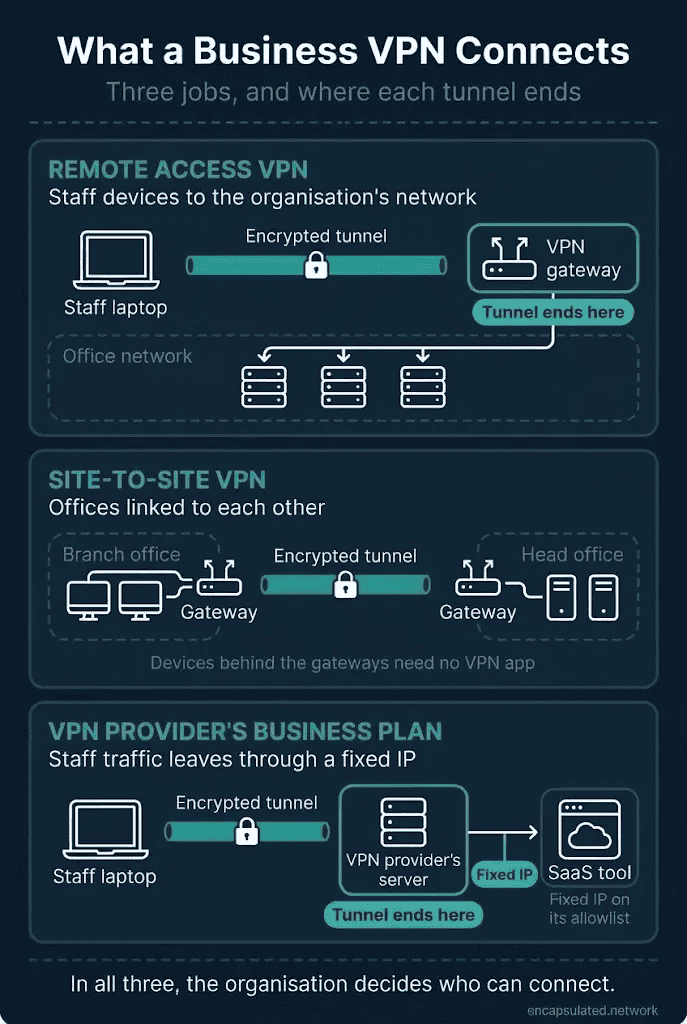
Remote access VPNs, site-to-site VPNs and VPN providers’ business plans do these three jobs. A business plan is a VPN that a provider runs and an organisation controls, not a separate technology.
| Job | What it connects | Where the tunnel ends | Who runs the gateway or server |
|---|---|---|---|
| Remote access VPN | Staff devices to the organisation’s network | A VPN gateway that the organisation runs or that a cloud provider or a vendor runs on its behalf | The organisation, a cloud provider or a vendor |
| Site-to-site VPN | Offices and cloud networks to each other | A gateway at each site | The organisation, a cloud provider or a vendor |
| A VPN provider’s business plan | Staff devices to the internet and SaaS tools through fixed IP addresses reserved for the organisation, on plans that include them; on some plans, also to the organisation’s own network | The provider’s server that carries the organisation’s fixed IP address | The VPN provider |
How does a business VPN work?
A business VPN works in four steps: a client or gateway opens an encrypted tunnel, the user signs in or the two gateways authenticate each other, the gateway applies the organisation’s access rules, and the gateway passes the traffic on.
- A VPN client on the staff device, or a gateway at an office, opens an encrypted tunnel to the organisation’s VPN gateway or to the provider’s server.
- The gateway or the provider typically asks the user to sign in before the device can reach anything, and some products let staff sign in through the organisation’s identity provider, the service that holds staff accounts for single sign-on. NIST recommends strong authentication, preferably multi-factor authentication, for remote access to an organisation’s systems. In a site-to-site VPN, the two gateways authenticate each other instead.
- The gateway’s filtering rules decide which parts of the network that user can reach.
- The gateway or the provider’s server decrypts the traffic and passes it to the organisation’s systems or on to the internet.
NIST publishes guides to two families of VPN protocols: IPsec, in SP 800-77 Rev. 1, and SSL/TLS, in SP 800-113 (2008). In a 2021 information sheet, NSA and CISA, the US National Security Agency and Cybersecurity and Infrastructure Security Agency, advise organisations to avoid non-standard VPN solutions, a class that includes products referred to as SSL/TLS VPNs, and recommend standardised IKE/IPsec VPNs instead. The two agencies explain that these products use custom, non-standard features to carry traffic over TLS, which adds risk even when the TLS settings themselves are secure.
Types of business VPN
Business VPNs do three jobs: remote access for staff devices, site-to-site links between offices and cloud networks, and fixed IP addresses through a VPN provider’s business plan.
Remote access VPN
A remote access VPN connects individual devices on untrusted networks to an organisation’s network through a VPN gateway.
Besides the client the organisation provides, Windows, macOS and iOS include a built-in IKEv2 client that an organisation can configure. An organisation can set the VPN to connect automatically, for example when the device starts or when the user signs in, which is called an always-on VPN.
In a full tunnel, all the device’s traffic, internet traffic included, goes through the VPN to the organisation, where the organisation’s firewall can inspect it before it continues to the internet. NIST notes in SP 800-215 that when remote users’ traffic for cloud services goes through the organisation’s network first, the extra trip adds distance and latency and can create bottlenecks.
With split tunnelling, only traffic for the organisation’s networks goes through the VPN. NIST notes that split tunnelling reduces the load on the remote access solution but stops the organisation from examining much of the device’s other traffic and from protecting the confidentiality and integrity of that traffic. The Canadian Centre for Cyber Security advises organisations to avoid split tunnelling as much as possible.
Site-to-site VPN
A site-to-site VPN links the networks of two sites through a gateway at each site. An organisation with more sites can build a tunnel between each pair of sites, or route traffic between branches through the head office, a design that NIST calls hub-spoke.
Devices behind the gateways need no VPN software of their own. NIST describes this architecture as most often used to connect two secured networks, such as a branch office and headquarters, over the internet, and NIST’s IPsec guide applies the same model to a remote office network or a cloud network.
A VPN provider’s business plan
Some VPN providers sell business plans that give an organisation fixed IP addresses that only its staff use, and some of these plans rent the organisation whole servers. Some business plans can also link the provider’s servers to the organisation’s office or cloud network through a site-to-site tunnel, so that staff reach the organisation’s systems through the provider.
A consumer VPN server, by contrast, usually gives the same IP address to many subscribers at once. The organisation adds its fixed addresses to the allowlists of its own services, so that only staff connected through them can reach those services.
These plans give administrators one console to add and remove users, and some plans also let staff sign in through the organisation’s identity provider.
An IP allowlist decides access by network address alone, and NIST’s zero trust guidance warns that network location alone does not imply trust. A compromised device on an allowed connection still arrives from an allowed address.
The VPN provider’s servers carry staff traffic after it leaves the tunnel. The provider can therefore see where that traffic goes and can read any traffic that is not separately encrypted, for example by HTTPS.
Business VPN vs personal VPN
A business VPN and a personal VPN can use the same kinds of protocols, but they differ in who controls the VPN and where the tunnel leads.
A personal VPN is a consumer VPN service that a person buys for their own devices.
| Business VPN | Consumer VPN | |
|---|---|---|
| Who controls it | The organisation | The person who subscribes |
| Who connects | Staff, contractors and offices | The subscriber’s devices, up to the plan’s device limit |
| Where the tunnel leads | The organisation’s network, or a provider’s server with the organisation’s fixed IP address | The provider’s servers, then the internet |
| Main purpose | Access to the organisation’s systems and services | Privacy from the local network and internet provider; a different apparent location |
| Access | Each person’s access, granted and removed centrally | One subscription, managed by its owner |
| Sign-in | An account the organisation controls, signed in through its identity provider on some plans | The provider’s own account |
| Who sees traffic after the tunnel | The organisation, or the provider it chose | The VPN provider |
| Who pays | The organisation | The person |
A consumer VPN subscription gives the organisation no console to remove the access of an employee who leaves.
The Electronic Frontier Foundation (EFF) notes that whoever runs a corporate network will see the traffic sent through a corporate VPN, and that whoever runs a commercial VPN service will see the traffic sent through that service.
A consumer VPN on a work device does not replace the work VPN, because the consumer VPN’s tunnel leads to the provider’s servers and then the internet, not to the organisation’s network.
How organisations get a business VPN
An organisation can get a business VPN through six routes: it can run its own gateway, use a cloud provider’s managed gateway, subscribe to a vendor’s cloud-delivered service, buy a VPN provider’s business plan, run VPN software on its own server or use a mesh VPN product.
The organisation’s administrators decide who can connect on every route. A cloud provider’s managed gateway is one form of cloud VPN, VPN software on the organisation’s own server is a self-hosted VPN, and a mesh VPN uses a coordination service to connect devices to each other.
| Route | Who runs the gateway | Who patches it | Fits |
|---|---|---|---|
| The organisation’s own gateway (appliance, firewall or router) | The organisation | The organisation | Offices with on-site systems and IT staff |
| A cloud provider’s managed gateway | The cloud provider | The cloud provider patches its gateway; the organisation configures and updates the device at its own office | Linking offices to a cloud network |
| A vendor’s cloud-delivered service | The vendor | The vendor patches its service; the organisation keeps the client apps on staff devices updated | Remote staff reaching cloud and office applications |
| A VPN provider’s business plan | The VPN provider | The provider patches its servers; the organisation keeps the client apps on staff devices updated | Teams that need fixed IP addresses for allowlisting |
| VPN software on the organisation’s own server | The organisation | The organisation | Small technical teams |
| A mesh VPN product | No central gateway; a coordination service shares the device list and keys, and devices connect to each other directly, or through a relay when they cannot | The vendor updates its coordination service, and some products also let the organisation host it; the organisation keeps the client apps on its devices updated | Devices and servers spread across offices and clouds |
What each route costs
The routes charge in different ways, so a business VPN has no single price.
- In-house gateway: The organisation buys the gateway itself, and gateway vendors license remote access in different ways, such as by the number of users or by the number of connections open at the same time.
- Cloud provider’s managed gateway: Cloud providers bill their managed VPN gateways by the hour, per gateway or per connection, and charge for the data that leaves their network through the VPN.
- Vendor’s cloud-delivered service: Vendors of cloud-delivered services license staff access per user, and some vendors license office connections by bandwidth, either for each site or as a pool shared across sites.
- VPN provider’s business plan: VPN providers license business plans per user, and some providers also charge for each dedicated server that carries the organisation’s fixed IP address.
- Self-hosted VPN: A self-hosted VPN needs a server that the organisation runs and patches itself.
Does a small business need a VPN?
A VPN fits a small business when its staff must reach systems on an office or cloud network, such as a file server or an accounting system, or when its offices must share systems. A team that works only in cloud apps, with single sign-on and multi-factor authentication, may not need one.
| Job | What fits |
|---|---|
| Staff reach files and systems on the office network, such as a file server or an accounting system | A remote access VPN |
| Two offices, or an office and a cloud network, share systems | A site-to-site VPN |
| Staff use only cloud apps that support single sign-on and multi-factor authentication | Possibly no VPN; secure each sign-in with single sign-on and multi-factor authentication |
| A few staff or contractors need one office computer | Remote access software through a vendor’s service, after weighing the risks; never exposed directly to the internet |
| A SaaS tool or server accepts connections only from listed IP addresses | Fixed IP addresses from a business plan, or the office’s own fixed public address, if it has one, with remote staff on a full-tunnel VPN; either way, one check alongside each user’s sign-in |
| Contractors on unmanaged devices reach a few web apps | Browser-based ZTNA |
NIST SP 800-46 Rev. 2 sorts the remote access methods most commonly used for telework into four categories: tunnelling, application portals, remote desktop access and direct application access. NIST notes that the tunnels in the first category are typically established through VPN technologies.
New Zealand’s National Cyber Security Centre, in its Own Your Online guide, suggests VPN software for small and medium-sized businesses whose staff need several systems or services on the office network. The same guide warns that exposing remote desktop services such as RDP, VNC or SSH directly to the internet carries a large security risk, and suggests a VPN instead. NIST advises using remote desktop access only in exceptional cases, after a careful analysis of the security risks.
NIST lists, among the network requirements for a zero trust architecture, that a remote user or device should not have to connect back through a VPN to reach services that a public cloud provider hosts for the organisation, such as email.
Questions to settle before choosing
Six questions decide which kind of business VPN, if any, an organisation needs.
| Question | What the answer decides |
|---|---|
| Which systems and services must staff reach? | Whether the organisation needs a VPN at all, or whether single sign-on and multi-factor authentication on its cloud apps may be enough |
| Where do those systems run: in an office, in a cloud network or in SaaS tools? | Systems in an office or a cloud network point to a remote access VPN for staff, links between offices or between an office and a cloud network point to a site-to-site VPN, and a team that works only in SaaS tools may need no VPN |
| Which devices will connect, and who manages them? | Whether contractors on unmanaged devices need a separate route; for a few web apps, browser-based ZTNA fits |
| How will staff sign in, and how will administrators remove access when an employee leaves? | Whether the product must sign staff in through the organisation’s identity provider, which some plans offer and others do not |
| Who will run and patch the gateway? | Which way of getting a business VPN fits the organisation |
| Does any service accept connections only from listed IP addresses? | Whether the organisation needs fixed IP addresses from a business plan or can use the office’s own fixed public address, if it has one, with remote staff sent out through the office by a full-tunnel VPN |
Benefits and limitations of a business VPN
A business VPN gives staff encrypted access to the organisation’s systems from untrusted networks, but connected users can reach whatever the gateway’s rules allow, the gateway faces the internet, and the VPN does not protect users who click a malicious link or download malicious content.
A business VPN has two benefits:
- Controlled access: Staff reach the organisation’s systems over an encrypted connection from untrusted networks, and the gateway’s rules let administrators decide in one place who can connect and what each person can reach.
- Linked offices and installed applications: Offices link to each other over the internet. Through the tunnel, applications installed on a staff device, such as an email client or a database client, communicate with servers inside the organisation, whether or not those applications are web-based.
A business VPN has five limitations:
- Network-level access: Once a user connects, the gateway’s filtering rules decide which parts of the network that user can reach. The UK’s National Cyber Security Centre (NCSC) notes that a perimeter-based model typically grants authenticated users broad access to internal systems, and that attackers who gain a foothold can move laterally within a network.
- An internet-facing gateway: NSA and CISA describe remote access VPN servers as entry points into protected networks and as targets for adversaries. The two agencies advise organisations to apply patches and updates immediately and to plan for multi-factor authentication.
- No protection from phishing or malware: The Canadian Centre for Cyber Security notes that a VPN does not protect users who click a malicious link or download malicious content.
- Availability and gateway outages: NIST notes that many VPN implementations tend to decrease availability somewhat, because they add more components, complexity and services to the network. NIST also says a VPN architecture should take planned and unplanned gateway outages into account.
- A provider in the traffic path: On a VPN provider’s business plan or a vendor’s cloud-delivered service, staff traffic passes through servers that the provider or vendor runs, so the organisation relies on that provider or vendor to run and patch them.
Alternatives to a business VPN
Other tools can take over some of a business VPN’s jobs. Zero trust network access (ZTNA) can replace a remote access VPN for staff who reach private applications, single sign-on with multi-factor authentication can protect SaaS tools, and remote access software through a vendor’s service can serve a few staff or contractors who need one office computer.
ZTNA decides access to each application separately, per session. The UK NCSC’s ZTNA guidance describes ZTNA as a way to control how users and devices reach applications, and neither of its two ZTNA scenarios covers links between networks.
The NCSC’s “Demystifying zero trust” page says that replacing a VPN should not be the goal of adopting zero trust, and that the decision to keep or remove a VPN depends on an organisation’s goals and risk appetite. The NCSC advises an organisation to remove its VPN only once the controls it depends on from the VPN have been replaced.
NIST notes that Gartner coined the term secure access service edge (SASE) in 2019 for an architecture that combines networking and security functions and delivers them as a cloud service. NIST also expects most enterprises to run zero trust and perimeter-based access side by side “for an indefinite period”.
Frequently asked questions
What are the three types of VPN?
One way to group VPNs names three kinds: personal VPNs, remote access VPNs and site-to-site VPNs. No standard fixes that list, and NIST’s guide to IPsec VPNs groups VPNs by architecture instead. Organisations run remote access and site-to-site VPNs as business VPNs, and a VPN provider’s business plan is a provider-run VPN that an organisation controls.
How much does a business VPN cost?
A business VPN has no single price, because each way of getting one charges differently. VPN providers and vendors of cloud-delivered services license staff access per user, and cloud providers bill managed gateways hourly plus outbound data. Gateway vendors license by users or concurrent connections, and a self-hosted VPN costs a server plus the work of running and patching it.
Is a corporate VPN the same as a business VPN?
A corporate VPN is another name for a business VPN: a VPN that an organisation provides and controls for its staff and offices. No standard separates the two terms, and people also call the same VPN an enterprise VPN, a company VPN or a work VPN.
Can a small business use a personal VPN plan?
A personal plan encrypts traffic, but the organisation cannot create an account for each employee or remove an employee who leaves from one central console. Whether a provider’s terms allow business use depends on the provider, and at least one provider’s terms forbid sharing one login unless the plan allows it.
Do we need a business VPN if we only use cloud apps?
A cloud-only team may not need a VPN when every app supports single sign-on and multi-factor authentication. NIST’s zero trust network requirements say remote users need not connect back through a VPN to reach services that a public cloud provider hosts for the organisation. Fixed IP addresses from a business plan help when an app accepts only listed addresses.
What is a dedicated IP in a business VPN?
A dedicated IP is a fixed address that only the organisation’s staff use, which the organisation can add to its services’ allowlists. An allowlist does not stop a threat that arrives from that allowed address, such as a compromised staff device.
Is a business VPN secure?
A business VPN encrypts traffic in the tunnel, but its gateway faces the internet, and NSA and CISA describe remote access VPN servers as targets for adversaries. NIST recommends strong authentication, preferably multi-factor authentication, for remote access. A business VPN also does not protect users who click a malicious link or download malicious content.
Is a business VPN the same as ZTNA?
A business VPN is not the same as ZTNA. A remote access VPN that builds a network tunnel gives the device a path into the organisation’s network, where the gateway’s rules decide what it can reach, while ZTNA decides access to each application separately, per session. Some platforms offer both a remote access VPN and ZTNA.
Do employees need to install anything?
For a remote access VPN, staff install the client the organisation provides, or the organisation configures the IKEv2 client built into Windows, macOS and iOS, which needs no installation. A site-to-site VPN needs nothing on the devices. Browser-based ZTNA and an SSL VPN in portal mode need only a web browser for web-based applications.
Why does my employer make me use a VPN?
A work VPN gives the employer two things: staff on untrusted networks reach its systems over an encrypted connection, and its administrators decide who can connect and what each person can reach. In a full tunnel, the employer’s firewall can also inspect the device’s internet traffic.