Both tools appear in the same section of the same providers’ websites, often on the same pricing page. Both claim to let you reach content blocked in your location, and both are described using similar language about geo-restrictions and location masking. The marketing positions them as options on a spectrum, one lightweight and fast, the other more comprehensive and secure.
They are not a spectrum. A VPN and Smart DNS operate at different layers of your connection and produce fundamentally different results. A VPN replaces your IP address and encrypts every packet leaving your device. Smart DNS manipulates one step in how a service determines your location, while your connection continues carrying your real IP address to every destination you reach. Everything this article covers follows from that distinction.
This guide explains how each tool works, where each one breaks down, and how to choose between them.
TL;DR
| VPN | Smart DNS | |
|---|---|---|
| Connection IP | Replaced by VPN server IP | Unchanged; your real IP reaches every destination |
| Encryption | All traffic, mandatory | None |
| ISP visibility | Blocked by encrypted tunnel | Fully visible |
| Speed | Typically low throughput overhead with WireGuard on capable hardware; higher with older protocols or distant servers | None; traffic goes direct to destination |
| Smart TV / console | Via router VPN only | Yes, via DNS settings (see hardcoded DNS caveat) |
| Public Wi-Fi | Safe; all traffic encrypted | Unsafe; no protection |
| Who it’s for | Anyone who needs privacy, security, or consistent access across services | Streaming only, on devices without VPN app support, on a trusted home network |
A VPN changes your connection at the network layer, replacing your IP address and encrypting everything that leaves your device. Smart DNS manipulates only the DNS response used in geo-detection, leaving your actual connection and IP address unchanged. The choice between them depends on what you are trying to do, which network you are on, and whether the device can run a VPN application.
If you only read one paragraph: Think of Smart DNS as presenting a forged address to a single checkpoint: the DNS-based location check sees the right country, but your actual connection still carries your real IP and anyone looking past that checkpoint sees where you really are. A VPN is closer to routing all your correspondence through a representative in the target country — everything leaves through them, and the destination only ever sees their address. Smart DNS is faster and works on more device types; a VPN provides complete IP replacement and encryption, and is the right choice for anything beyond streaming on a trusted home network.
Plain DNS, Smart DNS, and VPN — three terms, two tools
Plain DNS, whether that is your ISP’s resolver, Cloudflare’s 1.1.1.1, or Google’s 8.8.8.8, is the system that translates domain names into IP addresses. Switching to a third-party resolver can improve resolution speed or add a layer of privacy at the lookup level. It does not change your IP address, does not affect how services determine your geographic location, and does not give you access to geo-restricted content. It is infrastructure, not an access or privacy tool. For a full explanation of how DNS works and what a DNS leak exposes, see the DNS leak guide.
Smart DNS is a different thing. It is an active service that intercepts specific DNS queries and returns modified responses to manipulate how a streaming platform identifies your location. The word “DNS” appears in both names because both operate at the DNS layer, but the similarity ends there. Plain DNS resolves names correctly. Smart DNS selectively returns modified responses to fool geo-detection systems.
How a VPN changes your connection
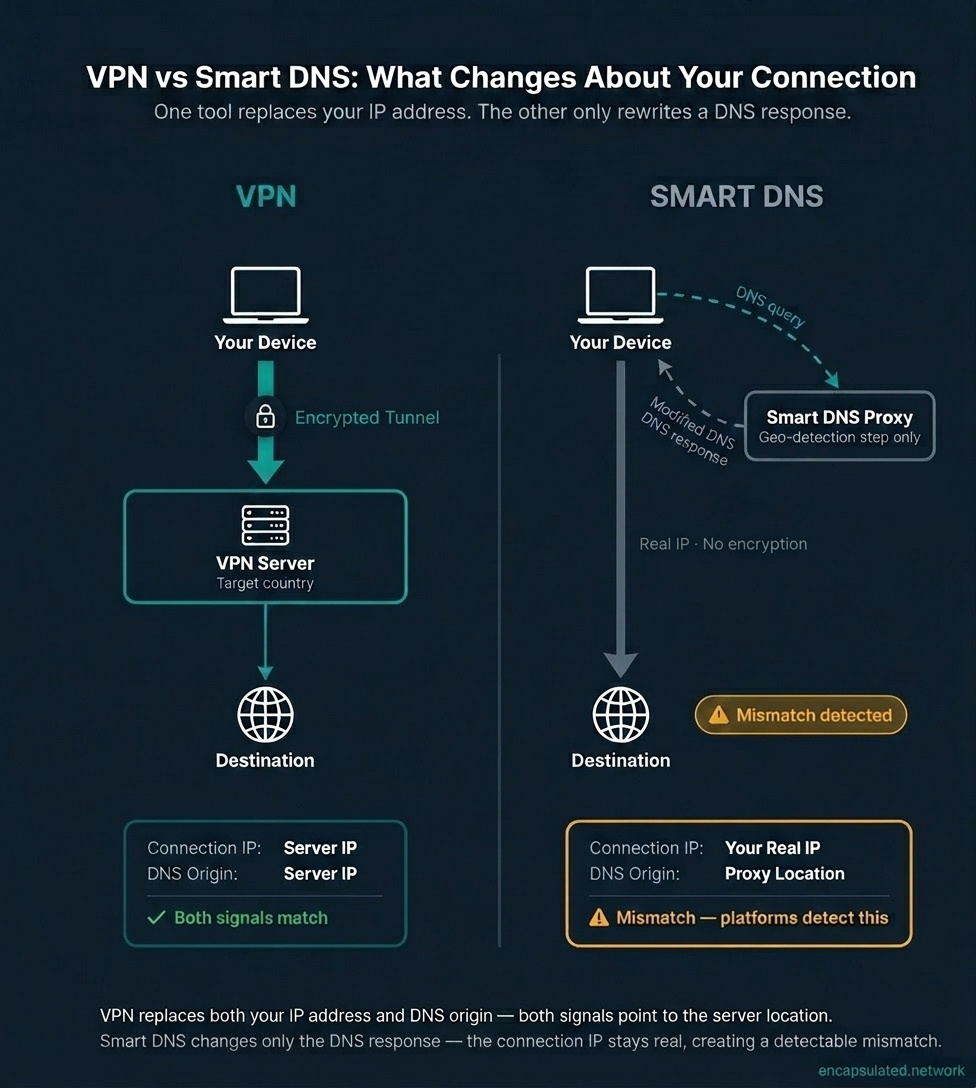
When you connect to a VPN, your device establishes an encrypted tunnel to a server in your chosen country. Every packet leaving your device travels through that tunnel: every browser request, every app connection, every DNS query. The VPN server forwards all of it to the destination using the server’s own IP address.
The destination sees the VPN server’s IP and country. Your ISP sees only an encrypted stream going to the VPN server and nothing beyond it. Two things change simultaneously: your apparent IP address and the origin of your DNS queries. Both point to the VPN server’s location. For the full mechanism, see how a VPN actually works.
How Smart DNS works — and what it leaves unchanged
What Smart DNS actually does
When Smart DNS is configured, your device’s DNS resolver is set to one operated by the Smart DNS provider. When your device looks up the domain name of a geo-restricted streaming service, the Smart DNS resolver recognises that hostname from its whitelist of supported services and returns a proxy IP address in response, rather than the service’s real server address.
Your device then connects to that proxy server. The proxy reads the SNI (Server Name Indication) field in the TLS handshake, which contains the target hostname in plaintext for most connections, and uses it to route the geo-detection and location-authentication step to the correct streaming backend in the target region. The streaming platform’s location check sees a request appearing to come from the proxy’s country and grants access.
The video stream typically travels directly from your device to the content delivery servers rather than through the proxy. The proxy handles only the location-verification step. Some implementations also relay the video stream when a platform checks location beyond the initial authentication, so the exact scope of proxying varies by provider and service.
No encryption is applied anywhere in this process. The Smart DNS provider intercepts and modifies DNS responses for whitelisted services.
Your IP address does not change
This is the fact that Smart DNS marketing consistently omits. Smart DNS never creates an IP replacement. It manipulates a DNS response. Every outbound packet from your device carries your real source IP address, and that IP reaches every server you connect to.
When a service checks the connection IP, the IP address of the device actually initiating the request rather than the DNS resolver it queried, it sees your real location. Smart DNS has no mechanism to change this. DNS manipulation operates at the name-resolution layer. The network-layer connection still originates from your device.
A VPN handles this at the network layer. Your device sends all traffic through the encrypted tunnel to the VPN server, which then opens the connection to the destination using the server’s own IP address. The destination sees the server as the connection source because the server is the connection source. Your real IP is absent from every packet that reaches the destination.
Services that apply geo-checks only at the DNS layer are susceptible to Smart DNS. Services that check the connection IP independently are not.
The mismatch that platforms increasingly catch
Smart DNS creates a structural mismatch in every connection it manipulates. The DNS resolver reports one country; the connection IP reports another. A device using a US Smart DNS server while physically connecting from Tunisia produces DNS queries that indicate “United States” and outbound packets that carry a Tunisian IP address.
Streaming platforms have increasingly begun comparing these two signals. In recent years, Netflix has expanded its detection to actively flag sessions where the DNS resolver location does not match the connection IP location. HBO Max and Paramount+ are reported to apply their own DNS/IP mismatch checks as well. BBC iPlayer takes a different approach: it enforces location by requiring a UK connection IP directly, and has done so for years, which is why it reliably blocks both Smart DNS and VPN services that fail to provide a genuine UK connection address.
This detection approach does not identify Smart DNS software specifically. It identifies the mismatch that Smart DNS produces by design. No Smart DNS configuration eliminates the mismatch, because the mismatch is the mechanism.
A VPN eliminates the mismatch entirely. Because all traffic including DNS queries routes through the VPN server, both signals report the same location.
The encryption gap
A VPN encrypts every packet that leaves your device. Your ISP sees an opaque stream going to the VPN server and nothing beyond it: no destinations, no content, no DNS queries. Anyone monitoring the network between your device and the VPN server sees only encrypted data.
Smart DNS applies no encryption anywhere. Your HTTPS connections retain the site-level TLS protection that exists between your browser and the destination server, but the connection itself is fully visible to your ISP, to any network observer on the path, and to anyone monitoring a shared network. Your ISP can see which services you are connecting to, when, and for how long.
On public Wi-Fi, this distinction is critical. A coffee shop, hotel, or airport network carries traffic from many users. Smart DNS provides no protection on these networks. An attacker on the same network can observe your connections as if Smart DNS were not configured at all. A VPN with an encrypted tunnel is the appropriate tool for any untrusted network. For a full explanation of what VPN encryption protects and how it works, see VPN encryption explained.
Smart DNS also does nothing to prevent your ISP from building a record of which services and domains your devices connect to. Every DNS query goes to the Smart DNS provider’s resolver, and every outbound connection carries your real IP to the destination. For the comparison with proxy services on the same question, see VPN vs proxy.
When Smart DNS silently stops working — encrypted DNS
Smart DNS depends entirely on being able to intercept and modify your DNS queries. When DNS queries are encrypted before they leave the device, that interception step is bypassed, and Smart DNS stops working without any error message.
DNS-over-HTTPS (DoH) and DNS-over-TLS (DoT) encrypt DNS queries between the device and the resolver. The Smart DNS provider cannot read or modify queries it never receives. Those queries travel encrypted to whichever resolver is specified in the browser or operating system, bypassing the Smart DNS provider.
Several common configurations enable encrypted DNS by default or increasingly by default. Firefox enables DoH on desktop and routes queries to Cloudflare’s resolver by default for US users, a rollout that began in February 2020 and completed over the following months, with broader country rollout following. Chrome enables Secure DNS by default when the operating system’s configured resolver appears on Chrome’s internal list of providers that support DoH, upgrading the connection to that same provider’s DoH endpoint without switching to a different provider. Android 9 introduced a system-wide Private DNS setting that uses DoT in opportunistic mode by default, attempting an encrypted connection to the network-assigned resolver and falling back to unencrypted if encryption is unavailable.
The distinction between opportunistic and strict encrypted DNS matters here. Opportunistic modes, such as Chrome’s Secure DNS upgrade and Android’s Automatic Private DNS setting, upgrade the existing configured resolver to DoH or DoT when the resolver supports it. If your Smart DNS provider’s resolver is already set as the system resolver and it offers a DoH endpoint, the opportunistic upgrade simply encrypts the connection to the same provider, and Smart DNS continues working. If the resolver does not appear on the browser’s mapping list or does not support encrypted DNS, queries continue in plaintext and Smart DNS functions normally. Strict modes are the breaking case: Firefox’s default DoH configuration routes queries to Cloudflare regardless of system settings, and any manually configured DoH or DoT endpoint in a browser or operating system will route queries to that third-party resolver, bypassing the Smart DNS provider completely.
When this happens, Smart DNS appears correctly configured. The internet works. The streaming service blocks access. There is no error pointing to the cause. Diagnosing the failure requires checking whether a browser or the operating system is routing DNS queries to a third-party encrypted resolver rather than to the Smart DNS provider.
A VPN is entirely unaffected by encrypted DNS. VPN operates at the network layer, routing all traffic through the encrypted tunnel regardless of whether individual DNS queries are themselves encrypted. The IP replacement that a VPN provides is a routing function, not a DNS function. DoH running inside a VPN tunnel means the encrypted DNS queries travel through the tunnel to the VPN’s resolver.
Speed — two reasons, not one
Smart DNS’s speed advantage over a VPN comes from two independent sources that are almost always described as a single benefit.
No encryption overhead
A VPN encrypts every outbound packet and decrypts every inbound packet. This processing adds a CPU cost and a small latency component to every transmission. With WireGuard on capable hardware, the throughput penalty is typically in the low single-digit percentages under favourable conditions, making it imperceptible for most streaming use cases. In real-world consumer environments — with hardware variation, longer server distances, and network conditions — overhead of 5–15% is more representative. Older protocols carry more overhead. For a detailed protocol comparison, see WireGuard vs OpenVPN.
OpenVPN over TCP introduces an additional problem beyond encryption overhead. Tunneling TCP traffic inside a TCP-based outer connection creates what is known as TCP meltdown: when packet loss occurs, congestion control triggers simultaneously at both the inner and outer TCP layers, each independently backing off and retransmitting. The combined response degrades throughput far more than either loss event would produce alone. OpenVPN over UDP avoids this. WireGuard, which uses UDP natively, is unaffected.
Smart DNS adds no encryption overhead to the data stream.
No routing detour
A VPN routes every packet through the VPN server before it reaches the destination, and the response travels back through the server on the return path. Every connection takes a geographic detour proportional to the physical distance between your device and the VPN server. A user in Kuala Lumpur connecting to a VPN server in London to reach a UK streaming service sends every byte of video content on the route Kuala Lumpur to London to the streaming origin and back.
Smart DNS sends traffic directly from your device to the destination. The DNS manipulation is a one-time step at connection setup. The data stream travels the shortest available path to the content servers.
For users connecting to a VPN server close to their physical location, the routing overhead is modest. For users connecting to a VPN server on another continent, the routing detour typically contributes more latency than the encryption overhead does. The practical gap between Smart DNS and a nearby WireGuard VPN server is small for most streaming use cases. The gap between Smart DNS and a long-distance VPN server is more significant, and routing is usually the larger component of that gap.
Device compatibility — and where Smart DNS still can’t help
Smart DNS is configured in a device’s DNS settings, a standard network parameter exposed by virtually every internet-capable device. This is its most compelling practical advantage: Smart TVs, gaming consoles, and streaming sticks that have no mechanism for installing a VPN application can be pointed at a Smart DNS resolver through the network settings they already expose. A VPN requires either a native application or a router-level setup that routes all network traffic through the VPN before it reaches individual devices. For a full guide on tool selection by device type and streaming service, see how to change your IP address location and the Malaysian IP address guide for a worked example including Smart DNS device configuration.
| Device | DNS settings available | Smart DNS compatible | Notes |
|---|---|---|---|
| Apple TV (tvOS) | ✅ Yes | ✅ Yes | Settings > Network > [select Wi-Fi network] > Configure DNS > Manual. On 3rd-gen and older: Settings > General > Network > Configure DNS. |
| Amazon Fire TV / Fire Stick | ⚠️ No direct field | ⚠️ Router recommended | No direct DNS field. Forget the network via Settings > Network, reconnect and select Advanced, then enter DNS manually. On some Fire OS versions and Ethernet connections, the entered value is silently ignored — router-level DNS is more reliable. |
| Nintendo Switch | ✅ Yes | ✅ Yes | Configure via System Settings > Internet > Connection settings |
| PlayStation 4 | ✅ Yes | ✅ Yes | Settings > Network > Set Up Internet Connection > Custom > [connection type] > DNS Settings > Manual |
| PlayStation 5 | ✅ Yes | ✅ Yes | Settings > Network > Settings > Set Up Internet Connection > [select active connection] > press Options button > Advanced Settings > DNS Settings > Manual |
| Xbox One / Series X|S | ✅ Yes | ✅ Yes | Configure via Settings > General > Network settings > Advanced settings |
| Chromecast (legacy casting dongles) | ❌ Hardcoded | ❌ No | Ignores custom DNS; uses Google 8.8.8.8. Line discontinued August 2024. |
| Google Nest speakers / displays | ❌ Hardcoded | ❌ No | Hardcoded Google DNS; not configurable at device level |
| Roku | ❌ No device-level setting | ⚠️ Router only | No DNS field on device; certain apps also hardcode Google DNS within the app |
Regardless of device, most Smart DNS providers require registering your home IP address with the provider’s dashboard before geo-manipulation takes effect. If the home IP changes, which it does periodically on most ISP connections, Smart DNS stops working without any error until the registered address is updated. Some providers mitigate this with an auto-update application or Dynamic DNS support, but the registration requirement is standard.
Smart DNS and VPN by streaming platform — 2026
Detection posture varies significantly across platforms. The table below summarises available information on detection methods and current status as of mid-2026. Platform detection behavior changes frequently; status is based on reported user experience and available documentation. Detection methods are inferred from independent testing and error-code analysis; no platform publicly discloses its geo-enforcement implementation. This section is subject to change and will be updated as platforms evolve their enforcement.
| Platform | Inferred detection method | Smart DNS (2026) | VPN (2026) | Notes |
|---|---|---|---|---|
| Netflix | DNS/IP mismatch + hosting IP flags | ⚠️ Increasingly blocked | ✅ Works; varies by server | Mismatch detection has expanded significantly in recent years. Switching servers resolves most blocks. |
| BBC iPlayer | Connection IP (UK required) | ⚠️ Often blocked | ✅ Works with UK server | Enforces UK connection IP directly, not DNS mismatch. Has applied strict IP checks for years. |
| Max (HBO Max) | Reported: DNS/IP mismatch | ⚠️ Increasingly blocked | ✅ Generally works | Platform does not disclose detection methods. Status based on reported user experience. |
| Paramount+ | Reported: DNS/IP mismatch | ⚠️ Inconsistent | ✅ Generally works | Platform does not disclose detection methods. Status based on reported user experience. |
| Disney+ | Datacenter-IP blocklisting + location cross-check (incl. GPS on mobile) | ⚠️ Inconsistent; increasingly difficult | ✅ Works; varies by server | Multi-layered enforcement including behavioral analysis. One of the more aggressive systems. |
| Amazon Prime Video | Multi-signal detection (IP ranges, DNS/IP mismatch, packet headers, geolocation) | ⚠️ Inconsistent | ✅ Works; varies by server | Enforcement widely reported to be uneven across regions. |
| Hulu | DNS/proxy detection | ⚠️ Inconsistent | ✅ Works with US server | US-only service. Geo-check is DNS-satisfiable in principle, but Hulu maintains active proxy detection (error codes P-EDU125, P-DEV320). Smart DNS performs better here than against UK broadcasters but reliability varies by provider and server. |
| ITVX | Connection IP + datacenter-range blocklisting (UK required) | ⚠️ Often blocked | ✅ Works with UK server | Similar enforcement posture to BBC iPlayer. Actively maintains datacenter IP blocklists. |
| DAZN | Multi-signal detection (IP blocklisting, GPS mismatch, DNS-leak detection, persistent cookies, traffic analysis) | ❌ Typically blocked | ✅ Works; varies by server | Among the most aggressive geo-enforcement systems. Most consumer VPNs are now blocked; Smart DNS rarely succeeds. |
Two patterns emerge from this table. Services like BBC iPlayer and ITVX enforce location at the connection layer — they require an IP address from the target country that is not flagged as a datacenter address, and they actively maintain blocklists of the hosting-IP ranges that Smart DNS relies on. DNS redirection alone does not satisfy these checks because the connection IP remains the device’s real address. Hulu also requires a US location; its geo-check is DNS-satisfiable in principle, and Smart DNS typically performs better there than against the UK broadcasters, though Hulu maintains active proxy detection and results vary by provider and server. Services applying DNS/IP mismatch detection, such as Netflix, fall between these poles: Smart DNS can work in gaps where mismatch checking has not been applied to a specific server, but those gaps are narrowing. A VPN, which aligns both the connection IP and DNS origin to the same server location, is the structurally more resilient choice across all enforcement approaches.
Who sees your DNS queries
When Smart DNS is configured as the device’s DNS resolver, all DNS queries from that device go to the Smart DNS provider’s resolver. This includes every streaming query the service is designed to intercept, and every other query the device makes: news sites, banking apps, email services, background application connections, and system update checks. The provider receives a complete record of every domain any application on that device looks up, not only the streaming-related ones. This is inherent to how the service functions: the provider must see the queries to know which ones to intercept.
Queries that a browser or operating system sends through its own encrypted DNS endpoint, such as Firefox routing to Cloudflare by default, bypass the Smart DNS resolver and do not reach the Smart DNS provider. The provider’s visibility is limited to the queries that actually arrive at their resolver.
VPN providers also see DNS queries, specifically the queries that travel inside the encrypted tunnel to the VPN’s resolver. The difference is that the encrypted tunnel prevents your ISP and network from observing those queries and the connections they produce. Reputable VPN providers are also subject to independently audited no-log policies verified by third-party security firms, creating external accountability for how traffic data is handled. For the framework for evaluating those claims, see the no-log VPN guide.
Standalone Smart DNS providers, services that offer Smart DNS without a bundled VPN, have generally not published equivalent third-party audits. No-log claims exist but are not verified at the standard applied to audited VPN providers. Some VPN providers bundle Smart DNS as an additional feature alongside their main service; in those cases the bundled Smart DNS inherits whatever audit posture the parent provider has established. A dedicated Smart DNS subscription from a provider with no published third-party audit is a meaningfully different trust relationship from a VPN provider whose no-log policy has been independently verified. For users whose only concern is streaming access on a trusted home network, that difference may be acceptable. For users who think about which entity holds a record of their browsing patterns across all applications, it warrants consideration before switching.
Choosing by use case
The right tool changes depending on who is asking the question and what they are actually doing.
Gamers
Gaming consoles present a compatibility advantage for Smart DNS. PlayStation, Xbox, and Nintendo Switch all expose DNS settings that can be configured without a native VPN application. On a trusted home network, Smart DNS is the practical choice for accessing region-locked game stores, DLC, or early releases from another country’s storefront. Configuration takes a few minutes in network settings with no application to install.
For PC gaming, the comparison is less straightforward. WireGuard adds a latency overhead that varies with hardware and server distance — typically modest under favourable conditions, but measurable in competitive play where milliseconds matter. Smart DNS avoids that overhead entirely and sends traffic directly to game servers without a routing detour. The practical difference in latency for gaming is context-dependent, not dramatic on a capable nearby-server connection. More relevant is that Smart DNS provides no benefit for privacy and does not change the connection IP visible to anti-cheat systems or game servers. For cross-region matchmaking or accessing game content restricted by connection IP rather than DNS, a VPN is more reliable because it changes both signals. Smart DNS may work for some game stores and content fronts that check only DNS, but fails for services with connection IP checks.
For any gaming on a network outside your home, a VPN is required. Hotel networks, tournament venues, and internet cafes are untrusted environments where Smart DNS provides no protection.
Travelers and expats
Smart DNS is not appropriate for travel. The moment you leave your home network, you are on an untrusted connection, whether that is hotel Wi-Fi, a mobile data connection, or an airport lounge. Smart DNS applies no encryption on those networks. A VPN is the correct tool for any use while traveling. For a full guide on accessing home-region services from abroad, including banking, streaming, and government portals, see how to change your IP address location.
Remote workers
Smart DNS is not relevant for remote work scenarios involving corporate infrastructure. Services that restrict access by connection IP, including enterprise SaaS platforms, internal tools, and corporate intranets that allowlist specific IP ranges, require an actual IP replacement at the network layer. Smart DNS cannot satisfy those access controls. A VPN connected to the appropriate server or network is the operative tool. For managing personal and work traffic on a home network, see the split tunneling guide.
Mixed-device households
For households with a mix of device types, the two tools are complementary rather than competing. A VPN on a laptop or phone covers browsing, public networks, banking, and sensitive services. Smart DNS configured on a Smart TV or gaming console handles streaming on a device that cannot run VPN software, on the trusted home network where the absence of encryption is an acceptable tradeoff. This is not a compromise; it is each tool applied to the situation it is suited for.
Which one to use
Neither tool is universally better. The right choice depends on what you are trying to accomplish, which network you are on, and whether the device can run a VPN application.
Use a VPN when any privacy or security consideration is present; when the network is anything other than your private home network; when the service checks the connection IP rather than relying only on DNS-based geo-detection; when you need access to banking, government portals, or any service that ties access to the connection IP; or when you need consistent, reliable access across multiple streaming platforms over time without chasing detection gaps.
Use Smart DNS when the device you need to stream on cannot run a VPN application and is not behind a router-level VPN; when the network is your trusted home network only; when the target platform is known not to check connection IP or apply mismatch detection; and when your use case is streaming only, with no financial accounts, personal credentials, or sensitive data involved in that session.
One note on trajectory: Smart DNS’s effective window for streaming is narrowing as mismatch detection spreads to more platforms. A configuration that works for a specific service today may not work in six months, not because the Smart DNS service changed but because the platform extended its mismatch checks. A VPN’s IP replacement is structurally more resilient to this because it eliminates the mismatch rather than exploiting gaps in its detection. For country-specific and platform-specific geo-access guidance, see how to change your IP address location.
| VPN | Smart DNS | |
|---|---|---|
| Encrypts traffic | ✅ All traffic, all apps | ❌ None |
| Changes connection IP | ✅ Yes; server IP replaces yours at the network layer | ❌ No; your real IP reaches every destination |
| Geo-detection method | IP replacement; connection and DNS both point to server location | DNS response manipulation; proxy handles location check |
| DNS/IP mismatch risk | ✅ None; both signals point to the same server location | ⚠️ Inherent; DNS and connection IP report different locations |
| Works with DoH/DoT to a third-party resolver | ✅ Unaffected; IP replacement is a routing function | ❌ Breaks silently; queries bypass the Smart DNS provider |
| ISP visibility of destinations | ❌ Hidden by encrypted tunnel | ✅ Fully visible |
| Works safely on public Wi-Fi | ✅ Yes; all traffic encrypted in transit | ❌ No; no protection on untrusted networks |
| Works on Smart TV / console | ⚠️ Via router-level VPN only | ✅ Yes, via DNS settings (see device table above) |
| Provider sees all DNS queries | Queries contained inside encrypted tunnel | ✅ Yes; all apps and all domains from configured devices |
| Independent no-log audit | ✅ Common among major VPN providers | ❌ Rarely published for standalone Smart DNS services |
Frequently asked questions
Does Smart DNS change your IP address?
No. Smart DNS manipulates the DNS response used in the geo-detection step of a streaming connection. Your actual outbound traffic still carries your real source IP address and that IP reaches every server you connect to. Services that check the connection IP rather than relying only on the DNS-based location step see your real location regardless of Smart DNS configuration.
Can streaming services detect Smart DNS?
Increasingly yes. Smart DNS creates an inherent mismatch between the DNS resolver’s reported location and the connection IP’s actual location. A streaming platform that compares these two signals can identify and block Smart DNS sessions without needing to recognise any specific Smart DNS software or server. Netflix and other platforms have significantly expanded these mismatch checks in recent years. Switching Smart DNS servers can address individual IP blocking but does not resolve mismatch-based detection, because the mismatch is built into how Smart DNS functions.
Is Smart DNS safe on public Wi-Fi?
No. Smart DNS applies no encryption to your traffic. On a public or untrusted network, your connections are visible to anyone monitoring that network, as if no tool were configured. A VPN with an encrypted tunnel is the appropriate tool for any public or untrusted network.
Why did my Smart DNS stop working after a browser update?
The most common cause is DNS-over-HTTPS. Firefox, Chrome, and other browsers increasingly enable encrypted DNS by default or following software updates. When DoH routes queries to a third-party resolver such as Cloudflare rather than to your Smart DNS provider, the geo-manipulation step is bypassed entirely. Your Smart DNS configuration looks correct, the internet works normally, and the streaming service blocks access with no error explaining why. Check your browser’s Secure DNS or DNS-over-HTTPS settings. If a third-party provider is configured there, disable it, or switch to using a VPN instead.
Can I use Smart DNS and a VPN at the same time on the same device?
Not in a meaningful way. A VPN routes all DNS queries through the encrypted tunnel to its own resolver, which overrides any Smart DNS configuration on that device. The Smart DNS provider never sees the queries. The two tools can be used on different devices in the same household, a VPN on a laptop and Smart DNS on a TV, but running both simultaneously on the same connection serves no purpose.
Does Smart DNS work on Chromecast or Roku?
Not reliably. The original Chromecast casting dongles and Google Nest devices are documented to ignore custom DNS settings and communicate directly with Google’s DNS servers at 8.8.8.8 and 8.8.4.4, so Smart DNS configuration has no effect on them. Google discontinued the Chromecast line in August 2024; whether current Google TV OS devices behave the same way is not confirmed. Roku devices expose no DNS setting at the device level at all, and certain Roku apps hardcode Google’s DNS servers within the application itself, bypassing even router-level configuration. Making Smart DNS work on these Roku apps requires blocking Google’s DNS IPs at the router, which in turn requires a router capable of custom routing rules.
Is Smart DNS or a VPN better for gaming?
It depends on the device and the use case. On gaming consoles (PlayStation, Xbox, Nintendo Switch), Smart DNS is often the more practical choice for accessing region-locked game stores or content, because these devices expose DNS settings but do not support VPN applications natively. For PC gaming where cross-region matchmaking or privacy matters, a VPN with WireGuard is more reliable: it changes the connection IP, which some game servers and platforms check independently of DNS. WireGuard’s latency overhead is typically modest; the more meaningful variable is server distance. For any gaming on a public or untrusted network, a VPN is required regardless of platform.
Is Smart DNS safe to use while traveling?
No, not for anything beyond low-stakes streaming on a network you fully trust. On hotel Wi-Fi, airport networks, or mobile data connections, Smart DNS provides no encryption and no protection. Your traffic is visible in the same way it would be without any tool. A VPN is the correct tool for any use while traveling, including accessing home-region streaming and banking services from abroad. See how to change your IP address location for the full guide on traveling with a VPN.
Does Smart DNS work with Netflix in 2026?
Results vary by server and change over time. Netflix has significantly expanded DNS/IP mismatch detection, and Smart DNS creates exactly the mismatch that this detection is designed to catch. Some Smart DNS providers maintain servers that currently operate in gaps where detection has not yet been applied; others are broadly blocked. Because the mechanism Smart DNS relies on is the same mechanism that mismatch detection targets, any working Smart DNS configuration for Netflix is operating in a gap that the platform is actively working to close. A VPN eliminates the mismatch by replacing the connection IP to match the DNS origin, which is why it is structurally more resilient for this use case.
How do I know if my Smart DNS is actually working?
Start with an IP check at a site like ipleak.net or browserleaks.com. Your IP address should show your real location — Smart DNS does not change it. The DNS servers listed should belong to your Smart DNS provider rather than your ISP. If your ISP’s resolver appears, Smart DNS is not intercepting your queries: check whether DoH is enabled in your browser or operating system. If the DNS check passes but the streaming service still blocks you, work through these in order: has your home IP address changed since you last registered it with the provider’s dashboard? Smart DNS requires IP registration and stops working silently when your IP rotates. Is the specific platform using connection IP detection rather than DNS-only checks? If so, Smart DNS cannot satisfy it regardless of configuration, and a VPN is the appropriate tool.
What is the difference between Smart DNS and a proxy?
Both operate without full-tunnel encryption and neither provides complete IP replacement across all traffic. A proxy routes one specific application’s traffic through an intermediary server in another location, so the destination sees the proxy’s IP for that application while all other apps on the device connect directly with your real IP. Smart DNS manipulates the DNS response for geo-detection purposes without routing the content stream through a server at all, for most implementations; your actual video travels from your device directly to the content servers. Neither tool is appropriate for any use involving security or private data. For the full comparison of VPN and proxy, including where a proxy is the right choice for specific use cases, see VPN vs proxy.