You open Astro GO from your hotel room in London. The app loads, then stops. A geo-restriction message appears where the video player should be. The same thing happens with Maybank2u: your account is valid, but the app refuses to proceed because your IP address is not Malaysian.
The fix is a VPN with servers in Malaysia. When you connect to one, your traffic exits through a Malaysian server and every service you reach sees a Malaysian IP address instead of yours. The steps below take under five minutes regardless of which device you are on.
What a Malaysian IP address lets you access
An IP address is a numerical label assigned to every device that connects to the internet. When your device connects through a Malaysian internet provider, it is assigned an IP from a range that geolocation databases associate with Malaysia. Services read that range to determine your location and decide what content or features to grant you access to. Presenting a Malaysian IP tells those services you are in the country, regardless of where you physically are.
Three categories of services apply these checks. The account itself is not the issue in any of these cases. The location is.
Streaming services. Astro GO, Tonton, Sooka, iQIYI Malaysia, and TV3 are all region-locked by content licensing agreements. Access requires a Malaysian IP regardless of whether you hold an active subscription. The same applies to the Malaysian Netflix library, which differs from other regional catalogues.
Banking and financial apps. Maybank2u and the MAE app, RHB Now, CIMB Clicks, AmOnline, and Touch ‘n Go eWallet all apply foreign IP checks as part of fraud prevention. The checks vary by institution: some block login entirely from foreign IPs, others allow login but restrict certain transactions.
Government and work portals. LHDN MyTax, EPF i-Akaun, MyGov, SSM, and JPJ operate with access controls or authentication requirements tied to Malaysian infrastructure. Corporate intranets commonly whitelist Malaysian IP ranges for remote access.
| Your situation | Main constraint | Recommended approach |
|---|---|---|
| Short-term traveller | Streaming and banking blocked abroad | VPN with Malaysian server — steps below |
| Malaysian expat living overseas | Streaming blocked; Secure2u requires ATM activation if not done before departure | VPN for streaming and most portals; roaming SIM for banking |
| Student abroad | EPF i-Akaun requires registered device and Malaysian mobile OTP, not IP | VPN for streaming and portals; ensure registered device and active SIM for EPF |
| Business traveller on a corporate device | MDM or IT policy may block VPN app installation | Use a personal device for personal Malaysian services; check IT policy first |
| Non-Malaysian accessing Malaysian content | Streaming geo-restrictions only; banking portals generally not relevant | VPN or Smart DNS depending on whether security is a priority |
How a VPN gives you a Malaysian IP
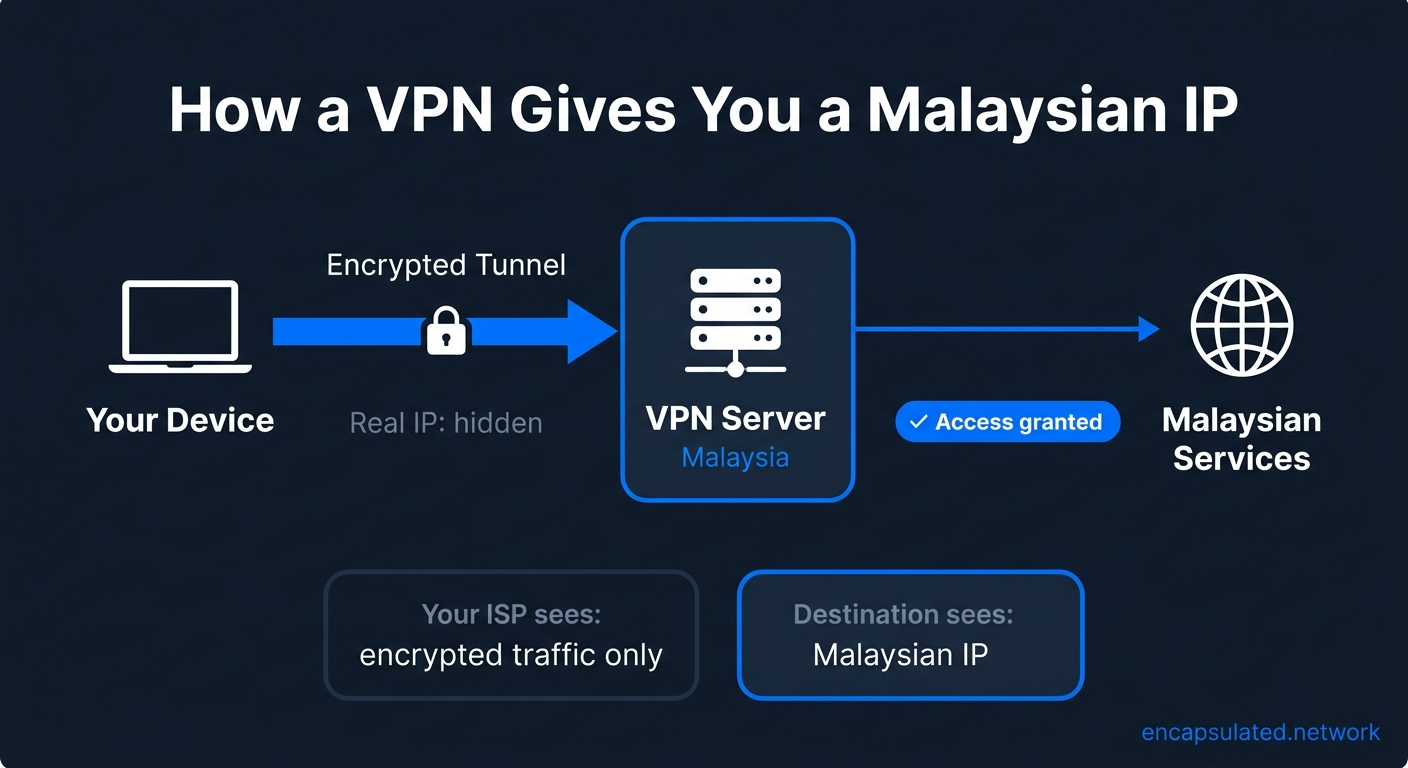
When you connect to a VPN server located in Malaysia, your internet traffic is routed through that server before reaching its destination. The destination sees the server’s Malaysian IP address, not your real one. For a complete explanation of the mechanism, see how a VPN actually works. For step-by-step guides covering other countries where similar restrictions apply, see how to change your IP address location.
How to get a Malaysian IP address: step by step
The steps below use ProtonVPN as the illustrative example. The same sequence applies in any VPN app that has Malaysian servers.
Step 1: Choose a VPN with servers in Malaysia
Not every VPN provider has servers in Malaysia. Before subscribing, confirm three things on the provider’s server list page: Malaysia is listed as an available country, the provider publishes an independently audited no-log policy, and a kill switch is included and enabled by default. The kill switch prevents your real IP from being exposed if the VPN connection drops unexpectedly. For a detailed explanation of what a no-log audit covers and why it matters, see our no-log VPN guide.
Some providers offer city-level server selection within Malaysia, typically Kuala Lumpur and Johor Bahru as separate nodes. A Kuala Lumpur server is the right choice for most Malaysian services, since the majority of platforms and portals are based in or route through KL infrastructure.
Step 2: Download and install the app
Go to the provider’s website, navigate to the download page, and download the app for your operating system. Run the installer and sign in with your account credentials. No manual configuration is required for standard use.
Step 3: Find Malaysia in the server list
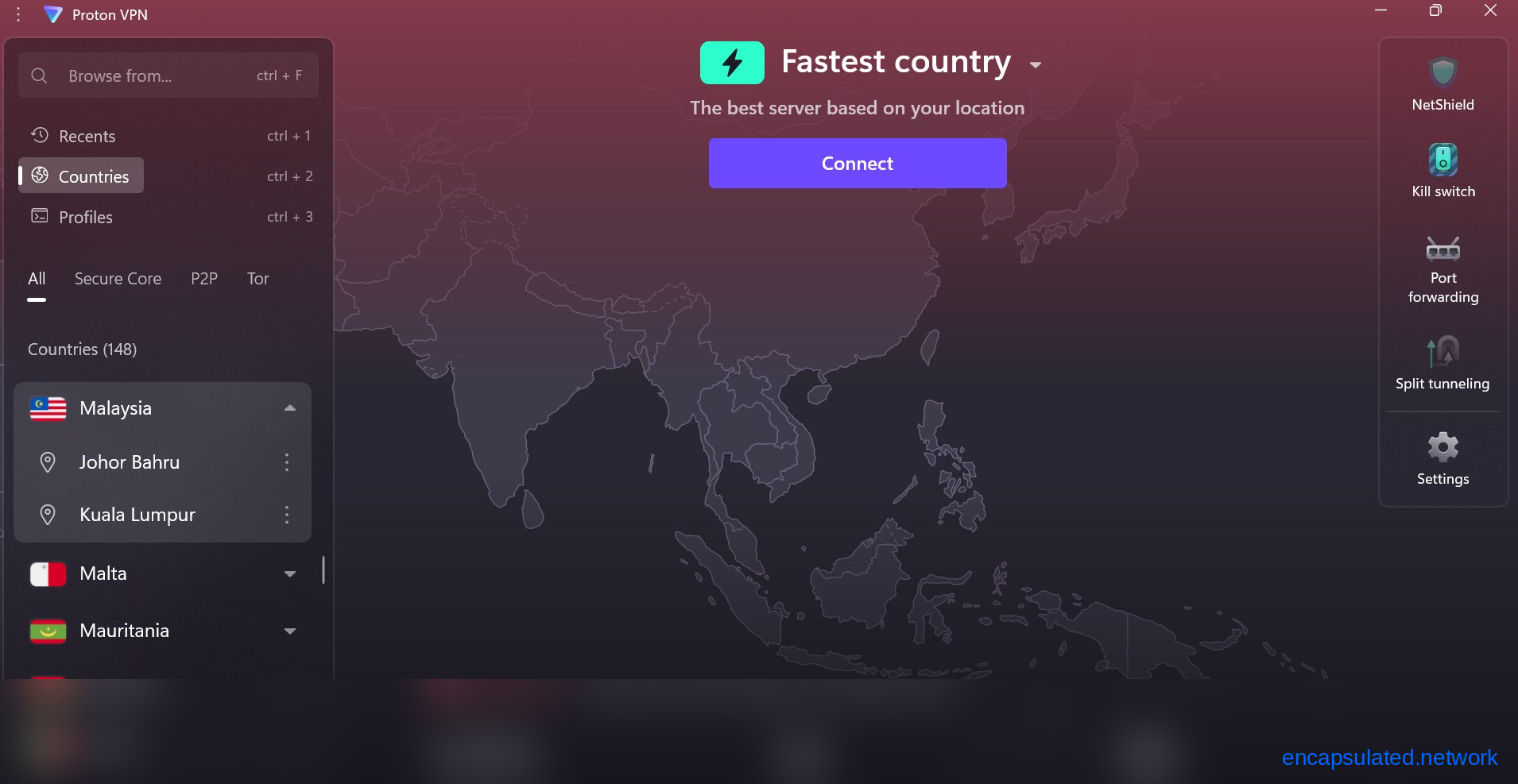
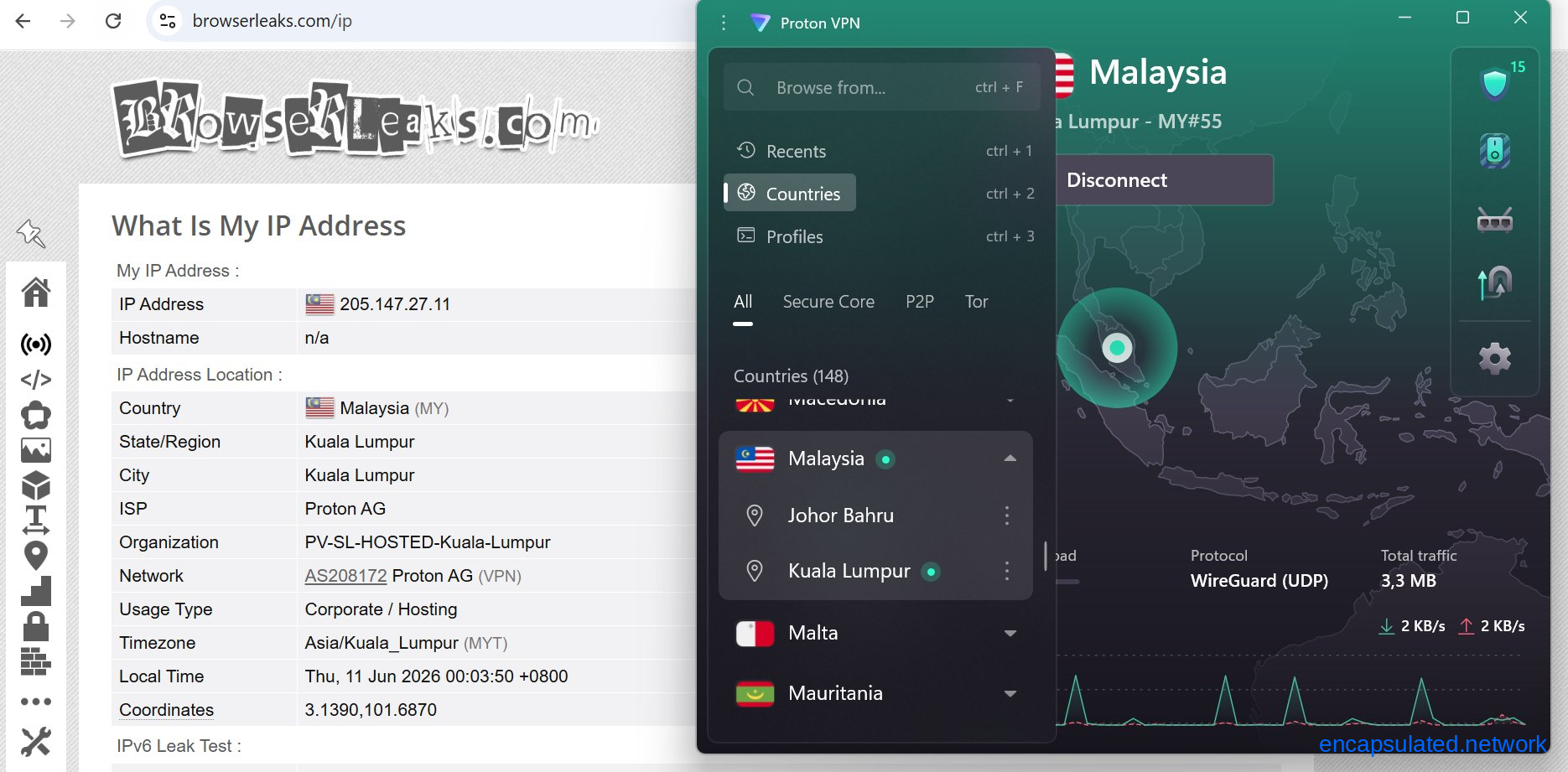
Open the server list or country search within the app. Type “Malaysia” in the search bar or scroll to find it in the country list. If city-level selection is available, choose Kuala Lumpur. You can add Malaysia to your favourites for faster access on future connections.
Step 4: Connect and confirm the connection
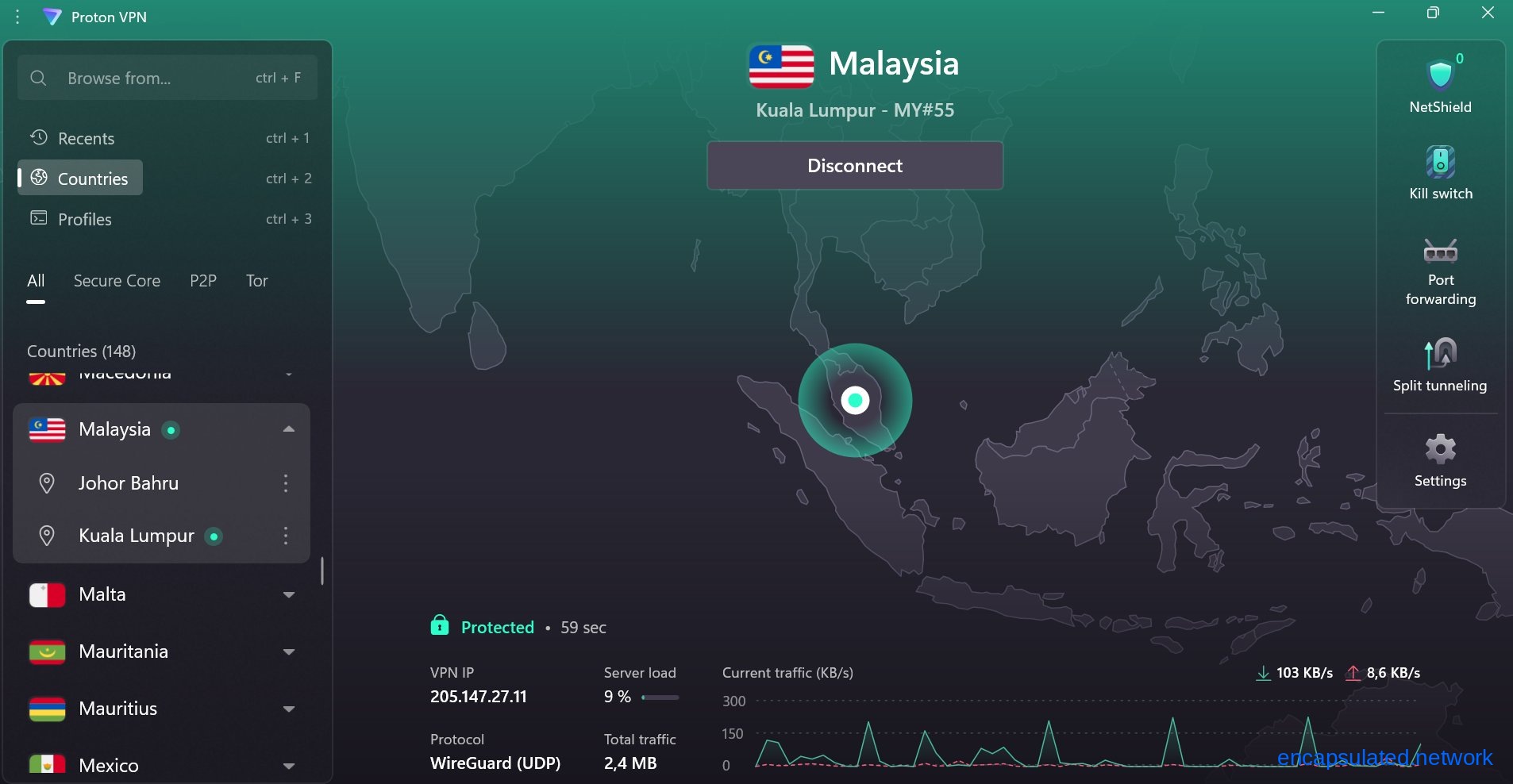
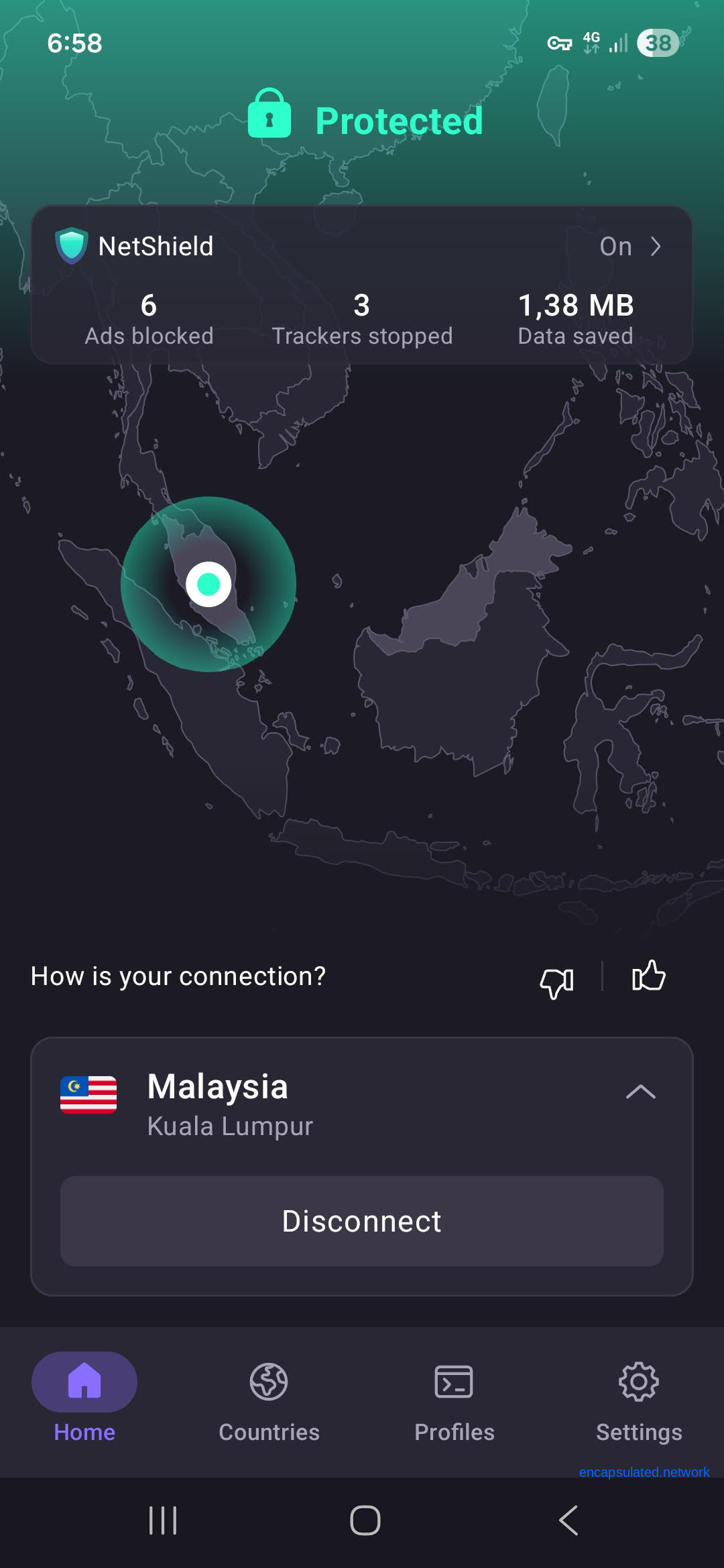
Click or tap to connect. The app will show a connected status within a few seconds, alongside the server location and your new IP address. A green indicator or “Protected” label confirms the tunnel is active.
Step 5: Verify the IP change worked
Before opening any service, confirm the IP change is in effect. Open a fresh browser tab and visit ipleak.net or browserleaks.com. The IP address shown should reflect a Malaysian location, and the ISP field should display your VPN provider’s infrastructure rather than your home internet provider. Check also that no DNS leak is present: the DNS servers listed should belong to your VPN provider, not your home ISP.
A note on accuracy: ipleak.net derives location and ISP data from the MaxMind database, which can occasionally be cached or slightly imprecise for newer IP ranges. If the location shows as Malaysia but the ISP name looks unexpected, that is usually a database lag rather than a misconfiguration. If the DNS test is temporarily unavailable on ipleak.net, browserleaks.com offers the same checks.
Using your Malaysian IP for streaming
Clear your digital footprint first
Before opening a streaming app or browser tab, clear your cache and cookies. Location data from a previous session can persist after the IP changes and cause geo-restriction checks to fail even with the VPN active. On mobile, close the streaming app completely before connecting the VPN, then reopen it once the Malaysian server is confirmed as connected.
If Astro GO shows an error
Astro GO checks for VPN and proxy connections. If playback is blocked, the app typically shows error code ERR-007 or a message indicating a VPN or proxy has been detected. The IP address of your current VPN server is in Astro’s detection database.
The fix is to switch to a different Malaysian server. VPN providers maintain multiple servers per country, and different servers use different IP ranges with varying detection histories. Disconnect, select a different Malaysian server, reconnect, clear the app cache, and try again. If city-level selection is available, try a Johor Bahru node if a Kuala Lumpur node is being detected, or vice versa. Tonton and Sooka apply similar geo-restrictions and respond to the same server-switching approach.
VPN, Smart DNS, and proxy: choosing the right tool
Four options can give a device a Malaysian-appearing presence online, and they are not interchangeable. The table below maps each to the use cases it actually serves.
| Approach | Encrypts traffic | Hides real IP | Works for banking | Works for streaming | Works on Smart TVs and consoles |
|---|---|---|---|---|---|
| VPN | ✅ Yes | ✅ Yes | ✅ Yes (datacenter IP caveat) | ✅ Yes | ⚠️ Via router only |
| Smart DNS | ❌ No | ❌ No | ❌ No | ✅ Yes | ✅ Yes (DNS configurable) |
| Proxy | ❌ No | ✅ One app only | ❌ No | ⚠️ Unreliable | ❌ No |
| Dedicated IP (VPN) | ✅ Yes | ✅ Yes | ✅ Better than shared VPN IP | ✅ Yes | ⚠️ Via router only |
Smart DNS reroutes only the DNS queries that streaming platforms use for geo-detection. The result is faster throughput with no encryption overhead, which makes it particularly useful for 4K streaming on Smart TVs, gaming consoles, and streaming sticks that cannot install a VPN app directly. On these devices, Smart DNS is configured in the network settings DNS field rather than through an app. For a router-level VPN setup, which routes all devices on your network through a Malaysian server without per-device configuration, see our router VPN setup guide.
Smart DNS provides no encryption and no IP protection. It is unsuitable for banking, government portals, or any service that performs a full IP address check rather than relying on DNS alone. For anything involving credentials or financial data, a full VPN is the appropriate tool.
Proxy services occupy similar territory at the application level but share the same absence of encryption and carry additional trust risks with free providers. For a full comparison, see our VPN vs proxy guide.
Using your Malaysian IP for banking and government portals
Why banking apps sometimes still block VPN users
Banking apps do not check only which country your IP is registered to. They also check the IP’s reputation. Shared VPN server IPs are assigned to commercial datacentre ranges operated by infrastructure providers such as AWS, Hetzner, or OVH. Fraud-detection systems flag these ranges as high-risk regardless of geographic location, because legitimate retail banking customers almost never connect from datacentre IP blocks.
A Malaysian datacentre IP and a Malaysian residential or mobile-carrier IP are geographically identical but treated very differently by fraud systems. This is the most common reason Maybank2u or RHB Now blocks a user even with a Malaysian server active.
What to try if banking access is blocked
Switch to a different Malaysian server. Different servers use different IP ranges with varying reputation scores. Try several servers before concluding a VPN will not work for a given service.
Use mobile data roaming. If you have a Malaysian SIM with international roaming active and your carrier uses home-routed roaming, your traffic exits via your carrier’s Malaysian network with a mobile-carrier IP. Carrier-assigned IPs fall into cellular ranges that fraud systems treat as normal consumer connections rather than flagging as datacentre traffic. This is not guaranteed for all roaming configurations: some setups and travel eSIMs assign a local foreign IP rather than routing traffic back through Malaysia. For standard home-routed roaming, this is the most reliable option for banking access. Note that roaming does not resolve device binding or OTP requirements.
Dedicated IP. Some VPN providers offer a static IP address assigned exclusively to one subscriber. Because a dedicated IP is not shared across many simultaneous users, it is less likely to appear on datacentre blocklists. Availability varies by provider.
Maybank Secure2u and the MAE app overseas
Secure2u is Maybank’s in-app transaction authorisation tool. Since March 2025 it has fully replaced SMS one-time passwords for Maybank card online transactions. If you need to activate Secure2u for the first time while overseas, there are two constraints a VPN cannot resolve.
First-time activation requires a visit to a physical Maybank ATM: insert your card, enter your PIN, and select Secure2u Activation. A minimum 12-hour waiting period follows before activation completes. If you are already abroad without having completed ATM activation before departure, the documented path is to register through the MAE app and then call Maybank’s overseas Customer Care hotline at +60-3-7844 3696 for activation assistance.
Secure2u is bound to the device rather than the SIM or phone number, so changing your SIM or number does not require reactivation. A Malaysian mobile number is required to receive the OTP during MAE registration. From 29 October 2025, biometric authentication began rolling out in stages for Secure2u transaction approvals, starting with interbank transfers and DuitNow transfers.
EPF i-Akaun, TNG eWallet, and other portals
EPF i-Akaun’s access controls are not based on IP geolocation. The actual constraints for overseas access are device binding through i-Akaun Secure, OTP and SMS TAC delivered to your registered Malaysian mobile number, and for certain functions such as withdrawal applications, prior e-KYC and a one-time fingerprint verification at an EPF office or Self-Service Terminal. A VPN does not resolve any of these requirements. Overseas EPF access depends on having your registered device and an active Malaysian mobile number.
TNG eWallet functions outside Malaysia, including QR payments via Alipay+ in over 50 countries. Friction when topping up from abroad typically comes from the funding method rather than TNG blocking foreign IPs. A Malaysian bank card or FPX transaction may require a Malaysian mobile number OTP as part of 3D Secure authentication, which a VPN does not substitute for.
For SSM, JPJ, and MyGov, a Malaysian IP via VPN is generally sufficient to resolve access blocks. These portals apply geographic IP restrictions rather than the layered device-and-OTP authentication framework that banking and financial services use.
Getting a Malaysian IP on your phone
Most Malaysian streaming and banking apps are mobile-first. The process is the same as on desktop: connect to a Malaysian server before opening the app.
iOS
Install the VPN app, select a Malaysian server, and connect. On iOS, a standard on-device VPN app takes priority over iCloud Private Relay, and the system automatically disables Private Relay while the VPN is connected. No manual action is required for this. Private Relay only affects Safari traffic and DNS queries and has no bearing on native apps such as Astro GO or the MAE app. The exception is a router-level VPN, which the iOS device cannot detect. If your VPN is configured at the router rather than on the device itself, disable Private Relay manually under Settings, then your Apple ID, then iCloud, then Private Relay.
Android
Connect to a Malaysian server in the VPN app and confirm the connection is active before opening the target app. A VPN key icon in the Android status bar confirms the tunnel is running. As with iOS, apps that were already open when the VPN connected may have cached a non-Malaysian IP at launch. Close them and reopen after the connection is confirmed.
What to do if a service is still blocking you
Work through these steps in order of likelihood.
Switch to a different Malaysian server. This resolves most persistent blocks. The current server’s IP may be in a platform’s detection database while another server in the same country is not.
Clear browser cache and cookies. Stale geolocation data from a previous session can persist after the IP changes. Clear cache and cookies in your browser, or close and fully reopen a native app, before retrying.
Check for an IPv6 leak. If your device has an active IPv6 address, some services detect it independently of the VPN’s IPv4 tunnel. Run a check at ipleak.net and look at the IPv6 section. If a real IPv6 address appears there, enable IPv6 leak protection in your VPN app settings or disable IPv6 on the device. For more on how IP leaks work, see our WebRTC and IP leak guide.
Switch VPN protocol. If the VPN connection itself is being detected and blocked, for example on a corporate network or hotel Wi-Fi, switch from WireGuard to OpenVPN using TCP on port 443, which makes VPN traffic appear as standard HTTPS to most firewalls. The protocol setting is in the connection or protocol options of your VPN app.
Open the app after connecting. Some apps cache your IP at launch. If the app was already open when you connected the VPN, close it completely, confirm the VPN is active, then reopen the app.
Is it legal to use a VPN in Malaysia?
VPN use by individuals in Malaysia is legal. The Communications and Multimedia Act 1998, as amended by the Communications and Multimedia (Amendment) Act 2025 (in force from 11 February 2025), does not make individual VPN use an offence. The Online Safety Act 2025, in force from 1 January 2026, applies to licensed service providers and platform operators rather than individual users.
In September 2024, MCMC publicly confirmed it had no intention to block VPN services and stated that content choice is up to the individual user. There is no ISP-level blocking of VPN services in Malaysia.
A VPN does not grant legal immunity. Using a VPN to access content you are otherwise prohibited from accessing, or to conduct activity that is illegal under Malaysian law, does not change the legal status of that activity.
Frequently asked questions
Does using a VPN slow down Malaysian streaming services?
Yes, to some degree, though the impact depends on the protocol and server distance. On a modern device using WireGuard, the encryption overhead is small and often barely noticeable. The larger factor is routing distance: connecting from Southeast Asia adds far less latency than connecting from Europe or North America. If streaming quality is affected, switching to a closer server or a faster protocol typically resolves it.
Can I get a Malaysian IP address for free?
A small number of free VPN tiers include Malaysian servers, but most do not. Those that do often have limited server capacity, which leads to overcrowded connections and unreliable performance. The more fundamental concern is trust: free VPN services have to recover infrastructure costs somehow, and many do so through data collection and third-party sharing. A paid provider with an independently audited no-log policy is the appropriate choice for any use involving financial or personal data.
Why is Maybank still blocking me after connecting to a Malaysian server?
The most likely cause is datacentre IP detection. Shared VPN server IPs are registered in commercial datacentre ranges, and Maybank’s fraud systems flag these regardless of geographic location. Try switching to a different Malaysian server, since different servers use different IP ranges. If the block persists, mobile data roaming on a Malaysian SIM using home-routed roaming provides a carrier-assigned IP that is far less likely to be flagged. See the banking section above for the full sequence.
Can I choose Kuala Lumpur specifically as my IP location?
It depends on the provider. Some offer city-level server selection within Malaysia and list Kuala Lumpur and Johor Bahru as separate nodes. Others provide only a country-level Malaysia option with server allocation handled automatically. Where city-level selection is available, a Kuala Lumpur server is the better choice for most Malaysian services.
Does a Malaysian IP work for Netflix Malaysia?
It can, but Netflix actively works to detect and block shared VPN server IPs. Whether it works depends on whether the specific server IP you are connected to has been added to Netflix’s detection list. If Malaysian Netflix content is not appearing, switch to a different Malaysian server. Results can change in either direction as providers refresh their server pools and Netflix updates its detection.
Do I need to keep the VPN on the whole time or just when opening the app?
For streaming, keeping the VPN connected throughout the session is necessary. Most platforms check your IP not only at login but during playback as well. Disconnecting mid-stream will typically interrupt or terminate the session. For banking, connecting before opening the app and keeping the VPN active during the full session is the safest approach, as some apps perform IP checks at multiple points rather than only at login.
Will a VPN fix my Astro GO error code?
If you are seeing error code ERR-007 or a message indicating a VPN or proxy has been detected, the issue is that Astro GO has identified your current VPN server’s IP. The resolution is to switch to a different Malaysian server rather than disconnecting the VPN. ERR-007 is specifically a VPN and proxy detection code. Other Astro GO error codes indicate unrelated issues such as subscription status or connection quality and are not resolved by changing servers.
Do I need a Malaysian phone number as well as a Malaysian IP?
For streaming services, a Malaysian IP is all you need. For banking and government services, it depends on the specific platform. Maybank Secure2u requires a Malaysian mobile number to receive the OTP during registration. EPF i-Akaun requires a registered Malaysian mobile number for OTP and SMS TAC verification. TNG eWallet top-ups from abroad may require a Malaysian mobile number for 3D Secure authentication depending on your funding method. A VPN provides the IP; it cannot substitute for OTP delivery to a Malaysian SIM.
Can I use the same VPN setup for both streaming and banking?
Yes, the setup is identical: connect to a Malaysian server before opening either type of service. The difference is in reliability. Streaming services detect and block certain VPN server IPs, and switching servers usually resolves it. Banking apps additionally flag IP ranges associated with commercial datacentres, which means some server IPs that work for streaming will still be rejected by banking apps. The steps above cover both use cases, and the banking section explains what to try when the standard connection is not enough.
Will using a Malaysian IP change my Apple or Google account region?
No. Your Apple ID or Google account region is determined by your payment method, billing address, and account settings, not your current IP address. Connecting to a Malaysian VPN server will not shift your App Store or Google Play Store to the Malaysian region or affect your account’s regional settings.