TL;DR
| Tor | VPN | |
|---|---|---|
| Model | Anonymity — no single relay holds both your identity and your destination | Privacy — one trusted provider holds both; your ISP holds neither |
| Routing | Three volunteer-run relays; each knows only its adjacent hop | One provider-operated server |
| Speed | Significantly slower — volunteer bandwidth ceiling, three-hop latency | Fast — commercial infrastructure, single-hop overhead under 10% |
| Coverage | Tor Browser only by default | All device traffic — every app, every protocol |
| Cost | Free | Paid subscription |
| Who it’s for | Anonymity-critical users: journalists, activists, .onion access, source protection | Privacy-focused everyday users: ISP tracking, public Wi-Fi, geo-restrictions |
A VPN provides privacy by encrypting your traffic and replacing your IP, so you trust one vetted provider instead of your ISP. Tor provides anonymity by routing traffic through three relays so that no single point in the chain ever holds both your identity and your destination. Most people need the first; some situations specifically require the second; this article explains exactly which is which and why.
If you only read one paragraph: A VPN is a sealed envelope handed to one trusted courier — the courier knows where you live and where the letter is going, but nobody else does. Tor is the same letter passed through three separate couriers in sequence, each of whom knows only the hand they received it from and the hand they pass it to. No single courier ever holds the full address. Most people need the first option; some situations specifically require the second.
What is Tor?
The full name is The Onion Router, and the name describes the mechanism. Traffic is wrapped in multiple layers of encryption before it leaves your device, and each relay in the chain peels one layer, like removing the outer skin of an onion, to reveal only where to send the payload next. No relay ever sees the full route or the content inside.
The research that became Tor began in 1995 at the US Naval Research Laboratory, when David Goldschlag, Mike Reed, and Paul Syverson set out to answer a question: could internet connections be built that do not reveal who is talking to whom? DARPA began funding the work in 1997, and the Navy filed the onion routing patent in 1998 (granted 2001). The Tor Project, the non-profit organisation that maintains the network today, was incorporated as a 501(c)(3) in 2006. It has no commercial interest in the network’s operation. The infrastructure itself consists of thousands of volunteer-operated relays distributed globally, with no single entity owning or controlling the servers.
Two things are easy to confuse: Tor the network, and Tor Browser the application. Tor Browser is the primary way most users connect to the Tor network. It is a hardened version of Firefox configured to route its traffic through Tor’s volunteer relays. But the network is separate from the browser, the same way the internet is separate from Chrome. Tor Browser is free to download and requires no account. The Tor Project is also rewriting the Tor client in Rust under the name Arti; as of May 2026 it has reached version 2.3.0, with the 2.0.0 release in February 2026 representing a major-version bump for breaking configuration changes and API cleanup.
How Tor routes your traffic
The detail that matters about Tor’s routing is not the number of hops but what each hop knows and what it cannot know, because the anonymity guarantee flows directly from that specific knowledge distribution.
The three relays and what each one knows
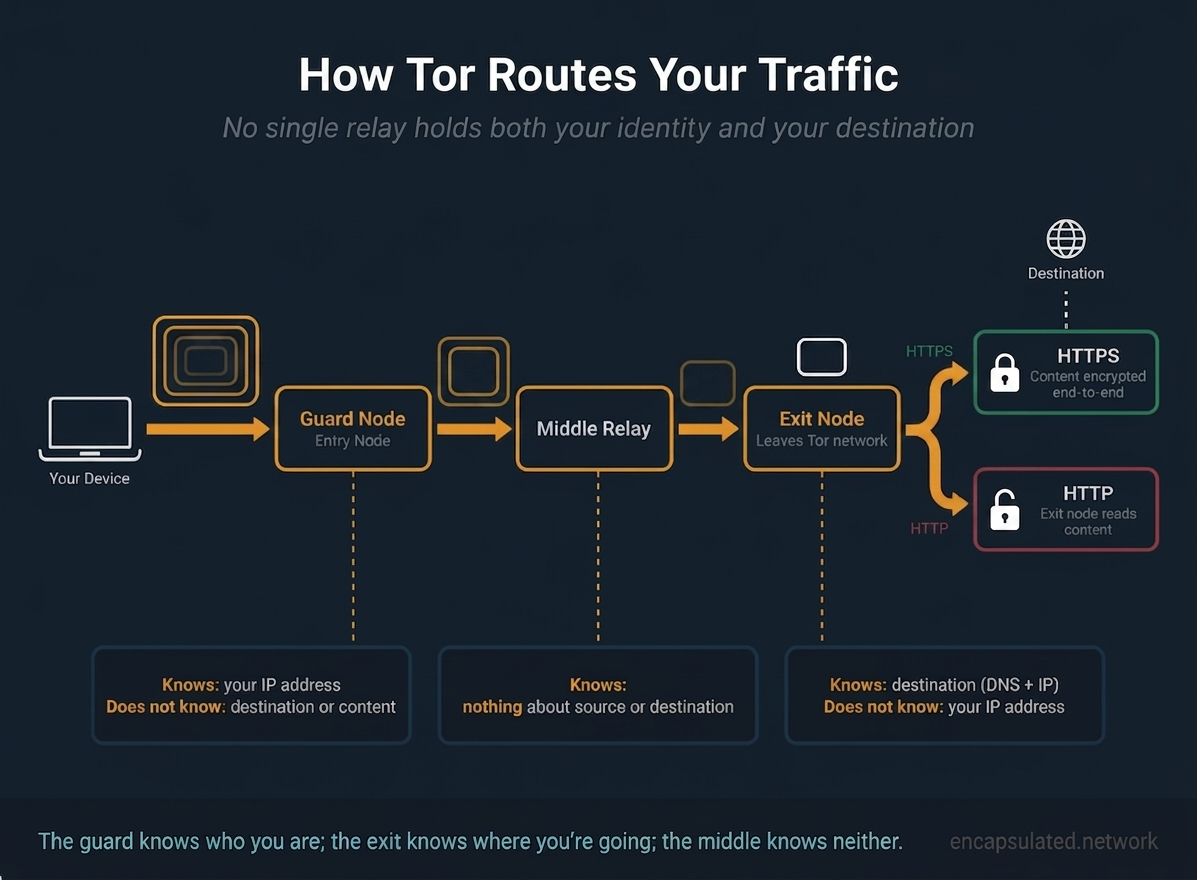
When Tor Browser builds a circuit, it selects three relays: a guard (the entry node), a middle relay, and an exit node. Each relay knows only the relay that handed it traffic and the relay it forwards to; none knows the full path.
The guard node is the first relay your traffic reaches. It receives a connection directly from your device, which means it knows your real IP address. What it does not know is your destination: it receives an encrypted payload and can see only the address of the middle relay it should forward it to. It cannot read the content inside. Tor’s design also includes guard persistence: rather than selecting a new guard for every circuit, the client uses a single primary guard for approximately 120 days. The rationale is counterintuitive but important. Frequent rotation would give adversary-operated relays more chances to be selected as your guard. A long-lived guard that is trustworthy reduces the probability of landing on a compromised one over time.
The middle relay sits between the guard and the exit. It knows only that it received traffic from the guard’s IP address (not from your device) and that it should forward it to the exit node’s address. It does not know your real IP, because it never communicates with your device. It does not know your destination, because the payload it receives is still encrypted for the exit node.
The exit node is where traffic leaves the Tor network and enters the public internet. It knows the destination: the website or service you are connecting to. It does not know your real IP address, because every packet it handles came from the middle relay, not from you. The exit connects to the destination on your behalf; the destination sees the exit node’s IP.
The architectural property worth stating explicitly: the guard knows who you are. The exit knows where you are going. Neither knows both. The middle knows neither. No single point in the chain holds the complete picture. This is not a policy that a relay operator chooses to comply with. It is a structural property of the circuit. Collapsing it requires simultaneously controlling or surveilling multiple relays, not compelling a single one.
Three relays is also not an arbitrary number. Two would be insufficient: with only a guard and an exit, the guard would know your IP and the address of the next node, which is also the exit connecting to the destination. Combining those two pieces would link entry and exit directly. Four or more relays would add latency with diminishing anonymity returns, because the key separation (guard knows entry, exit knows destination, no relay knows both) is achieved at three.
The layered encryption model
Before any traffic leaves your device, Tor Browser wraps it in three layers of encryption, one for each relay in the circuit, using each relay’s public key. The guard node decrypts the outermost layer, which reveals only the middle relay’s address and a still-doubly-encrypted inner payload. It forwards that payload to the middle relay and has no ability to decrypt further.
The middle relay decrypts the next layer, which reveals only the exit node’s address and a still-singly-encrypted payload. It forwards to the exit and, again, cannot read further.
The exit node decrypts the final layer, revealing the actual traffic destined for the website or service you are connecting to. No relay can decrypt the layers intended for downstream relays. This layered unwrapping is why the network is called The Onion Router.
What happens after the exit node
The exit node connects to the destination on your behalf and forwards the decrypted traffic. The destination server sees every request as originating from the exit node’s IP address. Your real IP address is absent from every packet that reaches the destination, having been stripped away at the guard.
The exit node performs the DNS lookup for the domain you are visiting and opens the TCP connection to the resulting IP address. It learns the destination through this process, regardless of anything the TLS layer might reveal separately.
For HTTPS connections, which represent the large majority of web traffic in 2026, a TLS session exists end-to-end between your browser and the destination server. The exit node carries that TLS connection but cannot decrypt it; the connection is opaque to it. The exit sees the destination domain and IP through its DNS lookup and TCP connection, but the content of your traffic remains encrypted between your browser and the server. The exit node operator can observe where you are going, but not what you are doing.
For HTTP connections, there is no end-to-end encryption. The exit node receives your traffic in plaintext and can read it entirely: the pages you load, the form fields you submit, any credentials you send. The exit node operator does not know your real IP address, because that information never reached them, but they can read every byte of unencrypted traffic they forward. The practical guidance is the same one that applies to any privacy tool: any sensitive activity must be over HTTPS, not HTTP, regardless of whether Tor is involved.
One technical note for HTTPS: Encrypted Client Hello (ECH) encrypts the TLS SNI field in the ClientHello message, which is one of the ways the exit node might learn which domain you are visiting. ECH adoption has grown, but the exit node still performs the DNS lookup and TCP connection to the destination IP, so ECH does not blind the exit node to your destination. It removes one signal, not the fundamental knowledge that comes from making the connection. Additionally, Russia began blocking ECH connections in late 2024 by detecting the cloudflare-ech.com SNI alongside the ECH extension, so the practical reach of ECH is also constrained in certain environments.
What a VPN does
The full mechanism of a VPN is covered in how a VPN actually works and what a VPN is. The brief version:
When you connect to a VPN, your device establishes an encrypted tunnel to a single server operated by your VPN provider. Every request you make travels through that tunnel, exits the VPN server, and reaches the destination. The destination sees the VPN server’s IP address. Your internet provider sees only encrypted traffic going to the VPN server and cannot see your destinations beyond it.
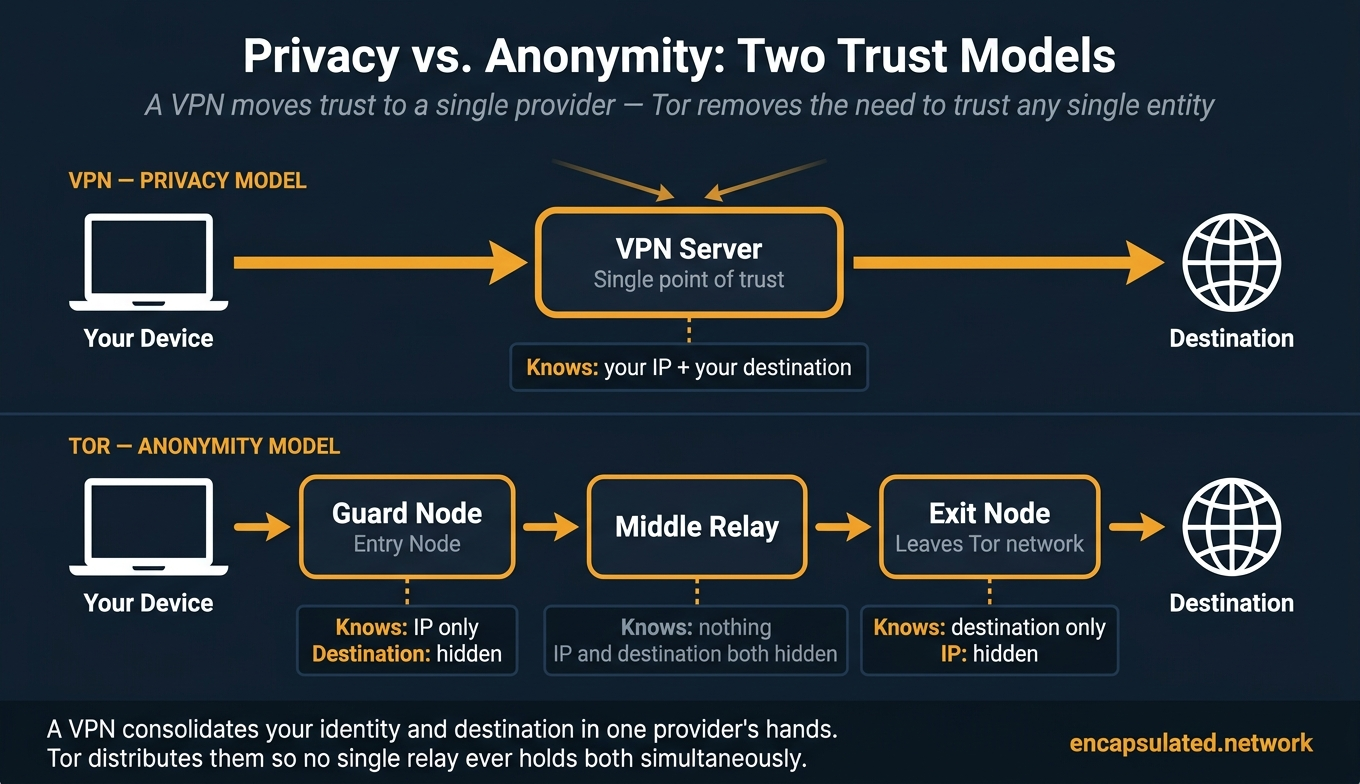
The trust model that results: your VPN provider occupies the position your ISP used to occupy. They can see your real IP address. They can see your destinations. They handle your traffic. You have changed the intermediary, not removed the need for one. Whether that change improves your privacy depends entirely on whether your VPN provider is more trustworthy than your ISP for your specific circumstances, which is why an independently audited no-log policy matters. The full verification framework for evaluating provider claims is in the no-log VPN guide.
The real distinction: anonymity vs. privacy
Privacy and anonymity describe different properties, and the gap between them is exactly the gap between what a VPN delivers and what Tor delivers.
What privacy means, and what a VPN delivers
Privacy, in this context, means hiding the content and destinations of your internet activity from passive observers: your ISP, other users on your network, and anyone intercepting the connection path between your device and your destination. A VPN delivers this by replacing you as the visible origin: your ISP sees only encrypted data going to the VPN server; websites see the server’s IP, not yours.
The constraint on this privacy guarantee is structural. Your VPN provider sits at the junction where your identity (your real IP) and your activity (your destinations) meet. They see both. If that provider is compelled by a court, compromised by an attacker, or dishonest in their data practices, your privacy depends on their response to that situation. A verified no-log policy reduces this risk; RAM-only infrastructure hardens it further; an independently audited provider who has withstood legal requests without producing data is more trustworthy than one operating on a published promise. But all of these measures reduce the risk of the single intermediary failing you. None of them eliminate the structural vulnerability of having one.
Legal compulsion can also go beyond demanding existing logs. Under US law, a pen register or trap-and-trace order under 18 U.S.C. §§ 3121–3127 is inherently prospective: a court can authorise forward-looking collection of connection metadata, directing a provider to begin recording a specific user’s activity from the date of the order. This is legally distinct from the Stored Communications Act path, which governs production of already-stored data. A provider can receive an order to start logging a user even when no existing logs are available. The significance: even a provider with a genuine no-log policy at the time of a request can be compelled to change that for a specific user going forward.
What anonymity means, and what Tor is designed for
Anonymity means no single entity can correlate your identity with your activity — the goal is not a more trustworthy observer but the elimination of any single observer holding both pieces.
Tor achieves this through the circuit architecture described above. The guard node knows your identity: it has your IP address. The exit node knows your activity: it sees your destination. They are structurally separated by the middle relay and do not exchange this information. Surveillance of any single relay yields one piece of information but never both. No combination of legal requests directed at a single relay operator can produce a complete picture of who visited what.
The Tor Project makes a precise distinction in its own documentation between two types of surveillance. Tor protects against traffic analysis, where an adversary tries to learn whom to investigate. It does not protect against traffic confirmation (also called end-to-end correlation), where an adversary who can observe both the entry and exit of a Tor circuit confirms a hypothesis about who is communicating with whom.
The prospective logging problem that applies to VPN providers does not apply to the Tor network in the same way. There is no single operator who sees a Tor user’s full activity. A pen register order served on one relay operator yields only that relay’s partial view: the address of the next relay in the circuit, which is structurally insufficient to identify a user or their destination. Jurisdiction matters enormously for evaluating a VPN provider’s trustworthiness; for an individual Tor relay operator, jurisdiction matters much less, because the relay structurally lacks the information that jurisdiction-based compulsion is trying to reach. This is a decentralisation property, not a legal immunity claim. Individual relay operators can still be served with legal process. The architecture limits what any single order can yield.
Where Tor’s anonymity holds — and where it doesn’t
Tor’s anonymity is robust for most threat models and limited for a specific few. The boundary matters.
What Tor reliably defeats
For the vast majority of users and threat models, Tor’s anonymity holds well. ISP visibility of your browsing destinations is defeated: without bridges, your ISP sees that you are connected to Tor but cannot see where your traffic goes from there; with bridges, even your use of Tor is concealed from them. Single-point legal compulsion against individual relays yields nothing useful, because no relay holds the complete picture. Website-level IP tracking is defeated: every destination you visit sees the exit node’s IP, not yours. Standard commercial tracking, passive ISP-level surveillance, and most monitoring systems that cannot observe both entry and exit simultaneously cannot penetrate Tor’s routing model.
The global passive adversary and traffic confirmation
The boundary of Tor’s guarantees is defined by what the Tor Project calls the global passive adversary, or GPA. This is an entity capable of observing traffic simultaneously at both the entry point to the Tor network (where your device connects to the guard) and the exit point (where the exit node connects to the destination). With both observations available, an adversary can perform traffic confirmation: by comparing the timing, volume, and pattern of packets entering the network with the pattern of packets leaving it, they can probabilistically link a user to their destination without decrypting anything.
The Tor Project states this directly in its design documentation: Tor tries to protect against traffic analysis, where an attacker tries to learn whom to investigate. But Tor cannot protect against traffic confirmation (end-to-end correlation), where an attacker who can observe both ends of a Tor circuit confirms a hypothesis about who is communicating with whom. This is Tor’s documented architectural ceiling, not a failure of implementation.
The adversary capable of this attack is extraordinarily well-resourced. Access to major internet exchange points or backbone infrastructure is required, along with the ability to correlate observations across different physical locations simultaneously. The organisations that qualify are national intelligence agencies such as the NSA and GCHQ, not ordinary commercial trackers, ISPs, or law enforcement agencies operating without intelligence-community resources.
The correct calibration: most users, including most journalists and activists operating in most countries, do not face this adversary. Tor’s anonymity is robust against the realistic threats that ordinary privacy-conscious users, researchers, and journalists face in their actual working environments. For users who do face state-level intelligence agency targeting, a narrow group with specific threat profiles, Tor provides a significant technical obstacle but not a mathematical guarantee. OS-level isolation through Tails or Whonix, strict avoidance of account logins during Tor sessions, and air-gapped systems for the most sensitive work are the additional layers appropriate to that threat level.
Node compromise and the KAX17 campaign
A less resource-intensive version of the same attack is available to an adversary who operates both the guard and exit relays for a specific circuit. Without needing global surveillance infrastructure, a relay operator who controls both ends of a single circuit can correlate entry and exit traffic directly. Guard persistence is the Tor Project’s primary mitigation: by keeping the same guard for approximately 120 days, the probability that an adversary’s relay will be selected as your guard over a given period is bounded. Frequent guard rotation would increase the attack surface by giving adversary-operated relays more opportunities to be selected.
This attack class is not theoretical. Between 2017 and 2021, a threat actor designated KAX17 by security researcher nusenu operated malicious Tor relays at a concurrent peak of over 900 relays, positioned primarily as guard and middle relays across more than 50 autonomous systems. At that peak, there was an estimated 16% probability that a Tor user would enter the network through a KAX17 guard, and a 35% probability of passing through one of its middle relays. The guard-and-middle positioning, rather than exit-node positioning, suggests the intent was de-anonymisation through circuit correlation rather than exit-node traffic snooping.
Nusenu first identified the pattern in 2019 and traced the activity back to at least 2017. The public disclosure came in late 2021. The Tor Project removed identified KAX17 relays from the consensus in batches: October 2020, October 2021, and November 2021. One important qualification: nusenu found no proof that KAX17 actually executed successful de-anonymisation operations. The finding was that the network was positioned to attempt them, not that confirmed de-anonymisations occurred. KAX17 demonstrates that the attack class is operational at scale; it does not establish a confirmed casualty record.
JavaScript and user behaviour
In practice, documented Tor user identifications have overwhelmingly resulted from application-layer and user-behaviour failures, not protocol failures.
JavaScript exploits are the most documented attack vector. Malicious JavaScript executing in the browser can make network requests that bypass Tor Browser’s routing, potentially exposing the user’s real IP address to a controlled server. The FBI has used this technique operationally, delivering what it called Network Investigative Techniques through compromised hidden services to identify users whose IP addresses were then obtained from the requests their browsers made outside the Tor tunnel.
Account logins defeat network-layer anonymity at the application layer. Logging into a Google account, a social media profile, or any service that identifies you by account while using Tor means the service identifies you by account regardless of the IP address your traffic arrives from. The network-level anonymity is intact; the application-level identity is not.
Browser customisation also undermines the anonymity that Tor Browser’s uniform fingerprint provides. Installing extensions, resizing the browser window beyond its default dimensions, or modifying settings all make the user distinguishable within an otherwise uniform population.
The practical guidance from these patterns: use Tor Browser without modification. Set the security level to Safer or Safest for sensitive work. Do not log into personal accounts during a Tor session. These are not extreme operational security measures; they are the minimum required to use Tor as its design intends.
Exit node exposure for HTTP traffic
When you access an HTTP site over Tor, the exit node receives your traffic in plaintext and can read it. The exit operator does not know your real IP address, because it never reached them. But they can read everything you send and receive on unencrypted connections. Page content, form submissions, and any credentials transmitted over HTTP are fully visible at the exit.
In 2026, HTTPS adoption is high enough that this risk is narrower than it was several years ago. Most destinations a user visits are HTTPS by default. But the risk is not zero, and for HTTP-only destinations the exposure is real regardless of whether you are using Tor or a VPN.
Tor Browser and fingerprinting resistance
Tor Browser is engineered specifically to prevent browser fingerprinting as a layer of anonymity protection independent of network routing — one of the most consequential differences between Tor and a regular browser over a VPN.
The uniform fingerprint model
Websites and advertisers routinely identify users through browser fingerprinting: collecting the specific combination of screen resolution, installed fonts, browser version, canvas API rendering output, WebGL behaviour, timezone, language settings, and dozens of other attributes that a browser exposes when it loads a page. Each combination tends to be unique, or close to unique, across the internet’s user population. A fingerprint can track a user across sessions even as their IP address changes.
Tor Browser treats this as an anonymity problem, not merely a privacy problem. If individual Tor Browser users can be distinguished from each other by their browser fingerprint, then network-level IP anonymity can be undermined: a fingerprinted user is identifiable and trackable across sessions even when their IP address rotates with each circuit. The engineering response is to make every Tor Browser user’s fingerprint as identical as possible: not to hide the fact that they are using Tor Browser, but to make it impossible to distinguish one Tor Browser user from another.
Screen resolution is handled through letterboxing. Rather than reporting the user’s actual monitor dimensions, Tor Browser rounds the content window to multiples of 200 pixels horizontally and 100 pixels vertically. A user on a 1920×1080 monitor does not see their actual resolution reported to websites; they see a content area sized to a standard bucket value.
Canvas fingerprinting, one of the most effective fingerprinting vectors, is blocked by default. When a website’s JavaScript attempts to read canvas image data (a common method for generating a hardware-specific fingerprint based on GPU rendering differences), Tor Browser blocks the request rather than returning a uniform or slightly-noised value. The site receives no canvas data.
WebGL is set to minimum-capability mode with pixel readback blocked. WebGL allows detailed GPU fingerprinting through differences in how graphics hardware renders content. Tor Browser’s minimum-capability mode reduces the variability exposed through WebGL, and blocking the readPixels function prevents the most precise GPU-level fingerprinting while leaving basic WebGL functionality available.
Font enumeration is restricted to a standard set with character fallback, preventing websites from identifying which specific fonts are installed on the user’s system, which is another fingerprinting dimension that varies across devices.
The rule is unconditional: use Tor Browser as installed. Every modification (an extension, a resized window, a changed setting) creates a dimension of differentiation that narrows the anonymity set.
Security levels
Tor Browser provides three security levels via the Shield icon in the toolbar.
Standard is the default. JavaScript is enabled, all browser features are active, and the fingerprinting resistance described above applies. This level is appropriate for general browsing on Tor by users who are not facing targeted exploitation attempts.
Safer disables JavaScript on non-HTTPS (HTTP) sites, where the absence of end-to-end encryption makes JavaScript-based exploits more dangerous. HTML5 audio and video, along with WebGL, become click-to-play, requiring an explicit user interaction to activate on each page element rather than running automatically. Certain fonts and math symbols are also disabled. This level is the recommended minimum for journalists, activists, and anyone whose use of Tor is connected to professional risk. One documented detail worth noting: some Safer-level protections, including JIT disabling, may not fully take effect until the browser is restarted after switching levels.
Safest disables JavaScript on all sites. Many site features break as a result, which is expected and acceptable for the use cases where this level is appropriate. The attack surface for JavaScript-based deanonymisation is eliminated. This level is appropriate for the highest-risk work, where targeted exploitation through browser vulnerabilities is a realistic threat.
Two additional technical notes relevant to the Tor vs. VPN comparison: WebRTC is disabled by default in Tor Browser, because UDP traffic does not route through Tor’s SOCKS5 proxy and would otherwise create an IP exposure channel. The full explanation of how WebRTC leaks work is in the WebRTC leak guide. DNS queries in Tor Browser are resolved by the exit node on your behalf. Your device never sends DNS requests directly to any resolver. There is no DNS leak risk at the browser level. The contrast with VPN DNS routing is covered in the DNS leak guide. A VPN configured with a standard browser prevents neither WebRTC leaks nor browser fingerprinting. It hides your IP address and encrypts your traffic, but has no effect on the browser attributes websites use to identify you. Tor Browser’s fingerprinting resistance is specific to the browser design, not an automatic consequence of using any privacy network.
Speed, compatibility, and practical use
Why Tor is slower than a VPN
Three structural reasons make Tor significantly slower than a VPN, and none can be resolved through configuration.
Three-hop latency is the first. Each relay adds a round-trip delay component. A connection through Tor requires at least three network round trips before any data reaches the destination: one to the guard, one to the middle relay, and one to the exit. A VPN requires one. The compounding effect on latency is substantial, especially for protocols sensitive to it.
The volunteer bandwidth ceiling is the second and more fundamental constraint. The Tor network’s capacity is determined entirely by what volunteers contribute. Every relay in the network is operated by a person or organisation that has chosen to donate bandwidth and hardware. The aggregate bandwidth of the network is a fraction of what a major commercial VPN provider’s purpose-built server infrastructure delivers. During peak periods, circuits compete for limited relay capacity. There is no commercial investment mechanism that can expand it on demand.
Geographic randomness is the third factor. The Tor client selects relays from the global volunteer pool based on availability and bandwidth weighting, not geographic proximity to you or your destination. A circuit may route through three different continents. Each continental hop adds physical-distance latency the Tor protocol cannot eliminate.
The practical result: text-based browsing (news sites, research, written communication, checking documentation) is usable on Tor with patience. Video streaming is impractical for most circuits; the bandwidth ceiling and latency combine to produce an experience that is consistently degraded relative to any direct connection. Large file downloads are severely constrained. Real-time audio and video communication is not viable over standard Tor circuits. The volunteer, decentralised structure that makes Tor resistant to shutdown is what limits its bandwidth. The trade-off is inherent.
Tor is browser-only by default
Tor Browser routes only its own traffic through the Tor network. Every other application on your device connects to the internet directly, without passing through Tor.
System-wide Tor routing requires a different approach. Tails OS is a live operating system designed specifically for this purpose: it boots from a USB drive, routes all traffic through Tor, and leaves no persistent trace on the host machine when shut down. Whonix takes a different architecture: it runs a user-facing virtual machine isolated behind a separate gateway virtual machine that forces all traffic through Tor. Both options require deliberate technical adoption and are meaningfully more complex than installing Tor Browser. They are appropriate for high-risk users who need comprehensive traffic protection, not for general-purpose use.
On mobile, the picture differs significantly between Android and iOS, and the gap is worth understanding before assuming Tor works the same way on a phone as it does on a desktop.
On Android, Tor Browser for Android provides an experience close to the desktop version, including the same security levels and fingerprinting resistance. Orbot, developed by the Guardian Project and endorsed by the Tor Project, goes further: it provides system-level Tor routing for all apps on the device, not just the browser. This means email clients, messaging apps, and other applications can route through Tor via Orbot, though each application’s own behaviour (such as sending identifying account credentials) remains a separate question. Orbot also supports Tor bridges and pluggable transports, making it useful in censored environments.
On iOS, there is no official Tor Browser port. Apple’s WebKit requirement prevents a direct port of Tor Browser’s hardened Firefox engine. The Tor Project endorses Onion Browser, developed by Mike Tigas, as its recommended iOS option, but the Tor Project’s own documentation notes its limitations: it uses WebKit rather than Firefox’s Gecko engine, meaning some of Tor Browser’s fingerprinting defences do not apply in the same way. There is no Tor Browser for iPhone in the desktop sense: Onion Browser is the closest available substitute, with documented limitations compared to the desktop version.
A VPN, by contrast, provides full-device coverage on both Android and iOS with no architectural complications. The VPN app installs a network extension that routes all device traffic through the tunnel. For everyday privacy needs on mobile, a VPN is substantially easier to deploy reliably than Tor, particularly on iOS.
VPN speed and full-device coverage
A VPN with WireGuard adds encryption overhead that typically amounts to less than 10% of baseline throughput on modern hardware. Video streaming, large downloads, gaming, and real-time communication all work normally through a well-chosen VPN server.
A VPN also routes all device traffic automatically. Every application, background process, DNS query, and system network call passes through the encrypted tunnel without any per-application configuration.
The speed difference is not primarily about encryption; it is about infrastructure. A VPN provider’s commercial server fleet scales with investment and is engineered for throughput. The Tor network’s capacity is bounded by volunteer contributions and is not commercially scalable. For everyday privacy tasks such as browsing, streaming, and using applications on public Wi-Fi, a VPN is the practical choice on speed and compatibility grounds alone.
Tor, streaming services, and torrenting
Streaming services (Netflix, BBC iPlayer, Disney+, and similar platforms) block Tor exit node IP addresses. The Tor Project publishes the complete list of exit node IPs, and streaming platforms query it to identify and refuse connections from Tor. A user connecting to Netflix through Tor will encounter a proxy-detected error. There is no meaningful workaround within the Tor architecture, because the exit node IP is the address the streaming service sees. For accessing geo-restricted streaming content, a VPN with a maintained server pool in the relevant country is the operative tool.
Torrenting over Tor is not a configuration issue; it is a category mistake. Two distinct problems make it inappropriate. First, BitTorrent clients routinely make connections outside the SOCKS5 proxy that Tor provides: peer connections, DHT lookups, and tracker communications often bypass the Tor tunnel entirely, exposing the user’s real IP to every peer in the swarm regardless of Tor’s routing. Second, the bandwidth that torrenting consumes falls on volunteer relay operators who have donated capacity for the purpose of enabling private communication, not for bulk file transfer. The Tor Project explicitly asks users not to torrent over Tor for this reason, and the practical IP exposure risk reinforces the request. For torrenting with IP privacy, a VPN with a verified kill switch is the appropriate tool.
Tor in censorship environments
For users in China, Russia, Iran, and other countries where internet access is actively filtered, both tools are relevant, but they work differently. They face different blocking techniques, and serve different needs in this context. The first practical question is not which tool to use but what your ISP can currently see about your traffic.
What your ISP can see by default
Tor relay IP addresses are published in the Tor consensus, a publicly accessible directory maintained by the Tor Project’s directory authorities. The consensus is updated regularly and lists every public (non-bridge) relay in the network. When you connect to Tor without a bridge, your device opens a connection to an IP address from this public list. Your ISP can compare outbound connections against the current consensus and identify your Tor usage in real time.
This is meaningfully different from the situation with VPNs. VPN server IP ranges are known and often blocked by censorship systems, but there is no single authoritative public directory of all VPN server IPs in the way the Tor consensus functions for Tor relays. The consensus is designed to be public so Tor clients can find relays, a feature that becomes a liability in environments where ISPs are looking for exactly that information.
In China, Russia, and Iran, connecting to Tor without a bridge announces your Tor usage to anyone watching your traffic. This is a concrete operational exposure, not a theoretical edge case. It is the first problem that bridge configurations exist to solve.
Bridges — unlisted relays
A bridge is a Tor relay whose IP address is not listed in the public Tor consensus. An ISP checking outbound connections against the consensus cannot identify a bridge as Tor infrastructure, because it does not appear in the list they are checking against. Connecting through a bridge transforms “ISP sees connection to known Tor relay” into “ISP sees connection to an unlisted IP address.”
This prevents identification via the relay list. It does not make Tor connections undetectable in all circumstances. Well-resourced censorship systems (the Great Firewall of China and Russia’s TSPU) use active probing and deep packet inspection alongside IP blocklisting. Active probing involves the censorship infrastructure sending test packets to suspected Tor endpoints to see how they respond. DPI can identify the traffic patterns of a Tor connection even when the destination IP is unlisted. Bridges raise the bar significantly against ISP-level passive identification; they do not guarantee concealment against active investigation by a sophisticated censorship system.
Bridges are distributed through several channels: the bridge request tool at bridges.torproject.org, by email to [email protected], and through the built-in bridge request in Tor Browser. Distribution is rate-limited to slow adversarial enumeration; if bridges were freely and completely distributed, censors could simply request the complete list and block all of them.
Pluggable transports
Even with a bridge, the traffic pattern of a Tor connection may be identifiable through deep packet inspection. A Tor circuit has characteristic flow properties (handshake timing, packet size distributions, connection behaviour) that a DPI system trained on Tor traffic can learn to recognise. Pluggable transports address this by transforming the traffic pattern to remove its identifiable characteristics before it leaves the device.
obfs4 is the most widely used pluggable transport. It transforms Tor traffic into high-entropy noise with no identifiable protocol structure, defeating signature-based DPI matching. Critically, it includes active probing resistance: an obfs4 server requires the connecting client to know a shared secret before responding to any connection attempt. A censorship system that sends test packets to probe a suspected Tor bridge receives only silence: no error, no response, no confirmation. This is what separates obfs4 from simpler scrambling approaches that remove protocol signatures but respond predictably to probing. The technical mechanism behind obfs4’s handshake is covered in depth in the obfuscated VPN guide. In China specifically, obfs4’s random-byte traffic pattern has become a target for the Great Firewall’s ML-based passive detection, deployed in November 2021, which flags fully-encrypted high-entropy traffic. Public obfs4 bridges are largely blocked in China as a result; private unlisted bridges may still work.
Snowflake takes a fundamentally different approach. It disguises Tor connections as WebRTC audio and video calls by routing traffic through a pool of volunteer proxies: browser extensions, standalone proxy processes, and website widgets run by volunteers globally. Because the connections look like legitimate WebRTC communications, blocking Snowflake requires blocking all WebRTC traffic, which would cause substantial collateral damage to video calling and other legitimate applications. Snowflake has been most effective in Iran and Russia, where it remains a reliable option as of 2026. In China, the picture is different: default Snowflake bridges have been blocked since early 2024, and user reports through 2025 describe Snowflake as unreliable in mainland China amid intensified Great Firewall enforcement. If Snowflake is working well for you in a censored environment, the most likely context is Iran or Russia rather than China.
The meek pluggable transport uses a technique called domain fronting to make Tor traffic appear to be heading for a major cloud provider’s infrastructure rather than a Tor bridge. Originally, the primary deployment used Microsoft Azure’s CDN infrastructure, under the name meek-azure. Azure enforced SNI and Host header matching starting January 22, 2024, which broke domain fronting on Azure and made the meek-azure bridge non-functional. The Tor Project removed meek-azure from the built-in bridge list in February 2025 with the commit message “Meek azure has stopped working.” A single meek bridge using CDN77 infrastructure survives and remains available, and the Tor Project is retiring the “meek-azure” name in favour of simply “meek” in Tor Browser. If you encounter guides published before 2025 that recommend the meek-azure configuration pointing to meek.azureedge.net, that configuration no longer works.
A comparison relevant to users choosing between tools in censorship environments: for reliable access to blocked content with acceptable speed, a VPN with obfuscation (Proton Stealth, Mullvad Shadowsocks, or obfs4-based implementations) is typically more stable and easier to configure than Tor with bridges, and performs better. The obfuscated VPN guide covers those options in full. For anonymity alongside censorship circumvention, Tor with bridges provides stronger anonymity guarantees at the cost of greater configuration complexity and less predictable performance. These are not competing solutions to the same problem. They address different requirements. A VPN with obfuscation solves “I need reliable access.” Tor with bridges solves “I need access and I need no single party to know I am using Tor.” Users who face both requirements may need both approaches for different purposes.
Hidden services and .onion addresses
Standard Tor browsing, meaning connecting to clearnet websites through the Tor network, provides meaningful anonymity but has one structural limitation: the exit node. Your traffic leaves the Tor network at the exit relay, which connects to the destination server on the public internet. The destination server has a publicly known IP address and can be physically located. An adversary with sufficient resources can attempt timing correlation on traffic arriving at that server’s IP address.
Tor’s hidden service protocol eliminates this limitation entirely. It is the strongest anonymity model the Tor network provides, and it underpins some of the most important legitimate use cases for the technology.
Why .onion provides stronger anonymity than standard Tor
When a server operates as a Tor hidden service, it establishes its own circuit into the Tor network, just as a client does. The server is not sitting at a publicly accessible IP address; it is inside the network, reachable only through Tor’s circuit infrastructure.
When a client wants to connect to a .onion address, both the client and the server build circuits toward a common meeting point called a rendezvous relay. Neither party selects this relay in advance; it is negotiated through the hidden service protocol. When the circuits connect at the rendezvous point, the data flows between client and server through two separate Tor circuits, end to end, without ever touching the public internet.
There is no exit node in this model. Traffic does not leave the Tor network. The client’s real IP address is never present in any packet visible to the server or any relay in the server’s circuit. The server’s physical IP address is never present in any packet visible to the client or any relay in the client’s circuit. Both ends of the communication are equally anonymised.
The .onion address itself is derived from the server’s cryptographic public key. This means the address simultaneously identifies the service and proves its authenticity: if a .onion address resolves to a connection, you are connecting to the genuine server that controls the corresponding private key, not an impersonator. This is a different trust model from HTTPS certificates, where authenticity depends on the certificate authority infrastructure.
The practical anonymity difference between standard Tor browsing and hidden service use: with standard Tor, the destination server has a publicly known IP address and can be physically located and seized. Investigators can attempt timing correlation on traffic entering that server. With a hidden service, the server has no publicly discoverable IP. Its physical location is protected by the same Tor architecture protecting the client. Seizing a hidden service server requires identifying its physical location through methods other than its IP address, which is a substantially harder problem.
Is the “dark web” the same as Tor?
In popular usage, “the dark web” refers to sites that are only reachable through an anonymity network, and in practice that almost always means Tor. More precisely, the dark web is the subset of the internet consisting of .onion hidden services: sites that exist only as addresses derived from cryptographic keys, with no publicly listed IP address, reachable only through the Tor circuit infrastructure. The term “deep web” is often conflated with it but refers to something different: any content not indexed by search engines, including private databases, paywalled content, and corporate intranets. The deep web is vast and entirely ordinary; the dark web is a specific technical category.
The association of the dark web with illegal marketplaces is well-founded historically (Silk Road and its successors operated as .onion hidden services) but it misrepresents the current landscape of .onion use. SecureDrop, DuckDuckGo, ProtonMail, and the BBC all operate .onion addresses. The Tor Project itself, the Freedom of the Press Foundation, and a large number of civil society organisations maintain a presence accessible only through Tor. Accessing a .onion address is not inherently illegal or suspicious; the relevant question is always the specific content of the site, not the routing mechanism used to reach it.
A question that frequently follows from this: “Do I need a VPN to browse the dark web safely?” The answer returns directly to the article’s trust-model argument. A VPN and the dark web address different concerns. A VPN provides privacy from your ISP and encrypts your local network traffic; it does not change the anonymity model of your Tor circuit. Someone using both a VPN and Tor to access .onion sites gains concealment of Tor usage from their ISP (Tor over VPN) but does not gain additional anonymity within the Tor circuit itself. For most .onion use cases, Tor alone is sufficient; the addition of a VPN is specific to the concern about ISP visibility of Tor connections.
Legitimate uses of hidden services
The association of .onion addresses with illegal marketplaces is common in popular coverage and misleading as a general characterisation. Hidden services exist across the full spectrum of legality and purpose, and some of their most important uses are in journalism and high-risk communication.
SecureDrop is the most significant example. It is an open-source whistleblower submission platform maintained by the Freedom of the Press Foundation, and it is deployed exclusively as a Tor hidden service. Using a .onion address is not incidental to SecureDrop’s design; it is a core architectural requirement. A source submitting documents through SecureDrop has their IP address concealed from the server, and the server’s physical location is concealed from anyone attempting to trace inbound traffic. More than 60 news organisations globally have adopted SecureDrop, including the New York Times, the Washington Post, The Guardian, and The Intercept. The BBC operates a .onion mirror of its news website, but this is a different category: a clearnet website made accessible through Tor for readers in censored environments, not a SecureDrop instance.
Other significant legitimate deployments include ProtonMail’s .onion address for its encrypted email service, DuckDuckGo’s .onion site for privacy-preserving search, and .onion versions of other major services specifically for users whose threat model requires the stronger anonymity model that hidden services provide. These are the same services available on the clearnet, offered through the hidden service architecture for users who specifically need it.
Accessing a .onion address is not illegal in any jurisdiction where Tor use is legal. The legality question is always about the specific service being accessed, not about the use of the .onion protocol. A .onion address is a technical routing mechanism, not a category of content.
Using Tor and a VPN together
The combination of Tor and a VPN is frequently mentioned and rarely explained with enough precision to be useful. The two configurations, Tor over VPN and VPN over Tor, route traffic in opposite directions and solve different problems. Understanding which problem each solves, and which it does not, prevents the common mistake of treating “more tools” as equivalent to “more protection.”
Tor over VPN
In this configuration, your device connects to a VPN first, then routes Tor traffic through the VPN tunnel to the guard node. The sequence is device to VPN server to Tor guard node to middle relay to exit node to destination.
What this achieves: your ISP sees only VPN traffic and cannot see that you are using Tor. ISP-level blocking of Tor relay IPs is defeated, because your Tor connections appear as traffic within your VPN tunnel. The Tor guard node sees the VPN server’s IP address rather than your device’s real IP. Your real IP is absent from every Tor relay’s view.
What this does not achieve: exit node exposure is unchanged. HTTPS remains the correct mitigation at that layer, as with any Tor use. The VPN does not strengthen Tor’s anonymity model against traffic confirmation attacks; the correlation point shifts from your device to the VPN server’s egress, but the structural vulnerability of the three-relay model against a global passive adversary is unchanged. Most importantly, adding a VPN adds a trust dependency: your VPN provider now knows you are a Tor user, even if they cannot see what you do through Tor. This is a new relationship introduced by the combination, not a removal of one.
The specific situation where Tor over VPN is the correct configuration: your ISP monitors or blocks Tor connections and bridges are not reliably available for your environment. The VPN conceals Tor usage from your ISP. Outside that specific requirement, the combination adds complexity and an additional trusted party without providing a corresponding anonymity benefit.
VPN over Tor
In this configuration, traffic routes through the Tor network before reaching the VPN server. The sequence is device to Tor guard to middle relay to exit node to VPN server to destination.
What this achieves: the VPN server receives connections from a Tor exit node rather than from your device. The VPN provider does not know your real IP address, because every connection they receive appears to originate from a Tor exit. Sites that block Tor exit node IPs may be accessible through the VPN server’s IP instead.
What this costs: it requires a VPN provider that explicitly supports and is configured for this connection mode, which is rare. AirVPN is the primary documented example, with documentation describing the configuration and noting that it requires their native client and is currently incompatible with their Network Lock kill switch feature. Tor becomes the bandwidth and latency bottleneck for all VPN traffic. The combination is significantly slower than either tool used alone and substantially more complex to configure correctly.
The use case is narrow: you specifically need the VPN provider not to know your real IP, and you can accept the speed and complexity costs. Most users protecting their activity from ISP tracking and destination-site visibility can achieve that with Tor alone, without adding a VPN that introduces its own complexity and a new trusted party.
When the combination adds rather than subtracts
Tor over VPN adds one thing: concealment of Tor usage from your ISP. If that specific requirement describes your situation (your ISP monitors or blocks Tor, and bridges are not a sufficient solution), the combination is justified. Outside that case, it adds complexity and an additional trust relationship without a corresponding security benefit.
VPN over Tor adds one thing: anonymity from your VPN provider with respect to your real IP. If that specific requirement describes your situation, the combination is justified. Outside that case, the speed penalty and configuration complexity are not warranted.
Evaluate any combination against the specific threat it addresses. Layering tools because “more seems better” without clarity on what each layer adds produces a configuration that is harder to maintain and audit, with trust relationships that are more difficult to reason about, rather than one that is more secure.
Which tool fits your situation
| Your situation | Primary threat | Right tool | Key notes |
|---|---|---|---|
| Everyday privacy: ISP tracking, public Wi-Fi, geo-restrictions | ISP visibility, passive network surveillance, public network attackers | VPN | Standard no-log VPN with WireGuard. No anonymity requirement for this use case. |
| Censorship: short-term travel to China, Iran, or Russia | DPI-based blocking of VPN and Tor traffic | VPN with obfuscation | Configure and test before arrival. Tor with bridges is possible but less stable and slower. See the obfuscated VPN guide. |
| Censorship plus anonymity: long-term resident in a restricted country | ISP monitoring of Tor usage combined with DPI blocking | Tor over VPN plus bridges (obfs4 or Snowflake for Iran and Russia; test before relying in China) | This combination addresses the compound requirement: ISP cannot see Tor usage, and no single party holds the full picture of your activity. |
| Journalism, activism, or whistleblowing | Source identification, operational security, account linkage | Tor, with security level set to Safer or Safest, no account logins, HTTPS-only destinations | Use SecureDrop for document submission. Do not modify Tor Browser defaults. Tor’s anonymity model was designed for this use case. |
| Accessing .onion services, including SecureDrop | Exit node exposure, server identification | Tor (mandatory) | A VPN cannot substitute. The .onion architecture requires the Tor network. This is the use case where Tor provides a qualitatively stronger guarantee than standard Tor browsing. |
| Highest-risk: facing a nation-state adversary with surveillance infrastructure | Traffic confirmation attacks, device compromise, account linkage | Tor plus bridges plus Tails OS or Whonix, with strict avoidance of account logins | Tor has architectural limits at this threat level (traffic confirmation by a global passive adversary). OS-level isolation is the additional required layer. |
Most readers of this article fall into the first or second row. The third and fourth rows describe real and important use cases, but treating them as the default overstates what most users actually need and leads to a mismatch between tool and requirement.
Tor and VPNs are the most widely deployed privacy tools, but not the only ones. I2P is a peer-to-peer anonymous network using garlic routing, optimised for hidden services rather than clearnet exit. Mixnets such as Nym target the traffic-confirmation vulnerability Tor cannot address: by adding cover traffic and mixing packet timing, they aim to defeat statistical analysis that the global passive adversary can perform. Both are significantly less mature and less widely deployed than Tor in 2026, but they represent where the field is heading as traffic-confirmation attacks become more practical.
Legal considerations
In the vast majority of countries, using Tor is as legal as using a VPN or a privacy-focused browser. No country has legislation that specifically prohibits the Tor protocol as a distinct technology separate from the general category of privacy tools. The legal question is always about the broader framework for VPN and anonymisation tool use in a given jurisdiction, and Tor follows that framework.
Tor is blocked and restricted in China, Russia, Iran, Belarus, and Turkmenistan. In these countries, using Tor, including with bridges, is subject to the same legal framework that governs unauthorised VPN use. Bridges and pluggable transports make Tor connections technically harder to detect; they do not change the legal status of the connection. The plain-English VPN guide covers the country-by-country legal landscape in detail, and Tor’s legal position in each country follows the same pattern as VPN use.
The universal principle: Tor does not grant legal immunity. Illegal activity conducted over Tor remains illegal. The anonymity Tor provides is a shield against identification, not against accountability for independently illegal acts. Separately, using Tor on an institutional or employer network that explicitly prohibits anonymisation tools may violate that network’s acceptable use policy regardless of legality in the broader jurisdiction. The law of the country you are in and the policy of the network you are on are two different frameworks, and Tor affects neither.
Frequently asked questions
Is Tor more private than a VPN?
“More private” conflates two distinct properties. A VPN provides stronger privacy from passive observers (your ISP, other users on your network, and anyone intercepting the connection path) with full-device coverage and practical speed. Tor provides stronger anonymity: no single entity in the circuit can correlate your identity with your activity. Which is more useful depends entirely on your threat model: a VPN for everyday privacy from ISP tracking and public networks; Tor when anonymity (no single party holding both your identity and activity) is specifically required.
Can my ISP see that I’m using Tor?
Yes, by default. Tor relay IP addresses are published in the public Tor consensus, and your ISP can identify outbound connections to known relay IPs as Tor usage. Bridges, which are unlisted relays not in the public consensus, prevent this identification via the relay list. Tor over VPN, which routes Tor traffic inside a VPN tunnel, also conceals Tor usage from your ISP. Neither approach guarantees invisibility against active probing by a well-resourced censorship system.
Does Tor hide your IP address from websites?
Yes. Websites see only the exit node’s IP address. Your real IP is absent from every packet that reaches the destination; it was stripped away at the guard node, which is the only relay that ever had it. The exit node’s IP is what the destination logs and sees, not yours.
Why is Tor so much slower than a VPN?
Three structural factors: three-hop latency (each relay adds a round-trip delay), the volunteer bandwidth ceiling (the network’s capacity is capped by what volunteers contribute, not commercial investment), and geographic randomness (circuits may route through multiple continents). The same decentralised architecture that makes Tor resistant to shutdown limits its speed.
Is it safe to use Tor without a VPN?
For most threat models, yes. Tor’s anonymity does not require a VPN. Adding a VPN addresses one specific concern: concealing from your ISP that you are using Tor. If ISP monitoring of your Tor usage is not part of your threat model, a VPN adds complexity and an additional trusted party without a corresponding anonymity benefit. The risk to evaluate is your own situation, not a general principle that more tools equal more protection.
What is a .onion site?
A hidden service hosted inside the Tor network. Unlike accessing a clearnet website through Tor (where traffic exits the network at an exit node), .onion traffic never leaves the Tor network. Both the client and the server build circuits into the network that meet at a rendezvous relay. Neither knows the other’s real IP address. This eliminates exit node exposure entirely and provides stronger anonymity than standard Tor browsing. SecureDrop, used by more than 60 news organisations including the New York Times and the Washington Post for protected source submissions, is the most prominent real-world example.
Can websites block Tor?
Yes. The Tor Project publishes a complete list of exit node IP addresses, and any website can query it and block connections from known Tor exit nodes. Streaming platforms, financial institutions, and some government services do this routinely. If you need access to a site that blocks Tor exit nodes and you are not using a hidden service, a VPN used specifically for that site is the practical alternative.
Is Tor legal?
In most countries, yes: as legal as using a VPN or a privacy browser. Tor is blocked and restricted in China, Russia, Iran, Belarus, and Turkmenistan. In these countries, using Tor, including with bridges, is subject to the same legal framework as using an unauthorised VPN. No country specifically targets the Tor protocol as a distinct illegal technology separate from the general category of anonymisation tools. Tor does not grant legal immunity: illegal activity conducted over Tor remains illegal.
What is the difference between Tor over VPN and VPN over Tor?
They route traffic in opposite directions and solve different problems. Tor over VPN (VPN first, then Tor): your ISP sees VPN traffic, not Tor connections; your guard node sees the VPN server’s IP rather than your device’s IP. The purpose is concealing Tor usage from your ISP. VPN over Tor (Tor first, then VPN): the VPN server receives connections from a Tor exit node and does not know your real IP address. The purpose is anonymising yourself from your VPN provider, a narrow use case that requires a provider explicitly configured to support it. AirVPN is the primary commercial provider that supports VPN over Tor, with the caveat that the feature is currently incompatible with their Network Lock kill switch.
What is a Tor bridge, and when do I need one?
A bridge is a Tor relay whose IP address is not listed in the public Tor consensus, so ISPs cannot identify it as Tor infrastructure by querying the relay directory. You need a bridge when Tor entry points are blocked in your country, when your ISP monitors connections to known Tor relay IPs, or when you specifically need to prevent your ISP from knowing that you are using Tor. Bridges are available through Tor Browser’s built-in request feature, via bridges.torproject.org, or by emailing [email protected].
Does Tor prevent browser fingerprinting?
Tor Browser is specifically engineered to reduce fingerprinting by making users as uniform as possible. It uses letterboxing to prevent precise monitor dimension detection. It blocks canvas image extraction entirely. It sets WebGL to minimum-capability mode with pixel readback blocked. It restricts font enumeration to a standard set. The goal is to make individual Tor Browser users indistinguishable from each other, not to report a single fixed fingerprint value. A VPN with a standard browser does not prevent fingerprinting: it hides your IP address but has no effect on the browser attributes websites use to identify you independently of IP.
Should I use Tor for everyday browsing?
No, for most users. The speed constraints from three-hop latency and the volunteer bandwidth ceiling make video streaming, large downloads, and many common tasks impractical. Tor is designed for situations where anonymity is specifically required: where the absence of a single trusted party knowing both your identity and your activity is a meaningful protection for your situation. For everyday privacy from ISP tracking and on public networks, a VPN with WireGuard provides meaningful protection with no practical speed penalty.
Is the dark web the same as Tor?
Not exactly. Tor is the network; the dark web is a subset of content on it. The dark web refers specifically to .onion hidden services: sites with no public IP address, reachable only through Tor’s circuit infrastructure and not indexed by standard search engines. Tor is also used to access ordinary clearnet sites anonymously; the network is not limited to dark web use. The dark web includes illegal marketplaces, but also SecureDrop, ProtonMail, DuckDuckGo, and other legitimate services with .onion addresses.
Can I use Tor for torrenting or streaming Netflix?
Torrenting over Tor is inadvisable for two reasons: BitTorrent clients routinely make connections outside the Tor SOCKS5 proxy, exposing your real IP to peers in the swarm, and the bandwidth consumption places an unfair burden on volunteer relay operators. The Tor Project explicitly asks users not to torrent over Tor. Streaming services such as Netflix block known Tor exit node IPs by querying the Tor Project’s public exit node list. For both use cases, a VPN is the appropriate tool.
What is the best Tor browser for iPhone?
There is no official Tor Browser for iPhone. Apple’s App Store requirement that all iOS browsers use the WebKit engine prevents a direct port of Tor Browser’s hardened Firefox engine. The Tor Project endorses Onion Browser, developed by Mike Tigas, as the closest available substitute. It provides access to the Tor network and basic privacy features, but uses WebKit rather than Firefox’s Gecko engine, meaning some of Tor Browser’s fingerprinting resistance does not apply in the same way. Download Onion Browser from the App Store and note its documented limitations relative to the desktop version.
What are the alternatives to Tor and a VPN?
The main alternatives occupy different positions on the privacy spectrum. I2P (the Invisible Internet Project) is a peer-to-peer anonymous network using garlic routing, optimised primarily for hidden services rather than clearnet browsing. Mixnets such as Nym aim to address Tor’s traffic-confirmation vulnerability by adding cover traffic and mixing packet timing, but are significantly less mature and deployed than Tor in 2026. Proxies provide IP replacement for a single application without encryption. Smart DNS services enable geo-restriction bypass without any privacy protection. For most users, the choice remains between a VPN for privacy and Tor for anonymity.